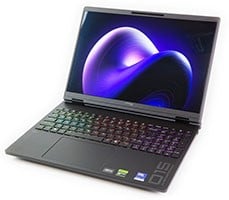
HP HyperX Omen 15 Review: RTX 5070 Gaming Meets Gorgeous OLED


HP HyperX Omen 15 Gaming Laptop Decals - Image: HotHardware
Before we dive into the benchmarks, I want to say a few things about the software on this laptop. The circumstance of new laptops coming loaded with an absolute boatload of bloatware is nothing new, and by no means exclusive to HP. However, this laptop does unfortunately come laden with quite a bit of software. Like the HP Omen Max 45L gaming desktop I reviewed earlier this year, there are at least three different applications with duplicate functionality. I'm not going to go on and on about the software on this machine, but I do want to point out a few things.

HP My Notebook App - Image: HotHardware
First, the MyHP app. HP has a shortcut to it embedded in the quick action center of Windows 11. When you open the app, you come to this screen here. Do you know what to do on this screen? I made the same complaint in my review of the Omen Max laptop and desktop systems, but that entire "My Notebook" rectangle is a giant button you click on to actually get into the app. It is not good UX for a desktop application.

HP My Notebook App - Image: HotHardware
"My Notebook" correctly lists the model of the laptop, but only in generic terms; it doesn't include the specific model that we're using. It also doesn't have a representative image, just a generic laptop icon, which seems low effort.

HP My Notebook App - Image: HotHardware
Another purpose of this app is to show you advertisements. You can adjust various features in the app, but the singular function you're most likely to use here is in the Battery Manager section, where you can set the laptop's maximum charge level below 100% to preserve battery longevity. It's absurd that Microsoft has not come up with a standardized function for this in Windows, but it's a useful feature, and this is where you would set it on this laptop. Aside from that, everything else is better managed elsewhere.

HP Omen Gaming Hub App - Image: HotHardware
Here we have the Omen Gaming Hub. In concept, I kind of love the Omen Gaming Hub. It's an app that is clearly designed by gamers for gamers, and it feels like one in a lot of ways. Unfortunately it's also an app designed to maximize user monetization. In earlier versions, on first launch, the app would ask you your permission to use your data. Now it instead pops up this "Accept All" button seen above, with "Manage Options" bringing you to the old screen.

HP Omen Gaming Hub App - Image: HotHardware
When you click "Manage Options", it brings you to this screen, where everything is ticked 'Yes' by default. I previously gave kudos to HP for offering up this screen right at the start with everything ticked 'No' by default. Unfortunately, that is no longer the case.

HP Omen Gaming Hub App - Image: HotHardware
Once you get into the app, not much has changed. I wrote more extensively about the HP Omen Gaming Hub in my previous reviews of the Omen Max 45L gaming desktop and Omen Max 16 laptop; if you're looking for more details information, you can check that coverage. The short version is that it is intended to be an all-in-one launcher for your games regardless of what service they come from, a complete system configuration tool (that nevertheless lacks many configuration options, like the aforementioned Smart Charging), and a tweak tool that you can use to improve the performance of your games.

HP Omen Gaming Hub App - Image: HotHardware
There is one particularly notable change when it comes to this machine, though. The HyperX Omen 15 does not include a MUX switch, which means that all graphics processing done by the GeForce RTX 5070 has to be transferred through the Intel chip, as the display is only connected to the Intel chip. This isn't true if you connect an external HDMI display; that port is wired directly to the GeForce RTX 5070. Still, because there's no MUX, there's no option for "discrete GPU only" as found in the other HP machines we've reviewed. You can elect to completely turn the GeForce RTX 5070 off if you really want to maximize battery life, but in my testing it makes almost no difference as the RTX 5070 draws extremely little power when idle anyway.

HP My Dashboard App - Image: HotHardware
Finally, of course, the HP Support Assistant is still here, too. I don't begrudge the existence of this application, but HP should pick a singular app and stick to it. There's no reason the functions of this app and those of the myHP app couldn't simply be bundled into the OMEN Gaming Hub.
HP HyperX Omen 15 Gaming Laptop System Benchmarks
I was a bit leery of the HyperX Omen 15 when I first started using the system, as it occasionally felt uncharacteristically sluggish in a way that very few new laptops actually do. Because of this, I was keen to get to the benchmarks and find out why. I got my answers pretty fast, and so will you, if you read on.ATTO Disk Benchmark
ATTO is a quick and dirty test that measures read/write bandwidth and IOPS across a range of different data transfer sizes. While we don't typically compare these results across multiple machines, it's useful to gauge whether a particular notebook's storage subsystem is up to snuff. We run the default test, but with Write Caching disabled to get the native performance of the drive.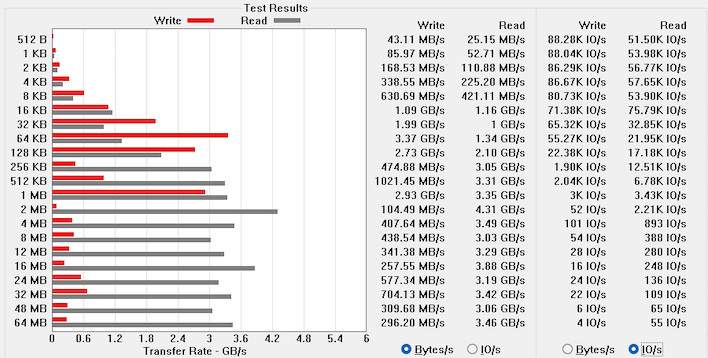
HP HyperX Omen 15 ATTO Disk Benchmark - Image: HotHardware
To quote one mister James Hyneman of Mythbusters fame, "well there's your problem." The budget-tier Samsung SSD in this machine is not spec'd for high performance, but even at that the results are disappointing. The drive can occasionally approach its rated 4.9 GB/second read speeds, but write speeds were generally poor in our testing. The drive wasn't as empty as it could have been, but it was nowhere near full. I ran this test several times as I usually do, and it was extremely inconsistent every time.
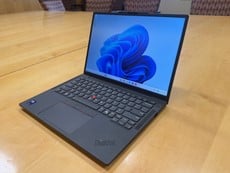
This SSD doesn't suit a laptop of this caliber, and I do think it's the cause for the occasional sluggishness I experienced while browsing, installing applications, and moving files around. Contrary to appearances this is not the same SSD model found in the Lenovo ThinkPad X1 Carbon Gen14 we reviewed recently; while that system also suffered somewhat poor I/O performance, it used a faster PM9C1 SSD.
Browserbench Speedometer 3 Browser Benchmark
We use BrowserBench.org's Speedometer test to take a holistic look at web application performance. This test automatically loads and runs a variety of sample web apps using the most popular web development frameworks around, including React, Angular, Ember.js, and even simple JavaScript. This test is an example of how systems cope with real-world, modern web apps. All tests were performed using the latest version of Chrome.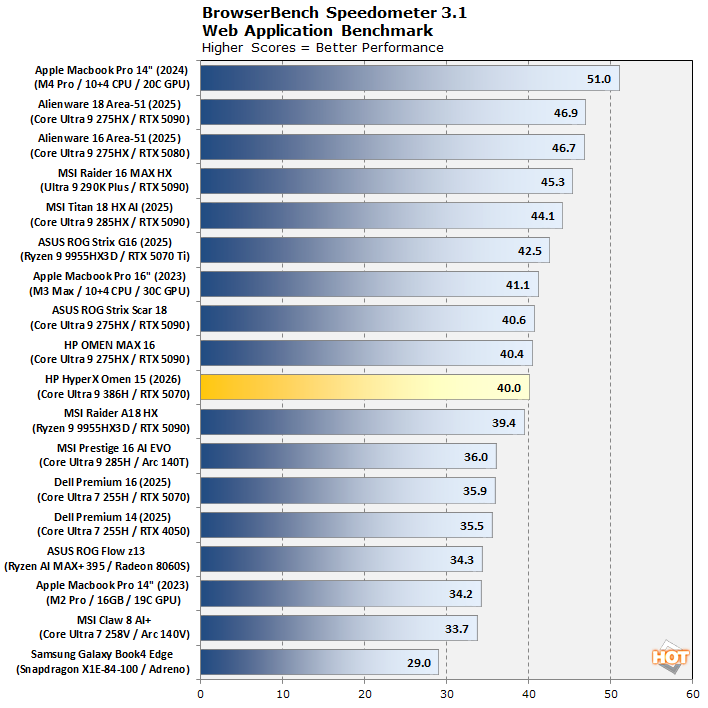
HP HyperX Omen 15 Speedometer 3.1 Benchmark - Image: HotHardware
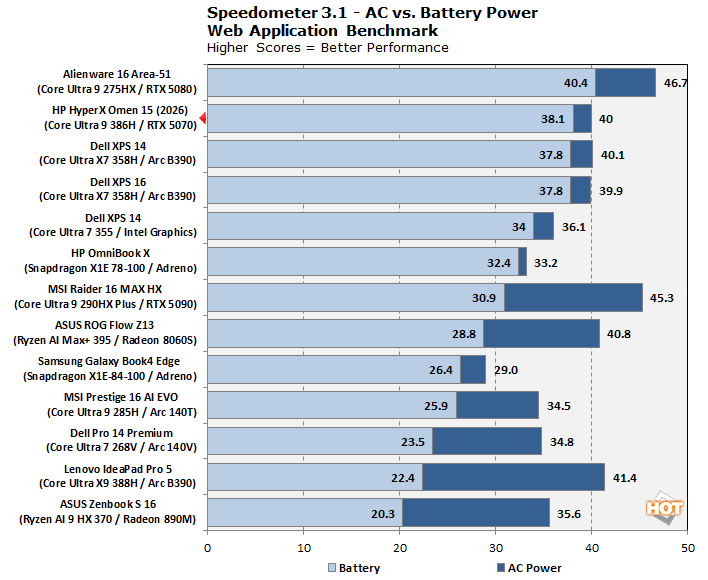
Nothing to complain about there. The Core Ultra 9 386H hangs tough with multiple desktop-class CPUs and the Apple M3 Max, though it does get bested by some real hard-core gaming laptops. Still, it's beating the pants off of the Ryzen AI Max+ 395, which must make Intel giddy. But what about on battery?
HP HyperX Omen 15 Speedometer 3.1 Benchmark On DC Power - Image: HotHardware
The HyperX Omen 15 barely loses any performance in Speedometer on battery. This is impressive stuff here. A very good result for HP and Intel to be sure. As long as whatever you're doing doesn't need to hit the SSD too hard, this machine stays very responsive on battery.
MAXON Cinebench 2026 Rendering Benchmarks
Next up is the latest-generation 3D rendering benchmark from Maxon, based on the Cinema 4D rendering engine. It's a purely CPU-based test that doesn't make use of the graphics processor or NPU, and it scales very well with additional CPU cores. We ran both single- and multi-threaded tests on all of the machines in the charts, and also tested these laptops on battery power as well.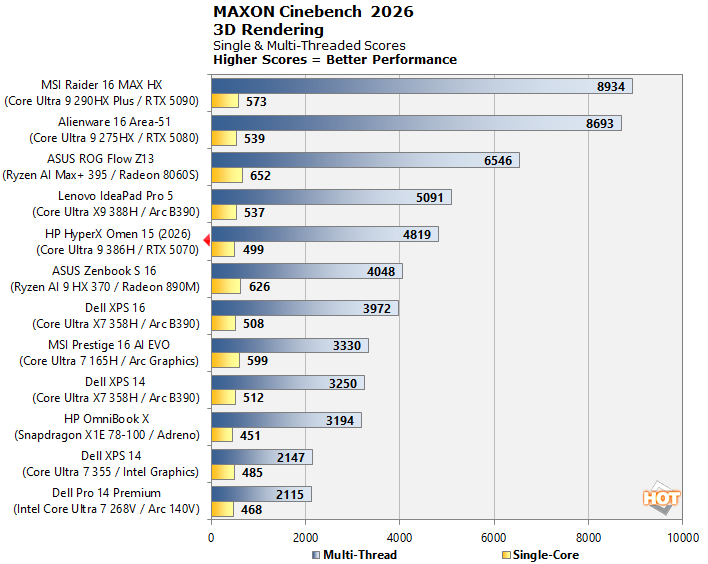
HP HyperX Omen 15 Cinebench 26 Benchmark - Image: HotHardware
All in all, not a bad result. It's exactly as expected; due to the reduced clock rate compared to the Core Ultra X9 388H, this machine scores a little bit lower than that system. Panther Lake is clearly not competitive with the big desktop-class CPUs for rendering, but then, it was never intended to be. Keep in mind that we're running the single-core test here, not single-thread, so processors with Simultaneous Multi-Threading get a boost in this benchmark. Scoring 499 on a single thread is not bad at all.
HP HyperX Omen 15 Cinebench 26 Benchmark On DC Power - Image: HotHardware
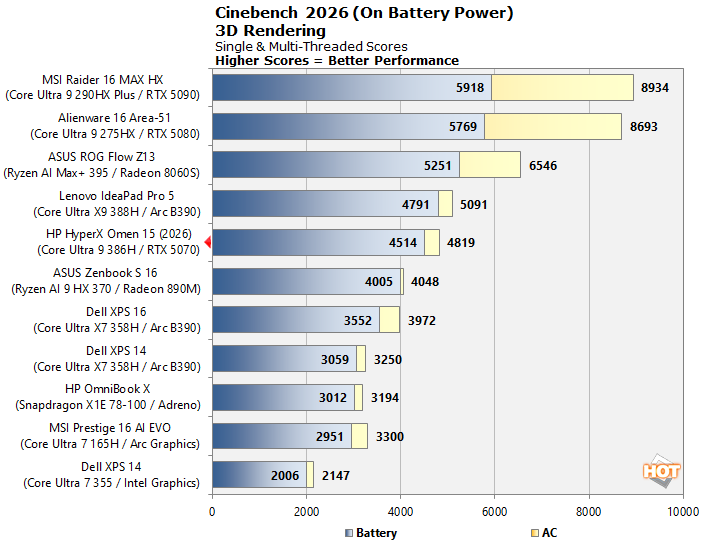
Flipping things over to battery power, we see a repeat of our last test, and also of our testing with the Core Ultra X9 388H. Performance dips only very slightly on battery. But does that affect battery life? You'll have to keep reading to find out!
Geekbench 6 CPU Performance Benchmark
Geekbench is a cross-platform benchmark that simulates real-world workloads in a wide variety of tasks, including encryption, image processing, physical simulation, machine learning, and many more. We tested the systems featured here with the final version of Geekbench 6 to get an idea of their overall system performance; while Geekbench 7 is out now, we don't have enough comparative data to start using it yet.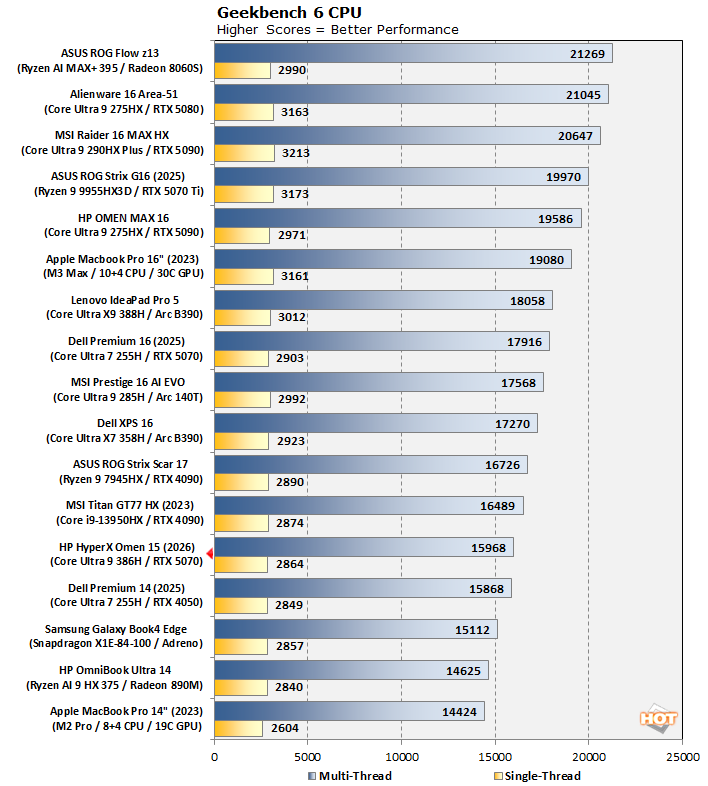
HP HyperX Omen 15 Geekbench 6 Benchmark - Image: HotHardware
While this result is pretty far down the chart, a lot of that is due to the chart being loaded with high-end gaming laptops. The overall results are still quite decent; check out the Core Ultra 9 386H with its 60W power limit hanging tough against the beastly Core i9-13950HX, with over double the power limit in the huge MSI Titan laptop. Not outstanding CPU performance, then, but not bad, either; I think this chip probably loses some performance due to the relatively slow DDR5-5600 SODIMM memory it's using too.
Geekbench AI Machine Learning Benchmarks
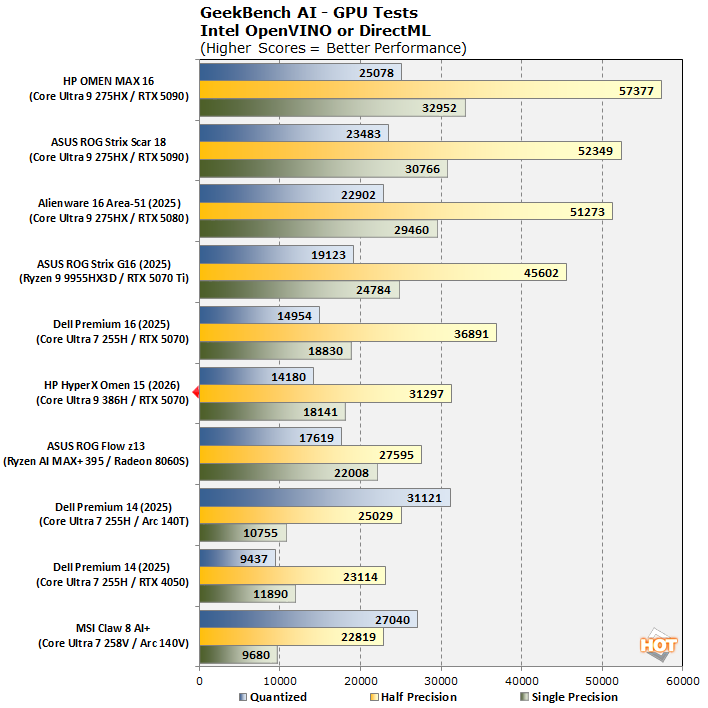
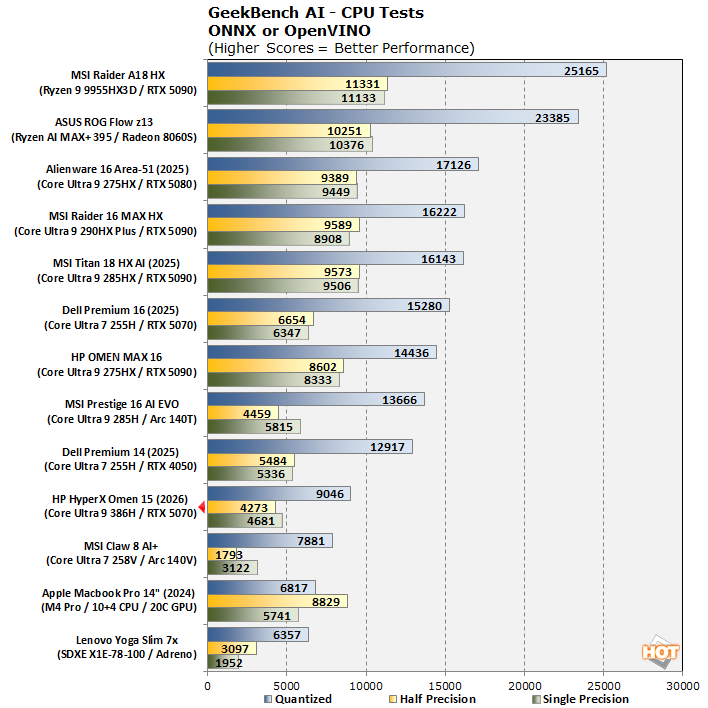
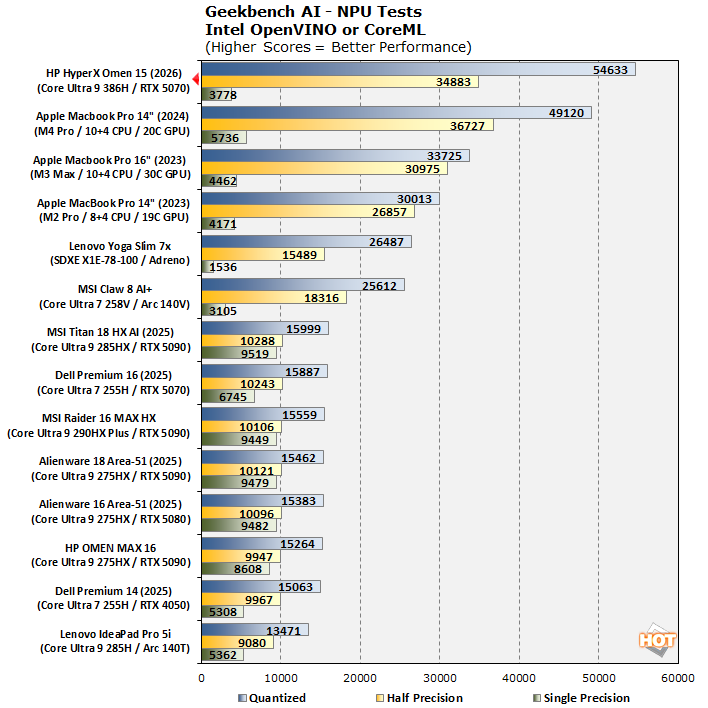
The Geekbench AI benchmark provides a straightforward look at how well a device handles a variety of AI-assisted tasks. This quick and easy test gives you a numerical snapshot of the CPU, GPU, and NPU's ability to power through real-world machine learning workloads, factoring in both speed and accuracy. The higher the score, the better the device's AI chops, whether it's image recognition, object detection, or natural language processing.Results are presented in three levels of numerical precision: single precision or FP32, half precision or FP16, and quantized or INT8. All results that the benchmark provides are geomean scores from multiple runs of each test workload.
HP HyperX Omen 15 Geekbench AI Benchmark - Image: HotHardware
First up, the GPU results. We're testing with the GeForce RTX 5070 here, and it does a little poorly, actually. It's not completely clear why; the Dell Premium has the same 60W power limit in place as our HyperX Omen. It performs similarly on the Quantized and Single Precision results, so it's only the Half-Precision results that are lacking. In any case, nobody's seriously trying to run local AI on an 8GB laptop GPU, so it's probably not a big concern.
HP HyperX Omen 15 Geekbench AI Benchmark - Image: HotHardware
Next up, the CPU results. Another quizzical performance, but again, Panther Lake is a lightweight chip made for thin laptops, not repurposed desktop silicon as many of our other CPUs are. Indeed, everything else here except for the Arrow Lake-H chips and the machines below the HyperX Omen are running desktop silicon. There's no point in running AI on CPUs when you have such a powerful NPU on tap anyway.
HP HyperX Omen 15 Geekbench AI Benchmark - Image: HotHardware
Indeed, the Core Ultra 9 386H's NPU turns out to be the fastest we've tested, at least in the 8-bit 'Quantized' test. It puts up strong performance in the 16-bit Half-Precision test too, while Single-Precision is seemingly a pain point for the NPU5 architecture. Of course, that's what GPUs are for. Very impressive stuff here from Intel; if you're into using Copilot integrations or other local AI tools, this NPU should serve you well.
UL PCMark Applications Office Benchmarks
We've started using the PCMark 10 Applications benchmark a bit more because it measures performance in Office and Edge using native instruction set-compatible versions of the apps for optimal performance across both x86 and Arm architectures. The following results should paint a picture of Microsoft Office productivity performance with the best foot forward from all systems tested.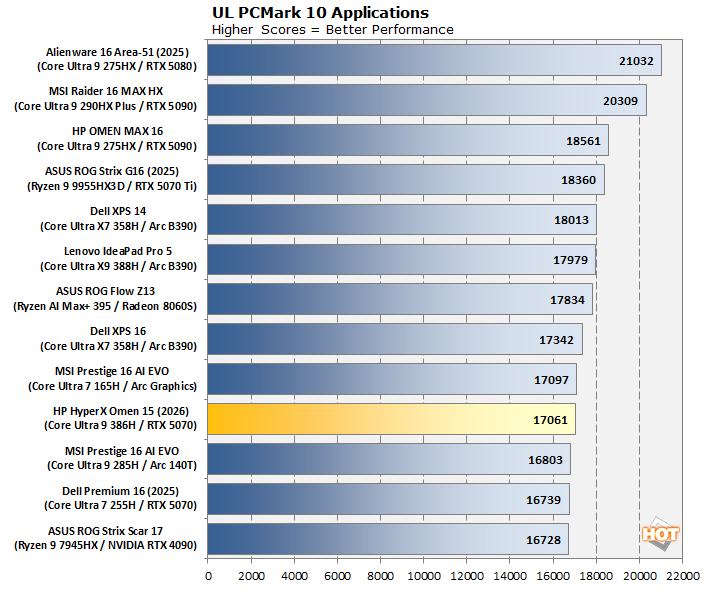
HP HyperX Omen 15 PCMark Benchmark - Image: HotHardware
In PCMark 10 Apps, we see a perfectly fine score. 17,061 is obviously not a commanding result, but it's still an extremely high score in the grand scheme, and it's just behind the Core Ultra X9 388H, which is exactly where we expect this chip to fall.
Puget Bench For Creators: Davinci Resolve
Next up, we have some video editing and encoding tests using the Puget Bench for Creators and Davinci Resolve. Puget Systems has been developing benchmarks that leverage real-world applications and workloads since 2020. These tests are highly regarded by creators, and leverage popular creative tools like the Adobe applications as well as Blackmagic's Davinci Resolve. Here, we used the free version of Davinci Resolve that features less hardware acceleration and relies heavily on CPU, GPU and memory performance.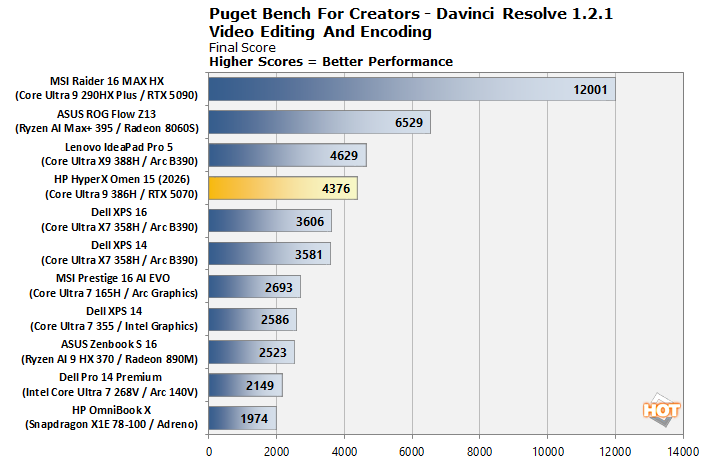
HP HyperX Omen 15 Puget Bench For Creators - Image: HotHardware
If you are surprised by the Core Ultra 9 386H landing just behind the Core Ultra X9 388H then you haven't been paying attention. I wouldn't recommend anyone to use a machine like this for serious, professional video editing, but if you're a hobbyist or amateur, it will absolutely get the job done.
UL 3DMark Synthetic Gaming Benchmarks
3DMark has a wide variety of graphics and gaming related tests available. To best match up with the historical benchmark data that we have hanging around, we ran the Fire Strike Extreme QHD DirectX 11 benchmark, the Time Spy QHD DirectX 12 benchmark, and the Port Royal DXR ray-tracing benchmark. First up, Fire Strike Extreme: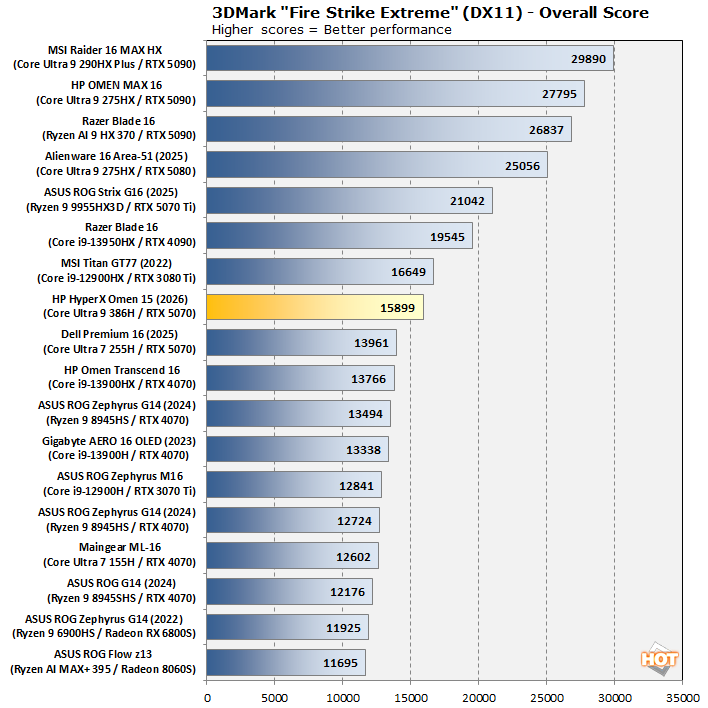
HP HyperX Omen 15 3DMark Fire Strike Benchmark - Image: HotHardware
Here's where things get a bit spicy. Where the Dell Premium 16 with the GeForce RTX 5070 came in ahead of the Omen 15 in the AI and productivity tests, HP's machine flies out ahead in 3DMark, exactly as expected for a proper gaming laptop. Sure, the result is far behind a bunch of laptops with markedly faster GPUs, but honestly for the price and form factor this is a great result.
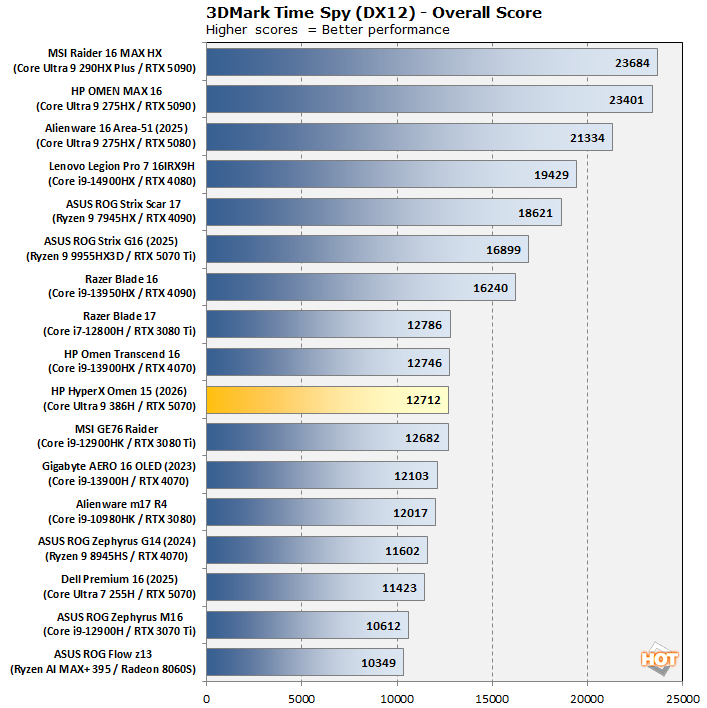
HP HyperX Omen 15 3DMark Time Spy Benchmark - Image: HotHardware
In Time Spy, functionally a similar result. We're reporting overall scores here, and Time Spy includes a massively multi-threaded CPU physics benchmark that skews the results a bit; that's why the Omen Transcend 16 with the Core i9-13900HX desktop-based Raptor Lake part ekes out a win here. Still, this result is perfectly fine and represents strong performance in 1440p DirectX 12 games.
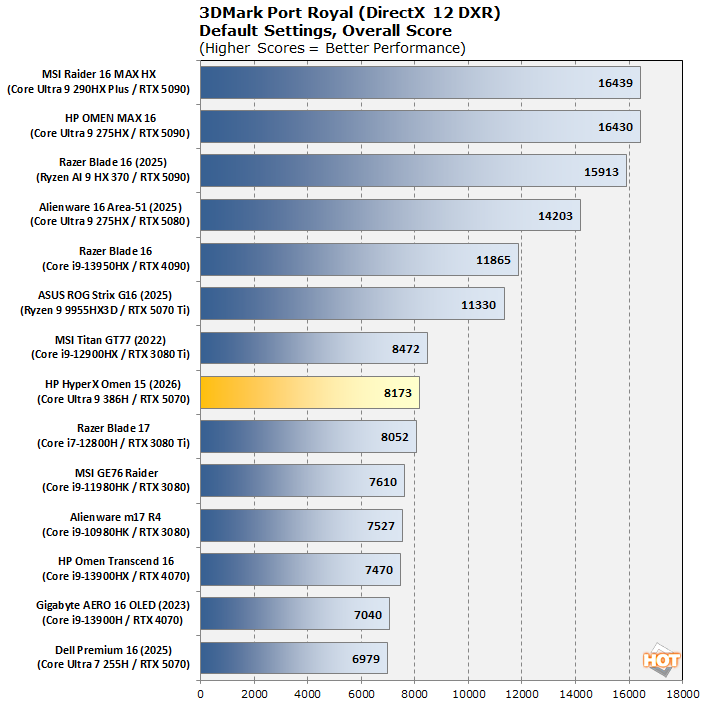
HP HyperX Omen 15 3DMark Port Royal Benchmark - Image: HotHardware
In Port Royal, nearly nothing matters but GPU horsepower. This is a very focused test of GPU ray-tracing performance. The powerful GeForce RTX 3080 Ti GPUs muscle their way ahead of GeForce RTX 4070s thanks to having much more memory bandwidth (the laptop RTX 3080 Ti is very similar to the desktop model because NVIDIA used honest laptop GPU naming for one generation), but the RTX 5070 offers functionally the same performance with less than half of the power. Very good stuff.
Middle-earth Shadow of War DirectX 11 Benchmarks
Middle-earth: Shadow of War is an ultra-violent open-world action title set in J.R.R. Tolkien's Lord of the Rings universe. To test the game's performance relative to other systems, we set the visuals to the High preset and tested in 2560×1440 exclusively, because the 1080p results simply aren't relevant or practical on a system like this. The frame rates here are the average reported by the built-in benchmark.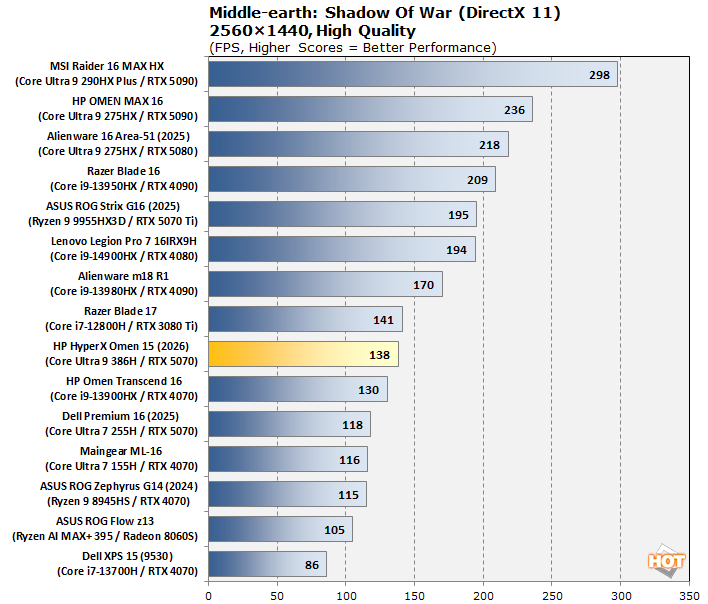
HP HyperX Omen 15 Shadow Of War Benchmark - Image: HotHardware
Nothing wrong with 138 FPS. This benchmark has comically bad frametimes even on the fastest systems, which is why we only report the averages, but on the second and successive runs it was quite smooth on this machine. A great showing for performance in older DirectX 11 games.
Shadow of the Tomb Raider DirectX 12 Benchmarks
Shadow of the Tomb Raider is easily the best-looking of the rebooted Tomb Raider trilogy, and it also has the least obnoxious whining from Lara. While it's a bit older, the developers continued to update the game for years after its launch, and so it's brimming with fancy tech, including all three vendors' smart upscalers, ray-traced shadows, and even Tobii eye-tracking support. To test this game out, we turned the visuals up to their highest preset and tested at 2560x1440. Note that this doesn't include the aforementioned ray-traced shadows, which are not enabled by any preset.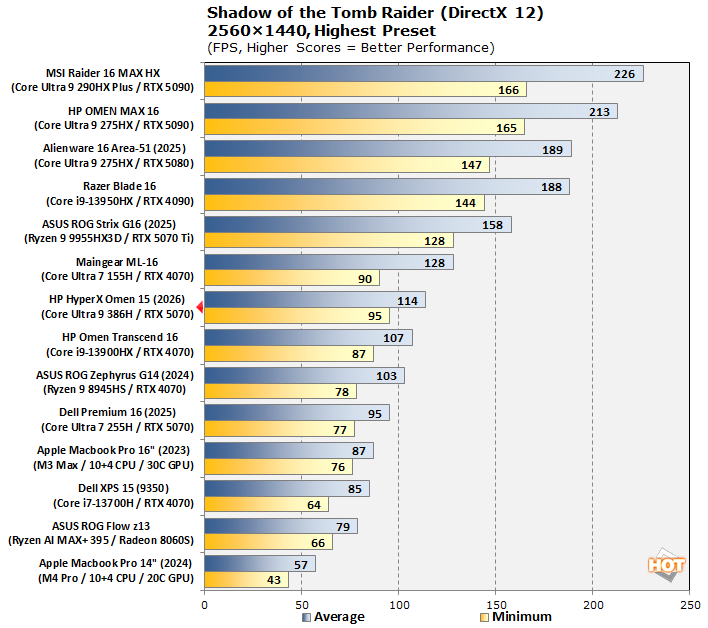
HP HyperX Omen 15 Tomb Raider Benchmark - Image: HotHardware
In Shadow of the Tomb Raider, we see this machine fall behind the older Maingear ML-16 with a GeForce RTX 4070 a little bit, but that's only in the averages. The minimum frame rates are actually higher, and that's representative of my experience with this system. Whatever magic Intel has worked with the Core Ultra 9 386H, it handles games with surprising aplomb.
Marvel's Guardians Of The Galaxy DXR Benchmarks
Marvel's Guardians of the Galaxy is an action-adventure game where you play as Star-Lord and lead the rest of the nominative Guardians from mission to action-packed mission, just full of that series' trademark quirky humor. The game's minimum requirements only call for a Radeon RX 570 or GeForce GTX 1060-class GPU, but it also supports some of the latest graphics technologies, including DXR and DLSS, so it's still serving as our ray-traced gaming test, for now.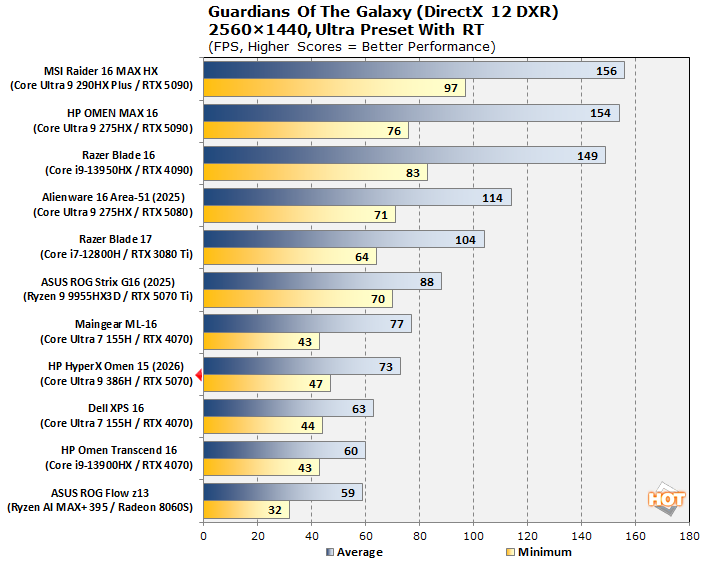
HP HyperX Omen 15 GotG Benchmark - Image: HotHardware
In Guardians of the Galaxy, we see the same thing as in Shadow of the Tomb Raider: slightly weak averages, but very strong minimums. This benchmark isn't utilizing DLSS, so you could easily flip on the AI upscaling tech to hit the 120 FPS mark of the OLED screen's refresh rate if you really wanted. But speaking of DLSS...
F1 24 Formula One Racing DLSS Benchmarks
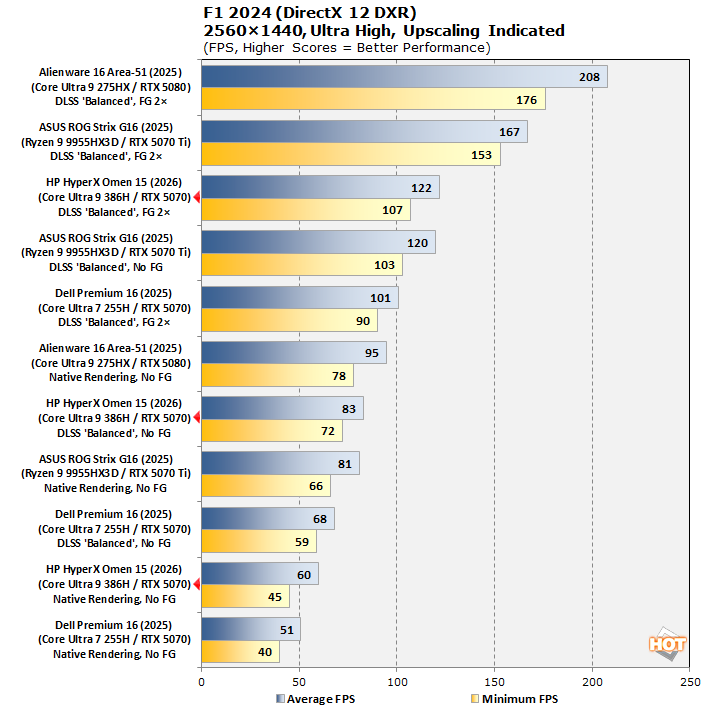
The previous iteration of Codemasters' annual officially-licensed F1 racing game carries forward the gorgeous custom ray-traced global illumination (RTGI) solution from F1 23 while improving texture quality and performance across the board. Many environmental objects have had their detail improved, and the tracks look a lot more like their real-world versions in this release, especially after a major graphics patch back in December 2024.We also wanted a test to demonstrate the benefits of NVIDIA's DLSS technology in terms of performance, and F1 24 presents the perfect opportunity to do so. We stuck to comparing systems with Blackwell GPUs because it was the most apples-to-apples comparison given that the Blackwell architecture performs frame generation in a different manner than the older Ada Lovelace architecture from the RTX 40 series.
HP HyperX Omen 15 F1 24 Benchmark - Image: HotHardware
F1 24 is still a very demanding workload when kicked up to "Ultra High" settings, as this enables the full suite of the game's ray-traced effects. The 60W GeForce RTX 5070 pulling out 60 FPS average in native 1440p is very impressive already. However, kicking on DLSS upscaling and 2x Frame Generation takes us all the way to 122 FPS average, which means you can maintain the optimal range for the 30-120 Hz VRR display most of the time. It's honestly a better experience, and this is probably how you should play this game.
HP HyperX Omen 15 Subjective Gaming Impressions
I've had this laptop for over three weeks at this point, and in that time, it has been my primary companion for my main hobby, which is of course PC gaming. While the title that soaked up the majority of my game time was the 24 year old MMORPG Final Fantasy XI Online (which runs fine on the system's integrated graphics, hyuk), I've tested quite a few other games on the machine. Here are some recommended settings that I personally tested: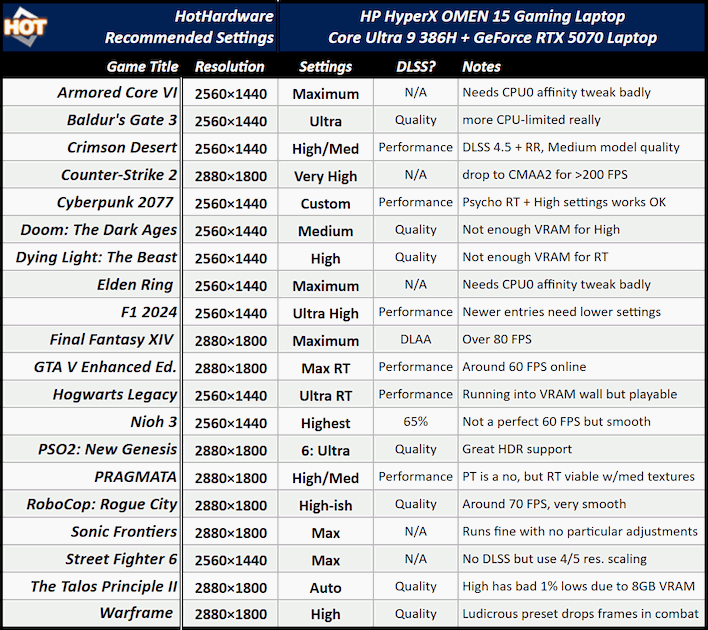
As you can see, you can enjoy an excellent gaming experience on this system, even in the latest and most demanding titles. However, because the GeForce RTX 5070 only has 8GB of video RAM, if you want to play high-end games like Pragmata or Doom: The Dark Ages, you're going to have to dig into the settings menu and make some manual adjustments to get the best experience. You certainly can simply slap things down to Medium or Low settings, but that's not really the optimal way to play.

Since I mentioned Pragmata, I'll start there. Simply put, Pragmata looks really bad without Ray Tracing enabled. It simply doesn't have proper lightmaps without its ray-traced shadows. However, enabling Ray Tracing is pretty much automatically going to put you into "Orange" memory territory, which means you're in danger of running out of video RAM.
I found that by lowering Texture Quality to "Medium: 1GB", Mesh and Shadow quality to Medium, Effects Quality to High, and Volumetric Lighting to Medium, I was able to achieve a very solid level of performance before frame generation, which put me over 100 FPS. The game still looks brilliant this way, and keeping Hair Quality at High preserves Diana's precious golden locks. Make sure to head into the NVIDIA App and enable the DLSS Ray Reconstruction override for the best visuals.

SEGA's free-to-play online action RPG Phantasy Star Online 2: New Genesis has a restrictive anti-cheat in place, so it doesn't let you override the DLSS preset. This is a shame, because the version it ships with is an ancient DLSS 2 preset that looks pretty bad now. Fortunately the game isn't smart enough to barf if you just swap out the DLSS DLL, so go get DLSS Swapper to drop in a new DLL and you'll be good to go. Even frenzied battles with twelve players at once won't cause performance to drop on a machine like this.

Despite being a lower-budget game, RoboCop: Rogue City (as well as its standalone expansion, Unfinished Business) uses the full Unreal Engine 5 feature set, and as a result these titles can be quite demanding. The game defaulted to some absurdly high "Epic" settings which were giving me less than 20 FPS on the title screen. Manually dropping to 'High' settings, with Medium texture quality and DLSS 'Quality' gave me a very acceptable experience around 70 FPS. Now if only I weren't so bad at the game! (It's quite hard!)

Baldur's Gate 3 is an interesting case on this machine. You generally won't be GPU limited as long as you apply any amount of DLSS upscaling; 'Quality' is fine. The game isn't that heavy on GPUs. However, when you actually enter the bustling city of Baldur's Gate in Act 3, the game actually becomes rather CPU-limited on the HyperX Omen 15. Performance is still playable in my testing, even in large battles with a couple dozen combatants, but it's important to understand the source of your performance limitation, because adding more DLSS is not really going to help in this game. In fact, you could probably just play it native and be completely fine.

Cyberpunk 2077 is another game where you can easily run into video RAM issues. For example, the GeForce RTX 5070 GPU in this machine can handle the path-traced "RT Overdrive" renderer in the benchmark, but once you get in-game the performance is really poor as you run out of RAM very quickly. However, with such a great ray-traced presentation in the game, and such strong ray-tracing performance from the Blackwell architecture, it felt bad to leave ray-tracing off altogether. In fact, if you're willing to be careful with the settings, it's actually possible to get around 40 FPS average with all the ray-traced effects on and Ray-traced Global Illumination set to 'Psycho'. I found setting most settings to 'High' and using DLSS 'Performance' worked well enough.

On to some more problematic titles. Nioh 3 is a very odd game technologically. It's built on Team Ninja's in-house "Katana" engine, which doesn't really behave like any other game engine. In particular, the game speed is tied to frame rate, but you can set the target frame rate between 30, 60, or 120 FPS. Unfortunately, this machine simply isn't capable of running Nioh 3 at 120 FPS, and it's not because of the graphics card. It's not completely clear why, but this machine really struggles with Nioh 3's CPU load. My theory is that it has to do with the 8KHz report rate of the keyboard combined with the relatively meager single-threaded performance of the Core Ultra 9 386H CPU.
You can play just fine, even at Highest settings, as long as you enable DLSS and then set a 60 FPS frame rate cap. You'll still see some slowdowns occasionally as the frame rate dips, but it's fully playable that way. Note that these dips even happen when you're playing with a gamepad. It's possible you could cut some of the settings, like model detail or Global Illumination detail, and reduce the CPU load, but it still didn't get me anywhere near a full-speed 120 FPS experience. Your best bet is probably to simply go for 60 FPS and enable frame-gen.

Finally, Armored Core 6 and Elden Ring both have the same issue on this system. To sum up, From Software's game engine is programmed in such a way that input handling can cause extreme CPU load on machines with a lot of USB devices, or with USB devices that have very high report rates. All of this CPU load gets concentrated on CPU core 0, which is the first CPU core in any given machine, and which is often heavily loaded by other processes that are (foolishly) hard-coded to run on CPU 0 as well. The end result is horrible stuttering and generally extremely poor performance in these games on this laptop.
Fortunately, you can resolve this issue completely by simply modifying CPU affinity using Task Manager or Process Lasso and disabling CPU 0. You might think that cutting out one of the CPU's four precious P-cores would have a poor effect on performance, but it actually completely smooths out the experience of these games on this system. I was able to achieve over 64 1% low FPS in 2560x1440 on the game's Maximum settings in AC6.
The downside is that you can't do this while Easy Anti-Cheat is running, which means it's only useful for offline play, unless you want to pay up for the paid version of Process Lasso. That app can use a more modern method for setting CPU affinity called "CPU sets", and it apparently doesn't trigger EAC. Attempting to write my own script for doing this with direct Win32 API calls still got me an Access Denied error though, so your mileage may vary. HP doesn't seem to provide a way to adjust the report rate of its keyboard, so in badly programmed games, you're just going to run into weird issues like this.
Let's head over to the last page to talk about thermals, noise, battery life, and my thoughts about the HyperX Omen 15.