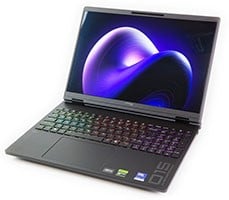
HP HyperX Omen 15 Review: RTX 5070 Gaming Meets Gorgeous OLED


HP HyperX Omen 15 - Image: HotHardware
HP HyperX Omen 15 Gaming Laptop Thermals And Noise
This is not a particularly large laptop, so you might be worried about the cooling. Worry not, because this machine uses a CPU and a GPU that both top out around 80W for short-period boost, with long-period boosts being limited to 60W. NVIDIA's Dynamic Boost is present, and the GPU can borrow up to 25W from the CPU for a peak power of 85W above the 60W configured power limit. The point is, this machine never draws more than about 150W, and it has plenty of cooling mass to absorb that heat. You don't have to take my word for it, though: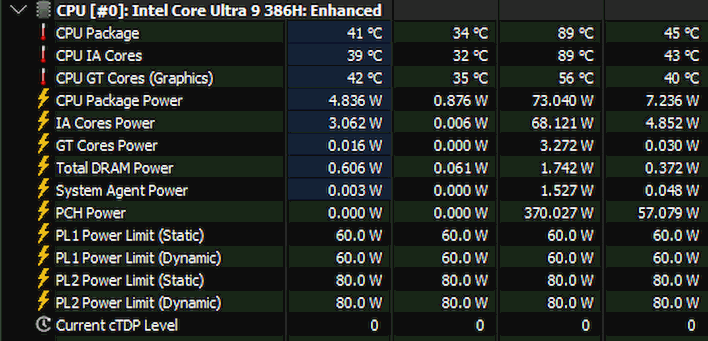
HP HyperX Omen 15 Thermals - Image: HotHardware
These are the results from over three hours of performance testing, including Cinebench, PugetBench, and game tests. The interesting column here is the third one, which shows the max values attained. That 370W PCH power reading is clearly wrong, but everything else looks pretty good. We see a peak package power of about 73W, and we see a maximum CPU temperature of 89°C Actually, HP seems to have configured the system firmware with a temperature limit of 90°C, which is a little odd considering that Intel specs the chip up to 100 degrees. Forcing it to stay cooler will increase its lifespan, but it also means it doesn't boost quite as aggressively.
HP HyperX Omen 15 Thermals - Image: HotHardware
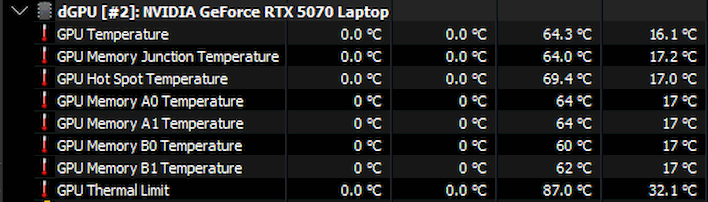
Over on the GPU side of things, thermals look even better. The RTX 5070 never really gets warm at all; it seems HP's cooling hardware in this case is gloriously overspec'd and the fan curve is quite generous. With that said...
HP HyperX Omen 15 Acoustics - Image: HotHardware
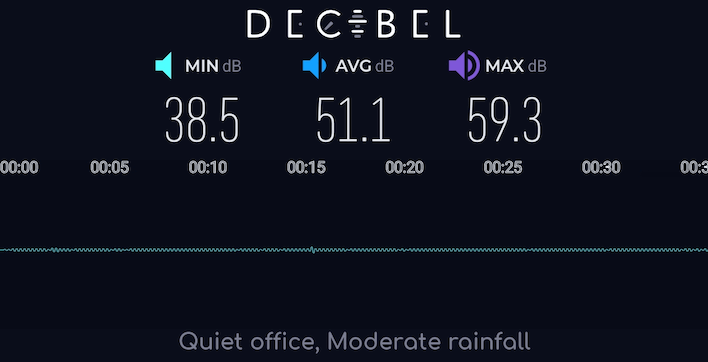
This system can get a little loud. Clearly, we would prefer it to be somewhat noisy than hot, which is the correct decision for a gaming system in our opinion. This result was recorded with the laptop in "Performance" mode, which is the mode it defaulted to out of the box. The 51.1 decibel value is more representative; the 59.3 decibel value only appears when you set the machine to 100% fans manually. 51.1 decibels is not ear-splitting; as the app notes, it's more like a quiet office or moderate rainfall. It's definitely noticeable, though. Nobody's going to be left unaware if you start trying to play Baldur's Gate in your work meeting. Due to the very large surface area of the cooling apparatus though, the sound is soft, low pitched and not bothersome.
HP HyperX Omen 15 Laptop Battery Life
The silver lining to this laptop's lack of a hardware MUX is that when the GeForce RTX GPU isn't in active use, it can power down and use essentially no power. We already know that Panther Lake is power-efficient, but this machine does have a smaller battery than many of the gaming laptops we've tested recently, and it also has a massive, super-bright OLED screen. How does it fare? See for yourself: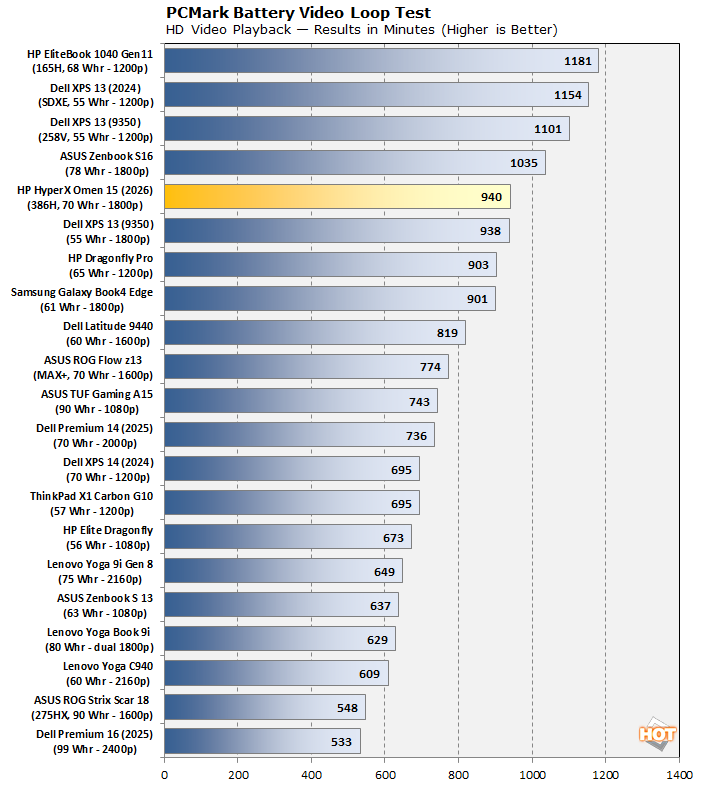
HP HyperX Omen 15 Battery Life - Image: HotHardware
That is nearly 16 hours of video playback battery life, and this test isn't done with the screen brightness so dim you can't see it, or the audio muted. Sure, you don't necessarily buy a gaming laptop to sit around and watch movies on it, but if that's something you wanted to do, you could watch the entire extended Lord of the Rings trilogy front to back on one battery charge. Very impressive for a gaming laptop!
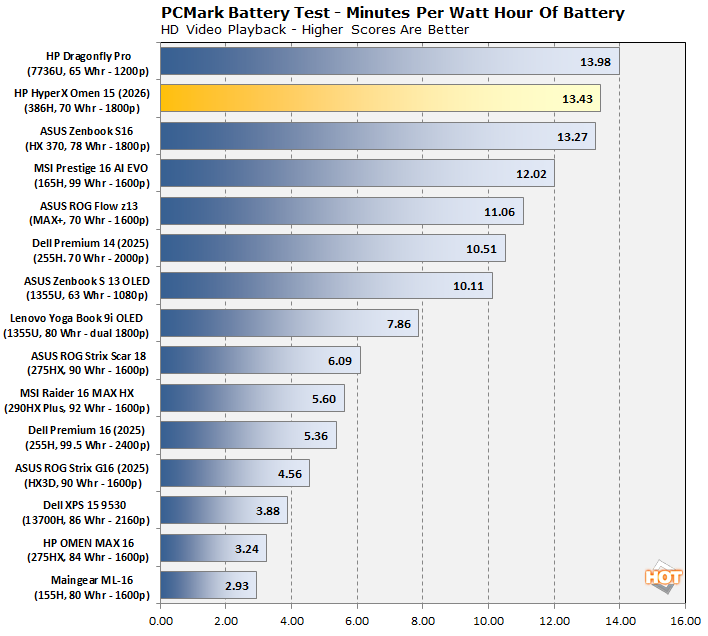
HP HyperX Omen 15 Battery Efficiency - Image: HotHardware
Moving over to the battery efficiency chart, this machine seriously kicks butt. It even beats out many systems that don't have discrete GPUs at all, including the MSI Prestige 16 AI EVO and its power-sipping Meteor Lake CPU. This is by far the best result we've ever seen in this test from a laptop with a discrete GPU, so excellent job, HP.
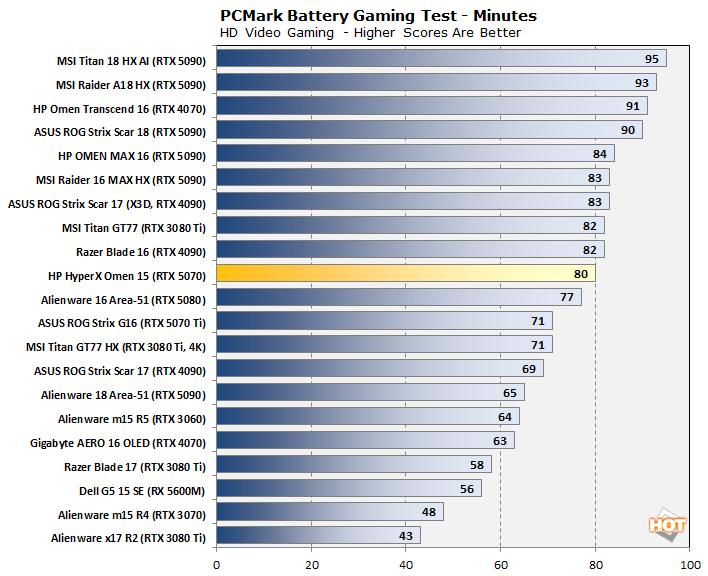
HP HyperX Omen 15 Battery Life - Image: HotHardware
In the PCMark 10 Battery Gaming test, the Omen 15's performance is a little more middling. The RTX 5070 has to work a little harder to render the 3DMark Fire Strike scene that the benchmark uses for GPU load, and in combination with the overall smaller battery it doesn't last as long as some of the big boys do. On the other hand, it beats out a lot of laptops with even smaller GPUs and even some current-generation machines, like the Alienware 16 Area-51, which was itself quite efficient. Well, truth be told, the performance is nearly identical, and the same goes for the HP Omen Max 16 we tested before. Overall, not bad at all, but we'd keep the charger handy if you're going to be gaming on it.
HP HyperX Omen 15 Gaming Laptop Conclusions

HP HyperX Omen 15 - Image: HotHardware
It's sometimes tricky reviewing a more mainstream product, versus halo systems packed with the latest, most powerful hardware. Manufacturer have to make certain compromises for form factor and cost reasons, like the four-zone RGB LED lighting on this machine's keyboard. You can't have the same expectations that you'd have of a high-end product costing twice as much. At the same time, you need to make sure that the device is delivering a good experience for its users, because if 'cheap' means 'crummy', then it's not worth it anyway.
I have few complaints about the HyperX Omen 15. It looks great, I love the keyboard, the screen is absolutely outstanding, and the performance is good, especially in light of the fantastic battery life. The software experience isn't great, but that's easily resolved. My biggest gripe with this system is that there's no way to control the report rate of the integrated 8Khz keyboard. That causes performance problems with certain games, so it's important to give users the option to control it. There's also the matter of the mediocre SSD that HP selected, but market realities are what they are right now and it's hard to make an issue of it.

At its MSRP of $2,799 for this laptop as configured for this review, it's not particularly exciting, but that's fine because at the current going price of $2,099, however, considering the state of the DIY market, it's a real deal. You get fully competent 1440p gaming performance with 32GB of RAM and a stunning HDR OLED screen, as well as well-thought-out external I/O and a second M.2 slot, all in a highly portable package that you can work on all day. I didn't say much about the form factor in this review, but I think 15.3" is a very comfy size for carrying around despite the relative bulk of the machine thanks to its expansive cooling hardware. It's very easy to recommend this system.
If not for the polling rate issue, I think this would be an easy Editor's Choice. As it stands, I'm going to give it our Recommended award, because Joe Gamer isn't going to want to have to troubleshoot issues like this. There's also the 8GB of video RAM to contend with, although that's not HP's fault. In any case, as long as you're willing to fiddle with your games a bit the HyperX Omen 15 is a very solid choice for a current-generation gaming laptop. And what PC gamer is afraid to delve into game settings menus anyway?