



NVIDIA DLSS 4.5 Tested: The Real-World Impact Of Dynamic Multi-Frame Generation


If you read that and thought "ew!" we do understand your sentiment. A lot of people have the wrong idea about frame generation. For example, I've seen the remark, "6x frame generation means 6x the input lag, since there's six frame." That's not accurate, though; whether you're using 2X or 6X frame generation (meaning one to five generated frames), you're not increasing the space between classically rendered frames, you're just adding more frames in between. So saying, the hit to input lag is the same, and in any case, it's quite a bit smaller than you might expect. We'll show you some benchmarks in a bit.
Clasically, when you enable Frame Generation, you simply add one generated frame for each "real" frame. Multi-Frame Generation lets you increase the number of frames to 2, 3, 4, or even 5. This multiplies your perceived frame rate, which is to say that visually, it looks smoother. The effect is quite convincing at this point, especially given that NVIDIA is now on its second-generation frame generation model.

Now, DLSS Dynamic MFG does exactly what you think it does: it automatically scales the multi-frame-generation multiplier up or down depending on what the game "needs" to hit the frame rate target you set, which defaults to the refresh rate of your screen. We were testing on a 4K monitor with a 160-Hz refresh rate and a GeForce RTX 5070 Ti, so we definitely needed those generated frames to hit that peak refresh rate.
The concerns with frame generation have always been twofold: issues with image quality ("ghosting" and other artifacts), and issues with input lag or responsiveness. Well, I'm here to tell you that artifacts can still be an issue, but the responsiveness problem is more or less solved. As long as your game is running reasonably smoothly—a consistent frame rate above 40 FPS or so—DLSS Frame Generation, particularly in its latest incarnation, provides a big increase in visual fluidity for very little downside. Let's take a look at some data.
NVIDIA's DLSS 4.5 In Hogwarts Legacy

Despite being based on the previous version of Unreal Engine (UE4), Hogwarts Legacy remains a visual feast, and a showcase for ray-tracing and related technologies. This was one of the first games to add support for DLSS Frame Generation, and so it goes that we're using it to test support for multi-frame generation.
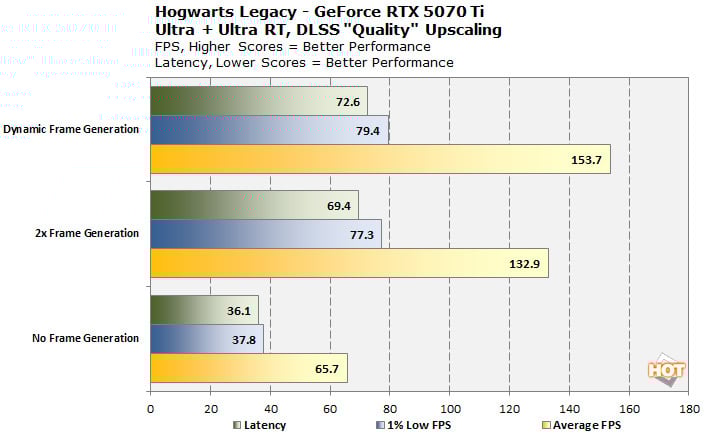
Now, it's worth noting that this is actually the worst result in our mini-suite of benchmarks in terms of latency. This is "PC Latency" as reported by NVIDIA's Frameview tool, and it seems to broadly track with out felt latency when playing on keyboard and mouse. Hogwarts Legacy does become noticeably less responsive with frame generation enabled, but it doesn't really get worse with dynamic frame-gen enabled, so might as well enjoy the extra visual fluidity.
This probably has something to do with the relatively low underlying framerate. While we're seeing an average of 65.7 FPS across the benchmark run without frame generation, the 1% lows are at 37.8 FPS, which means we're dipping below 40 FPS, and that doesn't feel great with or without frame generation.

It's hard to see for the bloom, but the painting on the left is a total mess.
Hogwarts Legacy is also the game in our suite with the most readily visible artifacts from frame generation. You see, Hogwarts as an institution is covered in magical paintings of past teachers and famous wizards, and these are implemented in the game engine as flat MP4 videos that play as you walk by. Because there's no motion data being passed to the DLSS AI, the interpolation algorithm has no idea what to do with the videos and just smears the heck out of them. It's a pretty minor issue that doesn't affect the core gameplay, but it's there.

Thankfully there are mercifully few artifacts anywhere else. Even when using bombastic combat spells that sling showers of sparks everywhere, there are virtually no visual anomalies to be seen, and the few oddities we noticed are as likely to be ray-tracing denoising artifacts as anything to do with DLSS. Hogwarts Legacy isn't really the kind of game you absolutely need a 30-millisecond input latency for, so it's hard to deny that DLSS Dynamic MFG improves this game considerably.
NVIDIA's DLSS 4.5 in Dragon Age: The Veilguard

Truthfully, I'd be lying if I said I spent as much time with this as with the others, but it's really just that I don't know the game as well. Still, we do have some interesting data. We tested Dragon Age: The Veilguard in 3840×2160 resolution at 160-Hz refresh rate just like the others, but not knowing how demanding the game was, we set DLSS upscaling to "Performance" and then away we went.
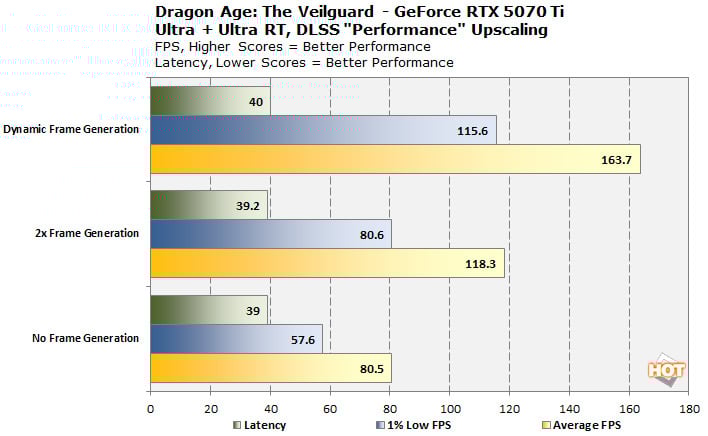
This resulted in an average frame rate over 80 FPS, which turns out to be quite useful, because it demonstrates that frame generation does come with a performance cost. With 2x frame generation we were only looking at around 118 FPS average, as enabling the new high-quality "Preset B" frame generation, which uses depth information to exclude the game UI from the interpolation effect, cut our "real" frame rates considerably. Of course, frame generation is there to lift them back up.
Note that the latency is nearly unchanged across the whole chart. That's at least partly because we didn't have NVIDIA Reflex enabled for our "No Frame Generation" testing. DLSS FG mandates NVIDIA Reflex, and the lag-reducing technology compensates for the extra latency added by frame generation quite effectively. We did have Reflex enabled in "Reflex+Boost" mode for our Hogwarts testing above; thus the wide gap.
NVIDIA's DLSS 4.5 in Nioh 3

The latest entry in Team Ninja's historical fantasy action RPG series is incredible, and it also supports DLSS upscaling and frame generation. Naturally, I had to see how well it works with dynamic frame generation, since I'm still playing it. The game actually supports Multi-Frame Generation, but the implementation is a little odd. Nevertheless, it played just fine with NVIDIA's overrides in the NVIDIA App.
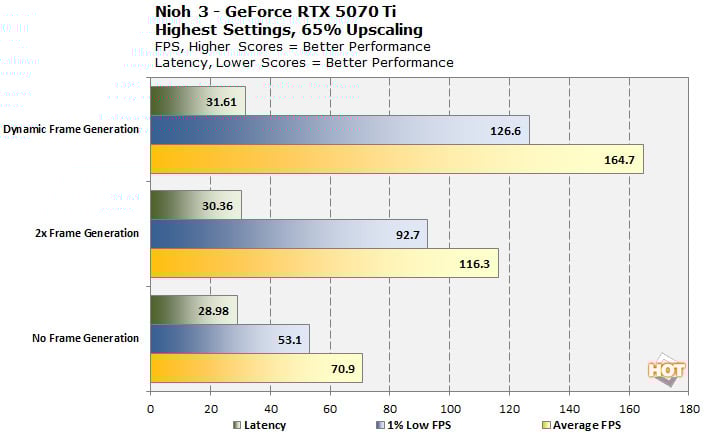
This one's a bit surprising because this time, we actually did have NVIDIA Reflex enabled for our "no FG" testing, and yet the resutls with frame generation still see nearly no increase in latency. You definitely notice the bump in visual fluidity, though. Enabling dynamic MFG in the NVIDIA App got us up to 164.7 FPS average, slightly above the 160-Hz refresh rate of our monitor; that's likely because it's not smoothly scaling the frame generation multiplier but simply picking between the integer values: 2x, 3x, 4x, 5x, 6x, representing 1, 2, 3, 4, and 5 inserted frames, respectively.

We didn't observe any artifacting or whatsoever in our time with Nioh 3 and Dynamic MFG. Even the waving grass in the intro cutscene was temporally stable, and neither the wispy golden amrita nor the ephemeral sprays of blood from our victims showed any significant signs of frame generation artifacts. Once again, it's honestly hard to argue against Dynamic MFG as a "set it and forget it" feature in this game, especially if you're one to leave motion blur and other screen effects turned on.
NVIDIA's DLSS 4.5 in Cyberpunk 2077

Of course, we had to test everyone's favorite benchmark, Cyberpunk 2077. This game recalls Ashes of the Singularity, Crysis, and Quake III Arena as previous titles that have long outlived their gameplay buzz yet still find service as benchmark tools. Just like those games, it's still a heck of a lot of fun, though, and easily the most demanding title we tested for this post.
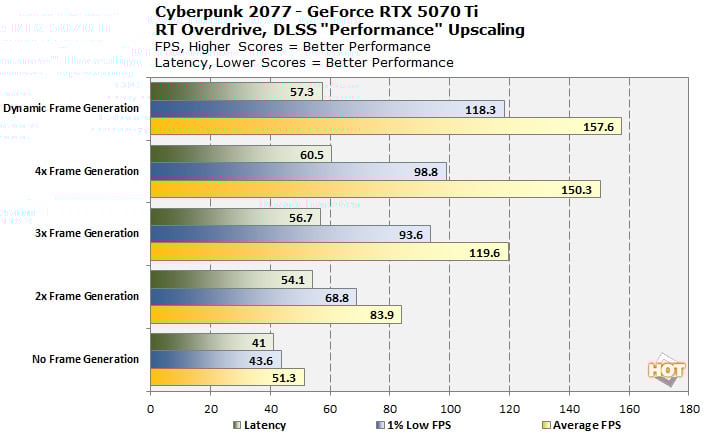
In Cyberpunk 2077, we decided to go ahead and test all of the frame generation presets that the game natively supports as well as the dynamic MFG feature. The results likely won't surprise you. We were highly impressed by the Dynamic MFG results, though; it's a hair more responsive than 4x MFG while offering a significantly higher 1% low frame rate.

We did spot a touch of artifacting; like with Hogwarts' paintings, Cyberpunk 2077 has many display screens all over Night City that are constantly displaying animations and which are flat 2D textures with no geometry to provide motion vectors to the AI. On a few screens, especially in the distance, it became very hard to tell what they were supposed to be as the frame generation smeared them into illegibility. These screens are never gameplay-relevant and become clear enough up close, so this is a fairly nitpicky complaint, but it is worth noting we feel; the smearing effect can be distracting.

Aside from that? Same story as before, more or less. The extra latency added, even by the 4x MFG setting, really isn't obvious and I had no trouble blasting through a crowd of guys with precision headshots. If anything, the higher visual frame rate makes it easier to track moving targets in dark rooms, even if the latency is a touch higher. It's not impossible to feel the lag, but it's rare and minimal for the most part—again, as long as your 'base' frame rate is acceptable. When the framerate dips with FG on, you really feel it, so it's important to adjust settings so that you stay above the ~40 FPS 'smoothness threshold'.
How To Enable DLSS 4.5 Dynamic Multi-Frame Generation
Today's the launch day for DLSS 4.5 Dynamic MFG, so if you're keen to fool with it, you'll need to make sure you have the latest NVIDIA GeForce graphics driver as well as the newest GeForce App. You can't fiddle with these settings using the old Control Panel, and while you can use Profile Inspector, if you know how to do that, you don't need this guide.
Once you have the latest NVIDIA App and driver installed, you should in theory be able to go to "Graphics" and then select your specific game you want to tweak. It is possible to apply these tweaks in a global manner, but neither HotHardware nor NVIDIA recommends you to do so, because it can and will break things. In general, stay out of the global settings menu unless you absolutely know what you're doing.
Once you're looking at the driver settings for a specific app, there are two panels you should mess with. One is "DLSS Override - Model Presets," which changes the "version" of DLSS you're working with for the app.

Our recommended setup for most games, but some won't benefit from FG Preset B.
In this setting, you select "Recommended" to use the settings selected by NVIDIA for the app. This will usually override whatever DLSS version the game has with one of the latest models. However, if you want to be more specific than that, you can go into Custom and select which model to use for Frame Generation and Super Resolution. Note that if your gmae doesn't have significant HUD artifacting issues, it's likely best to leave the Frame Generation model alone, as Preset B is a bit heavier with little real benefit on unsupported games. As far as DLSS Super Resolution presets go, we wrote up a decent guide before over here.

Our recommended setup for Dynamic MFG.
The other option, DLSS Override - Frame Generation Mode, lets you decide what degree of frame generation you want. This was previously for enabling multi-frame generation in apps that only supported the original DLSS Frame Generation, which was "2x" by today's nomenclature. However, you can now select 'Dynamic' to enable Dynamic MFG, which will try to keep your game's refresh rate near your monitor's refresh rate.
As we noted in our testing above, we've found Dynamic MFG to work extremely well in the limited set of games we've tested it with. There's really not a lot of reason not to enable it; as long as your game is maintaining a smooth enough frame rate to begin with, Dynamic MFG really is simply a much smoother experience with little in the way of extra latency or visual issues. The only real downside is the requirement of a GeForce RTX 50 series GPU.
Is Dynamic MFG worth upgrading for? Well, no, not really; certainly not at today's GPU market prices. It's definitely a cool value-add for NVIDIA's most loyal customers, though. Kudos to Team Green for continuing to support its gaming hardware with great new features. Next time, we'll talk about that next version of DLSS...





