HP HyperX Omen 15 Review: RTX 5070 Gaming Meets Gorgeous OLED


| HP HyperX Omen 15: Starting at $1,029, as tested $2,099 HP's latest-generation Omen gaming laptop gets HyperX branding and a slightly smaller form factor, making it downright pleasant to pack and go.
|
|||

|

|
||
If you're confused about the branding, let us help you out. HP acquired the HyperX brand back in 2021 and continued to sell gaming peripherals under that name, but the company has since gone and mashed up its two most popular gaming brands, HyperX and Omen. Thus this machine is the "HP HyperX OMEN 15 Gaming Laptop PC". Fundamentally it isn't much different from the previous Omen 16 laptop, a "Max" variant of which we reviewed last year.

HP HyperX Omen 15 Rear Vents - Image: HotHardware
The biggest difference is the smaller size. The HyperX Omen 15 is an unusual form factor for a gaming laptop. Most "15-inch class" laptops have 15.6-inch screens, which is, in fact, the most common mainstream laptop size. This machine is just a bit smaller than that at 15" diagonal, and yet with the 16:10 screen, it seems even smaller because it's really just 13" wide. It's also relatively svelte for a gaming laptop, at not even a full inch thick at its widest point.
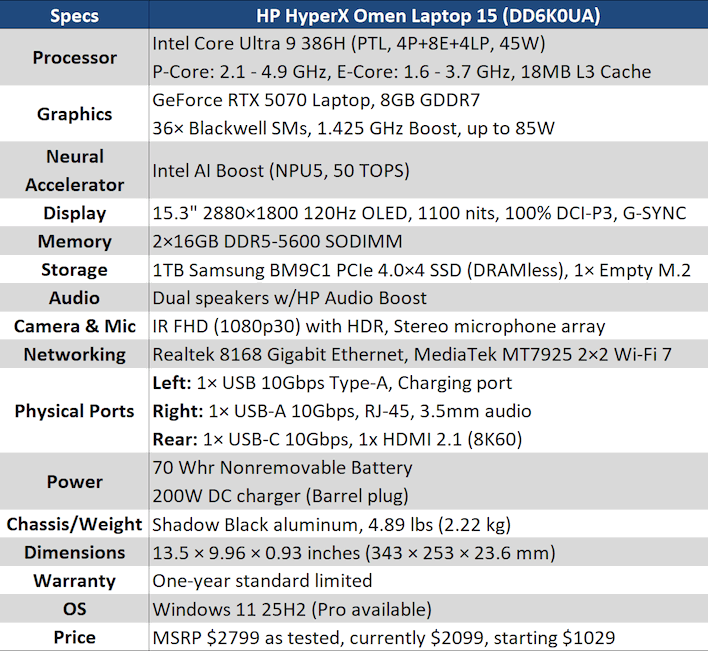
I'll talk more about its physical dimensions in a bit, though. First, let's go over the full specifications so I can point out a few places that HP did well and a few where HP was likely forced to make some trade-offs, due to the current market conditions.
HP HyperX Omen 15 Laptop Full Specifications
HP HyperX Omen 15 Gaming Laptop Specs - Image: HotHardware
Notably, this is our first laptop to test that uses a Panther Lake processor without relying entirely on that chip's powerful integrated graphics. This is the 4-Xe version of Panther Lake, where the integrated graphics are relatively modest compared to the 12-Xe version we've reviewed a few times before. This particular part retains the full Panther Lake CPU configuration: 4 Cougar Cove P-cores, eight Darkmont E-cores, and four Darkmont LP E-cores; however, it does take a 200 MHz hit to the peak boost clocks of both P- and E-cores versus the Core Ultra X9 388H, the top-end 12-Xe configuration.
This isn't our first time testing a mobile GeForce RTX 5070, although this specific model supports a significantly higher TDP than the Dell Premium we reviewed before. That comes through in the results, as you'll see. This laptop also doesn't have a hardware MUX, meaning that all video rendered by the GeForce RTX 5070 has to be copied to the video memory of the Intel graphics before being displayed. This isn't a serious issue; the performance loss from this is usually on the order of a few percentage points, but it's something to be aware of because it means that you need to use the Intel software to configure the screen, not the NVIDIA App.
Other key specifications worth discussing include the fantastic integrated screen, the questionable-but-also-laudable choice of DDR5 SODIMM memory, and the specific choice of SSD, but we'll talk about all of those in due time as we do our physical walk-around and our benchmarks. So without further ado, let's dive in...
HP HyperX Omen 15 Laptop Exterior Design

HP HyperX Omen 15 Gaming Laptop Lid - Image: HotHardware
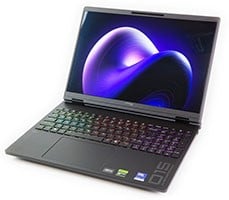
Much like the Omen Max 16 we reviewed last year, the HyperX Omen 15 makes a strong impression out of the box. The black aluminum chassis is very attractive, although it's also a fingerprint magnet, as you'll see in some later photos. Wash your hands before handling this laptop. It isn't too heavy at under 5 pounds, but it's not exactly lightweight, either. Combined with the relatively small size, it makes the system feel dense. Whether that's a good thing is an exercise left up to the reader, but I like it.

HP HyperX Omen 15 Gaming Laptop - Image: HotHardware

HP HyperX Omen 15 Gaming Laptop Keyboard Deck - Image: HotHardware
You can tell HP had real gamers design this laptop, because it includes a full keyboard (more or less) despite the svelte size of the system. This is important for gamers because it retains the extra keys for key bindings in games, but it does have some consequences; the keys are a good bit smaller than those on something like the Dell 16 Premium, and typing requires bunching your hands together toward the left side of the keyboard a bit. Yet, the experience of typing is pretty great once you get used to the dimensions. The keys have a crisp feel, at least when the keyboard is brand new; this is not a mechanical keyboard, after all, which is a fair trade-off considering the price class.
Another trade-off that isn't surprising for the price class is that this is not a per-key RGB LED keyboard. While it does have bright and attractive RGB LED accents, there are only four RGB lighting zones. This does make 'wave' and other motion effects look pretty awkward. We'd simply set the keyboard to color cycling or single-color modes for best effect, but your mileage may vary.
While the keyboard doesn't use actual mechanical switches, HP does advertise an 8KHz report rate for keyboard inputs for minimal input latency. Ultra-high report rates, while marginally reducing input lag, can actually cause problems in some games. Both Durante, author of the DSfix mod for Dark Souls, as well as Kaldaien, the author of the Special K multi-game mod, specifically recommend against using using polling rates over 1 KHz. Unfortunately, as far as I can find, HP does not provide any means to adjust the report rate on the keyboard. I actually ran into performance issues in two games that I am fairly certain are tied to the 8KHz report rate of the keyboard, but I'll talk about that in the gaming experience section ahead.

HP HyperX Omen 15 Gaming Laptop Rear - Image: HotHardware
Around the back of the machine, you see two ports: one USB Type-C, and one HDMI. That's because the vast majority of the back of the system is dedicated to exhaust for the laptop's cooling hardware. No complaints here; not only are these two ports well-placed, but there's more I/O than just these two items. That HDMI port supports HDMI 2.1 FRL, and it goes directly to the GeForce RTX 5070, so if you're seeking the absolute minimum latency from this machine, this is how to get it. The USB-C port is not USB4 or Thunderbolt; in fact, this laptop has neither. However, it does support DisplayPort alternate mode and you can even charge the laptop this way, albeit slowly.

HP HyperX Omen 15 Gaming Laptop Left Side - Image: HotHardware
On the left side of the laptop we have the DC barrel jack that it uses for power, a USB Type-A port supporting 10-Gbps transfer rates, and a 3.5mm combo audio jack. Very happy to see a USB Type-A port on this side of the machine, as this is vanishingly rare these days. The audio jack supports both headphones and headsets, and the power port has a tiny LED next to it to indicate charging status. HP bundles a 200-watt charger with the machine, which is relatively low compared to other gaming laptops we've reviewed, but it's enough to keep the system from draining its battery even under intense gaming with loud audio and 100% screen brightness.

HP HyperX Omen 15 Gaming Laptop Right - Image: HotHardware
Over on the right side we get a second USB Type-A port, once again supporting a 10-Gbps transfer rate, and then an RJ-45 jack for wired networking. These are also thoughtful choices clearly made by a gamer. The Ethernet jack is a necessity for low-latency online gaming, while the second Type-A port allows gamers to connect a mouse while also using a common USB flash drive, USB microphone, or whatever other device. Heck, we can even laud HP for making this system ambidextrous; if you prefer to use your mouse on the left, no problem! I would really like to have seen an SD card reader and/or a USB4 port, but I'd frankly rather have the configuration we got if getting USB4, Thunderbolt, or a card reader would have meant sacrificing any of the ports available on the system.

HP HyperX Omen 15 Gaming Laptop Bottom - Image: HotHardware
Flipping the laptop over, we can see the huge grille that occupies nearly half of the bottom of the machine despite that there are only two small cutouts for the fan intakes. It looks stylish, anyway. The QR code in the middle goes to a support page specifically for this laptop, which is a nice touch. You can find the serial number and product identifiers printed down toward the front of the laptop if you prefer kicking it old-school.

HP HyperX Omen 15 Gaming Laptop Internals - Image: HotHardware
We didn't try to tear into the machine ourselves, but this image from HP's wonderful teardown guide is quite illustrative. As far as user-serviceable components, there's basically the RAM, the SSD, and the Wi-Fi card, although the design of the machine makes it relatively easy to get at the battery and even to remove the cooling apparatus if you're so inclined. The memory, if you're wondering, is under that large silver piece of EMI shielding paper in the middle. On the left is the first SSD slot; on the right, the second slot, which comes empty. It supports PCI Express 4.0 x4 SSDs of 80mm length only. Actually getting into the chassis isn't that bad, by the way; unscrew a few screws and then pop clips around 3.5 of four sides.
All right, enough leering at this petite little beast; let's check out the software briefly and then look at how the HyperX Omen 15 handles our benchmark suite.