HP Omen Max 45L Desktop PC Review: Cool, Quiet, Brutally Fast


| HP OMEN MAX 45L Gaming Desktop: $6894 As Tested HP's most powerful pre-built gaming PC impresses with gorgeous looks, near silent operation, and great performance, all wrapped up in a reasonably-priced package considering the hardware inside.
|
|||

|

|
||
A lot of DIY PC gaming discourse is centered around value; maybe most of it, even. People constantly debate the best parts for a given price, and argue over whether this chip or that card are preferable based on its performance per dollar, for whatever percentage extra performance. It's fun, if you're into the debate, but it's also easy to understand how someone might want to opt out of that whole rigamarole entirely.
Indeed, some folks just want to plonk down some money and walk away with a killer PC, like the beastly HP Omen Max 45L we'll be showing you here. Buying a pre-built doesn't necessarily mean getting "the best of everything" at any cost, nor does it mean throwing frugality out the window. When we start talking about GeForce RTX 5090 GPUs, 64GB of DDR5 memory, and dual 2TB NVMe SSDs in the current era, however, we're definitely talking about something at the upper end of the price spectrum.

I won't spoil whether or not the HP Omen Max 45L desktop is a good value in my intro. We'll go over it in the conclusions, of course, but that's really neither here nor there. This is a gaming PC for folks who are tired of fiddling with settings and want a system that "just works." This is a premium gaming PC you set up and start playing on in minutes. This is a gaming PC for serious play.
So it goes that the HP Omen Max 45L embodies its design ethos, which is no compromise performance above all else. That doesn't mean that HP made compromises elsewhere, though. There really isn't much to complain about with this system. It's gorgeous to look at, it runs great, it stays cool, and it's remarkably quiet considering the horsepower at play here. I'm getting ahead of myself, though; let's go over the specifications...
What's Inside The HP Omen Max 45L?
Find The HP Omen Max 45L @ Amazon.com
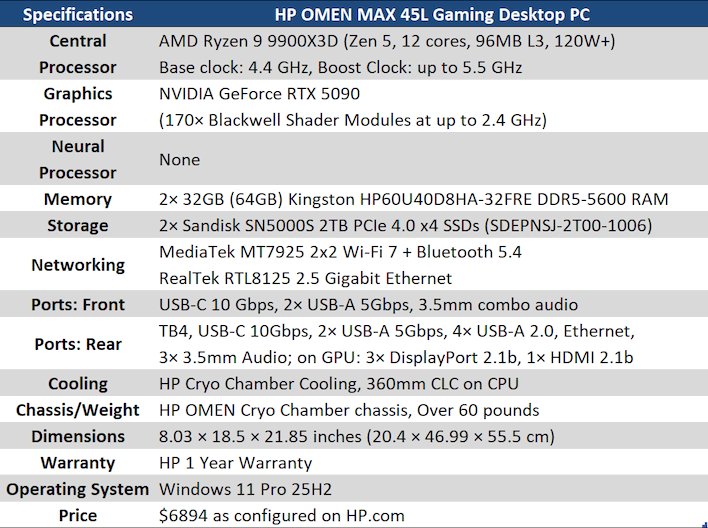
Starting right from the top, we don't actually have either of AMD's "best" consumer CPUs. The Ryzen 9 9950X3D or the new Ryzen 9 9950X3D2 Dual Edition would offer more CPU cores, and more cache in the case of the latter. The Ryzen 7 9850X3D would offer marginally better gaming performance. Instead, we have the Ryzen 9 9900X3D, the awkward middle child that lops off two CPU cores from each of its two CCDs. As you'll see, though, it does just fine for gaming, even with a GeForce RTX 5090. That's right: the pièce de résistance in this PC is the GeForce RTX 5090. What more could we possibly say about the fastest graphics card in the world?
Those parts are fed by a pair of Sandisk SN5000S DRAM-less PCIe 4.0 SSDs and a pair of slightly underwhelming Kingston DIMMs. Now look, it's better to have enough mainstream RAM than too little fast RAM, which is to say that we'd definitely rather have 64GB of DDR5 running at 5600 MT/s than 32GB of DDR5 running at 6400 MT/s, but this memory is also relatively slow in terms of latency, with a CAS of 46 cycles, putting the first word latency at 16.4 nanoseconds. It's understandable given the memory crisis, and it doesn't even matter that much thanks to the CPU's 3D V-Cache, but it does seem odd in a powerful gaming PC. Even more so when you learn what RAM is on those sticks, but we'll get to that.
In fact, let's get this show on the road, starting off with the usual tour around the machine.
HP Omen Max 45L Gaming Desktop Inside And Out

By the way, 45L is the interior volume; the machine is actually closer to 53L.
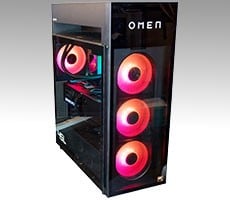
A key thing I want to communicate to you about the Omen Max 45L desktop is that it's extremely large. It's not as big as some of the old Chieftec-style full tower chassis, and it's not as wide as something like a Lian-Li O11. It's still considerably larger than your typical ATX chassis though, thanks to the "Cryo Chamber" cooling solution on the top. It's also really nice-looking in my opinion. In addition to the synchronized RGB LEDs all over the machine, you can also enjoy faintly tinted tempered glass and the glowing OMEN logo up top. It's classy without being overly loud, and of course, you can turn the RGB LEDS off if you dislike them.

Likely the most distinctive design feature of this system is the large gap in the top between the interior of the case and the "Cryo Chamber" above. As you can see in the picture, the liquid cooling hoses snake up through the back of the chassis to the radiator, which is in the top along with three 120-mm fans. This design allows the cooler to draw on room-temperature outside air rather than trying to cool the CPU with the already-warm air inside the PC. This isn't the first system we've seen with such a design, but it's no less clever every time we see it.

The button there labeled "Internal Access" is exactly what it sounds like. You push the button and the tempered glass side pops right off. It's very convenient; there's one on the other side for the back panel, too. We'll look at the interior on both sides in a moment, but first let's check out the back of the system.

To be honest, the I/O on this machine is a bit sparse. It's nothing we'd dock points for, but high-end DIY motherboards like the MSI X870E Carbon have quite literally a dozen USB ports splattered across their back panels. The OMEN MAX here gives you eight ports on the back, and four of them are USB 2.0 ports, which is fine because that means you can hook up a keyboard, a mouse, a microphone, and a gamepad without "wasting" higher-speed connectivity. Again, it's not a layout lacking enough that we'd complain, but it does feel a bit sparse relative to a typical DIY build.
By the way, the button up top in the IO Panel is a clear CMOS button. You can also do this by holding the power button for 15 seconds, apparently. One curious omission is the lack of external Wi-Fi antenna connections; likely HP figured (more or less correctly) that the internal antennae were good enough. It does contribute to the sparse appearance of the I/O cluster, though.

Meanwhile, up front you get a pair of USB 3.0 ports and a USB Type-C connection supporting up to 10 Gbps. There's also the usual headset jack and the power button. No reset button, but ideally you shouldn't need that anyway. We might have preferred the front I/O to be on the side or front of the chassis instead of the top; it's rather inconvenient to access when the system is sitting on a desk. Most people will probably put an 18.5-inch-tall PC on the floor, though, so this is likely better for the majority of users.

Pulling off the side panel we reveal a case with perfectly acceptable cable management. It's not fantastic by boutique vendor standards, but it's not enough to restrict airflow, so there's really nothing to complain about. Honestly, while it looks somewhat messy in the picture, in person the bright lights of the RGB LEDs make the wiring job much less noticeable.

The system uses a custom micro-ATX motherboard with a B850 chipset, but it's a fully standard design and a user so inclined could easily replace it. The chassis supports ATX motherboards with standoffs already in place for one; you'd just have to supply your own screws.
Of particular note is the GPU bracket holding the enormous, 3.5-slot GeForce RTX 5090 card in place at the front. That sucker is seriously secure, and while it might make removing the card a little more tedious, it also makes it considerably safer to ship cross-country. HP shipped the machine as it is to me, and it booted right up with no issues, so clearly the bracket does its job.

Around the other side we simply have this white OMEN logo. If you don't like flashy PCs, there's no reason you couldn't shove the other side up against a wall and just enjoy this very understated appearance. Indeed, the OMEN logo is simply painted on and not lit up, so it looks almost austere in its way. This side comes off by pushing a button on top, just as with the other side.

Naturally, under the back side panel is a myriad of wires. Notably there are places here to mount a pair of 3.5" hard drives, or four 2.5" SSDs; however, there are no SATA cables routed for them, so you'll have to pull out the GeForce RTX 5090 and do that yourself. There are also only two SATA ports on the motherboard, so maybe don't try to stick more than two drives in here.
All told, the HP OMEN MAX 45L gaming desktop is almost the platonic ideal of a gaming PC. It has everything you need for essentially maximum gaming performance, and almost nothing that you don't. It's not a workstation, and it's not a proprietary game console, either. We have to give props to HP for producing a fantastic gaming system this time around, with no notes about the hardware besides the nitpicks above.
We do have some notes elsewhere. Let's talk about the HP Omen Gaming Hub software on the next page...