Lenovo ThinkPad X1 Carbon Gen 14 Aura Edition Review


| Lenovo ThinkPad X1 Carbon Gen 14 Aura Edition: Starting At $2139, $2334 As Tested Boasting Intel Panther Lake power in a feather-light 14-inch chassis with an OLED display, Lenovo's ThinkPad X1 Carbon Gen 14 Aura Edition might just be the most comfortable laptop, to both work on and carry in bag, that we've tested to date. |
|||

|

 |
||
The ThinkPad X1 Carbon has long been Lenovo's flagship business ultraportable, and over the years it's earned a reputation for balancing premium build quality, excellent keyboards and enterprise-class reliability with a remarkably thin and light design. With the 14th-generation X1 Carbon Aura Edition, Lenovo has refined that formula once again, while offering Intel's latest Core Ultra Series 3 vPro platform, a redesigned internal chassis, upgraded cooling and a collection of AI-assisted software features under its Aura Edition umbrella.
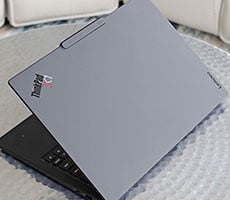
At first glance, the X1 Carbon Gen 14 doesn't look much different than its predecessor, and that's intentional. The familiar matte-black ThinkPad aesthetic remains, complete with the iconic TrackPoint and understated business styling. Underneath, however, Lenovo has substantially reworked the machine. A new Space Frame chassis redesign accommodates a more compact motherboard, freeing up space for larger cooling hardware and improving serviceability, all while keeping the system's starting weight at just 2.15 pounds (0.977 kg).

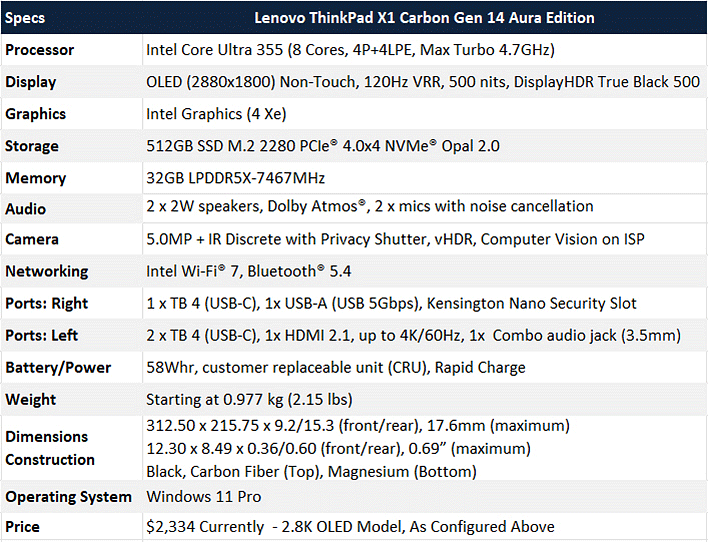
Our review configuration pairs Intel's Core Ultra 7 355 processor with 32GB of LPDDR5X memory, a 512GB PCIe Gen4 SSD and a gorgeous 14-inch 2880x1800 OLED display with a 120Hz variable refresh rate. This is a premium configuration aimed squarely at professionals who demand class-leading portability without sacrificing performance, but does it deliver on those needs? Let's dive in...
Lenovo ThinkPad X1 Carbon Gen 14 Aura Edition Specs:
Find The ThinkPad X1 Carbon Gen 14 Aura Edition @ Lenovo.com
ThinkPad X1 Carbon Gen 14 Design, Build Quality, Display, Audio & I/O
Although Lenovo hasn't dramatically altered the X1 Carbon's appearance, the engineering beneath the surface is significantly different. The new X1 Carbon Gen 14 introduces what Lenovo calls its Space Frame chassis. Rather than simply making the notebook thinner, Lenovo redesigned the motherboard layout, reducing its main system board footprint by roughly 20 percent. That reclaimed internal volume is now occupied by a larger onboard thermal solution, including fans that Lenovo says are approximately 70 percent larger than before. The result is improved sustained thermal performance while maintaining its exceptionally light chassis.

Another welcome improvement is serviceability. Ultralight laptops are rarely easy to repair, but Lenovo specifically designed this generation with easier access to internal components, earning an impressive 9/10 iFixit repairability score, which is almost unheard of in this class. More on this later in our teardown.

As always, the ThinkPad also meets MIL-STD 810H durability standards and incorporates recycled materials throughout its construction, from the magnesium chassis and carbon fiber top cover, to its battery and keyboard components.
The keyboard continues to be one of the best available on any laptop. The 1.5mm key travel provides satisfying tactile feedback without feeling mushy, while the layout remains familiar for longtime ThinkPad users. The signature TrackPoint is still present for those who prefer it, complemented by a spacious 120mm glass touchpad that tracks accurately and supports Microsoft's Precision drivers.


Lenovo also outfits the X1 Carbon with a 5MP webcam paired with an IR sensor for Windows Hello facial recognition, along with a physical privacy shutter for users who prefer an extra layer of security when the camera isn't in use.
Audio is another pleasant surprise. The Dolby Atmos speaker system on board delivers fuller sound than most ultralight notebooks, with respectable stereo separation and enough volume for video conferencing or media consumption. There's even a bit of low-end bass response, which is all too uncommon, especially in laptops of this weight class. Finally, Lenovo also includes dual-array microphones enhanced with Dolby Voice processing for improved voice pickup and background noise suppression during meetings.
X1 Carbon Gen 14 Aura Edition Software Experience And Utilities


Let's look at the performance characteristics of Lenovo's new ThinkPad X1 Carbon, next...