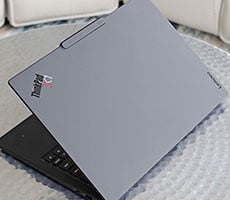
Lenovo ThinkPad X1 Carbon Gen 14 Aura Edition Review


Even under continuous graphics load, the notebook remained impressively cool. The hottest point I measured on the chassis reached just 99.5°F (37.5°C), with the palm rests and keyboard deck staying noticeably cooler (low 80s). That's an excellent result for an ultralight laptop weighing just over two pounds, and it's a testament to Lenovo's updated thermal design. Rather than concentrating heat in one area, the system dissipated it evenly and never became uncomfortable to use, even during extended heavier load use.

Even under this sustained workload, the X1 Carbon registered just 39.3 dB, which is remarkably quiet for a premium ultraportable under load. And it was even quieter on the Balanced power plan, so this is its worst case result. Combined with the notebook's excellent surface temperatures, Lenovo's cooling solution strikes an impressive balance between performance, thermals and acoustics. It allows the Core Ultra platform to stretch its legs without making the system either hot to the touch or distracting to work with.

Removing the bottom cover reveals that Lenovo put significant thought into the X1 Carbon's internal layout as well. The dual-fan cooling system and shared heat pipe are immediately accessible, as are the user-replaceable 58Wh battery, M.2 PCIe SSD and wireless module, making maintenance, replacements or upgrades far less intimidating than it is on many premium laptops. Cable routing is tidy, component placement is logical and there aren't unnecessary layers to work through just to reach commonly serviced parts. It's easy to see why Lenovo earned a 9 out of 10 iFixit repairability score for the X1 Carbon Gen 14, which is an impressive achievement in a notebook weighing barely over two pounds.
That said, there are still a few of the usual compromises inherent to the form factor here. The system memory is soldered directly to the motherboard, so the RAM can't be upgraded after purchase. Fortunately, our review unit shipped with 32GB of LPDDR5X memory, which should be more than adequate for the vast majority of professional workloads. Just choose your configuration wisely, as with most machines, if you opt for this laptop.
How Does The New ThinkPad X1 Carbon Gen 14 Perform With Respect To Battery Life?
Battery life is critically important for a business PC. Working on the go could mean long stretches away from outlets. The machine needs to last through endless hours of work that could mean e-mails and time spent poring over spreadsheets, not to mention some light content creation and potentially long runs of content consumption like Netflix binging.Here we've calibrated all laptop displays to a similar fixed brightness, in an effort to minimize that aspect of power draw, though lots of other variables come into play, like battery capacity, display type and display resolution, for example.
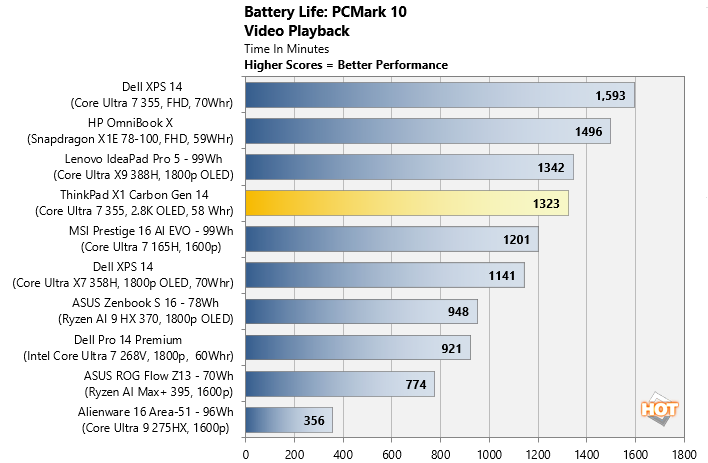
Perhaps the most impressive aspect of the ThinkPad X1 Carbon Gen 14 is its efficiency. Our continuous video playback test ran for 1,323 minutes, or just over 22 hours, from this ThinkPad's relatively modest 58Wh battery. That's an exceptional result for a notebook equipped with a high-resolution 2.8K OLED display.

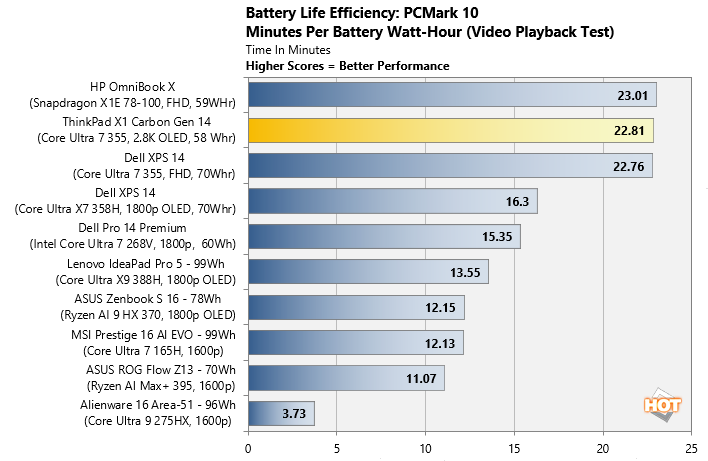
Even more impressive, its efficiency measured 22.81 minutes per watt-hour, placing it among the most efficient x86 ultraportables we've tested yet. Simply put, this is a laptop that can comfortably power through a full workday without sending you hunting for a power outlet.
HotHardware's ThinkPad X1 Carbon Gen 14 Aura Edition Review Conclusion
The ThinkPad X1 Carbon Gen 14 Aura Edition is another excellent evolution of Lenovo's flagship business notebook. It combines strong CPU performance, exceptional battery life, a gorgeous OLED display and one of the best laptop keyboards in the industry, all wrapped in a remarkably light 2.15-pound chassis. Just as importantly, Lenovo's redesigned Space Frame architecture pays real dividends. The notebook stayed impressively cool and quiet throughout my testing, while also earning a rare 9/10 iFixit repairability score thanks to its more serviceable internal design.
As always with ThinkPads, MSRP doesn't necessarily reflect street pricing, however. Lenovo regularly runs promotions on its business notebooks through Lenovo.com and its channel partners, so it's worth checking for current deals before paying full retail. I do wish Lenovo had at least one higher-end CPU configuration option for Intel's Core Ultra 3 series chips, especially one with the full 12 Xe graphics complement.
That said, the ThinkPad X1 Carbon Gen 14 gets just about everything else right. If portability, a quiet demeanor, battery life, build quality and productivity are your priorities, this is one highly refined workhorse that is a joy to use and won't let you down.