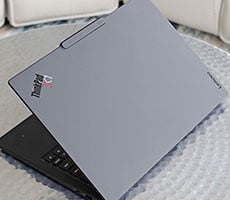
Lenovo ThinkPad X1 Carbon Gen 14 Aura Edition Review


The ThinkPad X1 Carbon Gen 14 felt snappy throughout my testing. From juggling dozens of browser tabs and Office applications to editing photos and working with AI-assisted tools, the system never felt sluggish or constrained. Lenovo's redesigned cooling solution also seems to be paying dividends, as I didn't notice the kind of performance drop-off or fan whine that can plague some ultralight notebooks during longer-running workloads.

The 512GB Samsung PCIe Gen 4 SSD in the ThinkPad X1 Carbon Gen 14 delivered decent performance for a modern PCIe Gen 4 drive. In ATTO, sequential read speeds top out at around 5.89 GB/s which is respectable, though there was a bit of a performance seesaw at some transfer sizes. Meanwhile write performance topped out at about 5.5GB/sec, which is still solid enough. I will say, however, that 512GB just isn't enough storage in this day and age, and our test system's drive filled up pretty quickly with just our benchmarks and a couple of games installed. I'd highly recommend going with a higher capacity storage config, versus what was shipped to us from Lenovo for testing.
I started with Speedometer 3.1, which measures browser and web application performance. The X1 Carbon posted a score of 35.7, placing it right where I'd expect among today's premium ultraportables. Modern productivity increasingly happens inside a browser, and the system felt every bit as responsive as the benchmark suggests while working in multiple browser-based applications simultaneously. Performance bleed on battery was also relatively minimal.
I saw much the same in Cinebench 2026, where the Core Ultra 7 355 scored 481 points in the single-core test and 2,296 in the multi-core run, just edging out Dell's XPS 14 with an identical CPU configuration. These scores are solid, considering how incredibly light this notebook is, though it does trail higher spec machines with more CPU cores. Lenovo's new Space Frame chassis and larger cooling solution once again appear to be helping the processor sustain higher clocks under longer CPU-intensive workloads, rather than quickly throttling back once temperatures rise. And on battery power in this test, there was once again only a hint of performance dip.
The PCMark 10 Applications benchmark measures performance in the Microsoft Office suite, as well as in the Edge browser, offering native instruction set-compatible versions of the apps for optimal performance across a wide variety of workloads in tools office workers, students and home users utilize every day. The following results should show a view of performance with a best foot forward from all systems tested.
In PCMark 10, the new Lenovo system turned in an overall score of 15,890, including 23,091 for Digital Content Creation and 16,849 for Productivity. Those are excellent numbers for a laptop weighing just over two pounds and reinforce what I experienced during day-to-day use. However, the system does trail the XPS 14 in this test, with the same Core Ultra 7 355 processor, which may speak to storage responsiveness or other slight bursty workload throttling due to a power state configuration. Regardless, whether I was editing documents, multitasking across multiple applications or doing some light creative work, the X1 Carbon never felt short on performance.
With AI becoming a bigger part of the user experience these days, I also spent some time looking at UL Procyon AI, where the X1 Carbon earned a score of 2,199. Synthetic AI benchmarks are still evolving, but the results show Intel's latest Core Ultra platform has plenty of capability for the growing number of AI-enhanced productivity and content creation applications that leverage the CPU, GPU and NPU together for different parts of a modern workload.
For a quick graphics sanity check, I turned to 3DMark Steel Nomad Lite, where Intel's integrated GPU averaged 16 FPS on the ThinkPad X1 Carbon Gen 14. That's generally what I'd expect from an integrated graphics solution in this class of machines with an SoC that only sports 4 Intel Xe graphics cores. As you'll see in my actual game benchmarks, if you want more graphics fire power, you'll need to opt for a higher-end Intel Core Ultra 3 series chip. Unfortunately, Lenovo doesn't offer a SKU that sports an Intel 12 Xe graphics option like Dell's XPS 14 does.
Finally, I wrapped up with a pair of real-world game tests. F1 25 averaged 39 FPS at 1080p using the High preset, while The Talos Principle 2 managed 19.2 FPS at our Medium settings. These aren't gaming laptop numbers, of course, but they do illustrate how far Intel integrated Arc graphics have come. Less demanding titles and esports games are at least within reach, and this GPU should offer enough performance to accelerate creative applications to a satisfactory level for mobile compute demands.
Let's look at skin temps, acoustics and battery life, next...
ATTO Disk Benchmark Results For The ThinkPad X1 Carbon Gen 14
We'll start off with ATTO, a quick and dirty test that measures read/write bandwidth and IOPS across a range of different data transfer sizes. While we don't typically compare these results across multiple machines, it's useful to gauge whether a particular notebook's storage subsystem is up to snuff.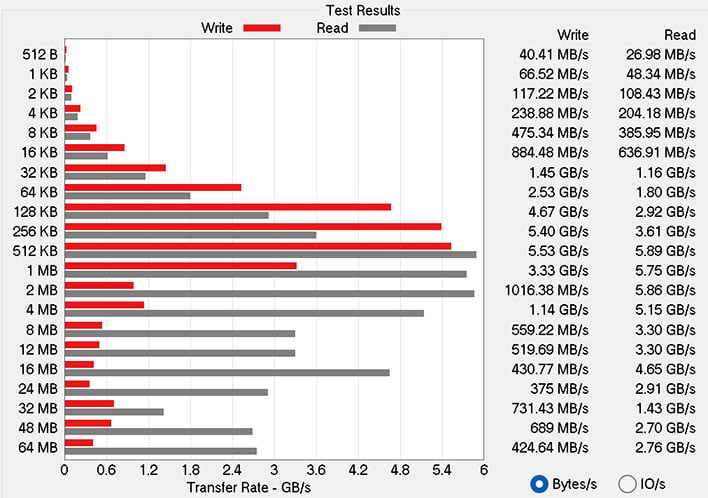
The 512GB Samsung PCIe Gen 4 SSD in the ThinkPad X1 Carbon Gen 14 delivered decent performance for a modern PCIe Gen 4 drive. In ATTO, sequential read speeds top out at around 5.89 GB/s which is respectable, though there was a bit of a performance seesaw at some transfer sizes. Meanwhile write performance topped out at about 5.5GB/sec, which is still solid enough. I will say, however, that 512GB just isn't enough storage in this day and age, and our test system's drive filled up pretty quickly with just our benchmarks and a couple of games installed. I'd highly recommend going with a higher capacity storage config, versus what was shipped to us from Lenovo for testing.
ThinkPad X1 Carbon Gen 14 Speedometer 3.0 Browser Benchmarks
We use BrowserBench.org's Speedometer test to take a holistic look at web application performance. This test automatically loads and runs a variety of sample web apps using the most popular web development frameworks around, including React, Angular, Ember.js, and even simple JavaScript. This test is an example of how systems cope with real-world, modern web apps. All tests were performed using the latest version of Chrome.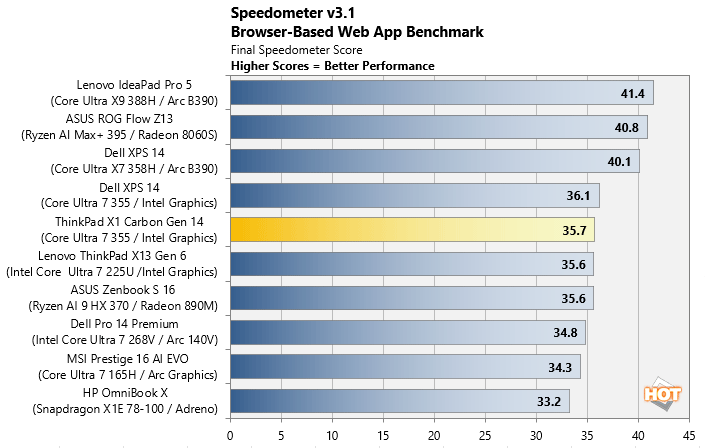
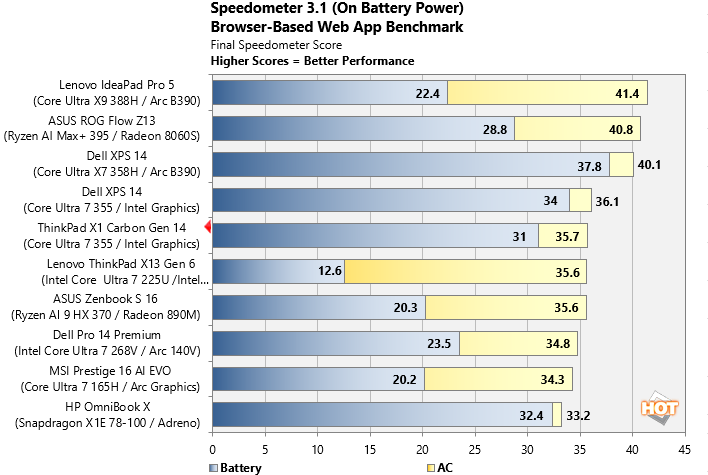
I started with Speedometer 3.1, which measures browser and web application performance. The X1 Carbon posted a score of 35.7, placing it right where I'd expect among today's premium ultraportables. Modern productivity increasingly happens inside a browser, and the system felt every bit as responsive as the benchmark suggests while working in multiple browser-based applications simultaneously. Performance bleed on battery was also relatively minimal.
MAXON Cinebench 2026 3D Rendering Benchmarks With The ThinkPad X1 Carbon Gen 14
Next up is the latest-generation 3D rendering benchmark from Maxon, based on the Cinema 4D rendering engine. It's a purely CPU-based test that doesn't make use of the graphics processor or NPU, and it scales very well with additional CPU cores. We ran both single- and multi-threaded tests on all of the machines in the charts, and also tested these laptops on battery power as well.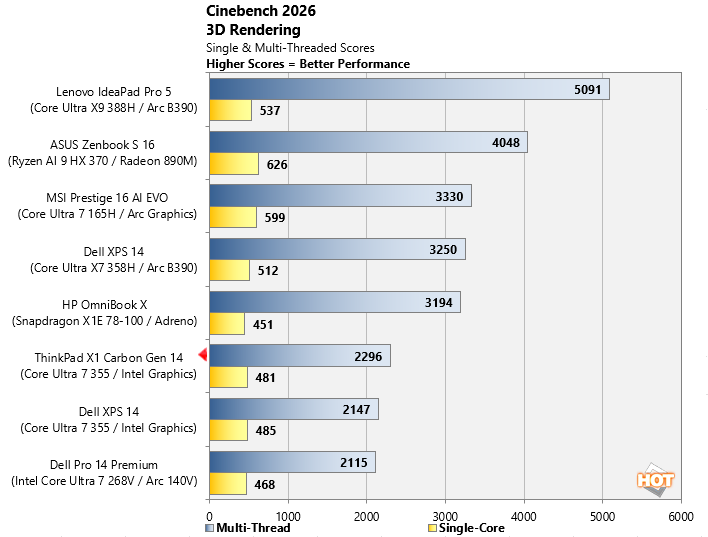
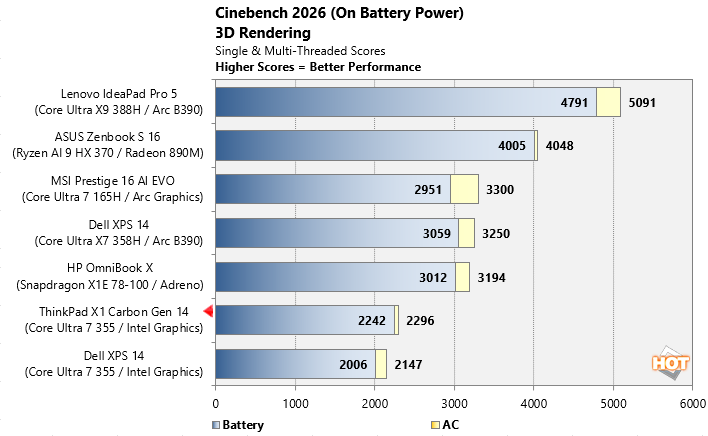
I saw much the same in Cinebench 2026, where the Core Ultra 7 355 scored 481 points in the single-core test and 2,296 in the multi-core run, just edging out Dell's XPS 14 with an identical CPU configuration. These scores are solid, considering how incredibly light this notebook is, though it does trail higher spec machines with more CPU cores. Lenovo's new Space Frame chassis and larger cooling solution once again appear to be helping the processor sustain higher clocks under longer CPU-intensive workloads, rather than quickly throttling back once temperatures rise. And on battery power in this test, there was once again only a hint of performance dip.
ThinkPad X1 Carbon Gen 14 UL PCMark 10 Applications Benchmark Results
The PCMark 10 Applications benchmark measures performance in the Microsoft Office suite, as well as in the Edge browser, offering native instruction set-compatible versions of the apps for optimal performance across a wide variety of workloads in tools office workers, students and home users utilize every day. The following results should show a view of performance with a best foot forward from all systems tested.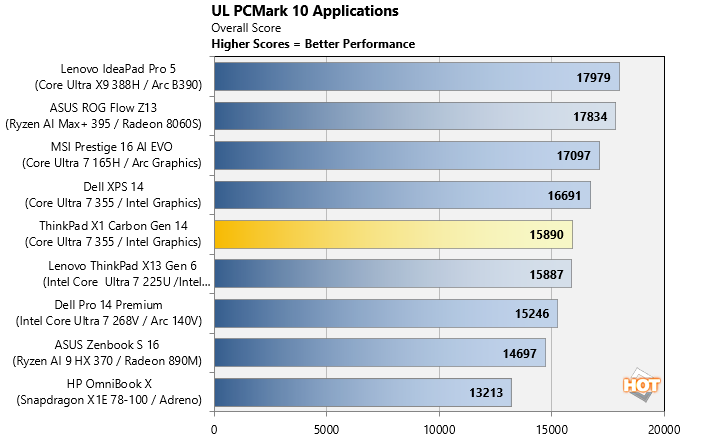
In PCMark 10, the new Lenovo system turned in an overall score of 15,890, including 23,091 for Digital Content Creation and 16,849 for Productivity. Those are excellent numbers for a laptop weighing just over two pounds and reinforce what I experienced during day-to-day use. However, the system does trail the XPS 14 in this test, with the same Core Ultra 7 355 processor, which may speak to storage responsiveness or other slight bursty workload throttling due to a power state configuration. Regardless, whether I was editing documents, multitasking across multiple applications or doing some light creative work, the X1 Carbon never felt short on performance.
Puget Bench For Creators: Davinci Resolve
Next up we have some video editing and encoding using the Puget Bench for Creators and Davinci Resolve. Puget Systems has been developing benchmarks that leverage real-world applications and workloads for a number of years now, which are highly regarded by creators using popular Adobe applications and Davinci Resolve. Here, we used the free version of Davinci Resolve (not the Studio edition) that features less hardware acceleration and relies heavily on CPU, GPU and memory performance.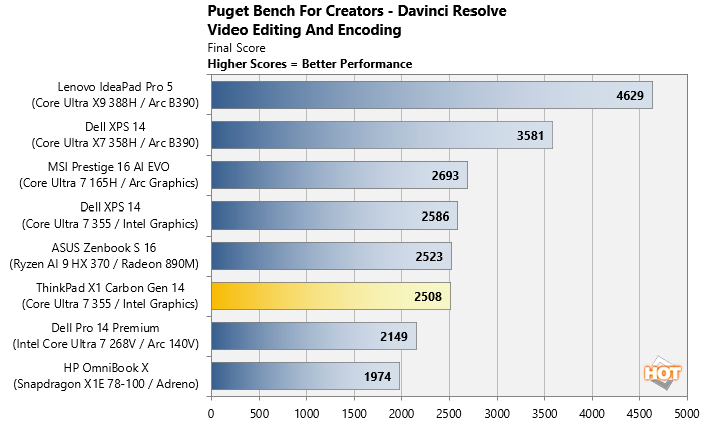
Content creators will also appreciate the notebook's showing in PugetBench for DaVinci Resolve, where it posted a score of 2,508, which is effectively within the margin of error for this test versus Dell's XPS 14. I wouldn't choose an integrated graphics laptop as my primary video editing machine, but for editing short projects, social media clips or working with photos while traveling, I found the X1 Carbon more capable than its svelte demeanor might suggest.
UL Procyon AI Computer Vision Benchmark
The idea of "edge AI", or running AI workloads natively on your local devices, instead of in the cloud, is only just emerging on mainstream PCs. As such, benchmarks for these workloads aren't exactly prolific. Fortunately, UL has already built a few into its Procyon benchmark suite. The following is a look at how a few machines do in this benchmark suite's AI Computer Vision benchmark, which exercises the test subject's ability to handle machine vision workloads, which you'll find in everyday tasks like webcam background blur, subject tracking, eye gaze correction and other effects, for example.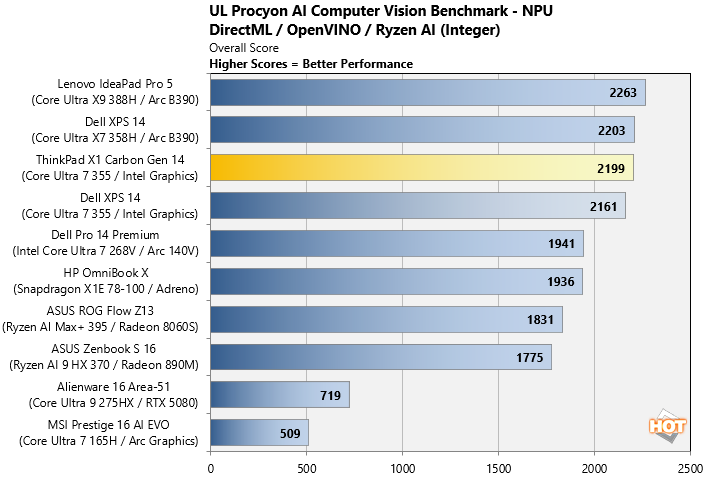
With AI becoming a bigger part of the user experience these days, I also spent some time looking at UL Procyon AI, where the X1 Carbon earned a score of 2,199. Synthetic AI benchmarks are still evolving, but the results show Intel's latest Core Ultra platform has plenty of capability for the growing number of AI-enhanced productivity and content creation applications that leverage the CPU, GPU and NPU together for different parts of a modern workload.
UL 3DMark Gaming Benchmarks
3DMark has a wide variety of graphics and gaming related tests available. In this next test, we chose to run 3DMark Night Raid, a modern DirectX 12 test specifically for mobile platforms with integrated graphics, as well as the more-demanding, cross-platform Wild Life Extreme benchmark which utilizes more modern rendering APIs.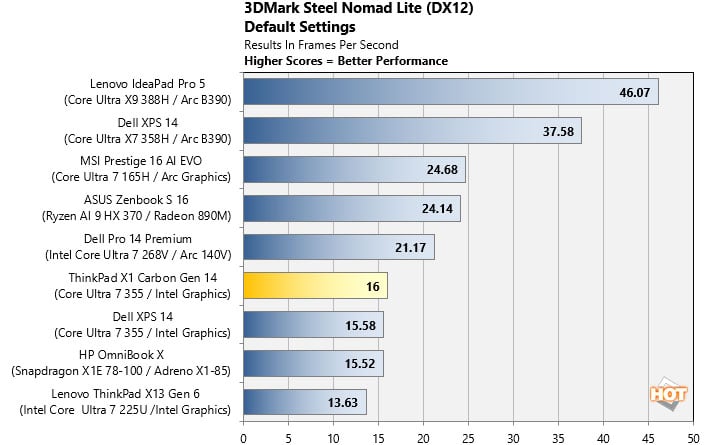
For a quick graphics sanity check, I turned to 3DMark Steel Nomad Lite, where Intel's integrated GPU averaged 16 FPS on the ThinkPad X1 Carbon Gen 14. That's generally what I'd expect from an integrated graphics solution in this class of machines with an SoC that only sports 4 Intel Xe graphics cores. As you'll see in my actual game benchmarks, if you want more graphics fire power, you'll need to opt for a higher-end Intel Core Ultra 3 series chip. Unfortunately, Lenovo doesn't offer a SKU that sports an Intel 12 Xe graphics option like Dell's XPS 14 does.
Game Benchmarks With F1 25 & The Talos Principle II
We also ran some fairly taxing gaming workloads on the laptops with F1 25 and The Talos Principle II at a 1080p resolution. With F1 25 we used the game's "High" image quality preset, which uses high-quality graphics settings, without ray tracing. And for The Talos Principle II, we used the game's "Medium" quality preset. Resolution scaling was disabled in both games, to show the native framerate across all platforms and iGPUs. Here, real-world gaming tests reinforce what the synthetic benchmarks suggest.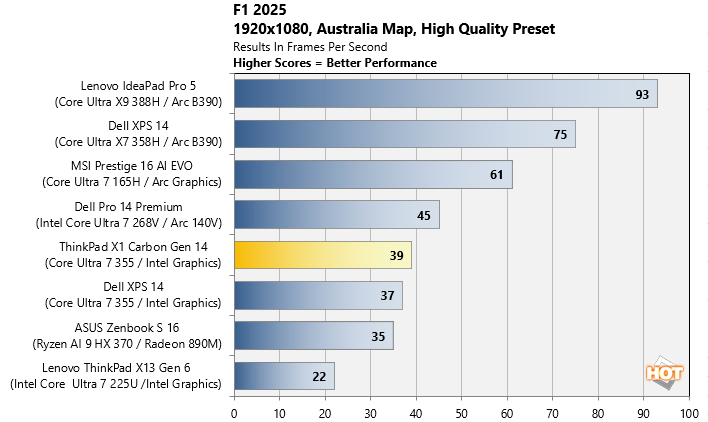
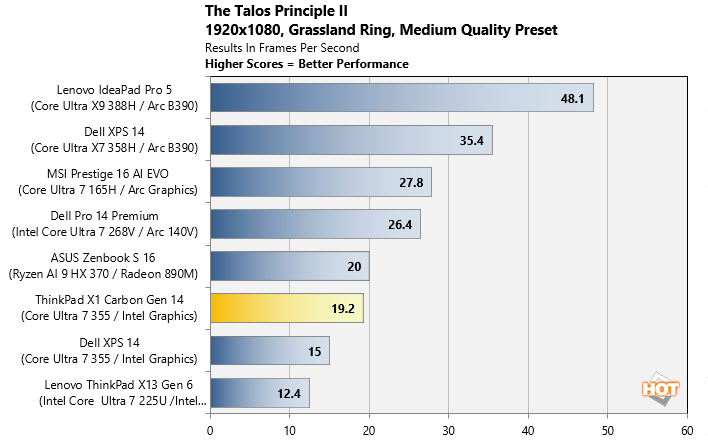
Finally, I wrapped up with a pair of real-world game tests. F1 25 averaged 39 FPS at 1080p using the High preset, while The Talos Principle 2 managed 19.2 FPS at our Medium settings. These aren't gaming laptop numbers, of course, but they do illustrate how far Intel integrated Arc graphics have come. Less demanding titles and esports games are at least within reach, and this GPU should offer enough performance to accelerate creative applications to a satisfactory level for mobile compute demands.
Let's look at skin temps, acoustics and battery life, next...