HP Omen Max 45L Desktop PC Review: Cool, Quiet, Brutally Fast


Obviously, gaming is what you buy a machine like this for. Even setting aside the OMEN branding and the RGB LEDs and all the other things that make this a gaming system, the combination of an AMD Ryzen X3D processor and a GeForce RTX 5090 is really only best-suited for one task: gaming. So let's play some games, huh? But first, 3DMark, as is tradition among our people.
UL 3DMark Synthetic Gaming Benchmarks
The venerable 3DMark application dates all the way back to 1998, although that version wasn't even related to this one in terms of technology. 3DMark includes more than a dozen tests now, but we're not going to waste everyone's time by running them all. Instead, we've picked out four tests that we think represent modern gaming well enough to give you an idea of how the machine performs.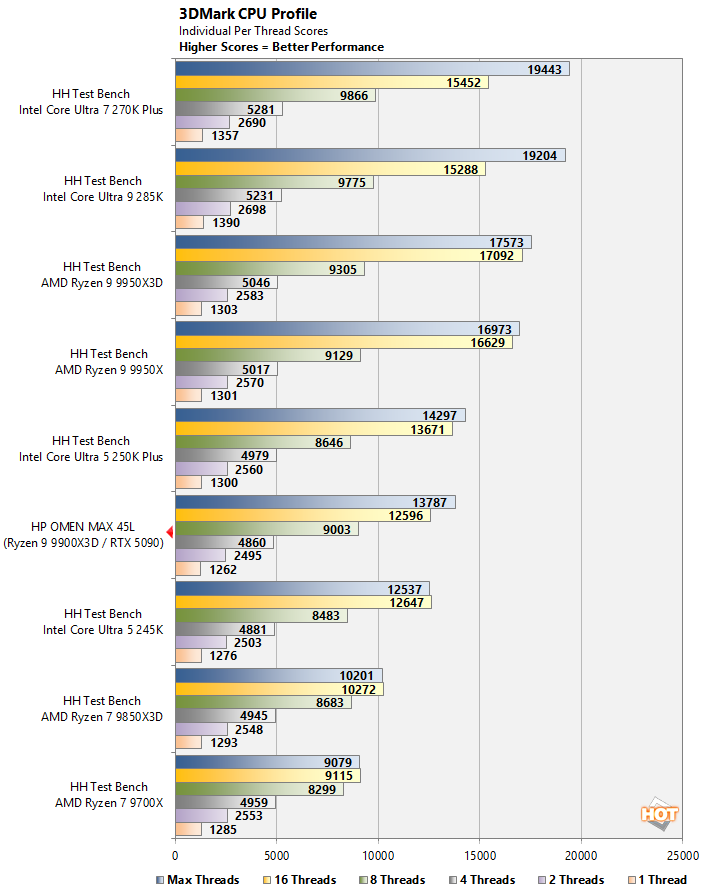
The 3DMark CPU Profile is basically a massively multithreaded physics benchmark. The test runs numerous times, testing with varying numbers of CPU threads to generate what is honestly quite a bit of data. As before, the Omen Max 45L falls right where we'd expect, with its 12-core CPU in the middle of eight and sixteen-core chips.
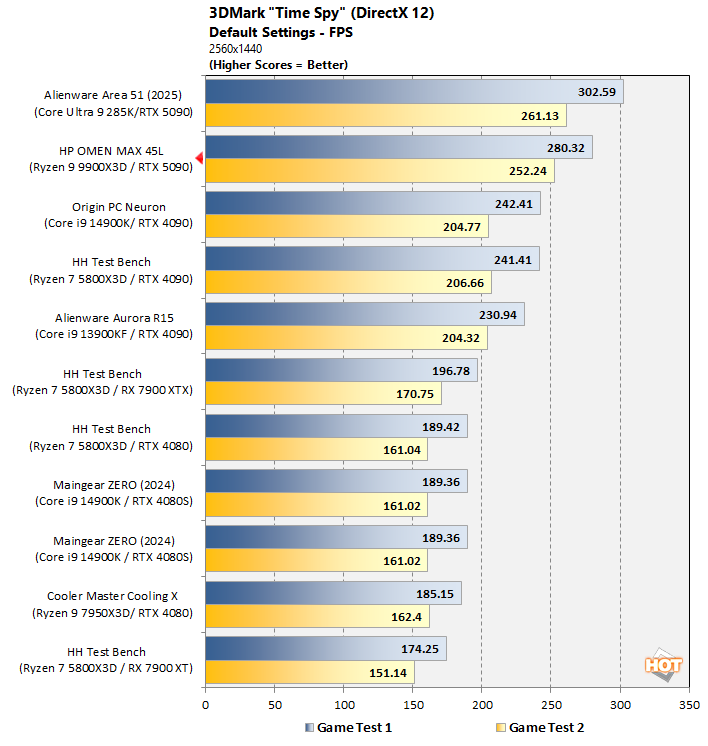
Time Spy, on the other hand, is a test that simulates a real game using the latest DirectX 12 features at the time it was written, which was a decade ago in 2016. Still, a great many games render things just like Time Spy does, and so it serves as a useful benchmark still. The Omen Max 45L fails to overtake the Alienware Area 51 from last year, but both are running GeForce RTX 5090 cards, and so they're absolutely smashing everything else on the chart.
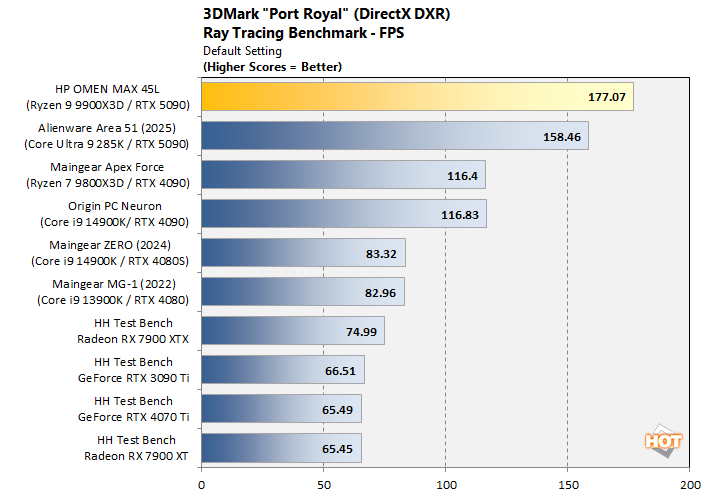
The tables turn quite significantly in the ray-tracing-heavy Port Royal test. This could be down to driver optimizations since we tested the Area 51, as it's been a while; NVIDIA may have hurt raster performance while optimizing for ray-tracing and path tracing performance.
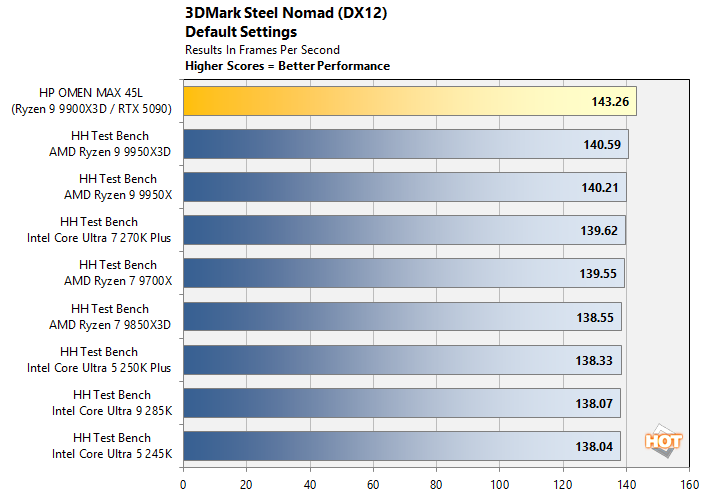
If that's the case, though, it certtainly didn't affect the system's performance in the brutal Steel Nomad benchmark. All of these systems were tested with GeForce RTX 5090 cards, and the Omen Max does indeed come out just a couple of FPS ahead. This is fairly fresh data, too, so it's not like the driver changed much. Good job, HP!
F1 25 Formula 1 Racing Benchmarks
In F1 25, you race Formula 1 cars around a variety of real-life tracks around the globe. I know; shocking, right? The latest iteration of Codemasters' racing simulator builds on the excellent technology in the previous game, New features this time around include LIDAR-scanned tracks, more realistic tonemapping, and an optional path tracing mode that we are unfortunately not using for our testing.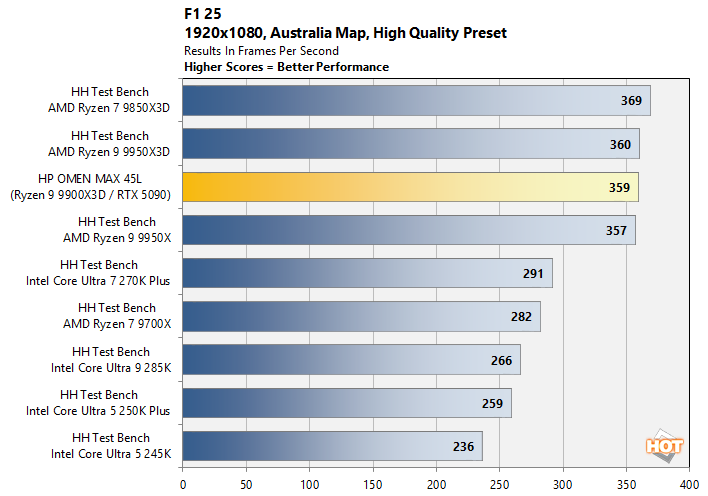
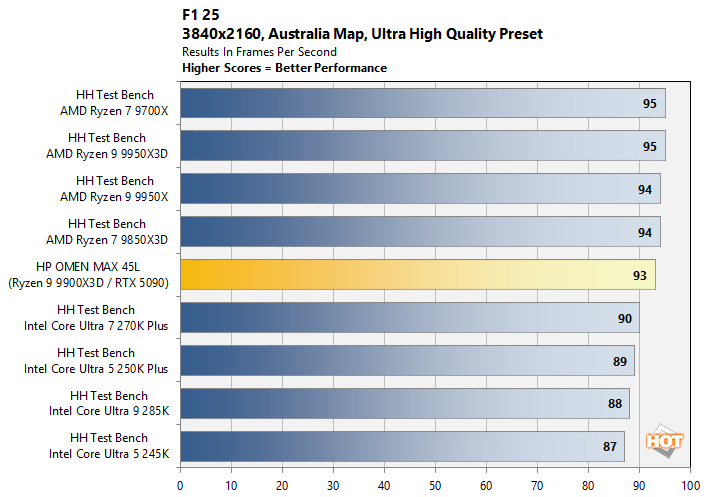
We're mostly GPU-limited either way, which is kind of fascinating considering how much faster the 3D V-Cache CPUs are compared to those without in the 1080p results. Obviously, that includes our Ryzen 9 9900X3D in the Omen Max 45L.
Monster Hunter Wilds RE Engine Benchmarks
Monster Hunter Wilds may not have been the runaway success that Capcom might have hoped, as serious fans clamor about missing monsters and absent challenge, but it's still a great looking game with a super-demanding benchmark. This will likely be the last time we use this game as a benchmark, though, as Capcom has actually removed the benchmark from the Steam store, and it was quite a task to get it working this one last time. Note that the actual game runs better than this... which is why Capcom removed the benchmark from the store, as it was non-representative.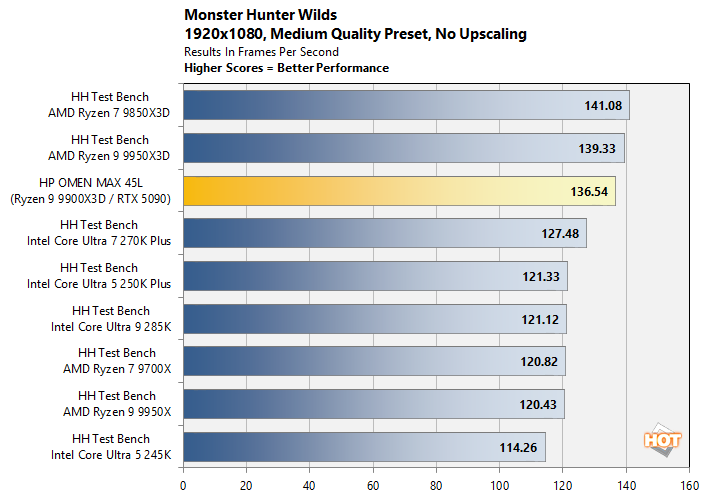
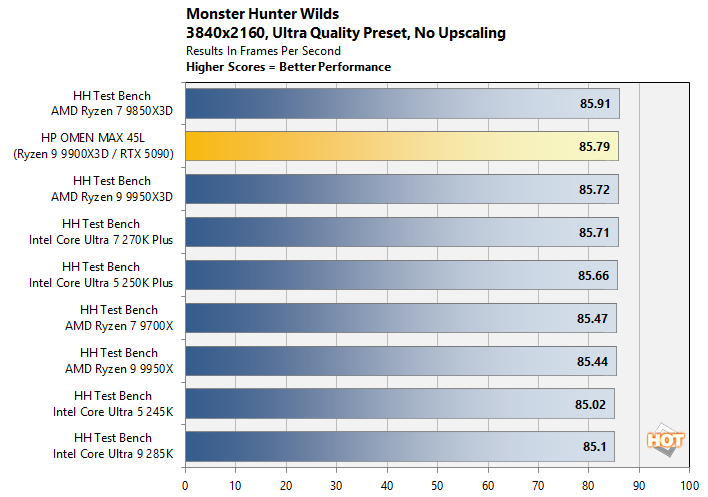
Second verse is same as the first, really. The Omen Max 45L manages to outpace our test bench with the Ryzen 9 9950X3D in 4K; that's likely down to the aggressive power tuning HP seems to have done on this particular GeForce RTX 5090 card. Of course, the difference is literally just benchmark noise and the result isn't necessarily perfectly consistent.
The Talos Principle II Unreal Engine 5 Benchmarks
We'd like to use Fortnite, the most popular Unreal Engine 5 game, for our benchmark testing, but there are a few problems with that. The first is that it actually just runs a bit crap, with constant shader compilation stuttering even after hours of play. But the second is that Epic invalidates replays for the game with every single update, so we'd have to retest all of our hardware every single time.So instead, we use The Talos Principle II, which is a fantastic Unreal Engine 5 first-person puzzler with a very handy built-in benchmark.
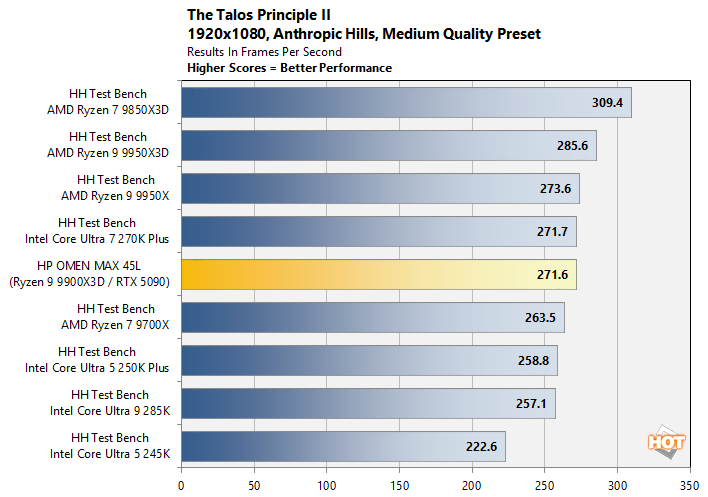
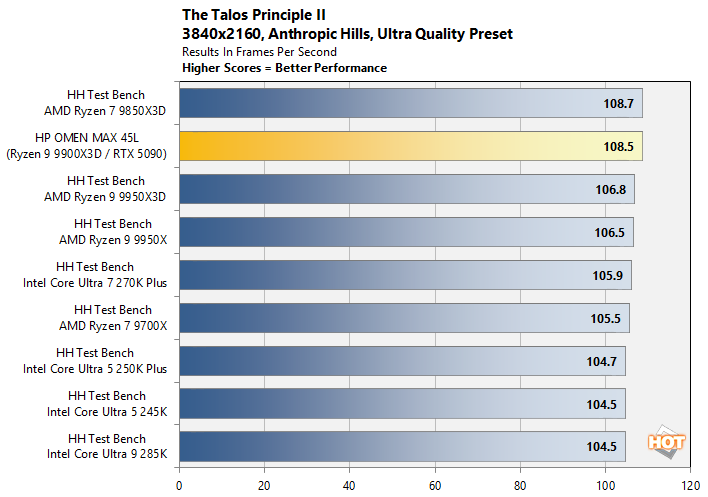
When the performance is about the CPU, the Omen Max 45L is only "excellent." But when the performance is about the GPU, this is among the fastest machines we've ever benchmarked. Whatever HP did with this GeForce RTX 5090, it's a beast. I mean, the RTX 5090 is always a beast, but... you know.
Overclocking the HP OMEN Max 45L Desktop
Surprisingly, HP does offer users the opportunity to overclock the OMEN Max 45L, although it's in a pretty limited fashion. You can't go tweaking multipliers by hand, for example. What you can do is fiddle with AMD's PBO settings, with the memory configuration (somewhat), and with the GPU settings. Before you can do any of this, though, you have to enter the UEFI setup utility and unlock "Extreme mode".
Sorry for the weird distortion, it's a curved monitor.
Unlocking Extreme Mode comes with this warning that requires you to type in the code directly above it like it were the easiest CAPTCHA in history. It's really not clear why you need to type in a security code to unlock this mode, but in any case, you do.
In fact, before you can even get to the Extreme Mode toggle, you have to access a Manual Overclocking page in the UEFI setup utility, which prompts this warning:

Once you've agreed to the warnings, you can access the PBO settings as well as the memory settings. The full suite of PBO settings isn't available, and in fact you're actually better off using Ryzen Master or even the Omen Gaming Hub to fiddle with that.
The memory settings are more useful since messing with those in Windows is just asking for trouble, but the options available for voltage and timing are a little incomplete. Primary timings, most secondary timings, and a few tertiary timings are available, but there's notably no way to configure the important Refresh Interval (tREFI) value.
I started to mess around with memory overclocking on this machine after noticing that enabling Extreme mode by itself wasn't netting much in the way of performance. It makes sense; no matter how much you overclock your CPU, if you're bottlenecked on memory, then it won't help much.
The stock settings for the memory in this system are 2800 MHz (5600 MT/s), 46-45-45-90 timings, tRFC of 990, 2T command rate, and UCLK == MCLK/2. These are very loose memory settings, and you can see the results in a few of our benchmarks. HP's "Turbo" setting for the RAM just raises it to 3000 MHz, which is certainly welcome, but it doesn't address any of the other issues.

The RAM in this machine is based on SK hynix A-die packages. By raising the VDD and VDDQ values from 1.25v to 1.30v, I was trivially able to set the memory to 6000 MT/s, 36-36-36-72 timings, tRFC of 540, with a 1T command rate and UCLK == MCLK. These changes cut memory latency by a quarter and took me about 3 minutes to input. Having done so and passed TestMem5 stability testing, I wanted to see what kind of results I was getting out of this simple, quick-and-dirty overclock.
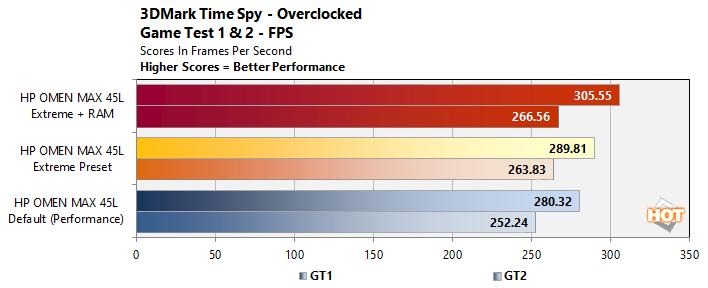
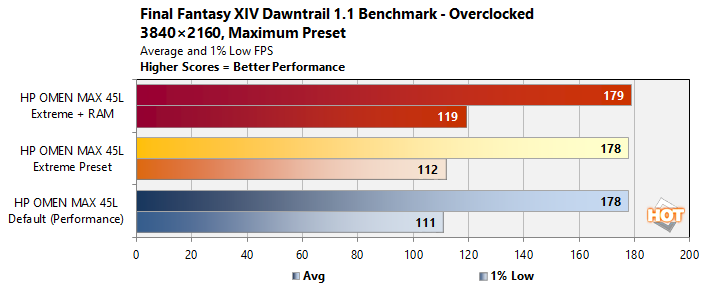
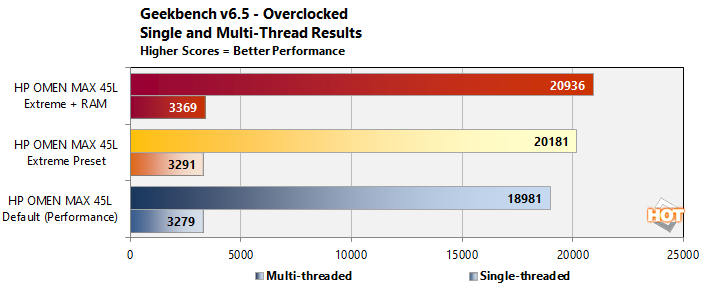
Obviously, the results speak for themselves. The biggest gain is actually in Geekbench, amusingly enough; with this boost, the HP Omen Max is now matching the other Zen 5 processors in the single-threaded results while outperforming the Core Ultra 5 250K Plus in the multi-core test. Not bad for a chip with 50% fewer CPU cores!
The other gains are more incremental, but still quite nice. In particular, the the improvement in low framerates in Final Fantasy XIV Online's Dawntrail benchmark is exaclty the sort of thing you should be looking for when memory overclocking. With extra voltage, I have no doubt this RAM could be pushed further, likely into the sub-60ns range with some effort. It's a bit of a shame HP leaves it to users to do this, though; a pre-set memory overclocking profile would have been an excellent addition to Omen Gaming Hub.
Lastly, let's look at noise, power, thermals, and then talk about our feelings on the system.