Razer Handheld Dock Chroma Review: Universal Gaming Dock With Classy RGB

The Razer Handheld Dock Chroma Has A Tasteful Design And Near Universal Compatibility

| Razer Handheld Dock Chroma: MSRP $89, Currently $57 Razer’s Handheld Dock Chroma is a USB-C dock for gaming handhelds that favors build quality and aesthetics over cutting-edge connectivity.
|
|||

|

|
||
I love gaming handhelds. I love being able to take a whole PC with me in a form factor in-line with the Nintendo Switch and enjoy all the benefits of PC gaming anywhere I go. I can play the latest releases, I can play the legendary classics, or enjoy emulators. I can watch movies, listen to music, and because they're PCs, you can even use them for getting work done.
Of course, doing that requires a dock, and these things really vary in quality. We wouldn't fault you for looking for a name-brand dock to ensure guaranteed functionality. There's Valve's dock, of course, but what if you want something a little more upmarket and a bit less utilitarian? Enter the Razer Handheld Dock Chroma we'll be showing you here today...
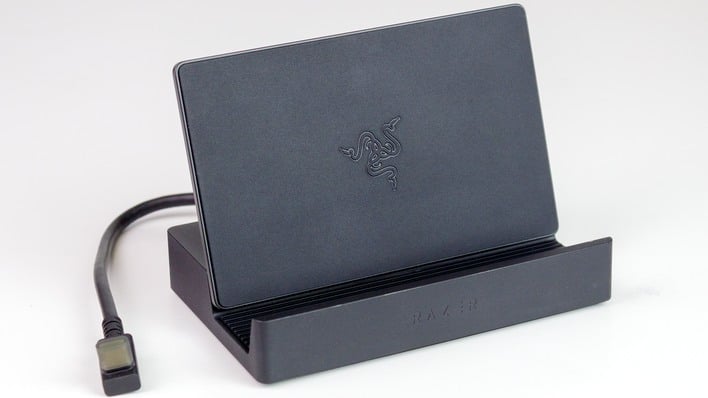
The Razer Handheld Dock Chroma is exactly what you think it is: a USB Type-C dock, or what we would have once called a "port replicator." You plug the Type-C cable into your gaming handheld, set it in the space provided, and it gives you three 5-Gbps USB Type-A ports, an HDMI 2.0 port, and gigabit Ethernet, as well as some tasteful RGB LED lighting on the front.
And that's about it. Thanks for reading! Jokes aside, we do have a few good and bad points to highlight about Razer's dock, so keep reading if you're curious about this specific offering in what has rapidly become a very crowded market.

Razer Handheld Dock Chroma Packaging And Features

The Handheld Dock Chroma comes in a very small box. The photo I took doesn't really give you any context for the size, but it's about the size of a DVD and about as thick as a cigarette pack. I was surprised at the size because it arrived in a much larger shipping box. Judging by the size, I expected that there wouldn't be a power brick inside, and I was correct. In fact, there's nearly nothing inside; you get the dock, a fold-out instruction manual with four pages, and that's it—no charger, no cables, etc.

We also have to point out some shortcomings as it relates to port selection. There's no HDMI 2.1 (for 4K120 displays), no 2.5G Ethernet, no 10-Gbps USB, and no Type-C pass-through whatsoever. It doesn't even have the DisplayPort 1.4 connection of Valve's official Steam Deck dock, never mind more esoteric features like integrated CFExpress or M.2 storage expansion, optical audio output, or legacy connectivity like a VGA or PS/2 port.

The button on the side is to toggle the RGB LED lighting effects.
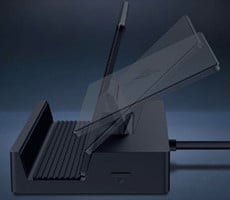
The backstop is intelligently designed. It uses a double hinge such that it can be closed to serve as a lid for the device or opened and tilted to reach many convenient configurations of height and angle. In practice, we found that all of the handhelds we had on hand (as well as a Nintendo Switch 2 and even a couple of smartphones) could be made to comfortably and stably fit in the dock's rubberized cradle. The centered position of the upstream cable means that it will likely fit nearly any handheld, tablet, or other device, too. That's a major frustration with certain other docks that have the upstream cable coming out of one end, making it a pain to fit some handhelds with far off-center ports (e.g. ROG Ally X lineage).

We do have one significant concern with the backstop, though. The large plastic plate may block airflow on handhelds that intake air for cooling through the back of their chassis. This didn't seem to be a problem on the handhelds we tested; the ASUS ROG Xbox Ally X and the Lenovo Legion Go S were both able to pull enough air from the bottom. Still, if the plate rests too flush against the back of a handheld it could pose a thermal problem for that device, which is a concern while docked given that systems tend to be driven harder while plugged in, and the act of charging generates extra heat, too.

While we tried all of our handhelds in the dock for physical fitment, including every ROG Ally version, the Legion Go S, and the Steam Deck, we only tested functionality with the ROG Xbox Ally X and the Legion Go S with SteamOS. In both cases, Windows 11 and Linux, the dock connected immediately without issue and all of the ports came online with no driver or other software needed. It is truly a plug-and-play device, which isn't exceptional, but it is nice to confirm.
Of course, Razer will attempt to install its software on Windows. By default, the software will attempt to install Synapse and Chroma. You don't actually need either of these, though; you can control the lighting using the button on the side or through Windows 11's Dynamic Lighting functions, and all the ports work besides. If you have other Razer hardware, you can manage the dock's lighting through the Synapse app you may already have; you only need the Chroma app if you want to create special synchronized shine patterns across your Razer equipment based on their position on your desk.
Razer Handheld Dock Chroma: Our Conclusions
The Razer Handheld Dock Chroma represents the company's first attempt at making a handheld dock, and for what it does, it got everything right. We've bought basic USB 3.0 hubs to use with gaming handhelds where the Ethernet port drops out when you plug in an HDMI device and have had other random compatibility issues--that's not the case with the Handheld Dock Chroma. Razer's dock is solid, versatile, and likely good enough for the overwhelming majority of people who want to use their gaming handheld docked to their TV or PC monitor. Particularly if you're already in the Razer ecosystem, this dock is an easy recommendation.However, the suggested retail price for this dock is $89.99 US. That's pretty steep relative to the rest of the market. Comparing directly to Valve's Steam Deck Dock, that device is $10 cheaper, yet includes a 45W charger. You can pick up Razer's dock for 33% off right now, however, bringing it to $59.99, and that's a much better deal.

Yet, even at its currently discounted price, you're still paying a small premium for the Razer name and build quality. There are more affordable docks available that have superior features, like this UGREEN model that offers 10-Gigabit USB and MicroSD expansion for $42. Alternatively, for about the same price as this Razer dock, you can get this JSAUX model that has an identical set of ports and includes a 100W PD charger.
Ultimately, we like Razer's dock just fine. The versatility of being able to use it comfortably with just about any handheld device is very convenient, and the feature set is sufficient. We just wish the company had shot a little bit higher for its first-generation handheld dock; Razer is a premium brand that usually aims higher than "sufficient."