Qualcomm Snapdragon X2 Elite Extreme Review: New ASUS And HP Laptops Tested


| Qualcomm Snapdragon X2 Elite Qualcomm's second generation PC processor, the Snapdragon X2 Elite is here and improves upon its predecessor in virtually every way, with more cores, increased performance, and enhanced efficiency.
|
|||

|

|
||
Late last year, Qualcomm held an event and disclosed all of the pertinent technical details regarding its Snapdragon X2 Elite, the second-generation follow-up to the original Snapdragon X Elite processors, which ushered in Copilot+ AI PCs. Qualcomm made quite a splash with the Snapdragon X Elite, thanks to the processor’s strong performance and class-leading NPU, but Windows 11 for Snapdragon and Arm devices was still in a fledgling state, and compatibility with the massive breadth of PC software left something to be desired. Nearly two years later, however, Qualcomm and Microsoft have done a ton of optimization work and a multitude of applications now also run natively on the platform. In the time since the original Snapdragon X Elite launched, Intel and AMD haven’t been sitting still either, and Core Ultra Series 3 (Panther Lake) as well as Ryzen AI 400 (Gorgon Point) have also arrived, though we’ve yet to get our hands on one of AMD’s latest mobile parts.


What all that means is the battle for mobile PC laptop supremacy will be very different today than what it was in 2024 when the original Snapdragon X Elite arrived. Let’s take a quick look at the systems we’ll be using for testing the Snapdragon X2 Elite, cover some details about the new processors, and then dive in for some benchmarks.

The Qualcomm Snapdragon X2 Elite Explained
If you haven't already read our deep-dive on the Snapdragon X2 Elite, do yourself a favor and check it out; there are many additional platform and architectural details in that piece that we won't rehash again here. To give some quick high-level information regarding the Snapdragon X2 Elite, though, the chips will initially be offered in three flavors: an 18-core Extreme edition, an 18-core base Snapdragon X2 Elite, and a 12-Core X2 Elite that also has a scaled back GPU. Lower core count Snapdragon X2 Plus models are coming as well. They are all manufactured on TSMC’s N3 process node, and composed of approximately 31 billion transistors. Its die size measures about 13.3mm x 16.5mm (219.5mm²) according to my trusty digital calipers.
The Snapdragon X2 Elite will also come with varying memory configurations. The top-end Snapdragon X2 Elite Extreme will feature up to 128GB of on-package memory with a 192-bit memory interface operating as fast as 9,533MT/s. Qualcomm says that this will be the most performant configuration. The 12-core and 18-core standard Snapdragon X2 Elites will feature either on-package memory or discrete memory, including support for LPCAMM, to give partners more flexibility with their system designs.
We’ll dive deeper a little later, but we should also mention that the Snapdragon X2 Elite features an improved cache configuration and faster memory fabric than its predecessors. The Last Level Cache (LLC) has 70% higher bandwidth than the previous-gen, and it can be dynamically shared across all IP blocks in the chip: CPU, GPU, NPU, sensing hub, etc. It’s not a static allocation of cache to the various components, but rather it is dynamically allocated to each block when needed. There’s a high-bandwidth, coherent fabric linking all of the components on the SoC too, which delivers (according to Qualcomm) improved latency and power efficiency over the previous-gen.

The Snapdragon X2 Elite will also feature higher clocks and a new boost / turbo algorithm that’s similar to what Intel and AMD offer with their mobile processors. On the Snapdragon X2 Elite Extreme, for example, when 1 Prime core is active, it will boost up to 5GHz. When 2 cores are active it’ll boost up to 4.8GHz; 3 cores, 4.47GHz, and when 4, 5, or 6 cores are active it’ll boost up to 4.45GHz. The chips feature three clusters of 6 Prime or Performance cores each (for 18 total), and clocks are controlled independently on each cluster based on the workload running at the time. The Prime cores will still clock higher than the performance cores, though.
Asus Zenbook A16 Test Platform Specifications & Features
Find Snapdragon X2 Elite Systems @ Amazon
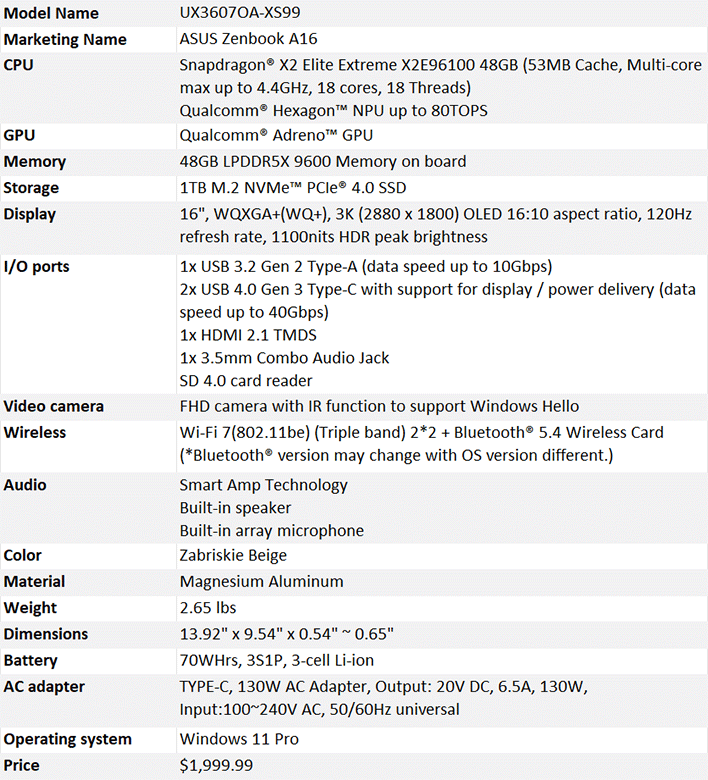
We got our hands on two test vehicles to take the Snapdragon X2 Elite for a spin, the ASUS Zenbook A16 and an HP Elitebook X G2q 14. The ASUS system is retail-ready and powered by the top-end Snapdragon X2 Elite Extreme, paired to 48GB of system memory. The HP Elitebook X G2q 14 is still a prototype, but HP says that its performance should be representative of final hardware. The HP Elitebook X G2q 14 we tested features 64GB of memory, but is powered by the standard Snapdragon X2 Elite, not the Extreme.
We are going to focus on the Snapdragon X2 Elite’s performance in this article, but wanted to give you all a glimpse of the machines we used for testing. We’ll be following up with a full review of the ASUS Zenbook A16 in a few days and will check out the HP system when it is ready for retail.
Snapdragon X2 Elite Laptops From ASUS And HP

ASUS Zenbook A16 With Snapdragon X2 Elite Extreme
ASUS encases the Zenbook A16 in a CNC-milled chassis featuring aluminum that has been chemically treated to give the surface a hard ceramic-like layer, which the company calls “Ceraluminum.” In our short time with the system, we have to say it feels great in the hand and we love the Zabriskie Beige colorway. Ceraluminum also seems to resist fingerprints very well.
The top lid is clean and minimalistic, with ASUS Zenbook etched into the center. Open that lid and you’re greeted by an absolutely gorgeous 16-inch 3K (2880x1800) OLED panel. The display offers a 120Hz refresh rate (.2ms response time), 1,100nits of peak brightness, and 100% DCI-P3 gamut coverage. In practice, this display is excellent. It’s bright, vivid, and well saturated and offers a fast fresh rate and wide gamut coverage. It is high-gloss, so reflections can be a problem, but that’s par the course with glossy displays. If you’re a stickler for contrast and color accuracy, you’re going to dig the Zenbook A16’s display.
Above the display is a small insert in the bezel where you’ll find the FHD webcam with Windows Hello support. The Zenbook A16 also has a proximity sensor and eye gaze tracking built-in and can automatically dim the display when the user looks away or lock the PC when the user walks away.

As for the keyboard and touchpad, the Zenbook A16 almost nails it. Despite being so thin and light – the machine measures 13.92 x 9.54 x .54 - .65 inches and weighs only 2.65 pounds – the Zenbook A16 is rigid and feels sturdy. The keyboard, wrist rest, and touchpad area are nicely spaced out and the keys offer a decent amount of travel, but they're also perfectly flat; we’d prefer if there were some contour to the keys. The touchpad is large and responsive, and ASUS did a great job with palm rejection and tap input. The touchpad also has multi-gesture support, of course.
The front and back edges of the Zenbook A16 are devoid of any features, save for a small indentation to make it easier to open the lid on the front and a thin plastic strip on the back for one of the system’s Wi-FI antennas. The sides are home to a decent assortment of ports, though. The left side of the machine is home to a full-sized HDMI port, dual USB-C ports, and a 3.5mm audio jack. The right side has a UHS-II SD card reader and a USB-A port. There’s also a couple of indicator LEDs on the right for power charging status.

The HP EliteBook X G2q 14 With Snapdragon X2 Elite
The HP EliteBook X G2q 14 is a more compact aluminum-clad, sub-3lb notebook. With the lid open you can see the machine's 14-inch 16:10 IPS display. The panel sports a resolution of 1920x1200, which looks sharp on a panel this size, and it also offers good color accuracy and contrast, though as an IPS display the black levels and effective contrast don’t compare to an OLED panel.
Above the panel sits an IR-capable 1080p FHD webcam, which supports biometric authentication through Windows Hello. The keyboard on the HP EliteBook X G2q 14 is excellent. There's enough key travel to offer a comfortable typing experience, and it allows for fast, accurate typing. The large touchpad is precise and accurate as well.

The EliteBook X G2q 14 has a USB-C port, full-sized HDMI and 3.5mm audio jack on its left side and a lock port, USB-A port, another USB-C port and a SIM tray on the right. The system is clean and unassuming, and we suspect most users would find it attractive in person; this machine would be perfectly at home in the boardroom or classroom.
We’ll save additional details on both systems for our full reviews. For now, let’s get to some benchmarks…