Dell XPS 13 (2026) Review: Intel Wildcat Lake Challenges Apple Efficiency


The Dell XPS 13 has has a pair of cooling fans inside, situated at the center of a slim heatsink that’s linked to a small heat plate, affixed to the top of the Intel Core 5 320 SoC. With the bottom panel of the machine removed, you can also see the systems internals, with a user serviceable wireless card and SSD. Considering the relative simplicity of the Dell XPS 13's motherboard, its easily replaceable battery and secondary daughterboard for its right-side port, this machine will likely score fairly high on a repairability index.

Dell XPS 13 Internal Hardware - Image: HotHardware
The cooling hardware inside the Dell XPS 13 is relatively compact versus higher-powered systems, but its dual cooling fans and beefier heat pipe are more capable and significant than what's employed in the Wildcat Lake-based Lenovo IdeaPad. You can see the dual down-firing speakers at either side of the battery, which takes up just about all of the available space inside the machine. 52Whr isn't a massive battery, but its about as big as Dell could have crammed into this svelte chassis.

The cooling hardware inside the Dell XPS 13 is relatively compact versus higher-powered systems, but its dual cooling fans and beefier heat pipe are more capable and significant than what's employed in the Wildcat Lake-based Lenovo IdeaPad. You can see the dual down-firing speakers at either side of the battery, which takes up just about all of the available space inside the machine. 52Whr isn't a massive battery, but its about as big as Dell could have crammed into this svelte chassis.
Dell XPS 13 (2026) Thermals And Acoustics
At idle, the Dell XPS 13 is dead silent and when running less-taxing workloads, you have to put your ear up against the edge of the system to hear anything running at all. As such, when the system was idling, nothing would register on our sound meter in the lab, which has a sound floor in the low 30dBa range.
Dell XPS 13 Acoustics - Image: HotHardware
The fan in the system will spin up when under a heavy, sustained loads, however. To get a sense for acoustics and thermals under load, we fired up the Steel Nomad Lite stress test, which runs the benchmark in a continuous loop. The heat and noise generated by the Dell XPS 13 under these test conditions should be indicative of what a typical, prolonged gaming scenario or 3D rendering might produce.
With the sound meter about 14" – 18” from the display, we measured approximately 40dBA on average, which is very quiet (the peak 45dBA in the screenshot wasn't generated by the system itself—it was me moving in my creaky office chair). The noise character also has a low pitch and is not particularly audible or irritating in our opinion. The fan emits a gentle whir as hot air is expelled from the chassis, which will likely go unnoticed by just about anyone in real-world environments with any sort of activity going on.
Dell XPS 13 Hardware Details - Image: HotHardware
The actual hardware health data gathered during a PCMark10 run, shows how the Dell XPS 13 behaves thermally with some everyday workloads. As you can see, the CPU in the system will often jump right up into the high-80°C range, but it then quickly throttles down into the mid-60s and 70s.
Like most thin and light laptops, the thermal solution onboard the Dell XPS 13 is quickly saturated, which causes the SoC to throttle. Frequencies bounce between ~1.4 and ~4.7GHz depending on the workload at the time, but the chip will remain in its max turbo range for relatively long stretches, even when it is riding at the edge of its thermal envelope (see the frequency plot at about the 0:60 mark).

The fan in the system will spin up when under a heavy, sustained loads, however. To get a sense for acoustics and thermals under load, we fired up the Steel Nomad Lite stress test, which runs the benchmark in a continuous loop. The heat and noise generated by the Dell XPS 13 under these test conditions should be indicative of what a typical, prolonged gaming scenario or 3D rendering might produce.
With the sound meter about 14" – 18” from the display, we measured approximately 40dBA on average, which is very quiet (the peak 45dBA in the screenshot wasn't generated by the system itself—it was me moving in my creaky office chair). The noise character also has a low pitch and is not particularly audible or irritating in our opinion. The fan emits a gentle whir as hot air is expelled from the chassis, which will likely go unnoticed by just about anyone in real-world environments with any sort of activity going on.

The actual hardware health data gathered during a PCMark10 run, shows how the Dell XPS 13 behaves thermally with some everyday workloads. As you can see, the CPU in the system will often jump right up into the high-80°C range, but it then quickly throttles down into the mid-60s and 70s.
Like most thin and light laptops, the thermal solution onboard the Dell XPS 13 is quickly saturated, which causes the SoC to throttle. Frequencies bounce between ~1.4 and ~4.7GHz depending on the workload at the time, but the chip will remain in its max turbo range for relatively long stretches, even when it is riding at the edge of its thermal envelope (see the frequency plot at about the 0:60 mark).
How Does The Dell XPS 13 (2026) Perform In Terms Of Battery Life?
Battery life is critically important for a mobile PC. Being productive on the go could mean long stretches away from power outlets, so the machine needs to last through hours of work--whether its for writing e-mails or poring over spreadsheets. Binging on content during long flights is another common use case.
Here we've calibrated the laptop displays to a similar fixed brightness, in an effort to minimize that aspect of power draw, though lots of other variables come into play, like battery capacity, or the number of integrated peripherals in a system, for example.
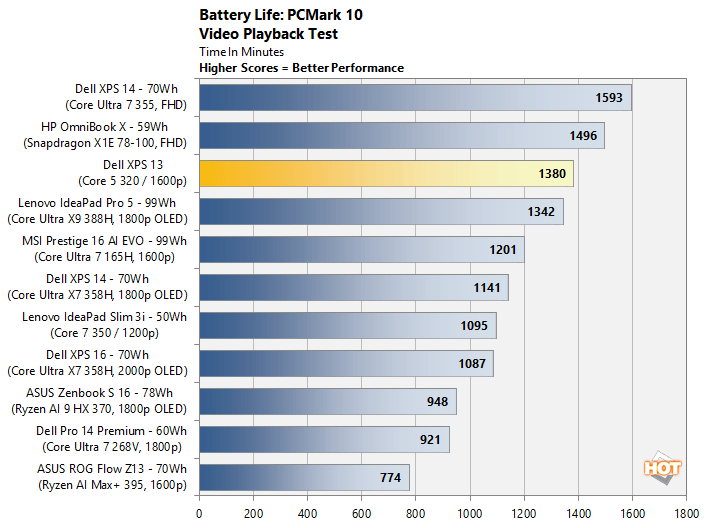
The Dell XPS 13 put up come excellent battery life, lasting about 23 hours on battery power, which put it in the upper echelon of this chart. You may think that's not a particularly good score but such a low power machine, but you must consider the system's battery capacity and slightly higher resolution 2.5K display versus some of the other laptops we tested.
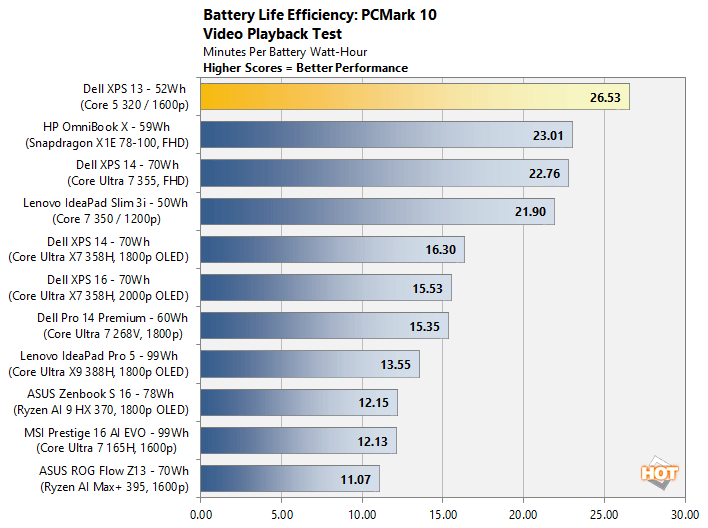
If we rank the machines on minutes per watt-hour of battery capacity, the true efficiency of the Dell XPS 13 comes to light. With the data presented this way, the Dell XPS 13 proves to be the most energy-efficient laptop we've tested to date.
Dell XPS 13 (2026): Review Conclusion
I was surprised by how much I liked the new, Wildcat Lake-powered Dell XPS 13. I get to play with some of the top-end, most-premium laptops around here, and am somewhat spoiled by the experiences and performance they offer. Having testing Intel’s Wildcat Lake, Core Series 3 previously, I knew it wasn’t going set any of the benchmarks ablaze, but its performance is still sufficient for everyday computing use-cases, and it’s a perfectly viable options for students or road warriors looking for an affordable laptop for web apps, office productivity, or media consumption. For STEM students, gamers, or those dabbling in AI, a more powerful system with a discrete GPU would be a better choice.That said, with its premium build, compact ultra-portable form factor, and good looks, the Dell XPS 13 elevates Wildcat Lake to a first-class experience. If killer battery life and ultimate portability are high on your list of priorities, the XPS 13 is great. Dell didn’t simply cram a low-power processor into whatever small chassis it had on hand. Dell engineered a premium aluminum chassis, through and through, attached a very good, high-DPI IPS display, outfitted the system with as big a battery as it could fit, and in the end, the system delivers a solid user experience and excellent value.

Obvious comparisons will be made to the MacBook Neo, due to the XPS 13’s entry-level price bracket and form factor, and Dell wins in a number of key metrics. The Neo offers generally better performance, except for some productivity and multi-threaded workloads, but in terms of build quality, the XPS 13 competes favorably, and the XPS 13 has better IO, a better display, keyboard backlighting, the latest wireless connectivity (Wi-Fi 7), and its slightly smaller and significantly lighter. Dell ticks a lot of boxes with the XPS 13.
If you like the chassis, Dell has also launched Core Ultra 7 powered versions as well, though they’re considerably pricier than the Wildcat Lake-based models.
The Dell XPS 13 is a winner in my opinion. With its premium build, very good display, excellent battery life, compact form factor and affordable pricing (starting at $699; $599 for students), it’s a highly competitive answer to the MacBook Neo and a solid entrant into the Windows laptop ecosystem that won’t break the bank.