Dell XPS 13 (2026) Review: Intel Wildcat Lake Challenges Apple Efficiency


| Dell XPS 13 (2026): MSRP $699 The new Dell XPS 13 powered by Intel's Wildcat Lake Core Series 3 platform is a sleek, cost-optimized but premium laptop with premium build materials and excellent battery life.
|
|||

|

|
||
Like its rivals in Cupertino, Dell didn’t just slap a low-power processor into the new XPS 13 and recycle parts it had in its inventory. Instead, Dell leaned on its supply chain partners to squeeze whatever margin it could out of them, optimized its processes, and designed a beautiful, highly portable, premium looking and feeling laptop, that just happens to be powered by Intel’s more affordable, mainstream, but modern processing platform.
There’s lots to discuss here, so let’s get to it...
Dell XPS 13 (2026) Specifications And Features

Find The Dell XPS 13 @ BestBuy
The Dell XPS 13 we received for testing is a slightly higher-end configuration than the base model. The Dell XPS 13 starts at $699 for a Core 5-320 (6-core [2P, 4LPE]) powered system, with 8GB of LPDDR5X memory and 256GB of storage—student discounts bring that starting price down to $599. The model we tested was powered by the same processor, but packed 16GB of memory and 512GB of storage. Those upgrades push the MSRP up to $999, but that same $100 discount is available to students. Since the XPS 13 launched, Dell has also introduced more powerful Core Ultra 7-based models, starting at $1,399 and creeping up to $1,949 with 32GB of RAM and 1TB of storage.
Common to the XPS 13 platform is a 13.4”, touch display, with a 2.5K resolution and peak brightness of up to 500 nits. The display uses IPS technology, for accurate colors and wide viewing angles, and also supports refresh rates of 30-120Hz. The system has quad speakers as well, a 1080p webcam that’s Windows Hello compliant, dual array microphones, Wi-Fi 7 and Bluetooth 6, and a couple of USB 3.2 Gen 2 Type-C ports on either side.
The Dell XPS 13 (2026) Materials And Build Quality

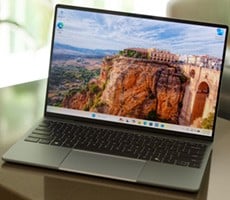
The latest XPS 13 features a CNC-machined aluminum casing (available in Sky or Storm colorways) constructed with up to 75% recycled aluminum and low-emission aluminum. Dell also uses 50% post-consumer recycled plastic within the interior framework and 50% recycled cobalt in the 52Wh battery. The XPS 13’s dimensions are a svelte 11.7” wide and 7.9” deep, and a mere .5” high, and systems weight only about 2.2lbs.

At first glance, the XPS 13 looks understated with a mostly matte finish and a glossy “XPS” embossed into its lid. You wouldn’t think this is a mainstream, relatively affordable laptop given the first impression the system makes. Its design language and the materials used for its chassis shout “premium”.

Open the lid and you’re greeted by a very good 13.4”, 2.5K resolution touch display. Because the panel uses IPS technology, viewing angles are excellent and it’s relatively accurate (we measured an average DeltaE of <.1), but contrast is nowhere near ask stark as a modern OLED. Still, considering the XPS 13’s price segment for the Core Series 3 powered models, the display is clearly a strong suit.

I should also note, that keyboard backlighting is another feature of the XPS 13 that's not offered on the MacBook Neo.

The machine has a traditional physical glass touchpad set into an aluminum palm rest, instead of the seamless invisible haptic glass deck like some the larger, current-generation XPS systems. The touchpad is a fairly good size, supports multi-touch gestures, and was sufficiently accurate and responsive throughout testing. Palm rejection was good too and we didn’t experience any wonky behavior at all. There’s nothing particularly stand-out about the touchpad, but it gets the job done.


The port selection on the XPS 13 is rather limited, but par for the course with this class of machine. There are two USB-C ports available, one on each side. Both support charging and DisplayPort and both support USB 3.2 Gen 2 (10Gbps) speeds. This is actually a key differentiator versus the MacBook Neo, which only supports USB 2.0 out of one of its ports (the other is USB 3.0).
The Dell XPS 13 Software Experience
The XPS 13’s out-of-box OS image is relatively clean and free from bloatware. The usual Microsoft apps are present, of course, along with a couple of proprietary Dell utilities – Dell Optimizer and Dell Support assist.

Dell XPS 13 - Image: HotHardware
We assume Dell has plan to incorporate additional capabilities into Dell Optimizer, because as it stands today it does almost nothing. When you open the application, you’re greeted with this screen, with only a couple of basic display options, and system identifiers. Click that Get Support button and the Dell SupportAssist utility opens.
Dell Support Assistant - Image: HotHardware
Dell SupportAssist has much more functionality. This is where users can easy search for updates, run diagnostics, scan the system for issues, etc. The Boost Performance option will clean up temporary and unnecessary files, clear browser cache, check the Windows registry for orphaned entries and a few other basic tweaks.
I'll dig into the XPS 13's benchmark results on the next page, which should prove very interesting.

We assume Dell has plan to incorporate additional capabilities into Dell Optimizer, because as it stands today it does almost nothing. When you open the application, you’re greeted with this screen, with only a couple of basic display options, and system identifiers. Click that Get Support button and the Dell SupportAssist utility opens.

Dell SupportAssist has much more functionality. This is where users can easy search for updates, run diagnostics, scan the system for issues, etc. The Boost Performance option will clean up temporary and unnecessary files, clear browser cache, check the Windows registry for orphaned entries and a few other basic tweaks.
I'll dig into the XPS 13's benchmark results on the next page, which should prove very interesting.