MSI Raider 16 Max HX Review: 300W Of Power In A Beastly Laptop


| MSI Raider 16 MAX HX B2WJ Laptop: Starting at $2,999, $3,499 as tested The new MSI Raider 16 MAX HX is arguably the fastest 16" gaming laptop we've ever tested, and it does it while remaining cool and quiet, too.
|
|||

|

 |
||
Put plainly, this is a laptop with enough horsepower for almost anything. Want to get some work done in Office? You got it. Want to crunch numbers in Excel and edit photos in Photoshop for hours? Done deal. Want to grind mobs in an old MMORPG, shoot zombies in the latest Call of Duty, or even generate AI waifus all day long? No problem. In the Raider 16 MAX HX, MSI has built a laptop that will do anything you ask, and has achieved this without completely giving up the portability of the laptop form factor.

This most recent revision of the long-lived MSI Raider is a brilliant machine, packing in one of the prettiest laptop screens we've ever seen along with a full 300 watts of combined CPU and GPU horsepower. Thanks to an upgrade to a Core Ultra 200HX Plus processor, the gaming performance takes a significant jump over last-gen, while the 400W power adapter ensures you can keep charging the battery even while gaming.
Of course, the first thing we always do in a review is go over the specifications, so let's go ahead and do that:
Starting right from the top, we have the main upgrade for this model: the Core Ultra 9 290HX Plus. Despite the similar-seeming specifications to the previous-generation model's Core Ultra 9 285HX, this chip has significant improvements to internal "un-core" clocks that radically improve its performance in certain applications, most notably gaming. The uplift on the mobile "Plus" parts isn't as big as the desktop versions, but it's still sizable.
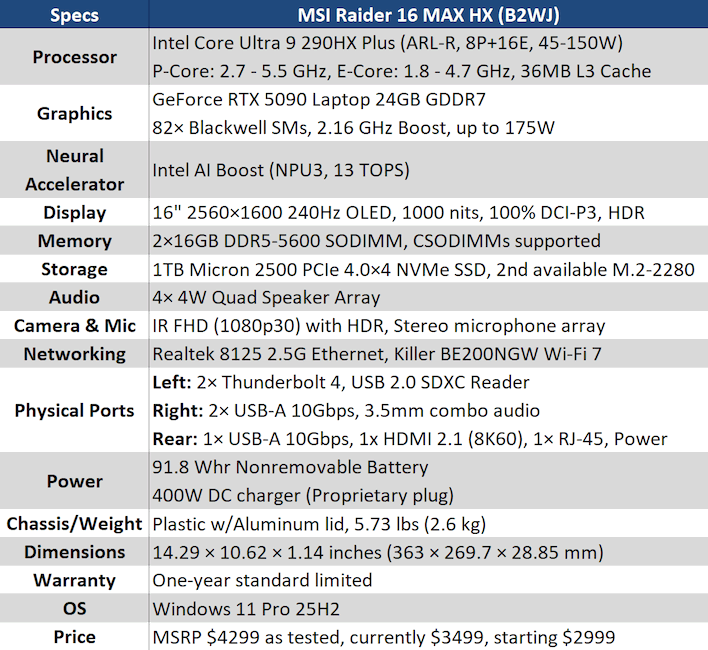
The real point of pride on this laptop is the display, though. This is a brilliant QHD+ OLED with a fast refresh rate, no noticeable fringing, super high brightness, gorgeously saturated colors, and HDR support. A key miss here is G-SYNC, which isn't supported even in direct dGPU mode, unfortunately. However, the fast 240-Hz refresh rate does make this a bit less critical. I'll talk more about the screen in the next section.
Other than the screen, most of the rest of the specifications are generally high-end but fairly standard within this price class. One notable difference from other powerful 16" laptops is the 400-watt charger. While it uses a reversible proprietary plug that's sort-of like a small DisplayPort connector, the 400W power delivery is one of the highest we've ever seen. It's quite cool to never worry about draining your battery while gaming.
Let's take a walk around the MSI Raider 16 MAX HX and check out some of its cool features.
MSI Raider 16 MAX HX (B2WJ) Design & Aesthetics

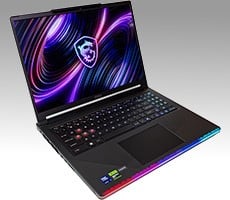
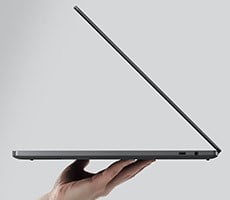
When I first unboxed the Raider 16 MAX HX, I was surprised to find that only the top cover is aluminum. Everything else on the machine is plastic, and it feels like it. It doesn't feel "cheap"; there's not an excessive amount of flex or play in the construction, which is to say that it's very well-constructed. It's just that it feels like, well, plastic, and so it doesn't have the premium feel of something like "Ceraluminum." If that matters to you, it's definitely noticeable.
However, as soon as I turned the machine on any concerns I had about the feel of the chassis were pushed aside by my awe of the display. This is one of the nicest displays that I have ever used, period, and even moreso for a laptop. Let me not overstate; it's not 4K, and it's not VRR, the latter of which is a definite miss, as I said above. Still, it's beautiful and vibrant. Colors are unbelievably rich, even on the accurate DCI-P3 profile, and the sharpness is plenty high at 189 PPI. The 240-Hz refresh rate looks awesome in games that can maintain that level of performance, as well as on the Windows desktop. (Hey, it looks nicer when sliding windows around!)

My praise for this system doesn't stop there, though. I was initially unimpressed by the keyboard's membranes as they felt stiff and uncomfortable to type on, with little in the way of 'snap'. This turned out to be a break-in issue; after more than two weeks of using the Raider 16 MAX HX, I can happily report that the keyboard feels much better to type on. It's still no mechanical, but I'll take a decent membrane with a numeric keypad over one without. Not everyone might feel that way, but that's absolutely my preference.
The keyboard layout is quite good, by the way. It has nearly everything exactly where it needs to be and there are a few clever decisions that really improve usability. For example, you can tell that this laptop was made for gamers and developers where F12 is almost always a useful function key, whether for screenshots in Steam or opening developer tools in a browser, because there's no function on the F12 key, so it always sends F12. I also appreciate that the Fn key is over on the right side, making it harder to hit on accident when you wanted Alt or Windows. My two gripes are the odd duplicated backslash key in the bottom row, and the completely absent right-side Ctrl key, but at least Fn+Copilot sends a "Menu" input.
I don't have much to say about the trackpad except that it does a good job of palm rejection and feels perfectly acceptable to use. It's plastic, so it's not as effortless as a glass touchpad, but the surface is super-smooth and my finger glides across it easily. No notes here.

The keyboard has per-key RGB LED lighting, and you can meticulously program the lighting using the included Steelseries GG utility. It's not clear why you have to use Steelseries GG instead of using MSI's own utility though, and furthermore, I don't like that you have to keep Steelseries GG running at all times if you want the lighting to do anything besides color cycle at full brightness. That applies to the light bar on the front as well as the shield logo on the lid, too. It's not a deal breaker, but it's definitely an annoyance.
I also wasn't particularly impressed with the audio. It's not bad; it gets quite loud, and the quality is decent enough at lower volumes. At max volume you can really tell the amplifier is struggling, however, and I noticed considerable harmonic distortion from the output with my relatively untrained ear. Turning the volume down a little helps quite a bit with this. This laptop includes the usual MSI Nahimic Audio software, and disabling that made things sound a bit more natural to my ears, but did not help with the distortion issue. Fortunately the headphone jack sounds just fine, as does Bluetooth audio.

A major strong point of this machine is the robust I/O. Over here on the left side, we've got a pair of Thunderbolt 4 ports and a full-sized SD Card reader. The SD card reader is limited to USB 2.0 speeds, but that's not the end of the world; still, I would have liked to have seen an SD Express reader in such a high-end machine, especially as MSI markets it for both work and play.

Over on the right side of the laptop you've got the audio jack and a pair of high-speed USB Type-A ports, which is awesome; they're perfect for plugging in a flash drive or wireless receiver for a mouse or gamepad. Then, on the back, you've got another of those same USB-A ports, an HDMI 2.1 port supporting up to 8K at 60Hz or 4K at 240Hz, the RJ-45 jack for the Ethernet connection, and the proprietary power plug.
I strongly appreciate having useful I/O all the way around the machine, so big kudos to MSI here. I'm less excited about the proprietary power connector, however. I completely understand that engineering a power plug solution capable of delivering the full 20A at 20V that this laptop needs is a major engineering challenge, but I also understand that if this power brick dies (which it inevitably will), replacing it may be a pain. Hopefully MSI keeps producing these for a long time.


Simply undoing the two screws in the middle lets you pop off the "UPGRADE TO WIN" plate that conceals a third fan, both DDR5 SODIMM slots, and both M.2 sockets, only one of which comes populated. There's just enough room to edge a tool in there and pop out the RAM or SSD, while the designers give you just a bit more room with that extra M.2 socket. It's PCIe 5.0, too, so you can really crank up some I/O performance in here if you want.
Taking off the rest of the bottom cover requires removing the other ten screws and using a spudger to pop clips all around the edge of the machine. The only reason you'd need to do that is if you're going to perform serious surgery on the laptop, like replacing the motherboard or keyboard, so we didn't take that step, especially since we hadn't actually tested the machine yet.

Finally, around the back of the machine with the lid open, you can appreciate the glowing MSI shield logo as well as the "RAIDER MAX" logotype in a font face that reminds us of the old game Descent. We angled the lid slightly so you could see the logotype as well as the interestingly distorted dragon logo on the back; even with the RGB LEDs off, you're not going to convince anyone that this is a regular work laptop, but it's not as loud (visually) as some gaming machines we've seen.
If you're tired of looking at the thing and just want to know how it performs, let's head to the next page.