Ryzen AI Halo Review: AMD's DGX Spark And Mac Mini Challenger Tested


| AMD Ryzen AI Halo AI Workstation: MSRP $3,999 AMD has its own small, quiet AI workstation loaded with fast memory and storage, but unlike the competition this one runs Windows or Linux to reach additional users, markets and applications.
|
|||

|

|
||
After giving the world an initial glimpse of the system back at CES 2026, a few weeks ago at Computex, AMD CEO Lisa Su launched the AMD Ryzen AI Halo developer platform. There was mounting pressure on the company to produce an AI-focused mini workstation like that of NVIDIA's DGX Spark with its Grace Blackwell GB10 processor, and it turned out AMD had what it felt was the right hardware all along. Dubbed Strix Halo, the Ryzen AI Max+ 395 processor has all the CPU and GPU compute power needed and an ample pool of high-bandwidth LPDDR5x memory.
We've seen this chip before in a few portables, including HP's ZBook Ultra G1a. That system is a beastly laptop, but it's held back somewhat by its mobile form factor. However, Ryzen AI Halo is different, because in a mini PC form factor similar to the DGX Spark or Apple's Mac Studio, there's more room to bolster the system's thermal solution and unlock the platform's TDP for peak performance while maintaining a petite footprint. And this is just the start for AMD, as there's another version arriving soon with additional memory. But let's not get ahead of ourselves, and instead meet AMD's Ryzen AI Halo...
Watch Our AMD Ryzen AI Halo Sneak Peek From CES 2026
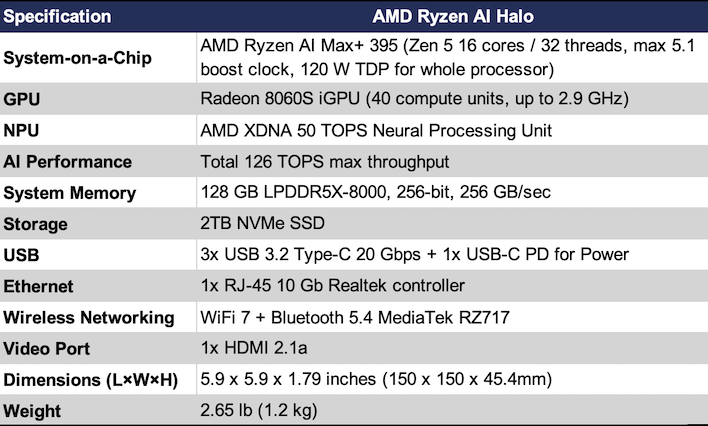
Ryzen AI Halo Specifications
As mentioned previously, the Ryzen AI Max+ 395 is a known quantity. With 16 Zen 5 cores and SMT, there's enough CPU horsepower to do any job, and with a 120 Watt TDP there should be enough headroom to run at high speeds for an extended period of time. This processor also has an integrated 50 TOPS XDNA neural processor along with a Radeon 8060S integrated GPU. That graphics processor is going to probably be where most AI work takes place since the performance is so much higher due to having 40 RDNA 3.5 graphics cores running at up to 2.9 GHz.
The color of the AMD Ryzen AI Halo shifts depending on the exact angle and what part you're looking at
One of the most important parts of any AI workstation is how much memory is on board, and the AMD Ryzen AI Halo has 128 GB of LPDDR5x-8000 with a 256-bit interface. That's good for 256 GB/sec of throughput. That's slightly less than NVIDIA's DGX Spark (or similar systems, like the Dell Pro Max with GB10 that we recently reviewed) but the figures are close. There's also a 2 TB M.2 PCI Express Gen 4 NVMe SSD on board for internal storage.
Internally, the Ryzen AI Halo also supports wireless connectivity. There's Wi-Fi 7 and Bluetooth 5.4 provided by the RZ717 by MediaTek. There's also a 10 Gbit Ethernet controller from Realtek. Unlike the DGX Spark or Dell Pro Max, there's nothing faster for multi-device interconnect like NVIDIA's use of the ConnectX7 NIC with dual QSFP connectors.
Ryzen AI Halo Comparison Points
Performance in various AI tasks should be pretty solid. AMD's own internal figures estimate 10-14% faster than the DGX Spark depending on the specific task and model. The DGX Spark's $4700 current retail price is a little more expensive than the Ryzen AI Halo's $4,000 price point, so AMD might have both a performance and a price advantage in some situations.AMD also compared this system to the Mac mini, but an M4 Pro with the max 48GB of RAM retails for $2400 after Apple's recent price increases due to component costs.The closer comparison in our eyes is a Mac Studio M4 Max, with 64 GB of RAM, and 2 TB of storage that retails for around $4300 after Apple's the hikes. You can get closer to matching the RAM with the M3 Ultra's 96 GB but that's 50% more expensive. Either way, Apple's systems lack the sheer quantity of RAM that the Ryzen AI Halo has, so there will be some things that it and the DGX Spark can do that Apple can't match.
We have a DGX Spark with its 128 GB of RAM along with a Mac Studio M4 Max with 64 GB and so that's what we'll use for comparisons. But first let's put eyes on the Ryzen AI Halo.

Ryzen AI Halo Build and Connectivity
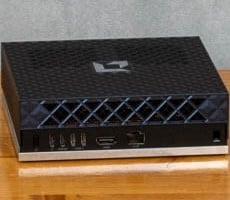
The AMD Ryzen AI Halo is tiny black box, but it's not entirely black. It's got this kind of pearlescent property that also reflects purple and a little green. But it's super subtle and if I hadn't drawn it to your attention, you'd just stare at it and wonder what color it was, as I did for a while after unboxing. Regardless, it's cool. It's not the cold, unfeeling black of the Dell Pro Max with GB10, and it's not the gaudy gold of the DGX Spark. It's classy and subdued until you turn it on. While powered up, the Ryzen AI Halo has a ring of white LEDs all around the base that absolutely shout "look at me!" They're not bright, but they do demand attention.
There are vents all around the Ryzen AI Halo. AMD went to great lengths to ensure that the system could stay cool, so there are intake vents on each side as well as on top. The company's included quick start guide warns users to not place the system on its side as it could overheat in that orientation. The footprint is tiny, but it's really no smaller than the GB10 systems we've tested, and it's absolutely dwarfed by the Mac Studio.

There's not much for ports on the Ryzen AI Halo. In a move that has frustrated this wired peripheral enthusiast, there's been a trend of including four USB-C ports and zero USB-A on these small AI workstations, and the Ryzen AI Halo is no exception. One of those ports will be occupied by the included 240 Watt AC adapter, just like the DGX Spark. There's also an HDMI 2.1b port for up to 8K AI shenanigans, and an RJ-45 connector for 10 Gbps Ethernet. And that's it. Unlike the GB10 systems we've tested, there is no dual QSFP connector and no ConnectX 200 Gbps controller on board. There's ample space where one could live, or maybe some USB-A ports, but it's blank space here.

Ryzen AI Halo Software
The Ryzen AI Halo is available in two flavors, one with Windows 11 Pro, and another running Linux. We've got the Windows 11 version on hand. However, installing an alternative OS is just a matter of preparing a flash drive and installing. Either way, the most important preinstalled application is the Ryzen Developer Center.
Ryzen Developer Center opens on each boot, and it can automatically keep the system's drivers up to date and preinstall some very useful software for AI development tasks. Whether it's Lemonade Server and LM Studio for running LLMs, Python, PyTorch, and Node.js, and Visual Studio Code for development workloads, or Comfy Desktop and Z Image Turbo for image generation, AMD has the most common use cases covered out of the box. AMD's Ryzen AI Playbooks website walks through installing agentic AI tools like n8n as well.

The AMD software bundled with drivers for the Ryzen AI Halo is no different than the normal AMD Radeon drivers. It tracks usage, power, and thermal metrics, and has plenty of levers and buttons to push that impact performance. This includes the AMD Chat server that runs a moderately-sized LLM and image generation model on consumer GPUs. Since we have loads of memory, it made more sense to just uninstall this so it's not taking up resources for our AI fun.

The most important feature is tucked away under Performance > Tuning, and that is the Variable Graphics Memory option. This is where the system's 128 GB pool of RAM is partitioned into system RAM and dedicated GPU memory that rise by powers of two from 512 MB to 64 GB, plus a custom setting that maxes out at 96 GB. Out of the box it was split in half with 64 GB for system memory and 64 GB for VRAM.
For the vast majority of our testing, it was easiest to just dedicate 96 GB of memory to graphics (and also AI when it's running on the GPU) and forget about it. Changing this setting does require a reboot. Interestingly, AMD's guidance for Linux based systems, which is documented in several of the public playbooks, is to set the static partition to just 512MB as the Linux software and driver stack is capable of dynamically allocating as much memory as needed without any static partitioning. So the need for static partitioning that I'd always assumed was a limitation of x86 is actually a limitation of the Windows stack, if not the OS itself.
Now that we've had a tour of the Ryzen AI Halo it's time to dig into AMD's playbooks and experiment...