Dell XPS 14 (2026) Review: A Great Return To Form


To evaluate the Dell XPS 14’s real-world capabilities, I ran our standard mix of browser, productivity, content creation, AI workloads, graphics, gaming, and battery benchmarks. For this review, our team also rounded-up an array of laptop systems we had on-hand, reset and refreshed all of them, and fully updated the systems with the latest UEFIs, firmware, and Windows Updates. We then ran all of the latest versions of each of the benchmarks to gather fresh benchmark data to build upon for future reviews and analysis.

The 1TB Samsung PCIe Gen 4 SSD in the Dell XPS 14 delivered lower performance than you’d expect from a modern Gen 4 drive. In ATTO, sequential read speeds top out at around 5.7 GB/s which is respectable, though there was a bit of a performance seesaw at some transfer sizes. Meanwhile write performance couldn't get past 2.56GB/sec (and usually hovered around 1.5GB/s) which is surprisingly low. Perhaps there's a firmware update that can remedy this in the future, but as you'll see in the following benchmarks, it really didn't hold the new XPS 14 back in real-world tests either.
The XPS 14 posts excellent results here, pulling ahead of the Core Ultra 7 268V Lunar Lake-powered Dell machine and staying competitive with much larger performance laptops. Intel’s Panther Lake architecture clearly delivers strong single-thread throughput, translating into snappy web apps, fast page loads, and smooth multitasking.
In short, everyday responsiveness is flagship-class, and as you can see in the on-battery test runs above, it doesn't bleed much performance when untethered from the wall.
Looking at the Cinebench 2026 results, the Dell XPS 14 with Core Ultra X7 358H lands in the middle of the pack for traditional thin-and-light class machines. Its multi-thread score of around 3,250 offers a 50+% uplift over the Core Ultra 7 355 configuration and allows it to outpace the Snapdragon X Elite HP system, showing just how much headroom the higher-core count Panther Lake chip brings in sustained workloads.
Single-core performance remains competitive across the field, but the real story is scaling. The XPS 14 we tested delivers meaningful multi-core muscle in an ultra-thin chassis, even if it can’t catch the high-wattage Ryzen AI Max or Core Ultra X9 systems. The key takeaway being that stepping up to the 358H meaningfully improves sustained creator-class workloads (rendering/encoding) in the same thin chassis, but it still sits well below the high-power, beefier machines in this test.
In addition, the good news once again is that when unplugged from the wall outlet, performance is maintained by Dell's new XPS 14.
The PCMark 10 Applications benchmark measures performance in the Microsoft Office suite, as well as in the Edge browser, offering native instruction set-compatible versions of the apps for optimal performance across a wide variety of workloads in tools office workers, students and home users utilize every day. The following results should show a view of performance with a best foot forward from all systems tested.
The Core Ultra X7-powered XPS 14 shows a nice uplift over the Ultra 7 355 model and lands solidly in performance-ultraportable territory. While it doesn’t challenge thicker, high-wattage laptops like the Alienware 16, it delivers excellent productivity app performance and responsiveness in a three-pound chassis, and handily bests even a 16-inch machine powered by AMD's Ryzen AI 9 HX 370.
Here, the Panther Lake-equipped Dell XPS 14 shows a significant leap over previous gen systems, and the Snapdragon X Elite -based HP machine, in this machine vision workload. This is a system that can definitely run local AI tasks, and Panther Lake's integrated NPU 5 is very much up to the task.
If you're the type of user that finds yourself regularly working with AI models and such, you should absolutely spring for the higher bandwidth 32GB of RAM configurations of the XPS 14.
Intel's Arc B390 12-Xe graphics on board the Core Ultra X7 358H-powered XPS 14 more than doubles the performance of the base Intel iGPU on board the Core Ultra 7 355-powered Dell XPS 14. The higher-end XPS 14 also steps well ahead of most thin-and-light competitors. While it doesn’t catch the high-powered Ryzen AI Max-equipped ASUS ROG Flow Z13 machine, that machine is also in another price category altogether. The lower-end 4 Xe core configuration of the XPS 14 with the Core Ultra 7 355 doesn't put up a very good showing. but regardless, as you'll see, this is easily the most graphics-capable XPS 14 yet in its higher-end loadout.
The base XPS 14 configuration puts up a somewhat playable score in F1 25 but falls to the back of the pack in The Talos Principle 2. The Arc B390-equipped Core Ultra X7 XPS 14 configuration, however, jumps well into buttery smooth territory in F1 2025 and remains playable in more demanding titles like Talos Principle 2 with reasonable settings. For a three-pound laptop with no discrete GPU, this is a substantial generational leap for Dell's XPS line-up, thanks to Intel's excellent graphics engine on many, but not all, Core Ultra Series 3 platform configurations. And keep in mind, enabling XeSS resolution scaling would send these numbers even higher.
Let's look at skin temps, acoustics and battery life, next...
ATTO Disk Benchmark Results For The Dell XPS 14 (DA14260)
We'll start off with ATTO, a quick and dirty test that measures read/write bandwidth and IOPS across a range of different data transfer sizes. While we don't typically compare these results across multiple machines, it's useful to gauge whether a particular notebook's storage subsystem is up to snuff.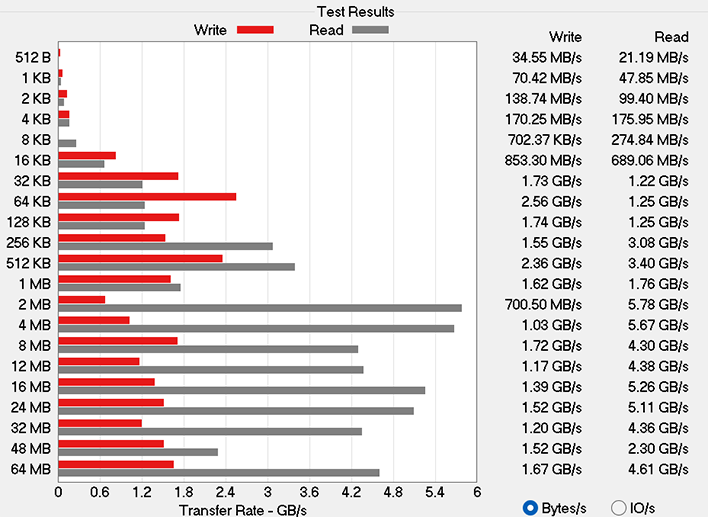
The 1TB Samsung PCIe Gen 4 SSD in the Dell XPS 14 delivered lower performance than you’d expect from a modern Gen 4 drive. In ATTO, sequential read speeds top out at around 5.7 GB/s which is respectable, though there was a bit of a performance seesaw at some transfer sizes. Meanwhile write performance couldn't get past 2.56GB/sec (and usually hovered around 1.5GB/s) which is surprisingly low. Perhaps there's a firmware update that can remedy this in the future, but as you'll see in the following benchmarks, it really didn't hold the new XPS 14 back in real-world tests either.
XPS 14 (DA14260) Speedometer 3.0 Browser Benchmark
We use BrowserBench.org's Speedometer test to take a holistic look at web application performance. This test automatically loads and runs a variety of sample web apps using the most popular web development frameworks around, including React, Angular, Ember.js, and even simple JavaScript. This test is an example of how systems cope with real-world, modern web apps. All tests were performed using the latest version of Chrome.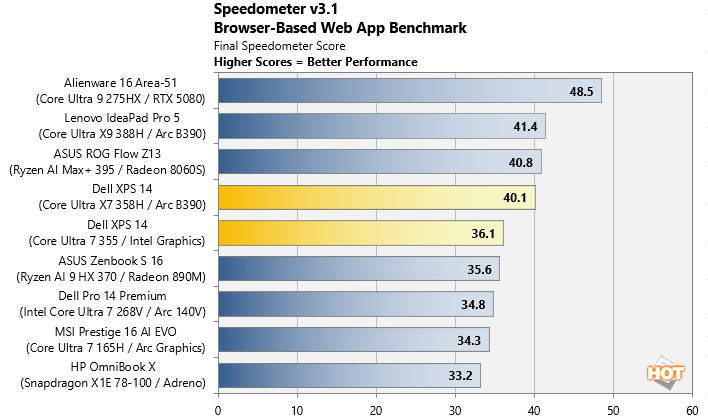
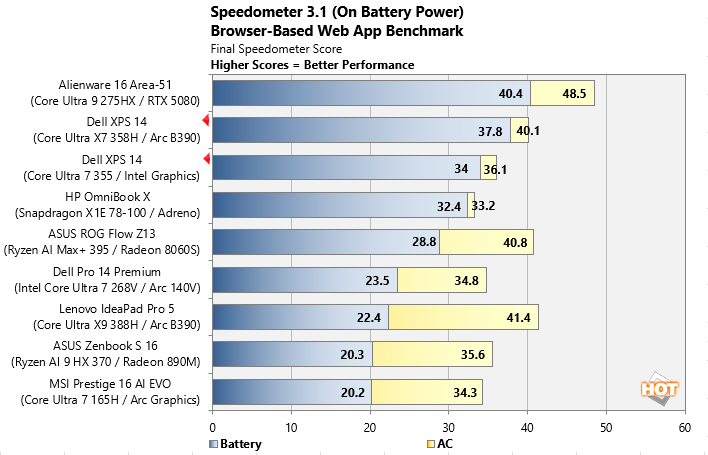
The XPS 14 posts excellent results here, pulling ahead of the Core Ultra 7 268V Lunar Lake-powered Dell machine and staying competitive with much larger performance laptops. Intel’s Panther Lake architecture clearly delivers strong single-thread throughput, translating into snappy web apps, fast page loads, and smooth multitasking.
In short, everyday responsiveness is flagship-class, and as you can see in the on-battery test runs above, it doesn't bleed much performance when untethered from the wall.
MAXON Cinebench 2026 3D Rendering Benchmark Results With The XPS 14 (DA14260)
Next up is the latest-generation 3D rendering benchmark from Maxon, based on the Cinema 4D rendering engine. It's a purely CPU-based test that doesn't make use of the graphics processor or NPU, and it scales very well with additional CPU cores. We ran both single- and multi-threaded tests on all of the machines in the charts.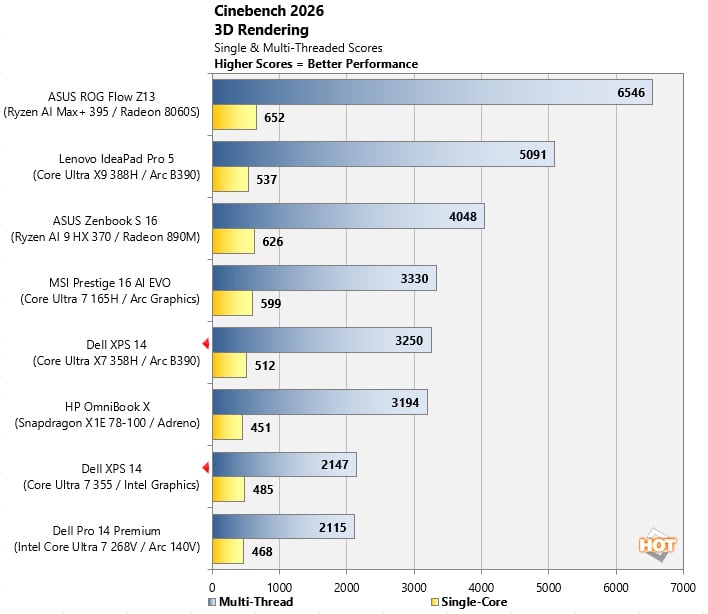
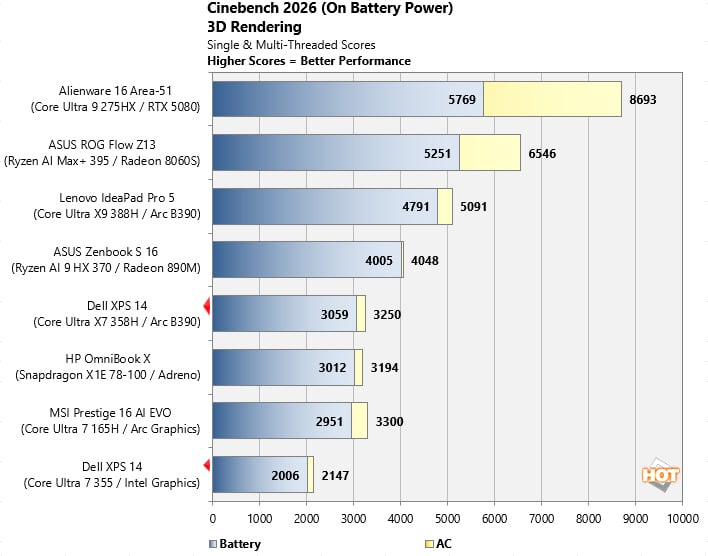
Looking at the Cinebench 2026 results, the Dell XPS 14 with Core Ultra X7 358H lands in the middle of the pack for traditional thin-and-light class machines. Its multi-thread score of around 3,250 offers a 50+% uplift over the Core Ultra 7 355 configuration and allows it to outpace the Snapdragon X Elite HP system, showing just how much headroom the higher-core count Panther Lake chip brings in sustained workloads.
Single-core performance remains competitive across the field, but the real story is scaling. The XPS 14 we tested delivers meaningful multi-core muscle in an ultra-thin chassis, even if it can’t catch the high-wattage Ryzen AI Max or Core Ultra X9 systems. The key takeaway being that stepping up to the 358H meaningfully improves sustained creator-class workloads (rendering/encoding) in the same thin chassis, but it still sits well below the high-power, beefier machines in this test.
In addition, the good news once again is that when unplugged from the wall outlet, performance is maintained by Dell's new XPS 14.
Dell XPS 14 (DA14260) UL PCMark 10 Applications Benchmark Results
The PCMark 10 Applications benchmark measures performance in the Microsoft Office suite, as well as in the Edge browser, offering native instruction set-compatible versions of the apps for optimal performance across a wide variety of workloads in tools office workers, students and home users utilize every day. The following results should show a view of performance with a best foot forward from all systems tested.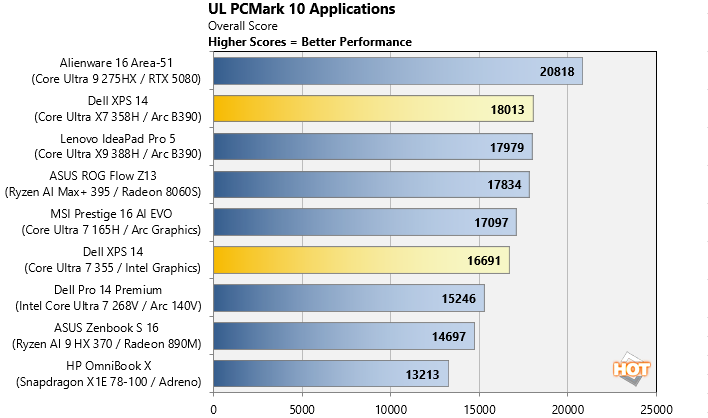
The Core Ultra X7-powered XPS 14 shows a nice uplift over the Ultra 7 355 model and lands solidly in performance-ultraportable territory. While it doesn’t challenge thicker, high-wattage laptops like the Alienware 16, it delivers excellent productivity app performance and responsiveness in a three-pound chassis, and handily bests even a 16-inch machine powered by AMD's Ryzen AI 9 HX 370.
Puget Bench For Creators: Davinci Resolve
Next up we have some video editing and encoding using the Puget Bench for Creators and Davinci Resolve. Puget Systems has been developing benchmarks that leverage real-world applications and workloads for a number of years now, which are highly regarded by creators using popular Adobe applications and Davinci Resolve. Here, we used the free version of Davinci Resolve (not the Studio edition) that features less hardware acceleration and relies heavily on CPU, GPU and memory performance.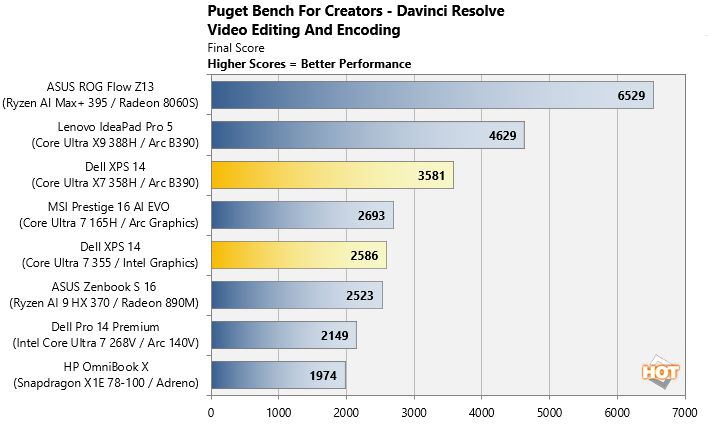
Puget Bench with Davinci Resolve shows a similar spread to our Cinebench scores for the XPS 14, with a much stronger showing for Intel's 16-core Core Ultra X7 over the 8-core Core Ultra 7 Panther Lake powered XPS 14. Once again, this confirms the new XPS 14 is more than capable of content creation work on the go.
UL Procyon AI Computer Vision Benchmark
The idea of "edge AI", or running AI workloads natively on your local devices, instead of in the cloud, is only just emerging on mainstream PCs. As such, benchmarks for these workloads aren't exactly prolific. Fortunately, UL has already built a few into its Procyon benchmark suite. The following is a look at how a few machines do in this benchmark suite's AI Computer Vision benchmark, which exercises the test subject's ability to handle machine vision workloads, which you'll find in everyday tasks like webcam background blur, subject tracking, eye gaze correction and other effects, for example.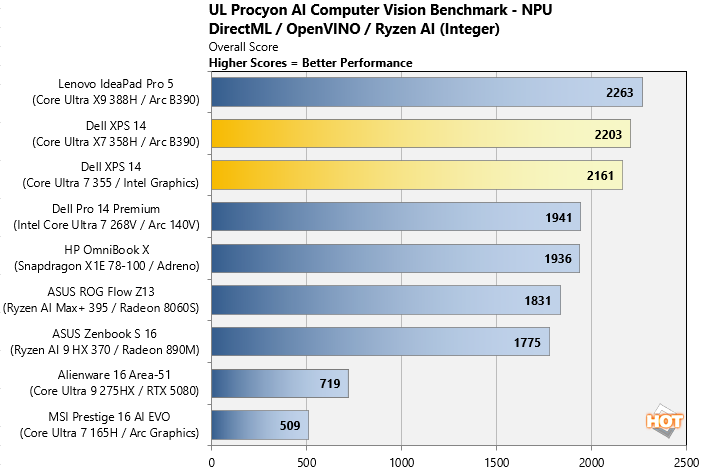
Here, the Panther Lake-equipped Dell XPS 14 shows a significant leap over previous gen systems, and the Snapdragon X Elite -based HP machine, in this machine vision workload. This is a system that can definitely run local AI tasks, and Panther Lake's integrated NPU 5 is very much up to the task.
If you're the type of user that finds yourself regularly working with AI models and such, you should absolutely spring for the higher bandwidth 32GB of RAM configurations of the XPS 14.
UL 3DMark Gaming Benchmarks
3DMark has a wide variety of graphics and gaming related tests available. In this next test, we chose to run 3DMark Night Raid, a modern DirectX 12 test specifically for mobile platforms with integrated graphics, as well as the more-demanding, cross-platform Wild Life Extreme benchmark which utilizes more modern rendering APIs.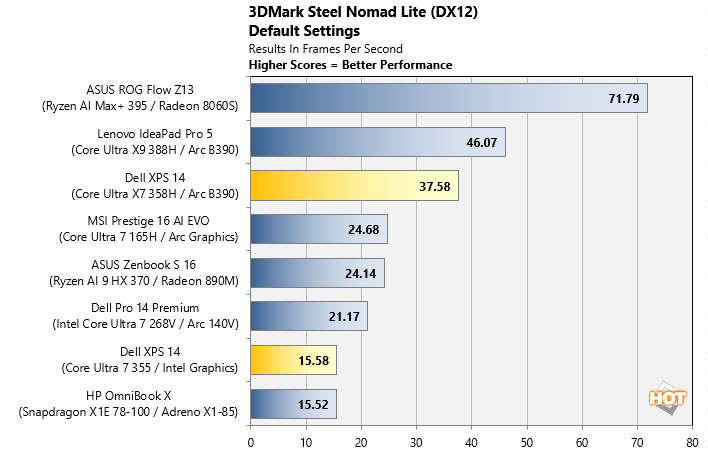
Intel's Arc B390 12-Xe graphics on board the Core Ultra X7 358H-powered XPS 14 more than doubles the performance of the base Intel iGPU on board the Core Ultra 7 355-powered Dell XPS 14. The higher-end XPS 14 also steps well ahead of most thin-and-light competitors. While it doesn’t catch the high-powered Ryzen AI Max-equipped ASUS ROG Flow Z13 machine, that machine is also in another price category altogether. The lower-end 4 Xe core configuration of the XPS 14 with the Core Ultra 7 355 doesn't put up a very good showing. but regardless, as you'll see, this is easily the most graphics-capable XPS 14 yet in its higher-end loadout.
Game Benchmarks With F1 25 & The Talos Principle II
We also ran some fairly taxing gaming workloads on the laptops with F1 25 and The Talos Principle II at a 1080p resolution. With F1 25 we used the game's "High" image quality preset, which uses high-quality graphics settings, without ray tracing. And for The Talos Principle II, we used the game's "Medium" quality preset. Resolution scaling was disabled in both games, to show the native framerate across all platforms and iGPUs. Here, real-world gaming tests reinforce what the synthetic benchmarks suggest.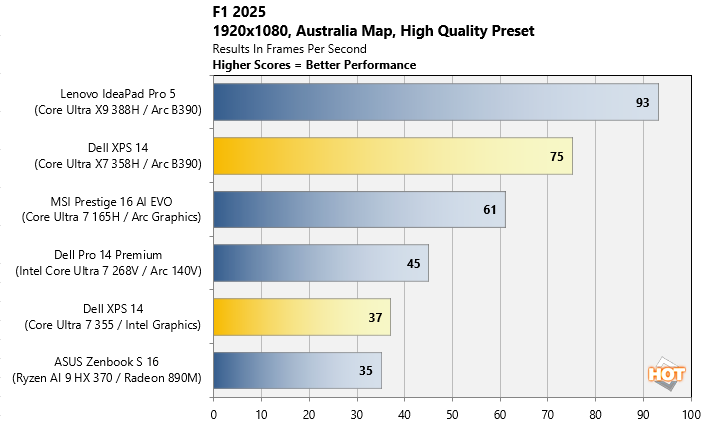
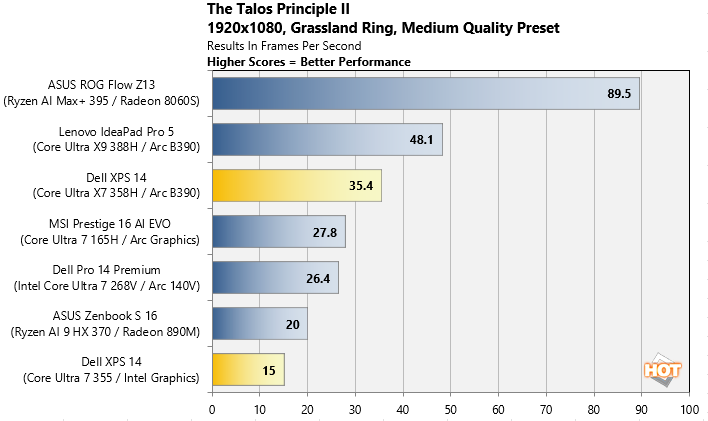
The base XPS 14 configuration puts up a somewhat playable score in F1 25 but falls to the back of the pack in The Talos Principle 2. The Arc B390-equipped Core Ultra X7 XPS 14 configuration, however, jumps well into buttery smooth territory in F1 2025 and remains playable in more demanding titles like Talos Principle 2 with reasonable settings. For a three-pound laptop with no discrete GPU, this is a substantial generational leap for Dell's XPS line-up, thanks to Intel's excellent graphics engine on many, but not all, Core Ultra Series 3 platform configurations. And keep in mind, enabling XeSS resolution scaling would send these numbers even higher.
Let's look at skin temps, acoustics and battery life, next...