Alienware 16 & 18 Area-51 Laptops Reviewed: Benchmark-Crushing Gaming Beasts


| Alienware Area-51 Gaming Laptops: As tested, $3349 (16) and $4099 These new Area-51 laptops aren't a mild refresh, but a whole new design philosophy, delivering top-shelf performance and show-stopping aesthetics.
|
|||

|

 |
||
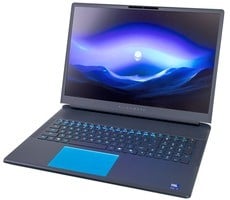
Dell announced back at CES 2025 that it was reviving the Area-51 name for its flagship line, with a bold new visual direction that harkens back to the original Area-51 systems and a somewhat "2000s" visual aesthetic. These new Area-51 laptops aren't a mild refresh, but a whole new philosophy. They're very distinct, visually, from recent Alienware lines—no more subtle stealth notebook look. Instead, picture a blend of industrial and classic sci-fi elements, with teal metallic shells, glass sections to show internal fans and lighting, diffused rear lighting around the exhaust, RGB trackpad and per-key lighting, and a more sculpted wrist rest/keyboard layout. The design language reminds us of the unapologetic gamer aesthetics of the 2000s, and we love it.
That's not to say that these machines look outdated, though. Dell's latest-generation Area-51 laptops are both visually striking and speedy, as you'll see in the pages ahead. We've got both the 16" machine and the 18" flagship here for review, and we've put the systems fully through their paces to find out if the revitalized Area-51 is the real extraterrestrial deal or just another UFO hoax.
Let's go over the full specifications for the systems before we take a look at them in detail...
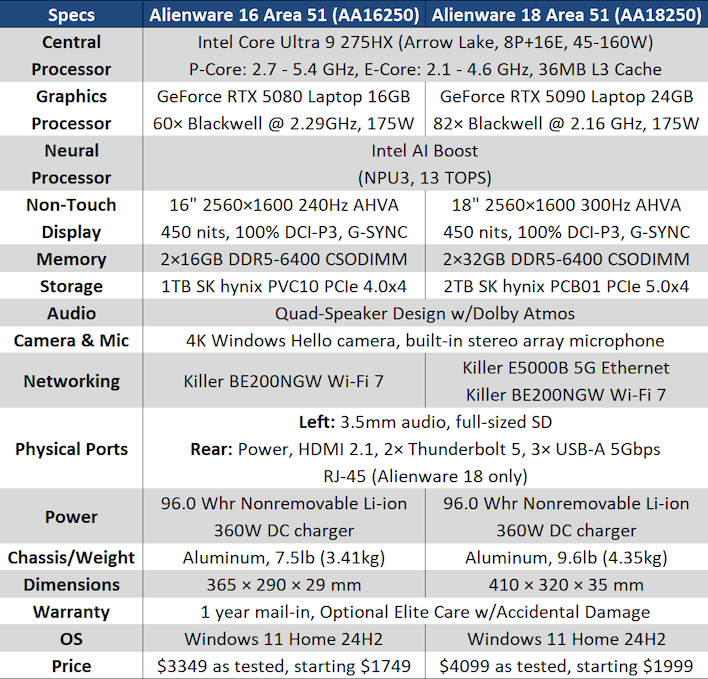
Both of the new machines are based around Intel's Arrow Lake-HX platform that ports the desktop Arrow Lake-S silicon over to a mobile form factor. The Core Ultra 9 275HX is a very close cousin to the desktop Core Ultra 9 285K, and they're in fine form in Dell's new machines. Arrow Lake is sensitive to memory performance, and Dell has chosen to outfit these systems with CSODIMMs, which are the mobile version of the hot-clocked CUDIMMs that feature a clock driver on each module to improve signal stability. Memory performance is good, as you'll see.
Other notable qualities from the specifications include a pair of high-end gaming displays driven by NVIDIA's latest GPU silicon. The smaller system gets the GeForce RTX 5080 Laptop GPU, while the bigger machine boasts the flagship GeForce RTX 5090 Laptop GPU—although you can actually get an RTX 5090 Laptop in the 16" model, too. The displays boast high refresh rates and 100% DCI-P3 coverage, although coverage may not be perfect; we'll talk more about that below.
Despite the somewhat retro aesthetics, every element of these machines is fully modern, with optional PCIe 5.0 storage, Thunderbolt 5 ports, 5-Gigabit Ethernet, Wi-Fi 7, and surprisingly svelte chargers given their 360 watt power ratings. The aluminum chassis are meaty and massive, but that serves a purpose in keeping the powerful cooling quiet, too. Actually, instead of talking about them, let's just have a look.
Alienware 16 & 18 Area-51 Design & Aesthetics

The two laptops are nearly identical in terms of both styling and features. The easiest way to tell them apart in photos is to look at the keyboards, which is where they differ the most. However, they are quite different in terms of size. Two inches plus two-and-a-half pounds might not sound like much, but the difference when using them is night and day. The Alienware 16 Area-51 feels similar to a regular laptop (albeit a beefy one), while the Alienware 18 Area-51 feels like you just unfolded a science-fiction suitcase computer.

Despite the outer shell being primarily anodized aluminum, the interior surfaces of the laptops are actually all a composite material. This is honestly preferable because it means that considerably less heat is transmitted into your hands while you're gaming. Despite that all of our photos depict the machines with teal lighting, you can in fact customize the color of all of the device's lighting in the Alienware Command Center.
Both machines have AHVA LCDs in 2560×1600 resolution, supplied by AU Optronics. Despite the name, AHVA is actually an IPS-like technology. The 16" Area-51 supports a 240-Hz refresh rate when powered by the discrete GPU, while the 18" system supports up to 300 Hz. Dell lists both panels with 500 nits peak brightness, but we weren't able to verify that; in our testing, they both topped out right around 450 nits.

Dell also lists both panels as being able to reproduce 100% of the DCI-P3 colorspace. Unfortunately, we couldn't verify this claim. We can say, however, that side by side versus an OLED panel it's clear the OLED provides deeper, more saturated colors and obviously better contrast. We hope Dell eventually offers an OLED option on these machines.
The rated response time on these panels is 3ms and while that's probably an exaggeration, the motion clarity is indeed quite good, at least for a screen without blur reduction (which no laptop has ever included, to our knowledge). These screens were clearly selected with an eye towards catering to hardcore competitive gamers, not those who prefer rich cinematic experiences. That's the decision we would have made for sure, although the lack of both 4K and OLED options in Dell's flagship gaming laptop model is peculiar.

This rear-angle photo gives the best view of the actual color of the laptops. It's a very interesting finish. The greenish teal color is only really visible in bright direct light or when looking directly at the laptops. Dell refers to it as "Liquid Teal." It's a very handsome look, although the contrast against the matte plastic of the rear part of the machines is a little awkward. The lighting accents back there help offset this contrast.
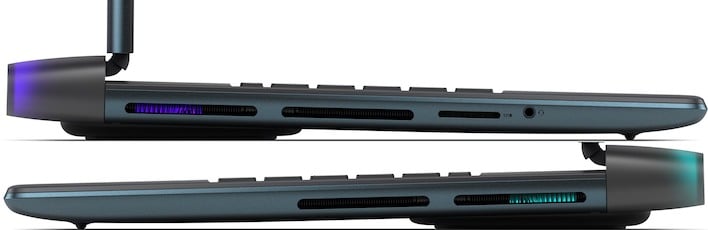
Aside from a full-sized SD card reader (UHS-II, not Express) and 3.5mm combo audio jack on the left side, all of the I/O for both machines is on the rear. This is really nice for desktop replacement-class systems where the massive laptop may take up the whole table or desk that you're using it on, so you don't want to have to sacrifice lateral space for USB plugs sticking out.


Flipping over the Alienware 16 Area-51 we see one of the more curious features of the system: a large Gorilla Glass window underneath allowing you to peer inside. You can see the cooling hardware of the system, and there's some lighting in there, but generally speaking it's not going to be visible when the machine is on. However, it does serve as an air intake thanks to a vent on the back side of the raised portion.

All it takes to get inside is to remove the eight screws holding the aluminum baseplate on, pop the clips around the edges with a spudger, and then push toward the front on the glass, releasing the bottom plate. 3/5 difficulty to open up, we'd say; nothing too bad for an experienced tech. Inside you have easy access to the three M.2 sockets as well as both DIMM slots, although obviously ours are populated. You can really appreciate how robust the cooling hardware is, with a large vapor chamber feeding heatsinks attached to four fans.

The underside of the Alienware 18 Area-51 is virtually identical to that of the 16, with the biggest difference being that the glass panel is not quite as wide. Ultimately there's still not much to see underneath either way, so it remains a peculiar feature of these systems. As before, unscrew the screws and pop the clips to remove the bottom casing.

The inside of the Alienware 18 Area-51 is arranged slightly differently from the 16, but not by much. The two memory modules are still center-left, and the three SSD slots are arranged the same way, with one in the bottom left and the other two to the right. This machine has its singular 2TB SSD installed in the "SSD-2" slot rather than the SSD 1 slot; that could be because it looks like the SSD-1 slot might slightly obstruct airflow into the largest of the blower fans. That's probably not a major concern, though.

Moving back over to the 16" system for a bit, here's a clear view of the keyboard layout. We're not wild about the lack of a dedicated "Print Screen" key, but it's mapped to Fn+F12 and works well enough. We're also not super keen on the massive Copilot key that is wasted if you're not actually using Copilot. The ability to remap this would go a long way toward assuaging our complaint, but there's currently no easy way to do so. For a relatively compact keyboard though, the layout is perfectly acceptable.

Unsurprisingly, the Alienware 18's keyboard is considerably larger, and includes a full numeric keypad. Also unsurprisingly, we like it better. It still doesn't have a dedicated PrtScr key, but the same workaround applies. The same complaint about the double-wide Copilot key carries over, too.

We should talk about the typing feel, because it's quite good on both of these machines. That's thanks to the integration of fully mechanical Cherry MX ultra-low profile keyswitches. This gives solid tactical feedback for keypresses on the keyboards, and yet it remains quiet and unobtrusive. This is an optional feature on both machines, but we wholeheartedly recommend the upgrade if you spend much time typing on your laptop.

Another point of contention with these machines is their weight. This is to be expected given their size and form factor, and it's the direct result of Dell building these systems for the absolute maximum gaming performance with no compromises. Still, it has to be pointed out that carrying around the Alienware 18 with its power adapter is about twelve pounds. That might not sound like much if you're a big guy, but try sticking three red bricks in your backpack and seeing how comfortable it is to lug that around all day. The Alienware 16 is slightly lighter, but these are both decidedly "portable" systems, not "mobile."
Now that you're acquainted, let's talk about the software included on these systems before getting into the benchmarks...