GeekBook X14 Pro Review: Geekom’s First Featherweight Alloy Laptop


| Geekom GeekBook X14 Pro: Starting At $1049 ($1249 As Tested) The Geekom GeekBook X14 Pro is highly portable, has a great OLED screen, and ample memory and storage, but its previous-gen processor hampers performance and battery life.
|
|||

|

|
||
Geekom is a well established name in the mini-PC market, and has earned quite a good reputation for the balance of performance, build quality, and value that its pint-sized PCs deliver. After successfully penetrating the mini-PC market, Geekom is now entering a new space and launching its first laptop. The new Geekom GeekBook X14 Pro we'll be showing you here today was announced just ahead of the New Year and trotted out at CES 2026. Geekom also launched a larger X16 Pro laptop, and outlined plans for more, updated laptops in the coming months.
Geekom made quite a few bold claims with the new GeekBook X14 Pro. Its marketing materials suggest it is “the world’s lightest all-metal laptop.” The compact CNC unibody magnesium alloy clamshell weighs just 2.2 pounds (999g) and measures only 0.23 inches (16.9 millimeters) at its thinnest point. Despite its slender frame, the systems still feature up to a potent Intel Core Ultra 9 processor with 32GB of RAM and a spacious 2TB SSD--which is the configuration we tested. Another highlight is the 2.8K OLED display, featuring a 120Hz refresh rate.
Geekom GeekBook X14 Pro Specs

Because Geekom is new to the laptop game, we're going to pay particular attention to the device’s physical build. It is also quizzical to see a Meteor Lake-based laptop released in 2026. Eerging Far-East system builders like Geekom often work with older chipsets to achieve low price points, while still offering compelling features.

Though it might be a couple of generations old at this point, the Meteor Lake processor powering the X14 Pro still has a respectable amount of horsepower. The Core Ultra 9 185H CPU which was inside our test machine features 6 P-Cores, 8 E-Cores, and 2 Low Power E-Cores. That's a total of 22 threads of computing power delivered by the CPU, which also has 24MB Smart Cache and boosts up to 5.1 GHz.
The Core Ultra 9 185H also packs an Arc Graphics iGPU with 8 Xe cores, operating at up to 2.35 GHz. An NPU is on board as well, which offers up to 11 TOPS of compute performance, which is obviously short of the 40 TOPS needed to make this an official Copilot+ PC, but the GeekBook X14 Pro does have a Copilot key on the keyboard anyway.
Geekom offers a great display option on the X14 Pro. The 14-inch OLED screen is excellent, but more on that later. The feel of Geekom's first laptop is also admirable. Its unibody magnesium alloy chassis offers a compelling mix of lightness and rigidity, with a unique texture that doesn't feel like a cold slab of metal. For reference, it felt more like my carbon fiber Dell Latitude 14-inch laptop than my all-aluminum Asus Zephyrus G16.
Design, Build Quality, Display, And I/O Expansion
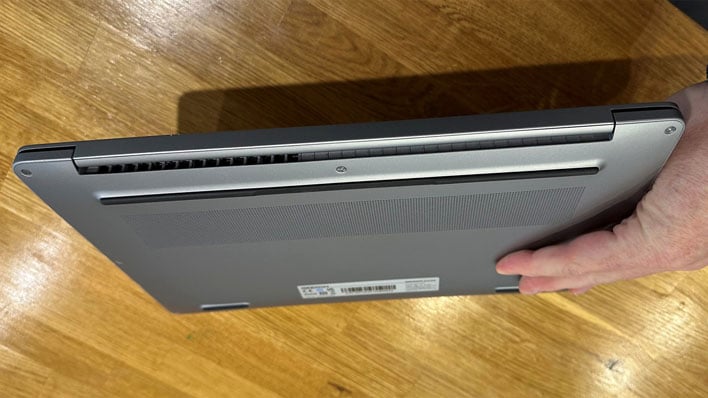
Geekom hopes to make an impact on the thin and light laptop market by offering one of the thinnest and lightest machines of its kind. I've looked around, and it does indeed seem to be the lightest 14-inch laptop with unibody construction. A handful of devices from LG, Fujitsu, and Panasonic are lighter, however, those machines don't feature unibody designs and mix stamped multi-panel metal, plastic, and carbon fiber construction. Furthermore, it is only the LG Gram series which seems to be available in the U.S.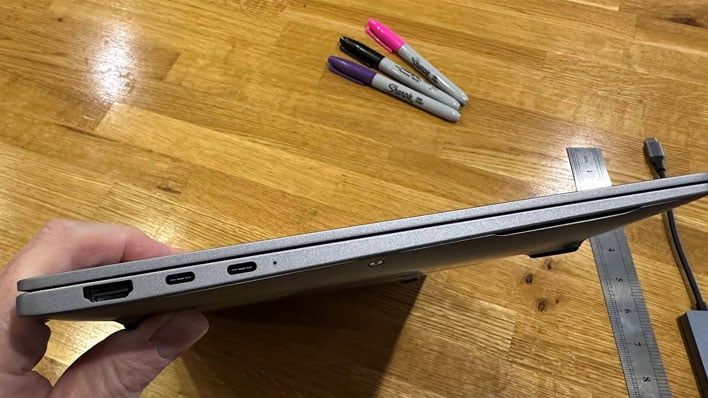
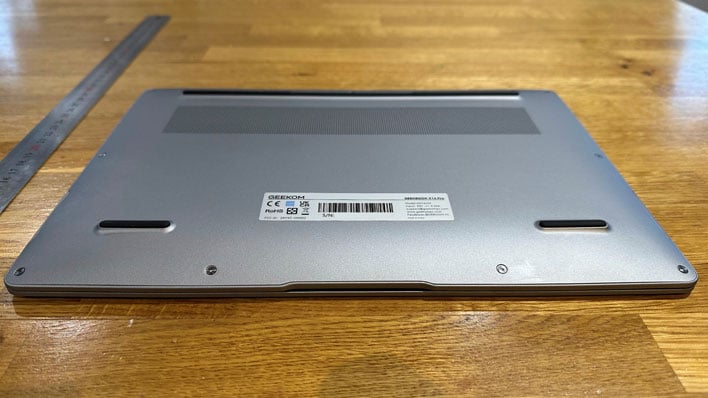
Despite its light weight, the GeekBook X14 Pro didn't feel unsubstantial. This 999g machine felt strong and rigid throughout testing. Pushing the keyboard frame and keys hard to check for flex, there wasn't anything to be concerned about. It held up well, only showing some springiness if pushed pretty hard in the center of the keyboard area.
There was one issue though. The GeekBook I received wouldn't site perfectly flat on the desk. I spoke to Geekom about this, and they had me check the rubber feet, and then put a little diagonal pressure on the chassis. Doing tihs, I managed to get it to even out just right, but Geekom's quality control loses some points for not noticing this wobble pre-shipping.
The design of the GeekBook X14 Pro will no doubt draw comparisons to the Apple MacBook Air. The popular Air is indeed a unibody design, but sadly for Apple aficionados, the aluminum unibody MacBook Air 13 is noticeably heavier at 1.24kg, even though it has a smaller screen. Apple hasn't brought OLED screens to its Air laptops, either.
On the topic of displays, Geekom's glossy OLED panel packs in 2,880 x 1,800 pixels. It offers vibrant and accurate colors, smooth animations, and looks great overall. Official specs claim that it covers 100% of the DCI-P3 gamut, and scales up to 450 nits of brightness. The performance of the OLED panel is great too. It offers up to a 120 Hz refresh rate, and OLED response times are typically one of the technology's greatest strengths, alongside the deep blacks they are renowned for.

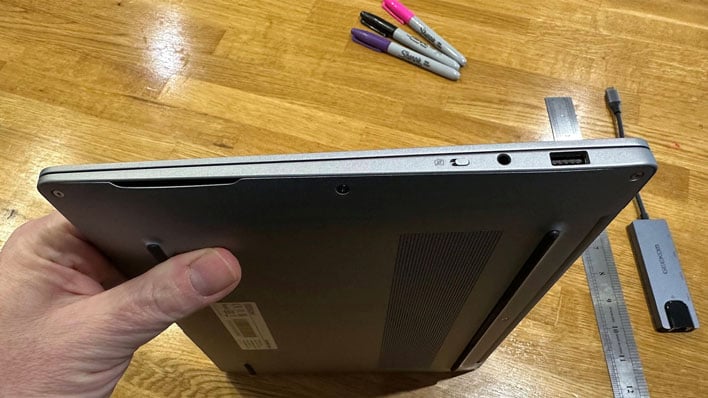
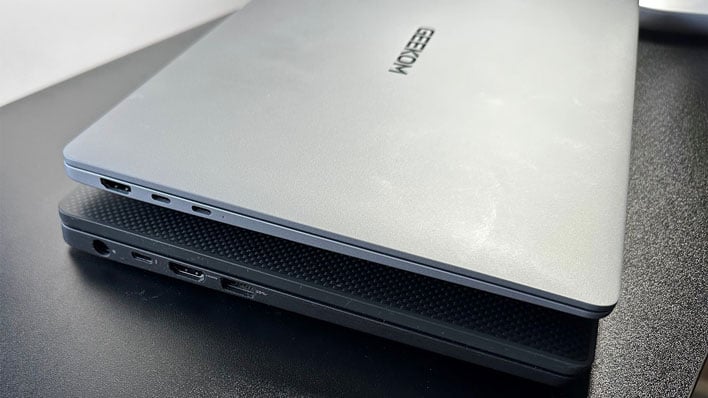
The port selection is more or less what you might expect on such a thin and light 14-inch machine. There is an HDMI port and two speedy, full-function USB4 ports to the left (USB-C). You have to use one of these for charging though, so it is nice that Geekom includes an official dock which adds a USB-C pass-through, another HDMI port, 2 x USB 3 Type-A ports, plus an Ethernet port.
To the right of the laptop, there's a USB 3 Type-A port, a 3.5mm audio combo jack, and a switch to toggle the webcam privacy shutter. It would have been much better to have a another USB-C port on this side of the laptop too, that could also handle charging.
I was happy with the GeekBook keyboard's feel and performance. The tile-like keys aren't cramped, nor arranged in a peculiar or unfamiliar way. The feel was quite snappy, with positive feedback. My Dell Latitude and ROG Zephyrus keyboards may offer greater key travel, but this one is still very good, considering it is smaller than those alternatives. Again, making a comparison with the MacBook Air (and Pro), with their 1.0mm key travel, the GeekBook's 1.2mm key travel and feedback is preferable. I tried a few MacBook keyboards and typing on them felt almost like I was drumming my fingers directly on a desk.
Another positive about the GeekBook's keyboard deck is that there are five levels of (white) backlighting. The Caps Lock and Function Lock keys have built-in indicator lights. A pre-installed system tool lets you decide the default status of the Function Lock key--which is handy if you prefer the shortcut keys for brightness, audio control, and so on by default. To the upper right of the keyboard deck, on the bezel, is the power button, which includes a responsive fingerprint reader for biometric security and convenience. Slightly less impressive was the touchpad. It uses a Mylar material, rather than glass, and could have been a bit larger, though responsiveness and accuracy was acceptable.
Geekom GeekBook X14 Pro Software Experience
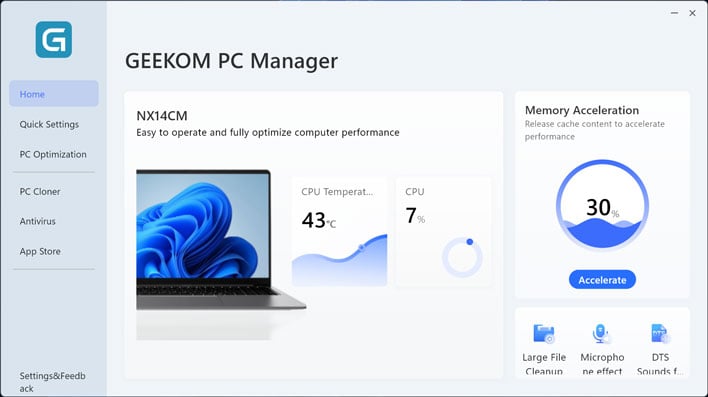
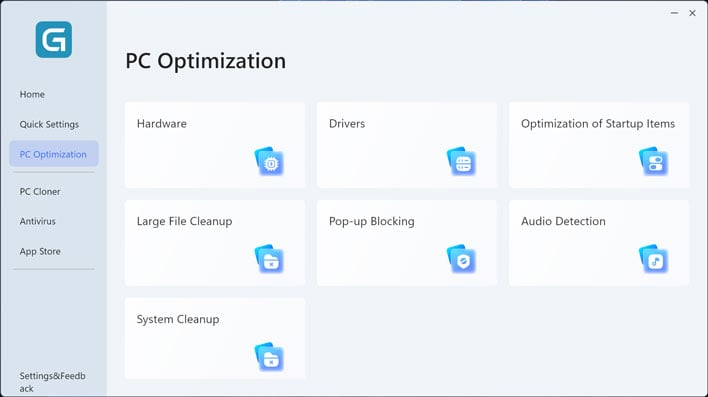
Geekom pre-installs control app called Geekom PC Manager on this laptop that has an extensive mix of features, but has some key omissions. The app has been updated twice since the laptop first arrived, but it could still use some refinement. For example, with the default, out-of-box Windows scaling option, some text in the app UI gets cropped or wraps awkwardly (see sample images).
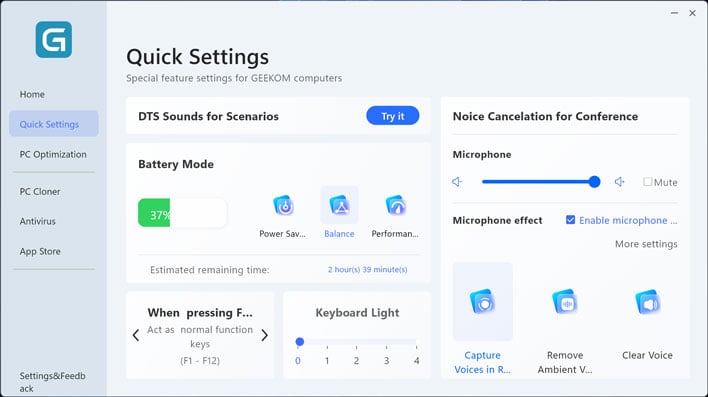
I had hoped that power and fan control would be available in the PC Manager app, but only found three levels of preset fan control. Among the system tools, the app offered PC cloning, antivirus, and an 'App Store'. The latter simply opened the Microsoft Store. Thankfully though, Geekom PC Manager was the only extra piece of software that came pre-installed. I didn't see any preloaded trials for third party apps and games, so Geekom scores some points for the lack of bloatware on the factory OS image.
And with all of that out of the way, let's do some testing and see how the Geekom GeekBook X14 Pro performs in a variety of benchmarks...