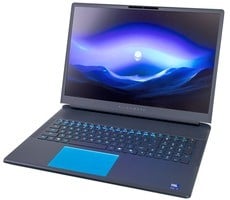
GeekBook X14 Pro Review: Geekom’s First Featherweight Alloy Laptop


When launched at CES a few weeks back, the GeekBook X14 rubbed elbows with all of the premium, new Intel Panther Lake and AMD Gorgon Point portables, but as mentioned earlier, this machine is powered by Intel's older Meteor Lake platform. But does everyone need the latest silicon? And if so, where does it matter most? We'll try to answer these questions next.
ATTO Disk Benchmark
We'll begin by checking the performance of the GeekBook X14 storage subsystem. The ATTO disk benchmark performs quick and dirty read/write and IOPS tests, using a variety of data chunk sizes. The X14 only has one M.2 storage slot inside, so one would hope the included drive is a good performer.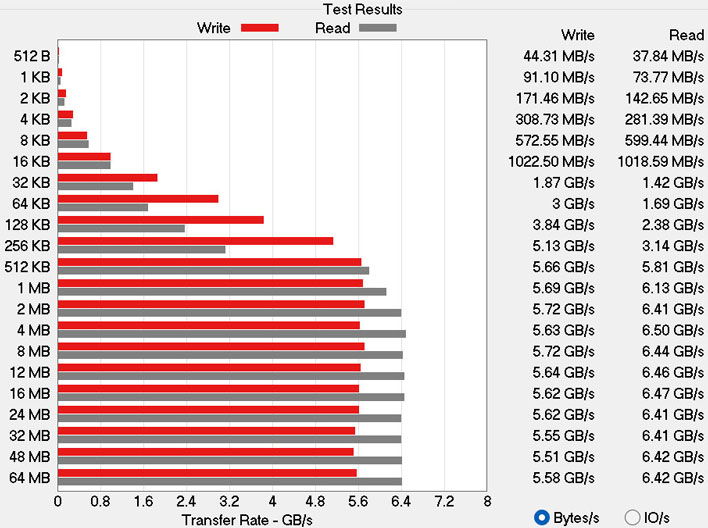
The GeekBook X14 Pro we tested included a generous 2TB SSD--the Crucial P310. The Crucial P310 is a gen 4 drive that isn't regarded as a performance champ, but sequential transfers look good and remained stable. It's a DRAM-less HMB-enabled TLC NAND SSD from Micron, and while not the fastest out there, we reckon it is a decent choice for storage in this class of machine.
Crucial advertises the P310 as offering transfer speeds of up to 7.10 GB/s. So, the pretty consistent real-world reads at around the 6.5 GB/s mark are very reasonable for a host OS drive.
Speedometer 3.0 Browser Benchmark
BrowserBench.org's Speedometer test provides a holistic measure of a device's ability to handle web applications. With the increasing popularity of web apps and their growing complexity, fast and responsive handling of such workloads is desirable for any PC. Speedometer automatically loads and runs a variety of sample web apps using the most popular web development frameworks around, including React, Angular, Ember.js, and even simple JavaScript. We always run this test in the latest version of Google Chrome.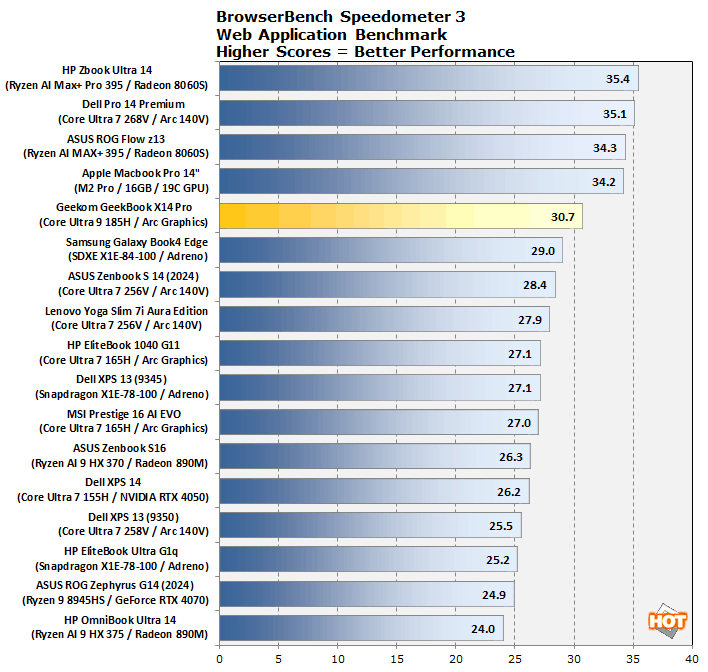
Maxon Cinebench 2024 3D Rendering Benchmark
Maxon's 3D rendering benchmark is based on its professional creative Cinema 4D application's rendering engine. This version of the benchmark is entirely CPU-based, and focused on single- and multicore CPU performance.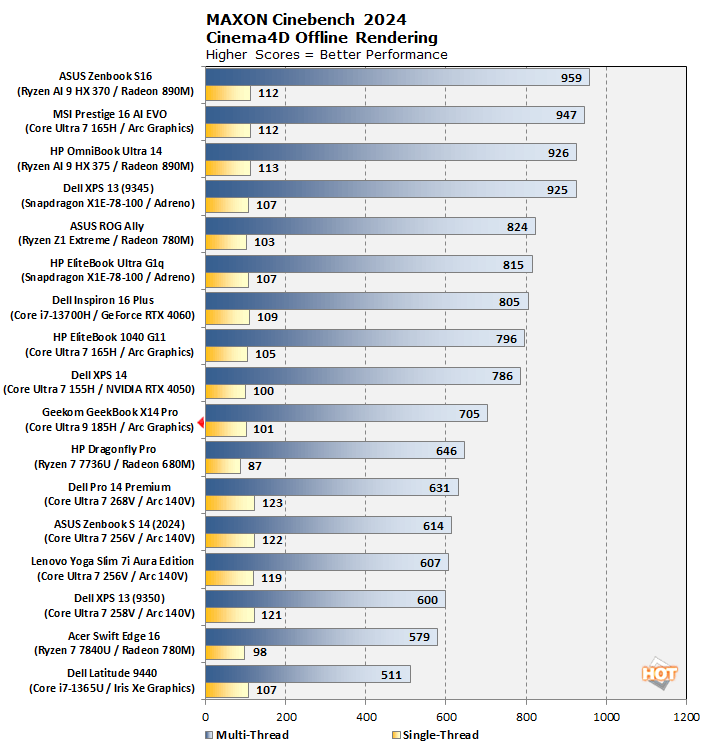
The GeekBook's single-core score of 101, and multicore score of 705 put it firmly in the middle of the pack. The 35W processor TDP limits the machine somewhat, compared to some devices which run the same Meteor Lake silicon at up to 45W. This decision to limit power is obviously influenced by the exceptionally thin and light chassis of the X14 Pro. On the other hand, even the best performer in our chart is only about 10% faster in single-core performance.
UL PCMark 10 Applications Benchmark
Countless students, home, and professional users spend hours in Microsoft's Office Suite every day, so the PCMark 10 Applications Benchmark is a particularly important one...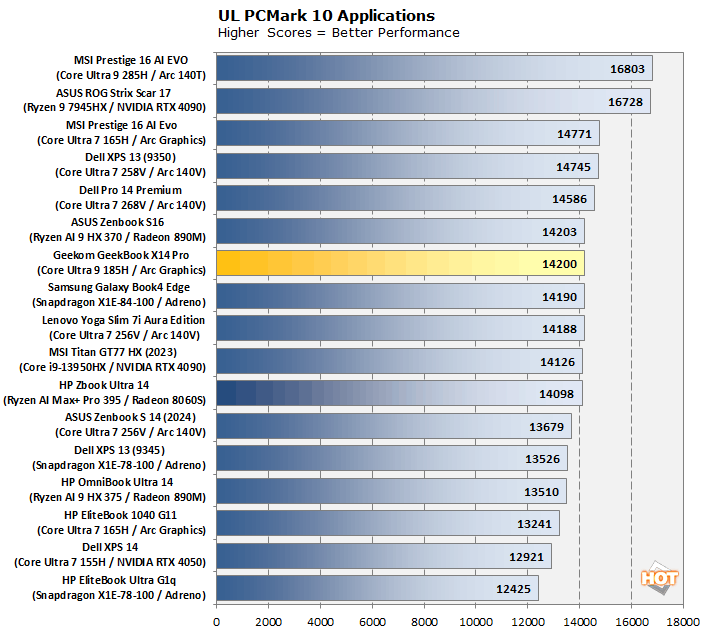
UL Procyon AI Computer Vision Benchmark
Intel's Meteor Lake was the company's first consumer processor with an integrated NPU for local AI workloads. This particular benchmark tests the performance of a processor in machine vision workloads, but can leverage the NPU, CPU, or GPU.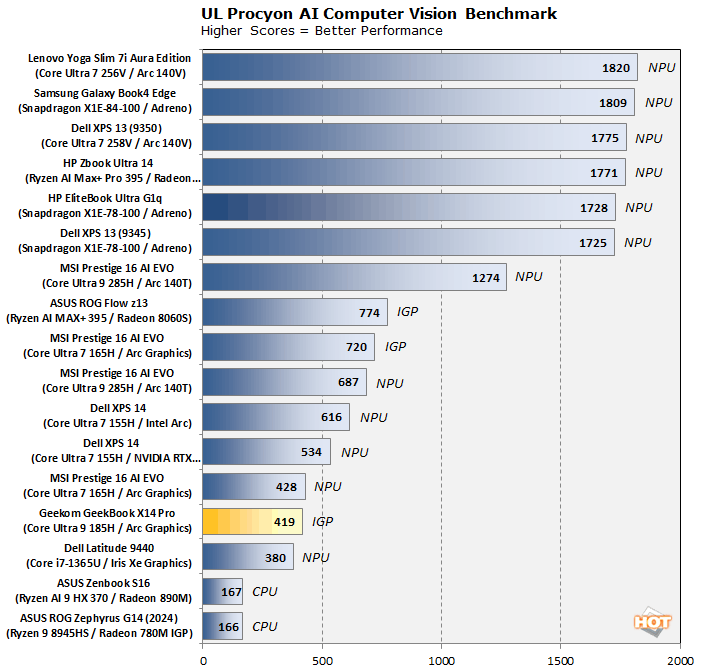
There are options in Procyon for using various frameworks, to test the CPU, IGP, or NPU. The X14 Pro's Core Ultra 9 185H's IGP was the best performer in these tests, which is why we put it in the chart, above. For reference, the NPU score was around 340. For completeness, I also tested the CPU, which scored 231 (all using Intel OpenVINO). The advantage of passing AI tasks to the NPU in this case, even though it's performance is lower, would be for improved power efficiency.
UL 3DMark Gaming Benchmarks
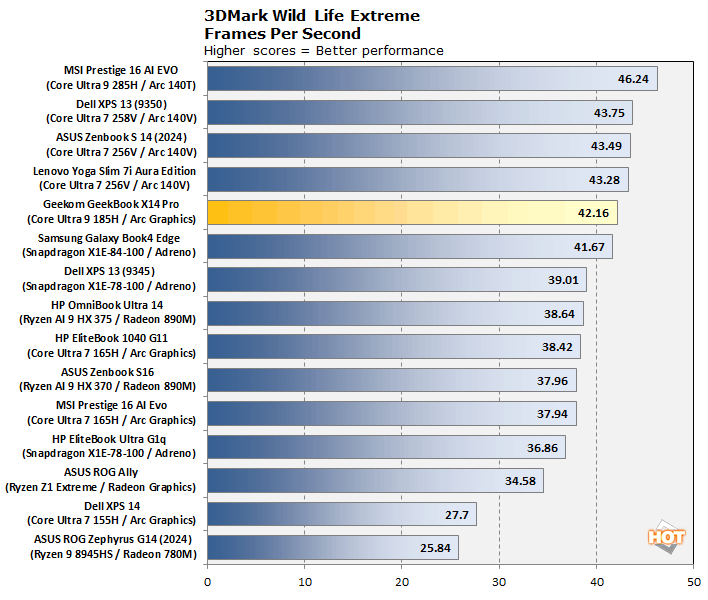
For thin and light laptops with integrated graphics, 3DMark Night Raid is a modern DirectX 12 test specifically for mobile platforms with iGPUs. Providing further perspective, we also ran the more-demanding, cross-platform Wild Life Extreme benchmark which utilizes more modern rendering techniques.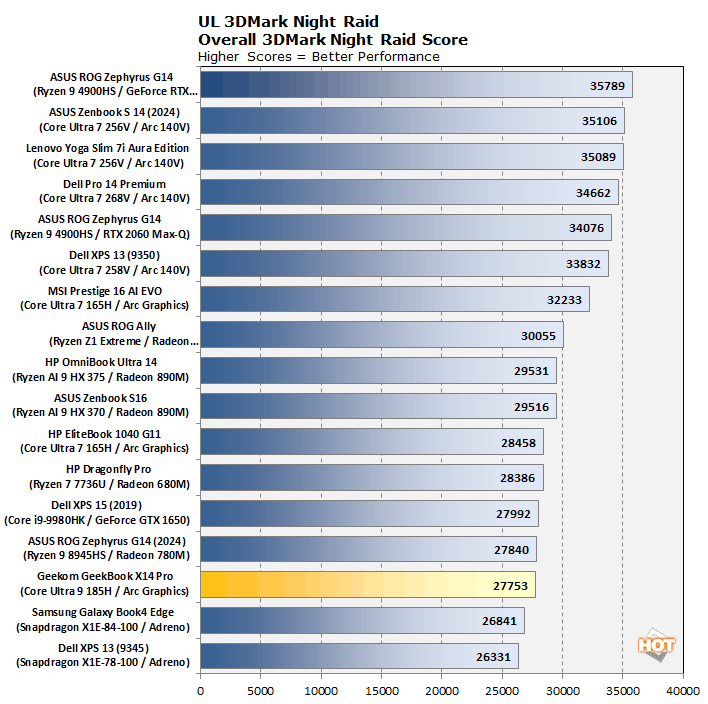
F1 2022 Formula 1 Racing Game Benchmark
We have found this AAA racing simulator to be sensitive to certain system configurations, and a bellwether game for real-world gaming performance across a wide range of other titles. The test is run using the high graphics preset at 1080p, without any upscaling technologies applied.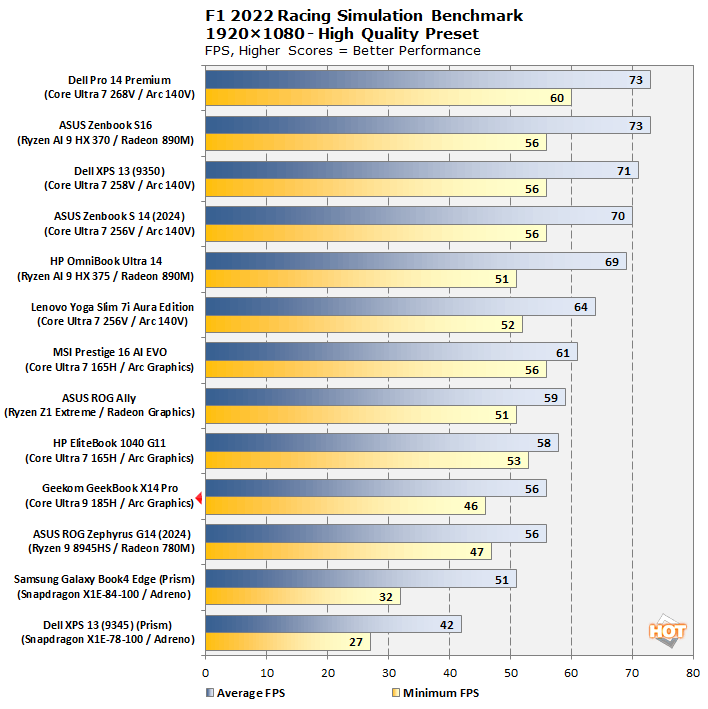
Here, the GeekBook does a decent job in handling this visually appealing game at 1080p. The action felt fluid and playable enough at an average 56FPS, with a palatable 45FPS minimum. If you'd like a 60FPS+ average in this game, it's completely possible by dialing back the image quality settings a bit.
Outside of benchmark testing, I also enjoyed a bit of gaming on the GeekBook X14 Pro with some older titles like The Division 2 (30-44FPS average), Far Cry 5 (50FPS average), and some other classics. While the X14 Pro is no gaming PC, it can still provide some gaming fun on the go, if you remember to stick to modest settings and less demanding titles.