Dell UltraSharp 52 Review: A Massive 6K IPS Black Monitor For Power Users

Dell's Combo Display And Dock Solution For Users Who Demand Big Screen Real Estate Impresses

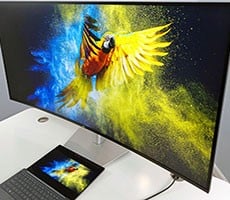
| Dell UltraSharp 52 Thunderbolt Hub Monitor $2899.99 (W/ Stand), $2799.99 (No Stand) The Dell UltraSharp 52 (U5226KW) is a massive, beautiful, gently curved Thunderbolt Hub-enabled monitor featuring a 6K2K resolution, 120Hz variable refresh rate and IPS Black panel technology. It's ideal for analysts, creators and productivity workers who need top-shelf color fidelity, a ton of high resolution screen real estate and total integration.
|
|||

|

 |
||
There is a point where adding more monitors to your desk stops being productive and starts becoming cumbersome. You're looking at more cables, more stands, mismatched panels, awkward bezels, and a creeping sense that your workspace has turned into an IT science project. With the Dell UltraSharp 52 Thunderbolt Hub Monitor (U5226KW), the company is making a clear and unapologetic statement: if your work revolves around dense multitasking, the answer might not be more monitors, it could one very large, color-accurate panel with a whole bunch of integrated functionality.
After spending quality time with this big beautiful monitor, that promise largely holds up, but let's dive deeper in my full detailed analysis.
What Is Dell UltraSharp 52's Physical Design And Desktop Reality

For a display this large, Dell has done a commendable job keeping things practical, rather than ostentatious.
What Are Dell UltraSharp 52 (U5226KW) Key Specs & Features
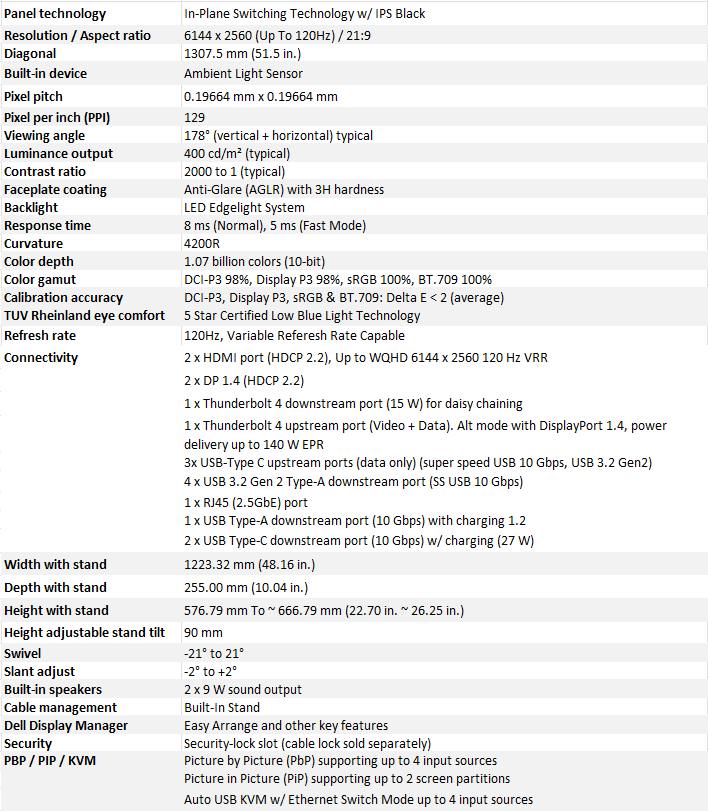
Find The Dell UltraSharp 52 Thunderbolt Hub Monitor, $2899.99 @ Dell.com
Power consumption is sensible for a panel of this size, with typical usage hovering in the mid-60-watt range, though heavier brightness and connectivity loads will naturally push that higher.
What Is Dell's UltraSharp 52 Resolution, IPS Black Tech And Image Quality Really Like

The headline specification here is the U52's 6144×2560 resolution, which stretches across the panel at 129 pixels per inch. That density turns out to be just about ideal at this size. Text remains sharp, UI elements look clean, and there is no sense of pixelation even when sitting closer than you probably should to a 52-inch display.
IPS Black technology is where the UltraSharp 52 really differentiates itself from more generic ultrawides. With a contrast ratio rated at 2000:1—roughly double that of most IPS panels—the display delivers noticeably deeper blacks and stronger perceived depth. It doesn't approach OLED-level contrast, but for a creation and productivity-focused IPS panel, the improvement is immediately visible, especially in darker themes and shadow-heavy content. Color performance is equally strong. Full sRGB coverage, 99% DCI-P3 / Display P3 coverage, and solid factory calibration make this a trustworthy panel for color-sensitive work.

In day-to-day use, colors look accurate without appearing oversaturated, which is exactly what you want from a monitor that may spend its morning in spreadsheets and its afternoon in a video timeline.

Peak brightness lands at around 400 nits, which is more than sufficient for office and home environments, though High Dynamic Range capability is not on offer here, unfortunately.

Viewing angles are excellent, and while uniformity challenges are inevitable on a panel this massive, our unit avoided any distracting backlight bleed or major inconsistencies.
Here's Dell's U5226KW Refresh Rate And Eye Creature Comforts

Can You Game On The Dell UltraSharp 52? Of Course
The UltraSharp 52 Thunderbolt Hub Monitor isn’t a gaming targeted monitor per se—but for gaming, at 120Hz and using the panel’s Fast setting, you get a 5 millisecond gray-to-gray response time, which is good enough for all but hardcore enthusiasts or eSports gamers.
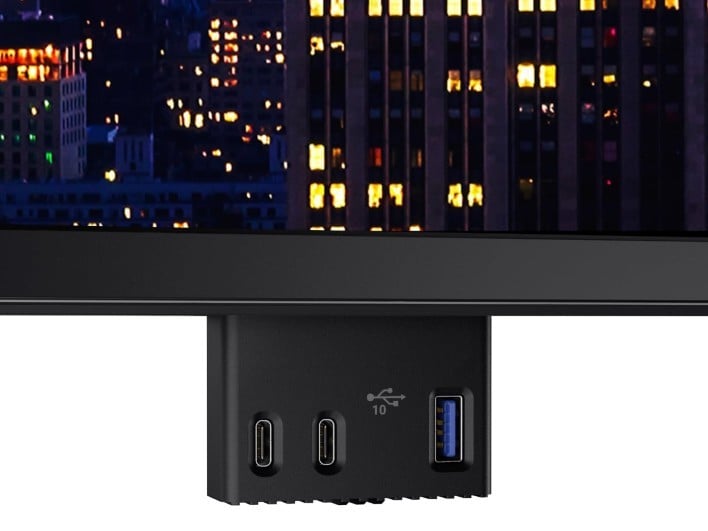
Here's The IO Connectivity And Thunderbolt Hub Capabilities Dell's U52 Brings


What's Multitasking, KVM, And Workspace Control Like With Dell's UltraSharp 52
If the UltraSharp 52 has a defining strength, it is how well it handles complex multitasking. Picture-by-Picture support allows the display to be divided into multiple functional zones, and the integrated KVM—paired with automatic switching—makes it easy to juggle two systems without turning your desk into a peripheral nightmare. One keyboard and mouse can fluidly control multiple machines, which is invaluable for hybrid workers, developers, and anyone running parallel environments.

Dell Display And Peripheral Manager rounds out the experience with mature, well-executed software. Saved window layouts, intelligent tiling, and automatic workspace restoration may not sound exciting, but once you dial in a config that's most optimal for you, it's a bit of a game changer. Dell’s class-leading experience in enterprise display management clearly shows here.
What Are Our Final Thoughts And Review Analysis Of The Dell U5226KW?

Between its expansive 6K ultrawide resolution, IPS Black image quality and color accuracy, smooth 120Hz variable refresh rate, thoughtful low blue light eye-comfort features, and genuinely useful docking capabilities, this is one of the most compelling productivity displays Dell has ever built.
At $2,899.99 (with stand), it demands a serious investment. But for professionals whose workflows genuinely benefit from this level of screen real estate and integration, the Dell UltraSharp 52 delivers on its ambition—and earns its place on a professional, creator or productivity maven's desktop that can accommodate such abundance and a plethora of features.