Dell 16 Plus 2-in-1 Review: Mini-LED In A Big Convertible Laptop


| Dell 16 Plus 2-In-1: $1,449 As Configured (On Sale For $1,199) Intel's latest mobile platform and a large 16-inch display that rotates a full 360-degrees make the Dell 16 Plus an interesting 2-in-1 with powerful compute resources under its hood.
|
|||

|

|
||
Although the form factor can be a bit unwieldy in some configurations, there's a lot to like about a larger 2-in-1 laptop with a touchscreen that can rotate a full 360 degrees. The Dell 16 Plus 2-in-1 can be used as a laptop or tablet, with plenty of screen real estate to get work done, do some casual gaming, or just enjoy your favorite content. Trying to design a jack-of-all-trades type device like this required Dell to make some specific concessions, however, and that’s where users have to decide what’s most important for their particular use case.
Powered by an Intel Core Ultra 7 Lunar Lake processor with a low-power NPU and integrated Arc graphics, the internals of this machine have enough oomph to push through just about any task. In this review, we'll put the Dell 16 Plus 2-in-1 through its paces, find out how this machine stacks up to an array of competitive devices and diver deeper into its design aesthetics and user experience.
Dell 16 Plus 2-in-1: Specifications And Features

The Dell 16 Plus 2-in-1 sits in an interesting place in Dell’s lineup. It melds the large-screen, productivity focus of the older Inspiron 16 Plus and adds a 360-degree hinge to give it a tablet-capable form factor. That’s where its “2-in-1” designation comes in.
In terms of its specifications, this is a premium device with a modern Intel Core Ultra processor, integrated Arc graphics, and a 16-inch touchscreen available in both standard IPS and a brighter, more striking mini-LED version, which is what we tested. This devices tries to straddle the line between a creative workstation and a media-ready hybrid 2-in-1, though some trade-offs are part of the equation here as well.
Dell 16 Plus 2-in-1 Build Quality
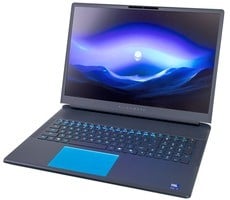
The Dell 16 Plus 2-in-1 is based on a new chassis that feels solid and has an understated aesthetic. Though thinner and somewhat lighter than Dell’s older Inspiron 16 Plus, it undoubtedly remains a large and relatively heavy convertible machine at 4.52 lbs. It’s got a sturdy hinge that keeps the screen stable regardless of its setup or orientation and other solid features well.

Like any convertible device, the display has to be a major consideration, and the mini-LED version we tested is certainly a crowd pleaser. Brightness is middling at a peak of 300 nits, but it’s still a very acceptable number for a panel this size. The display also has excellent contrast and good HDR output, even if it lacks the HDR True Black 500 certification of some OLED panels.


In a way, the Dell 16 Plus 2-in-1 presents a catch-22. The sharp display and vivid colors make watching content or working on media production enjoyable, but the larger form factor isn’t always conducive to utilizing it as a media-consumption tablet. It works with any stylus for input (though one doesn’t come in the box), and while the larger canvas can be fun to use, it can get a bit unwieldy due to its sheer size. Try to hold it one-handed for reading, sketching, or photo editing and you’re quickly reminded that this is a laptop first, with the capability to function as a tablet.
The display's 90Hz refresh rate is acceptable, though not as fast as some other devices in this class. It does make for fairly smooth animations, though, and you can play some games on the Dell 16 Plus 2-in-1, though this is decidedly not a gaming systems. The platform has enough horsepower for some casual gaming, and Intel has made great strides with its GPU drivers, but this system is designed for productivity and creators first and foremost.
The display's 90Hz refresh rate is acceptable, though not as fast as some other devices in this class. It does make for fairly smooth animations, though, and you can play some games on the Dell 16 Plus 2-in-1, though this is decidedly not a gaming systems. The platform has enough horsepower for some casual gaming, and Intel has made great strides with its GPU drivers, but this system is designed for productivity and creators first and foremost.

The full-sized keyboard was clearly designed with productivity in mind, with well-spaced keys and ample travel. The trackpad is spacious and highly responsive too, but it doesn’t have any haptic feedback, so clicking on it doesn’t feel quite the same as some other premium laptops.


In terms of IO, you get a USB-C Thunderbolt 4, USB-C 3.2 , and HDMI 2.1 ports on the left side, along with USB-A 3.2 and headphone jack on the right. Unfortunately, there’s no memory card slot, despite the larger form factor, which does feel like an odd omission for a convertible device that caters to creators.
Dell 16 Plus 2-in-1: Dell Software And Updates
Dell didn't saddle the 16 Plus 2-in-1 with tons of bloatware, though some pesky pop-ups and update reminders did emerge. The Dell SupportAssist software acts as a complement to Windows Update and gives users the ability to run diagnostics tests, perform regular maintenance, update drivers, and otherwise troubleshoot issues with the hardware in the machine.
Not everything in SupportAssist is free, however. Certain features, like Dell Migrate and antivirus protection, either require a Dell service plan or incur a one-time fee that can differ depending on the region you're in. The basic diagnostics are included, and there's enough granularity to help troubleshoot basic issues without getting tech support involved, and for less tech-savvy users, the steps are clearly laid out and fairly automated, which is good to see.

The Virtual Assistant chatbot is a recent addition that will come in handy for many users. Ask questions about setting or describe problems, and the chatbot will try to narrow down any issues by process of elimination, through asking various questions. For example, it may ask if the laptop suffered any physical damage or if peripherals are connected to it. If there are outstanding updates, it will pull them down from Dell servers and install them on the spot, then run a diagnostic to see if that resolves the issue. This software feature is pretty neat, but clearly aimed at users who may not know their own way around a PC.
Let's fire-up the machine and run it through our benchmark track test, next...
Let's fire-up the machine and run it through our benchmark track test, next...