



NVIDIA DLSS 4.5 Benchmarked Across GeForce RTX 50, 40 And 30 GPUs


We're going to take a look at those another time, but we heard an interesting report regarding DLSS 4.5 Super Resolution this morning, and we wanted to check it out for ourselves. The story goes like this: DLSS 4.5 introduces a new second-generation Transformer model for the AI-based super resolution function of the suite. This new model offers radically improved visual quality, even over the excellent DLSS 4, along several axes, including reduced ghosting, improved anti-aliasing, and in general less artifacting, especially when upscaling from smaller internal resolutions.

This is due to several changes not only in the models but also in how they are used. With DLSS, upscaling is supposed to be performed before final tonemapping, but not every game respected this. Fixing this issue results in much more accurate lighting responses in some areas, particularly those showing detailed specular highlights. Fine lighting detail should be represented more faithfully, and areas of high contrast are less diminished. This also results in a large improvement in the rendering of particles, which are much brighter and more vibrant now; more similar to native rendering, rather than the dimmed appearance they had before.

These are excellent steps forward, but the interesting report that we heard was that the new model has a particularly significant performance impact on older GeForce RTX 20 and RTX 30-series graphics cards. Many GeForce gamers have been told to set the "DLSS Override" in the NVIDIA App to "Latest." However, doing so could potentially result in a bigger than expected performance hit after the driver update, causing gamers to blame the new driver.

We wanted to test this ourselves, so we cranked up our trusty test bed and loaded up Cyberpunk 2077, everyone's favorite benchmark. Since we were explicitly testing the performance of DLSS upscaling, the built-in benchmark works just fine. We used NVIDIA Profile Inspector to manually toggle the DLSS presets as the new DLSS 4.5 presets L and M were not appearing in the NVIDIA App for us despite being on the beta version. Strictly speaking, the new presets don't drop for everyone until January 13th.
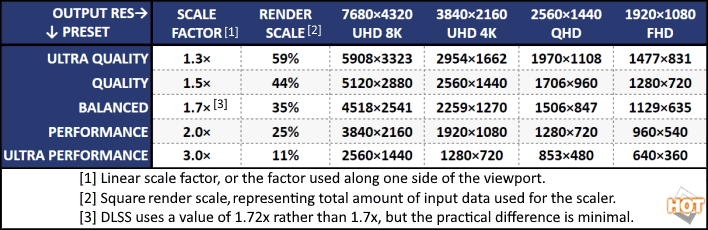
Valid for DLSS and FSR. Note that XeSS 1.3 and later use higher scaling factors (lower resolutions.)
However, swapping the profiles was definitely working, as the difference was plain to see. Presets L and M are both immediately and noticeably more attractive to the eyes than the older model, which we already thought looked fantastic. Fine details resolve more clearly, artifacts are nowhere to be seen, and even when using Performance upscaling (which uses a 25% render scale, or 1/4 the number of pixels), everything looks razor sharp and perfectly clear. Good stuff.
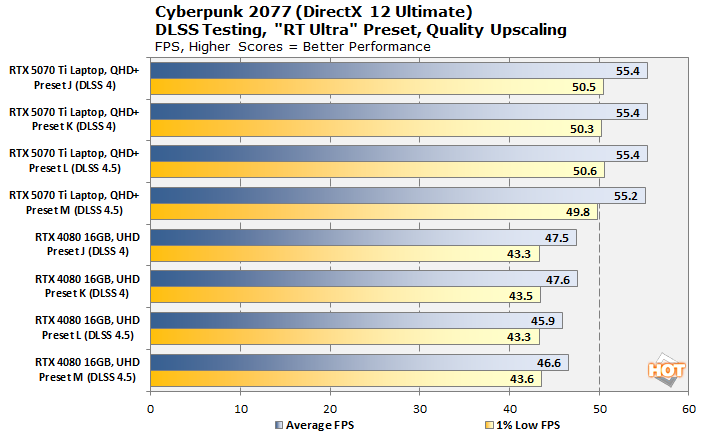
To establish a baseline, we first tested the game on Blackwell and Ada Lovelace. Because I didn't have a desktop Blackwell GPU on hand, I used a laptop with a GeForce RTX 5070 Ti 12GB card (ASUS ROG Strix G16) to test Blackwell, and then used the desktop GeForce RTX 4080 to test Ada Lovelace. Changing models affects performance slightly with Ada Lovelace, but the effect is extremely minimal on the powerful RTX 4080. So what about older GPUs, then?
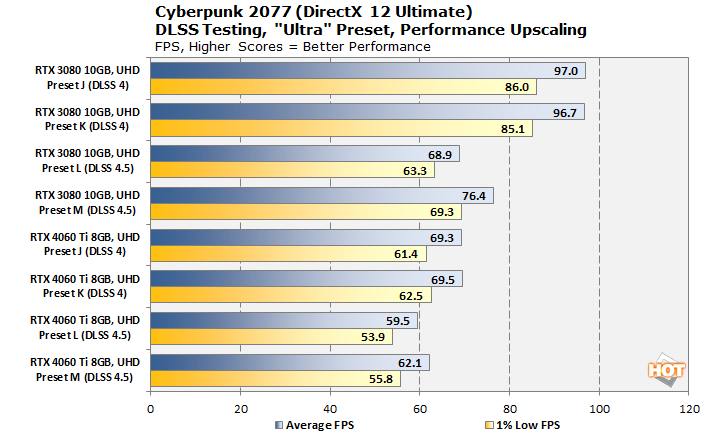
Well, that's a bit more conclusive. The much smaller GeForce RTX 4060 Ti 8GB card does see a larger performance hit when moving to DLSS 4.5; as large as 15% when changing from Preset K to Preset L. 59.5 FPS is still fully playable, and the difference in quality is plain to see, but it's certainly a trade-off.
It's the GeForce RTX 3080 that tells the real story, of course. Note that all of these tests are using Transformer-based DLSS; the game looks pretty good at any of these settings. However, the performance delta between DLSS 4 and DLSS 4.5 on Ampere is very large. In particular, the "L" preset, which NVIDIA says is intended to be used for "Ultra Performance" upscaling, causes a massive hit to frame rates versus the previous generation. I don't have a Turing GPU on hand to test, but I suspect it would be even bigger.
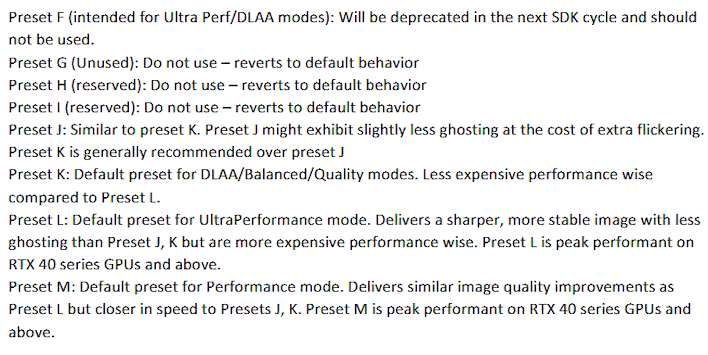
Where does NVIDIA say what the presets are for? Why, in the DLSS Programming Guide, which you can find on GitHub. We've screen-shotted the relevant section above. All of the CNN versions of DLSS are now considered deprecated, and all but one have been removed from the NVIDIA Neural Graphics Extension (NGX) SDK. Now, the only valid presets are J, K, L, and M; the former pair are DLSS 4 transformer models, and the latter pair are DLSS 4.5 second-gen transformer models.
You'll note that NVIDIA says Preset L and Preset M are "peak performant on RTX 40 series GPUs and above." What quality do the Ada Lovelace and Blackwell GPUs have that the older cards don't? Well, lots, actually, including specific tensor-core tuning for transformer models—but the most likely critical change is native support for the FP8 data type.

Right here in the slides, NVIDIA notes that the second-generation transformer model used for DLSS 4.5 Super Resolution is "FP8 Accelerated." That's exactly why it runs less optimally on the older GPUs; it requires at least twice as many cycles to do the same thing on an Ampere or Turing GPU as it would on an Ada Lovelace or Blackwell chip because the data has to be "dequantized" to FP16 first.
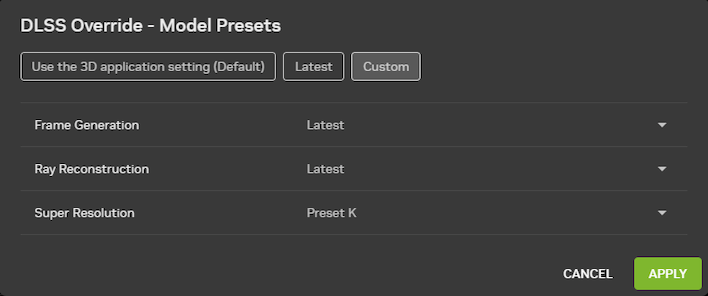
Users on GeForce RTX 20 and 30 series GPUs may want to consider this configuration.
So, great; DLSS 4.5 is tough for older-generation GPUs to handle. What does this mean to you, if you have one of these cards? Well, if you're performance-conscious, don't use the default "Latest" override in the NVIDIA App. Instead, under "DLSS Override - Model Presets," click "Custom" and change the "Super Resolution" preset to "Preset K." That will revert you back to the previous DLSS 4 Super Resolution model. It's an easy workaround, if you want to call it that.
Make sure to check out our chat with Justin Walker, Head of GeForce at NVIDIA!
With that said, if your game runs fine with the newer model, go for it — it absolutely offers superior image quality, so you have a little bit of a choice to make. Indeed, we'd probably recommend setting this on a game-by-game basis, rather than picking one option globally. Of course, if you have a newer RTX 40 or RTX 50-series GPU, you can happily set it to "Latest" and go on about your merry way.





