Crucial X10 SSD Review: Fast, Rugged, Pocket-Sized Storage

Crucial's X10 Portable SSD Sets A High-Bar For Compact USB External Storage

| Crucial X10 Portable SSD (2TB): MSRP - $239, Sale Price - $209 The Crucial X10 is a rugged, dust and water-resistant external USB SSD, that offers excellent performance in a compact package.
|
|||

|

|
||
External storage is a key enabler for a wide variety of use cases and workloads. Whether using it for backup purposes, portability of frequently required data, recording from a modern camera, or just expanding the storage on a device with limited internal capacity, external storage may fit the bill. The Crucial X10 portable SSD we’ll be looking at today ticks all of the right boxes to address all of those use cases, and then some. This compact external USB drive is fast, rugged, durable, and available in high capacities. It’s also compatible with a broad range of devices, from game consoles and smartphones, to modern mirrorless cameras and PCs.

Crucial X10 Portable SSD Specs & Features
|
|
Micron offers the Crucial X10 in multiple capacities, ranging from 1TB on up to a beefy 8TB – we’ve got 2TB model on hand here. The drives feature a USB 3.2 Gen2 2x2 20Gbos interface (USB Type-C connector) and are outfitted with a proprietary Micron controller and NAND flash memory.
Micron rates the drives for transfer speeds up to 2,100MB/s reads and writes, which puts performance well ahead of any SATA-based external hard drives (or SSDs), but not on the level of some faster USB 4 or Thunderbolt-based external storage solutions.

Inspecting The Crucial X10 Portable SSD
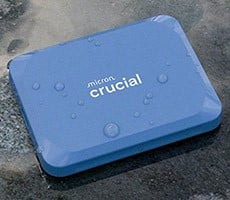
The Crucial X10’s enclosure measures a little less than 2.5” x 2” x .5”, with rounded edges all around, and consists entirely of a plastic composite material. That’s much smaller than popular drives like Samsung’s T5 or T7, and thinner and less wide than something like the ADATA SE880.At one end of the drive, there is a single USB Type-C connection and at the opposite end there’s a hole for a lanyard or other tether. The top of the drive carries the Crucial X10 branding, while the bottom shows the capacity, serial number information, and various certification badges.

The Crucial X10 has a clean look and feels durable in the hand, though it is very lightweight at only 32g. The enclosure also provides some level of shock resistance and the drive has a IP65 rating for dust and water resistance. Micron actually claims a drop resistance of 9.8’ (3 meters).
Included with the Crucial X10 is some basic documentation and a 9” USB Type-C to Type-C cable. It could be nice to have a USB-A to USB-C cable included as well, but a USB 3.2 Gen2 2x2 port – which is required for maximum performance – will likely have a Type-C connector anyway.

The Crucial X10 is also compatible with the company’s Storage Executive software, which can be used for drive maintenance, firmware updates, and the like. And the drives are warrantied for 3-years.

Crucial X10 Portable SSD Performance
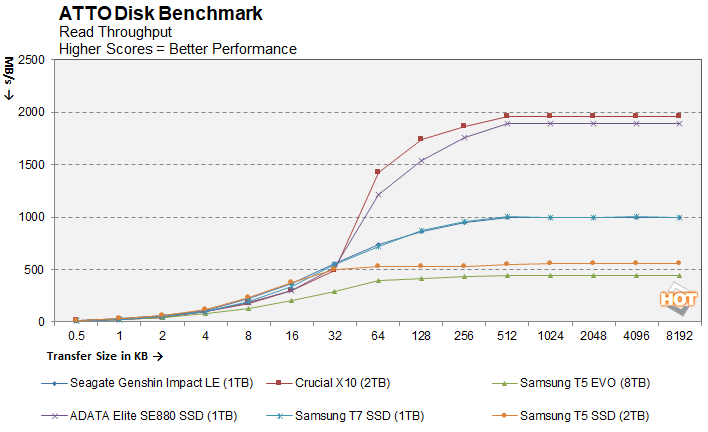
In order to test the performance of the Crucial X10, we enlisted the help of some straightforward benchmarks. First up is ATTO, a disk benchmark that measures sequential transfer speeds across a specific volume length with various block sizes. It measures transfer rates for both reads and writes and graphs them out in an easily interpreted chart. ATTO's workloads are sequential in nature and measure bandwidth, rather than I/O response time, access latency, etc.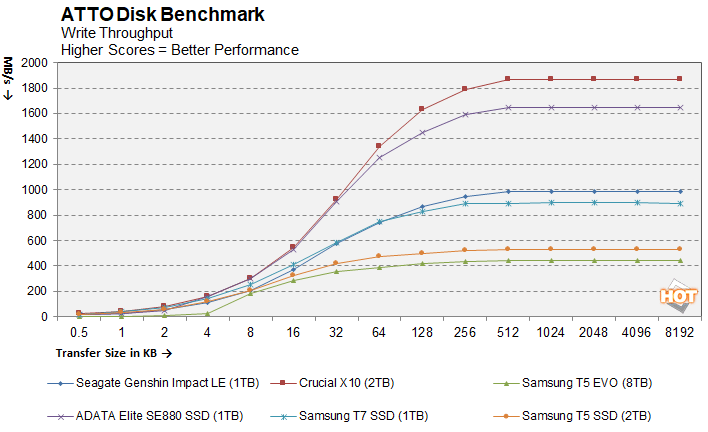
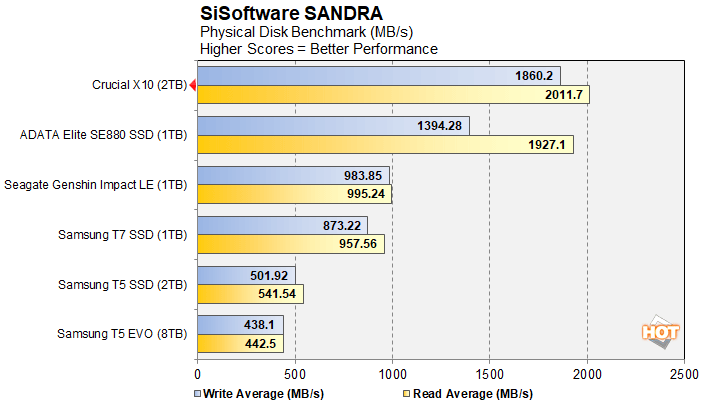
Next up are some numbers with SiSoft SANDRA, the the System ANalyzer, Diagnostic and Reporting Assistant. Here, we used the Physical Disk test suite and provide the results from our comparison SSDs...
CrystalDiskMark is a synthetic benchmark that tests both sequential and random small and mid-sized file transfers using incompressible data. It provides a quick look at best and worst case scenarios with regard to SSD performance, best case being larger sequential transfers and worse case being small, random transfers.
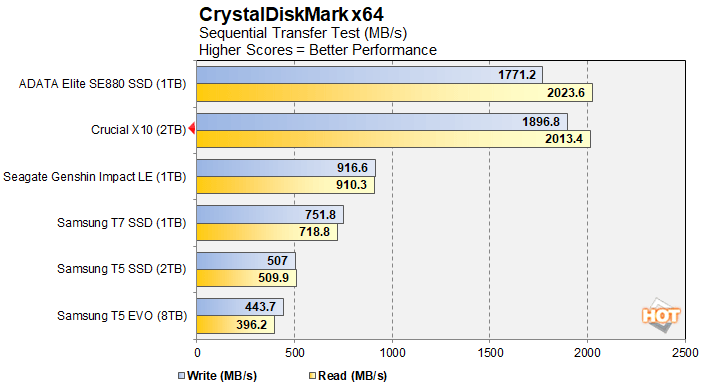
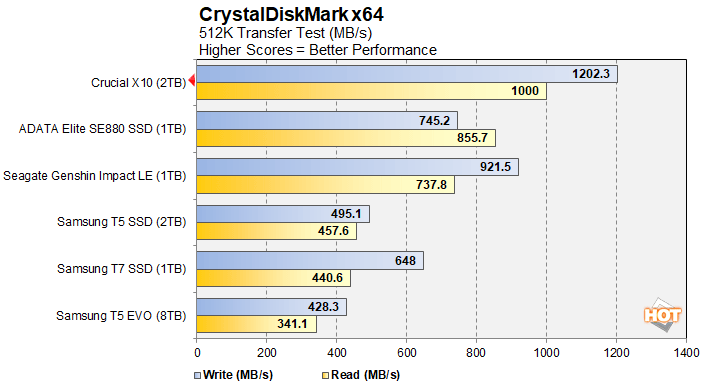
CrystalDiskMark's sequential tests had the Crucial X10 trading blows with the SE880 in the large sequential test, with the Crucial drive offering better write speeds and only slightly lower reads. In the 512MB test, however, the Crucial drive led by a wide margin.
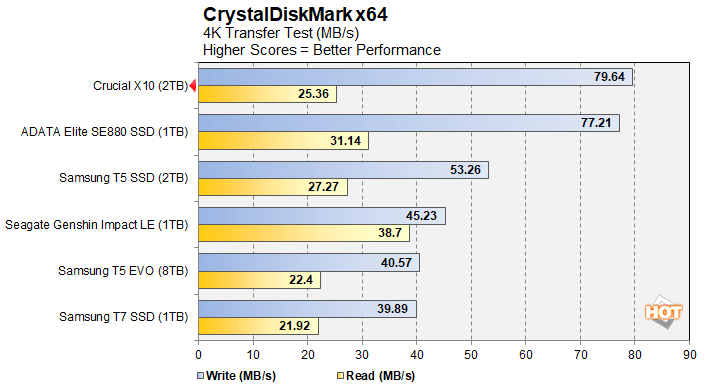
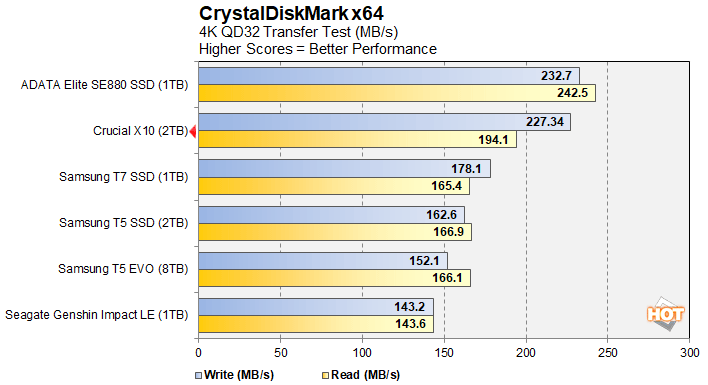
The 4K transfer tests favored the ADATA SE880 overall. The X10 had faster writes at QD1, but trailed in the read test. At QD32, however, the SE880 took the lead. We'd argue that the QD1 test is the more important one for consumer workloads, though.
Crucial X10 Portable SSD: Our Conclusion
The Crucial X10 is an excellent portable SSD. The drive gets high praise in all of the right areas – it’s compact, rugged and durable, compatible with virtually any modern device with a USB-C port, available in a variety of capacities, and performance is very good. Of course, you’ll need a system with a USB 3.2 2x2 or USB 4 port to get the most out of the X10, but using the right interface is a requirement for top performance of any external SSD. It’ll still work on slower USB ports; it just won’t be as fast.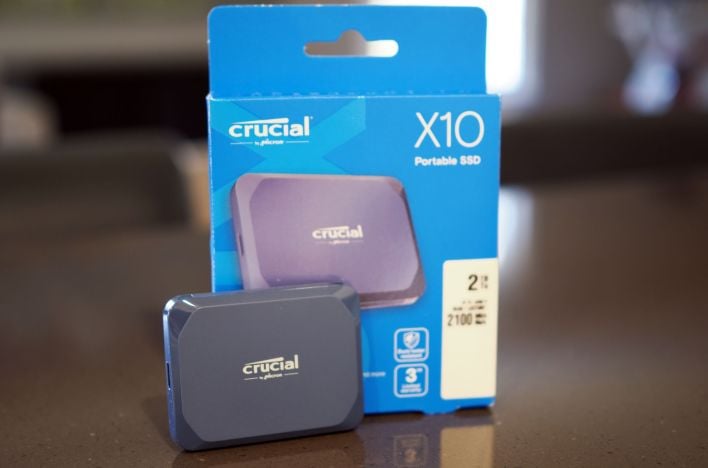
We tested the Crucial X10 on a wide variety of devices and it always “just worked”. We bring this up, because that is not always the case when building your own external storage with USB enclosures and M.2 SSDs. We tried the X10 on a Samsung Galaxy X25, a myriad of desktop and laptop PCs, and a Panasonic G9 II mirrorless camera, without issue. What’s great about a drive this performant and small, is that it fits just about anywhere. One of the handier use cases we found was recording directly from the camera to the X10, then plugging the X10 into our smartphone to inspect images and video footage on its much bigger screen (and better speakers). If you’ve ever tried to watch and listen to video clips on a camera’s small rear screen and junky speaker, you’ll understand how handy that is.
We can easily recommend the Crucial X10 portable SSD. While there are faster USB 4 and Thunderbolt drives on the market, they’re also priced higher, and Thunderbolt drives in particular won’t be as broadly compatible. Just as we were wrapping this article, Micron also announced that it would be exiting the consumer memory and storage business. That’s a huge bummer, but the company will still stand behind existing products, and it doesn’t dimmish the quality of the X10. At about $.10 per gigabyte (the 2TB X10 is currently on sale for $209), for a drive this rugged, small, and fast, there’s a lot to like.