

ASUS ROG XBOX Ally X20 OLED Review: Peak Handheld PC Gaming


| ASUS ROG XBOX Ally X20: MSRP $1,299 Created to celebrate the 20th anniversary of the Republic of Gamers brand, the ROG XBOX Ally X20 applies some premium upgrades to a previously-released product, which enhance the user experience significantly.
|
|||

|

|
||
There's a lot that goes into making a complete computer system. Besides the processor(s), there's the memory, storage, I/O, and in the case of fully integrated machines like laptops or the ASUS ROG Xbox Ally X20 we'll be showing you here, you've also got the screen, speakers, the input devices, and the battery to consider. As hardware enthusiasts, it's easy to fall into the trap of judging a device by how it benchmarks, but that doesn't even remotely tell you the whole story.
Having said that, you can probably guess where we're going from that opener, but let's step through the formalities anyway. On the test bench today (and for most of the last month) is the ASUS ROG XBOX Ally X20, a special edition of the ASUS ROG XBOX Ally X PC gaming handheld that we reviewed upon its release last year. The new version was specifically created to celebrate the 20th anniversary of the Republic of Gamers brand.

To mark the occasion, the device gets upgrades in a few key areas, but it is fundamentally the same machine that we reviewed about this time last year. It's launching into a completely different market than last year's model, though, and the question becomes whether its (admittedly fancy) upgrades do enough to make the device compelling despite being fundamentally the same machine, at least in terms of its internal hardware.
Indeed, this machine is definitely an evolution rather than a revolution, but don't knock evolution too hard—it's how you got here, after all. Let's start with the customary examination of the specs. Afterward, I'll take you on a walk-around, then we'll talk a little about the screen and software before finally diving into the copious benchmarks.
ASUS ROG Ally X20 Full Specifications
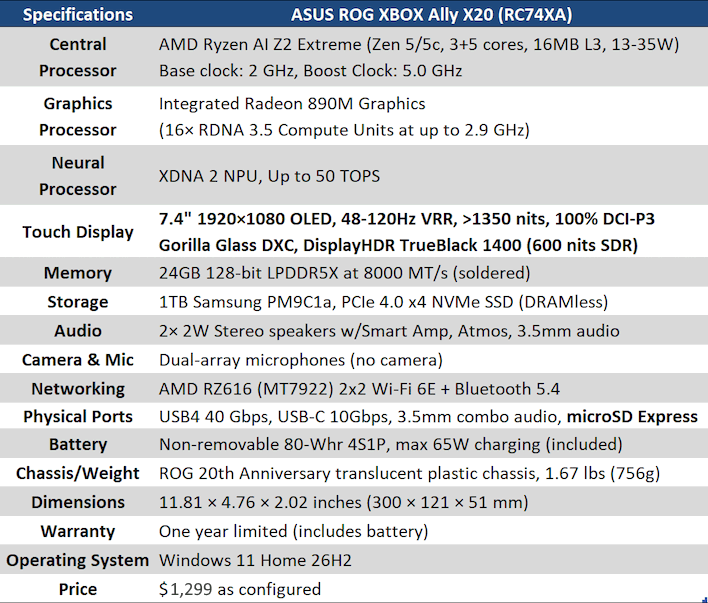
I've taken the unusual step of bolding the new items here, because specification-wise, there's really just those two of real consequence: the microSD card reader upgrades from UHS to SD Express, and then the screen gets swapped from an already quite decent IPS LCD to an absolutely gorgeous HDR OLED. You'll get to see me gush effusively about the screen a bit later, so let's skip over that for now.
Aside from those two things, the rest of the machine is mostly as it was last year. You get the same AMD Ryzen AI Z2 Extreme processor with its weird 3+5 core configuration, you get the same powerful Radeon 890M graphics, and you get the same 24GB of LPDDR5X memory running at a speedy 8 GT/s. There is one other notable upgrade, which is that the SSD, a rather modest BM9H1 in last-year's machine, gets replaced with the TLC-based PM9C1a in this year's machine, significantly improving I/O performance.
One final note about the specs; the dimensions of this machine are actually slightly different from the original ROG Xbox Ally X. It's subtle, but significant enough that the hard case I have for the Xbox Ally X does not fit on this machine. I don't find that the size makes it more or less comfortable to use, but it's important to keep in mind so you don't buy accessories for the wrong system. This particular change I think is a bit of a miss, but ASUS had to elongate the system a touch to accommodate the larger 7.4-inch screen.
There's not much else to say here that wouldn't be better accompanied by pictures, so let's move on to leering at this luxurious lightweight.
ASUS ROG Ally X20 Design And Features

I really like that purple shade that the MSI Claw 8 EX AI+ came in, but I'll take 'smoke gray translucent' over any color all day long. The combination of the gray color with the gold accents makes this look like a truly premium device, almost like a high fashion accessory. Carrying this thing around while testing, I've had a number of people ask me what it was because they were captured by its look.

The controls have been re-arranged a bit in a very welcome way. The analog sticks now use Tunneling Magneto-Resistance (TMR) mechanisms instead of Hall-effect, which offer all of the same advantages of the contactless stick sensors but with reduced power use. The Xbox button is flatter on this year's model and harder to hit by accident, but it's also illuminated, which is pretty cool; the design reminds of the Xbox 360.

Another interesting design change is that the D-pad has a mechanism where you can lift it out of its socket slightly, and then rotate it to convert the pad from a conventional four-way pad into an eight-way pad with corner stands that allow you to more smoothly roll your thumb across the diagonals. To be frank, the difference is very small visually, but it really does feel pretty different under your thumb. While ASUS didn't invent this concept, this is nonetheless a killer feature and one that I'd love to see more gamepads (or all gamepads) embrace.

Over on the right side, things look familiar, but there's a major change here, too; the much-maligned Armoury Crate button (that only served to call up the Armoury Crate app) has been replaced with an 'Action Button' that you can easily reconfigure to do whatever you want in the aforementioned app. By default, it's configured to capture screenshots, which was convenient for me. Armoury Crate comes pinned to the taskbar by default; there's absolutely no reason to have a whole button just to open it, so this is a great change. Of course, the right thumbstick also gets upgraded to a TMR mechanism.

On the top of the ROG Xbox Ally X20, things are substantially more similar to the previous-gen. The biggest difference is the gold-tinted cooling vents, which are charming but hardly impactful. I did have someone ask me if I colored the machine that way to support the local high school football team (whose colors are gold and black), though. The two USB Type-C ports are not identical in functionality, so be careful where you plug things in; the "left" side (as you're holding it, right side in the photo) is the USB4 port.

Similarly, on the bottom of the machine there's not much to see. The QR code on the label down on the bottom takes you to a support page specific to your exact machine, which is pretty slick. It would be cool if one of these vendors would put some pogo-pin pads on the bottom of one of these systems for a charging dock, but it hasn't happened yet. Note that unlike the Legion Go S and the MSI Claw 8 EX, the Xbox handhelds won't stand on their own without a dock or other stand due to the handgrips, although a paper stand is included in the box.

Speaking of the handgrips, one of the more controversial changes from the ROG Xbox Ally X is the addition of rubberized pads to said grips. They definitely feel premium out of the box, and I have to say that I like it... for now. The problem is that these sorts of surfaces tend to degrade into sticky, greasy mush over time, and even ASUS acknowledges this possibility, advising users to only use warm water to clean the grips lest cleaning chemicals (including soaps) degrade the rubber. Frankly, the OLED isn't going to last forever either, so maybe owners of the Ally X20 should just embrace mono no aware and accept that nothing is truly timeless.

So far, this is the ultimate form of the ASUS ROG Ally family, and it has certainly been the result of an iterative process over the last four years. I have always preferred the ergonomics of the Ally over other handhelds, and while I don't feel that the gamepad-style grips are fully necessary—my favorite ergo configuration was actually the original white Ally from 2023—they do definitely give you a more secure grip on the machine, especially with the added rubber. ASUS' designers know what they are doing.
That's enough ogling the new girl. Let's direct our orbitals to the screen, and then I'll show the results of more than 100 game benchmarks putting the thing through its paces.