

ASUS ROG XBOX Ally X20 OLED Review: Peak Handheld PC Gaming


The pièce de résistance of the ASUS ROG XBOX Ally X20 is absolutely its HDR OLED screen. I'm going to be using a lot of superlatives in this section, so I apologize in advance if it sounds like I broke out the thesaurus. But seriously, this screen is awesome. It is every bit as wonderful as the Alienware AW3926QW that I just reviewed, except in 7.4" size and built into a handheld. It's that good.
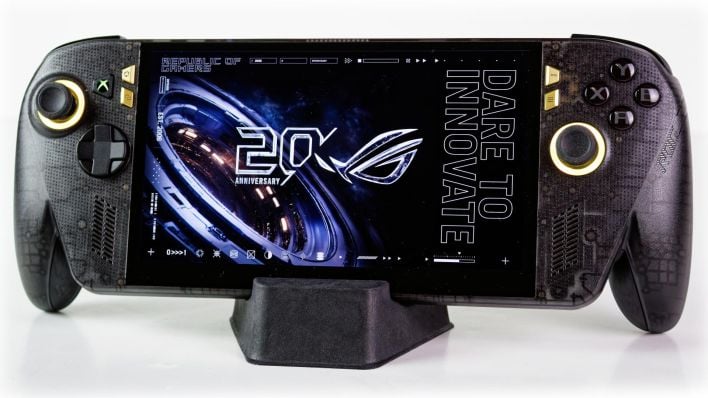
The difference is immediately apparent the moment you power the machine on. The image above is the default wallpaper included with the machine and the fact that it's some strange AI-generated abstract art aside, it's a cool looking image. But what struck me about it is that it really allows the contrast of this display to 'pop'; the bright-on-dark highlights are unbelievably vibrant in person. Also, the techy-looking glyphs around the edge of the screen help to highlight the edges, because otherwise it's nearly impossible to tell thanks to OLED's characteristic of black pixels being completely off.

The Ally X20's screen is the same 1920×1080 resolution as the previous Ally handhelds, which I think is a master stroke because the Strix Point GPU integrated into the Ryzen AI Z2 Extreme processor is just about fast enough to handle 1080p. Many handhelds have included higher-resolution screens, and in something that can be used as a tablet like the Legion Go, that might be sensible. In a purely dedicated gaming device like this, 1080p is just perfect. It also refreshes at the same 120 Hz, which is completely fine because there aren't many games that will comfortably run above that on this class of hardware anyway.
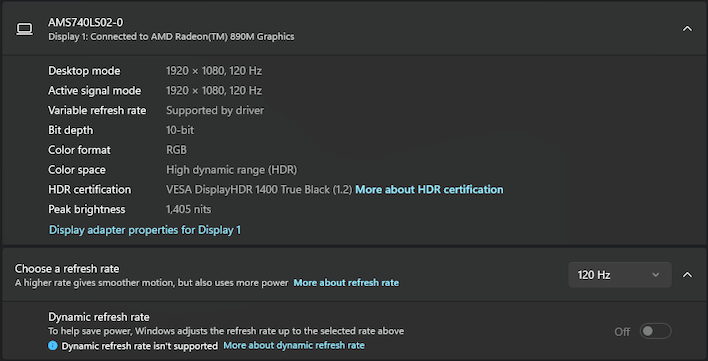
ASUS acquired a DisplayHDR 1400 True Black certification from VESA for this machine, and it shows. True Black is no joke, as noted above, and while 1400 cd/m² highlights are eye-piercing on a big monitor, they're absolutely gobsmacking on a little handheld like this. The screen supports a whole-image brightness of 600 cd/m², which might seem underwhelming in the face of 1400 nits, but let me assure you that it is eye-searing if you stare at a bright white screen.
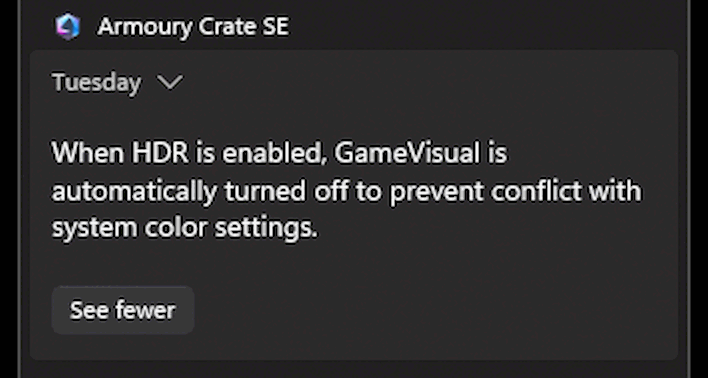
In fact, the peak SDR brightness is that same 600 cd/m², and you may actually prefer to run the machine in SDR mode most of the time. Why? Well, because HDR in Windows 11 is still kind of wonky. Conveniently, the machine is able to configure the display with an HDR color profile automatically, but you still run into issues with software that incorrectly toggles the HDR state, software that uses the wrong encoding, software that doesn't support HDR at all (necessitating the use of Auto HDR, which works, but is clumsy), and other quirks, like the difficulty of capturing screenshots in HDR games. The Windows Game Bar can do it, sometimes, but that functionality has never been reliable for me in the past, and neither here either.
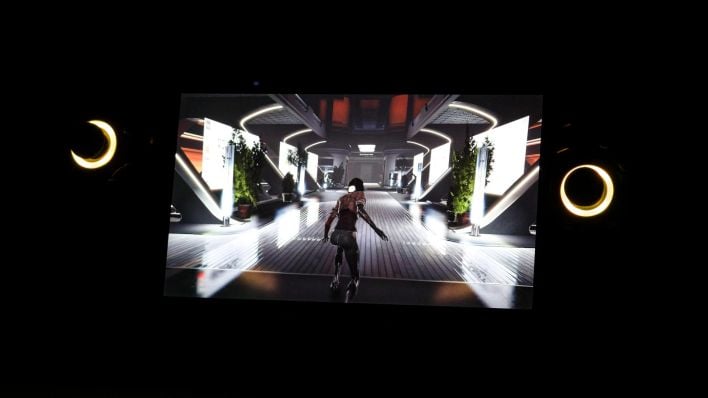
But that's okay, because even in SDR mode, the screen is so bright that my camera can't even capture anything else in a room with dim lighting. The room isn't fully pitch dark in that photo, but you'd never know because of my camera adjusting the exposure to handle the insanely bright screen. It is a truly impressive screen with unmatched quality among handheld gaming systems, and completely appropriate for a "20th Anniversary" device.
ASUS ROG XBOX Ally X20 Handheld System Benchmarks
I've got just a small handful of storage and system benchmarks for you before we get into the gaming tests. You probably don't care how a handheld does on Cinebench or local AI inference, so we didn't run those tests—although if you're dying to know, we can crank them out for you, so let us know in the comments.) The three system benchmarks we have for you here are the ATTO Disk Benchmark, Browserbench Speedometer 3.1, and Geekbench. Let's start with ATTO.ATTO Disk Benchmark
As is tradition, we begin the barrage of benchmarks with this venerable storage subsystem test. The ATTO disk benchmark is a fairly quick and simple utility that measures read/write bandwidth and IOPS across a range of different data sizes. While we don't typically compare these results across multiple machines, it's useful to gauge whether a particular system's storage subsystem is up to snuff.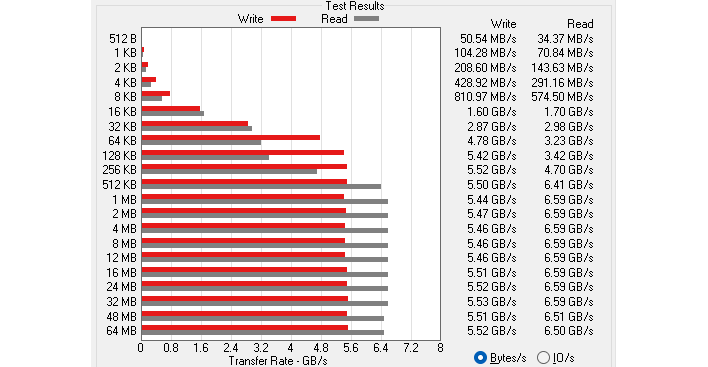
The Samsung PM9C1a SSD in this system is a solid upgrade over the DRAM-less QLC drive in the original ROG Xbox Ally X, but it's still a mid-range drive and not among the fastest we've tested. It does fine; certainly for a gaming device it's more than fast enough, so no complaints here. It's relatively straightforward to replace the SSD yourself if you want a faster drive anyway.
Speedometer 3 Browser Benchmark
While the main purpose of this machine is obviously gaming, you do a surprising amount of poking around websites as a part of setting up and proceeding with PC gaming. Given that, web app performance can be pretty important. We use BrowserBench.org's Speedometer test to take a holistic look at performance in a variety of sample web apps using the most popular web development frameworks around. This test is an example of how systems cope with real-world, modern web apps. All tests were performed using the latest version of Chrome.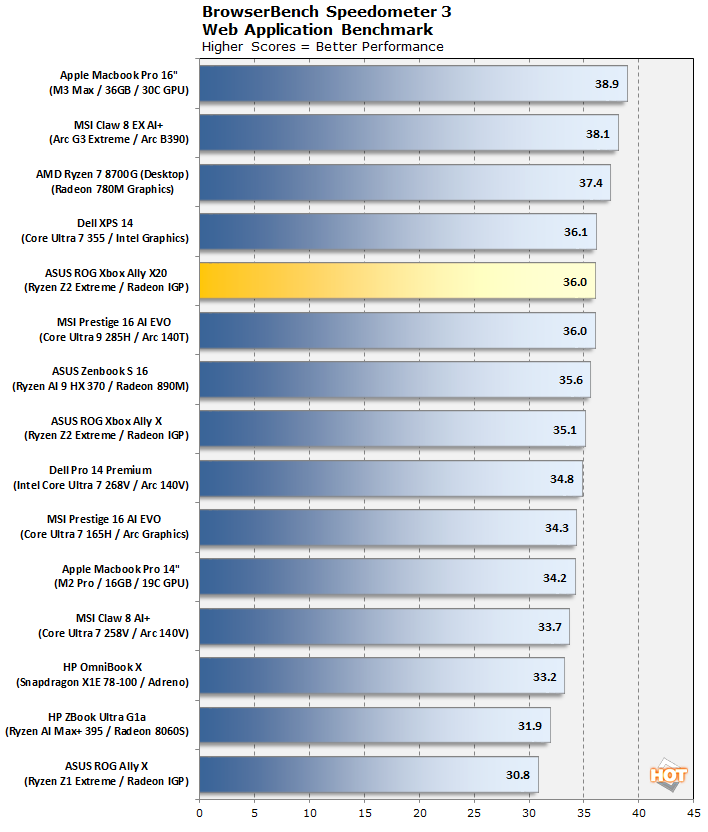
The 36.0 result here is actually slightly faster than the ROG Xbox Ally X for reasons I can't adequately explain, since they are the same hardware fundamentally. Overall, a very solid result from this machine, beating out even the full-fat Ryzen AI 9 HX 370. Of course, that could be down to software optimizations in the interim, but the gaming handhelds in this test are all fresh data.
Geekbench 6 CPU Benchmark
The Geekbench CPU tests stress only the processor cores in a system (not the graphics card/GPU), with both single and multi-threaded workloads. The tests are comprised of encryption processing, image compression, HTML5 parsing, physics calculations, video processing, and other general purpose compute processing workloads.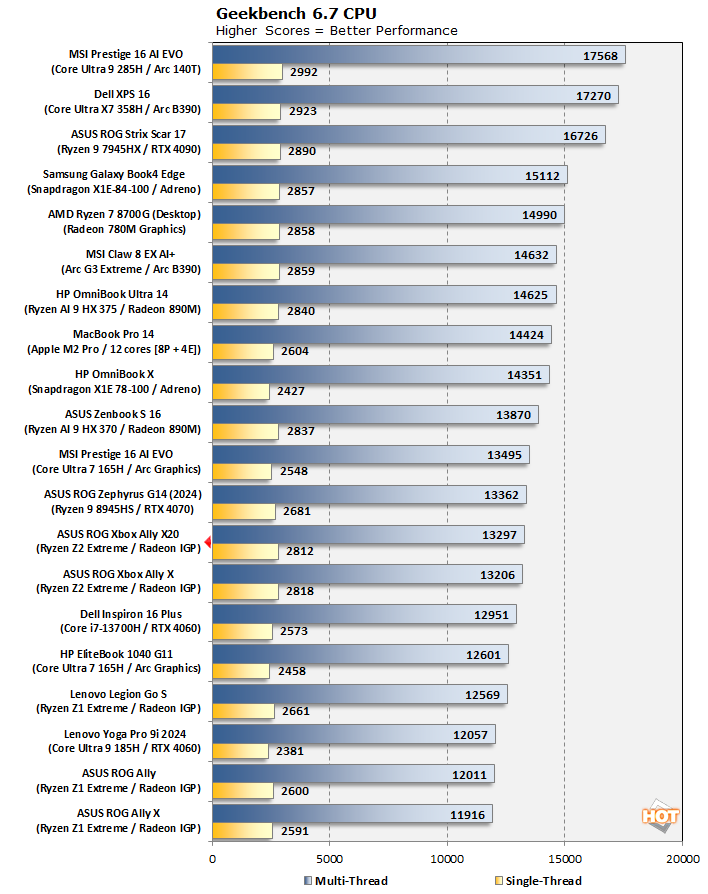
Meanwhile, in Geekbench, the ROG Ally X20 scores immediately adjacent to the ROG Xbox Ally X. The machines are barely beating their predecessors with Ryzen Z1 Extreme processors, which isn't actually surprising given that the Z2 Extreme has the same core count and is fabricated on the same manufacturing process, while being constrained by the same power limit. Frankly, the fact that the Ryzen Z2 Extreme is any faster than the Z1 at all is impressive.
That's going to round out our system benchmarks. We don't expect most people to be as interested in how the Ally X20 handles productivity and rendering tests, but if you're itching to see those results, let us know and we can circle back. For now let's get to the real meat and potatoes of a gaming handheld review: the games!