ASUS ROG Xbox Ally X Review: Excellent But Evolutionary Handheld PC Gaming


| ASUS ROG Xbox Ally X: $999.99 at Best Buy ASUS and Microsoft's new handheld PC gaming machine is a revised version of the original Ally X sporting a new Ryzen Z2 Extreme SoC, a new Windows gaming frontend, and even-more-premium pricing.
|
|||

|

|
||
We present to you the ASUS ROG Xbox Ally X, the first PC gaming device to be branded "Xbox" that isn't actually an Xbox. That is to say that you can't play Xbox games on this system unless they support Play Anywhere, which simply means that the game has a PC version and cross-save support. Indeed, we're getting it out of the way up front—if you have a big pile of Xbox games going back to the OG machine from 2001, you can't play them on this system.
The ASUS ROG Xbox Ally X Improves On The Original In Key Ways, Along With A New Ryzen SoC
With that said, there's reason for the ASUS ROG Xbox Ally X to have Xbox branding. Besides the Xbox logo button just to the side of the left stick, this machine comes with a new "Xbox Full Screen Experience" for Windows PC games that promises to offer improved performance and a more consistent experience with Microsoft's own Xbox consoles. Does it, though? Well, you'll have to actually read the review to find out. But first, here's a quick hands on look to get you acquainted with the device...ASUS ROG Xbox Ally X Specifications And Features
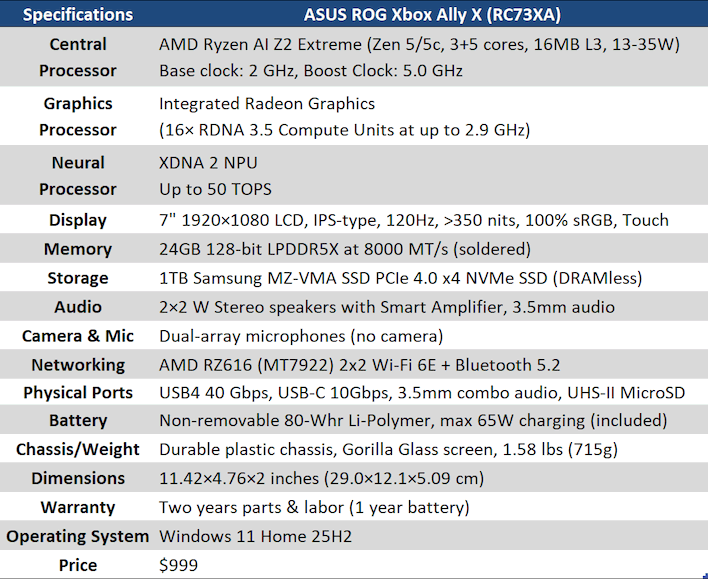
This device is fundamentally the same machine as the original ASUS ROG Ally X, which was itself a refined version of the OG ROG Ally. The only real differences between that machine and this one are the SoC that they use, the exterior design of the chassis, and some significant software revisions. The new SoC is the Ryzen AI Z2 Extreme, which is exactly the same as the Ryzen Z2 Extreme, but it retains the NPU from the Strix Point silicon on which it is based.
Compared to the Ryzen Z1 Extreme, the Ryzen AI Z2 Extreme upgrades to the Zen 5 CPU core, although it uses a hybrid design with three Zen 5 CPU cores and five Zen 5c dense cores. The dense cores don't clock as high, and use more power when they do boost up to their max, but they use less power when they're running at lower clocks, which helps save a bit of energy when those cores are handling background tasks. It also moves to the more area-efficient RDNA 3.5 graphics architecture, and bumps the number of compute units from 12 to 16.
Versus the ROG Ally X, the memory speed gets a slight bump from 7,500 MT/s to 8,000 MT/s in the Xbox version, and the quality of the SSD takes a hit, but this machine retains the 24GB of RAM, the 7" 1080p 120Hz touch-capable LCD, the Mediatek Wi-Fi adapter, and basically everything else, including the massive 80 Watt-hour battery. Let's take a look at the exterior, because that's where some of the biggest changes are.
ASUS ROG Xbox Ally X Design And Controls

We also didn't think the grips were particularly comfortable. There's definitely a comfort problem when using the original ROG Ally for a long time, however, the extra girth of the ROG Ally X helps to offset that slightly. This device takes the girth of the system to new dimensions, though—it's fully two inches thick at its widest point. If you have large hands, you will probably find this more comfortable to hold. It's more similar to a Steam Deck in that way. I have small hands, and find it a little cumbersome.

Like the previous generation, the sticks and triggers on the ROG Xbox Ally X make use of classical potentiometers instead of durable Hall-effect sensors. This probably isn't a problem for most users; those who really care about this can do the upgrade themselves, as the sticks are modular and easily replaced, but it would have been nice to see the upgrade included. The singular new input on this system is the Xbox logo key there, which serves as a Guide button, as you could probably guess. Pressing it opens the Game Bar overlay, by default, although you can also configure it to open ASUS Armoury Crate or Steam's Big Picture mode, if you prefer.
However, another easy-to-miss change on this device is that the View and Menu buttons—"Select" and "Start" on Xbox—are now on the bottom instead of on the top. On previous Ally machines, the View and Menu buttons were above the Overlay and Armoury Crate buttons. That is no longer the case, and this is perhaps the best QoL change on the new device, because you press View and Menu a lot more than you press the overlay or Armoury Crate buttons.


Around the top of the machine is where all of the I/O lives. Starting from the right, you have a USB4 port, which bears a Thunderbolt logo because Thunderbolt 4 and USB4 are basically the same thing. There's a second Type-C port; this one is USB 10 Gbps. Next are the battery charge light and the power light, the volume rocker, a small fan exhaust vent, a MicroSD card slot, the 3.5mm headset jack, and the power button, which includes a fingerprint sensor.

Really, if you've seen the ROG Ally, then you've seen the ROG Xbox Ally X. We think the aesthetic isn't quite as clean as the original, but some people will absolutely adore the handgrips. It's mostly just going to come down to your hand size, though. If you loved the XBOX "Duke" controller, you'll feel right at home here.