MSI Claw 8 EX AI+ Review: Arc G3 Extreme Takes The Handheld Crown


| MSI Claw 8 EX AI+: MSRP $1,799 Intel's Arc G3 Extreme propels the new MSI Claw 8 EX AI+ to performance heights heretofore unknown to PC gaming handhelds, but it commands a precious price premium.
|
|||

|

|
||
The MSI Claw 8 AI+ was one of our favorite gaming handhelds. It had a beautiful IPS screen, excellent Hall-effect inputs, and distinctive aesthetics. One of the main reasons we liked it so much was because of its potent and efficient Intel Core Ultra 7 258V processor, which in combination with its then-massive, but now-standard 80-Whr battery gave it unbelievable handheld gaming battery life.
Naturally, we were stoked to try out that handheld's successor, the new Claw 8 EX AI+. This machine, despite looking fairly different, inherits nearly everything from its predecessor, including the screen, the inputs, the memory, the I/O, and the battery, but there is some fresh silicon inside. The biggest differences are the move to the new Intel Arc G3 Extreme processor, and the new price point.
We'll talk more about the latter later, though. For now, let's talk a bit about that fancy new SoC, because it steps things up considerably, and could really disrupt the PC gaming handheld market. For the visual learners out there, we've also got a video review live, if you'd like to check it out...
Intel's Arc G3 Is Panther Lake Portioned For Portable Gaming
If you are a regular around here, you'll no doubt already be aware of Panther Lake. That's the code name for Intel's Core Ultra 300 series processors for laptops. These are the first chips off of the 18A production line, and that's one of the most interesting things about them. In our testing, Panther Lake offers excellent all-around performance and shocking efficiency, which is exactly what you want in a laptop processor.Laptop users have different needs from gaming handheld users, though. To that end, the Arc G3 Extreme has been pared back slightly from the original Panther Lake design. Half of the I/O has been removed, leaving this machine with dual Thunderbolt ports instead of four, and likewise, half of the P-cores have been removed, too. That's because those big Cougar Cove P-cores, while very fast, are also very power-thirsty, and games simply don't need more than a couple of super-fast threads.

So what you get with the Arc G3 Extreme is a pair of Cougar Cove P-cores, the full allotment of eight Darkmont E-cores, and the four Darkmont LP-E cores that have their own clock and power domain, separate from the rest of the CPU cores. That's all fine and well, but arguably more interesting is that you also get the full-fat GPU: twelve Xe3-cores clocking at up to 2.3 GHz, which is actually a slight cut from the 2.5 GHz of the flagship Core Ultra X9 388H. That chip comes in fancy laptops like the Dell XPS 16 which can afford to spend a little extra power on faster graphics, but the Arc G3 Extreme is targeted at handhelds that need to save every watt.
One might wonder why Intel left all eight E-cores enabled. The simple fact is that some games, like Cyberpunk 2077, will actually make use of a pile of extra cores, and the GPU on the Arc G3 Extreme is fast enough that the chip could end up bottlenecked by the CPU without those E-cores in some situations. The E-cores, unlike the LP E-cores, share L3 cache and the ring bus with the P-cores, so they're considerably faster, nevermind the higher clock rate.
Where the Lunar Lake chip in the previous-generation Claw had its memory on package, the Arc G3 Extreme does no such thing. However, it does still use LPDDR5X RAM. Where the Core Ultra X9 388H supports LPCAMM memory at up to 9600 MT/s, the Arc G3 Extreme only supports regular FBGA LPDDR5X at up to 8533 MT/s, the same speed as the previous-generation Claw. As such, the memory bandwidth isn't changed at ~136 GB/second, but thanks to reorganized caches, the Arc G3 Extreme uses its available memory much more efficiently, as you'll see.
With that discussion out of the way, let's actually talk about this specific handheld MSI has built.
MSI Claw 8 EX AI+ Full Hardware Specifications
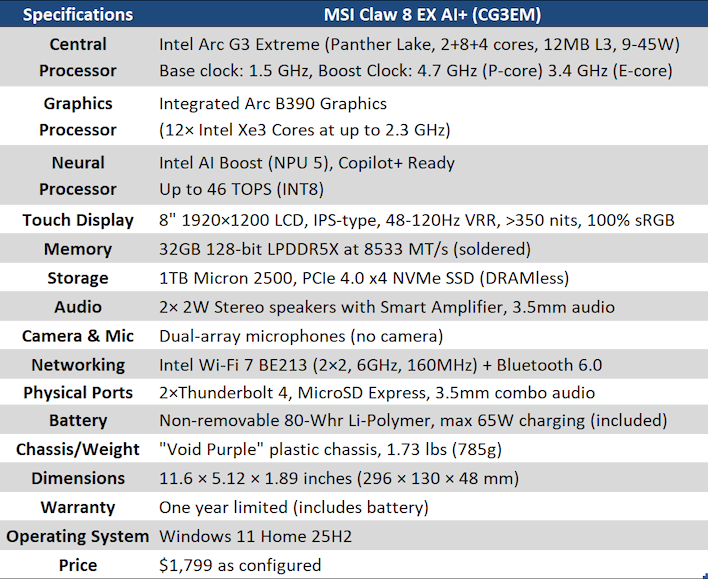
As discussed above, the SoC powering this whole endeavor is the Arc G3 Extreme. There's actually a "non-Extreme" version of the Arc G3 with a few strategic cuts to core counts, but it's not clear if MSI will be building a variant with that chip. For now, the only model we're aware of is this exact system.
Besides the SoC, the specifications of the Claw 8 EX AI+ are basically identical to the Claw 8 AI+ from last year. The Micron 2500 SSD in this year's model is a bit better than the previous machine, and the Wi-Fi adapter has been updated to Intel's BE213 adding full Wi-Fi 7 support (minus 320 MHz channels) as well as Bluetooth 6.0. Possibly the biggest upgrade is to the MicroSD card slot, though, which now supports SD Express cards for up to 900 MB/second transfers from the tiny plastic tabs. That makes it more practical for game storage, to be sure.
MSI Claw 8 EX AI+ Design And Features

It stands up on its own without the need for a kickstand.
The Claw 8 EX AI+ (which we're just going to call the Claw 8 EX from here on out) is surprisingly different from the previous-generation model considering how similar it is on paper. The last-gen system was kind of bulky and had contentious aesthetics; by contrast, the Claw 8 EX is downright svelte, and it has a neat party trick: it can stand up on its bottom edge, relatively stable thanks to the handgrips being the same length as the screen.

The directional pad is oddly concave, and I'm not sure if I love it or hate it.
That screen requires some deeper discussion too. It's not the best screen we've seen on a handheld; that accolade still goes to the Lenovo Legion Go. However, it's very sharp and very smooth, with excellent, clear motion and 'good enough' brightness. MSI rates it for 350 nits on its product page, but we measured it at 392 nits with the brightness maxed out. It doesn't have any HDR support, which is arguably a miss at this price point, but it does have VRR support. Technically, the Claw 8 AI+ did too, but it was buggy and mostly non-functional at the time of our review, although we've heard Intel has fixed it up. That's believable, because it works well on this system.

All of the relevant controls (that is, the sticks and triggers) on the Claw 8 EX are Hall-effect. This is very good, and absolutely preferable over regular old potentiometer-based analog inputs. However, it is known that Hall-effect sensors are relatively power-thirsty, and we would have liked to have seen a move to the newer Tunneling Magneto-Resistance (TMR) sensors, which have all of the advantages of Hall-effect with a fraction of the power draw. That's a nitpick, but at this price point, it's a reasonable expectation to have the latest tech.
Another nitpick we have is that the buttons to summon the MSI Center M application and the Windows Game Bar are below the View and Menu buttons. This is really down to preference, and you might prefer this setup if you have longer thumbs, but personally I'd like to have the more-frequently-used View and Menu buttons (like Start and Back on the older Xboxes) closer at hand. I frequently hit the Game Bar button while trying to hit View in games.

All of the non-gaming controls and all of the I/O are on the top edge, as usual for one of these devices. The power button also serves as a fingerprint sensor. That minuscule dot next to the power button is the charge light. You can use either port for charging or connectivity; they have the same capabilities.

Around the back of the machine, you can see the intakes and exhaust vents, the six screws holding the thing together, and the two configurable macro buttons. Actually, every single button on the thing is reconfigurable using the MSI Center software, if you're so inclined. MSI says that the Claw 8 EX AI+ is easy to tear down, but we didn't have time to investigate the internals of the system for this review.

Intel's Jason Cheah posted this image on Linkedin of the Claw 8 EX AI+'s internals.
Let's take a brief look at the software and a handful of system benchmarks before we dive into the gaming tests.