AMD Radeon RX 9070 GRE Review: Great 1440p Gaming, With Caveats


Similar to previous-gen Radeons, when the GPU is boosting, frequencies and voltages dynamically scale up or down based on the GPU's workload and temperatures at the time. That frequency and voltage curve can be altered to increase performance, optimize efficiency, or sometimes both if you tune the settings precisely.
The tuning options built into AMD's driver suite give users the ability to manually alter frequencies, voltages, fan speeds, and the max power target -- using percentages or finer-grained numerical sliders. Users can also opt to use various preset modes that slant the VFC in favor of efficiency or higher performance.

Powercolor Radeon RX 9070 GRE Stock Hardware Health Data
The tuning options built into AMD's Radeon Software suite offer manual controls, along with an automatic GPU overclocking button. The auto memory overclocking button available on previous gen AMD Radeon cards was not present.
As is the case when overclocking any GPU, finding the highest stable memory and GPU clocks, at the lowest voltage possible, while simultaneously increasing the max power target and keeping temperatures low, is what will yield the best overall overclocking results.

Powercolor Radeon RX 9070 GRE Manually Overclocked, Running 3DMark
At its stock settings, the PowerColor Reaper Radeon 9070 GRE's GPU clocks will hove around the 2,660MHz range while gaming (give or take) with maximum boost clocks of approximately 2,790MHz. When running in this stock configuration our card hit a modest GPU temp of 56°C. With some tweaking, we found we could increase the GPU clock offset by 100MHz, with the power target increased by its maximum of 10%, with a minus -10 offset to the GPU voltage. The memory clock hit nearly 2.8GHz (2,772MHz to be exact), which is a healthy increase. Pushing the memory any higher would result in green screens when we tried to launch any game. We also bumped up the fan curve a bit to help keep the CPU cool.
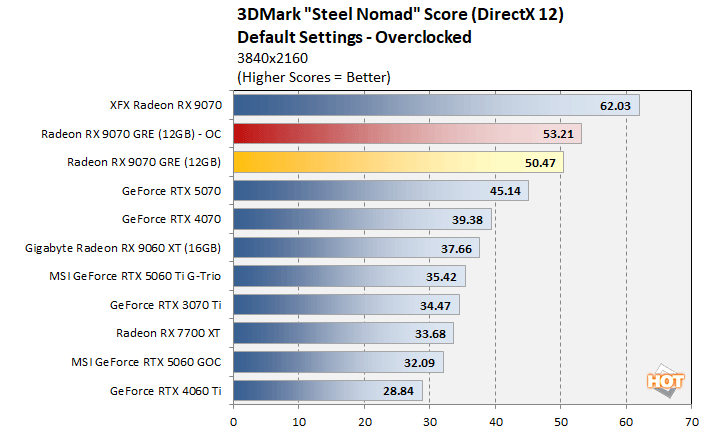
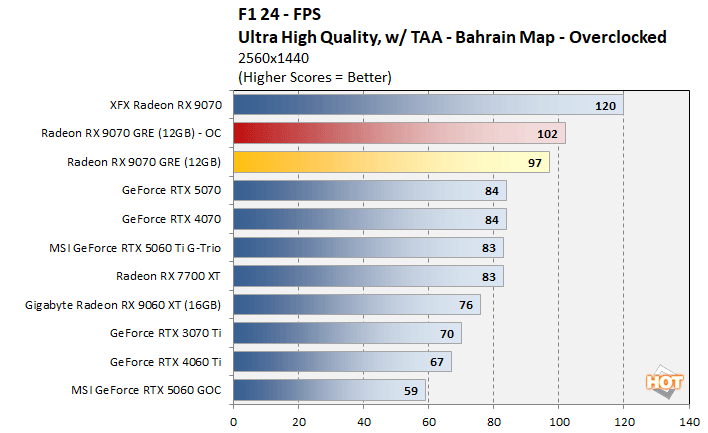
When all was said and done, the GPU temp peaked at about 60°C and we saw about a 5% - 6% increase in performance. Not a massive overclock, but not bad for messing with a few sliders for a little while.
Total System Power Consumption Tests
We'd also like to cover a couple of final data points regarding power consumption and acoustics before we wrap up. Throughout all of our benchmarking and testing, we monitored noise output and tracked how much power the test system was consuming using a power meter. Our goal was to give you an idea as to how much power each GPU used while idle and also while under a heavy workload. These power numbers were captured during MLPerf and a Horizon Zero Dawn Remastered run at 4K...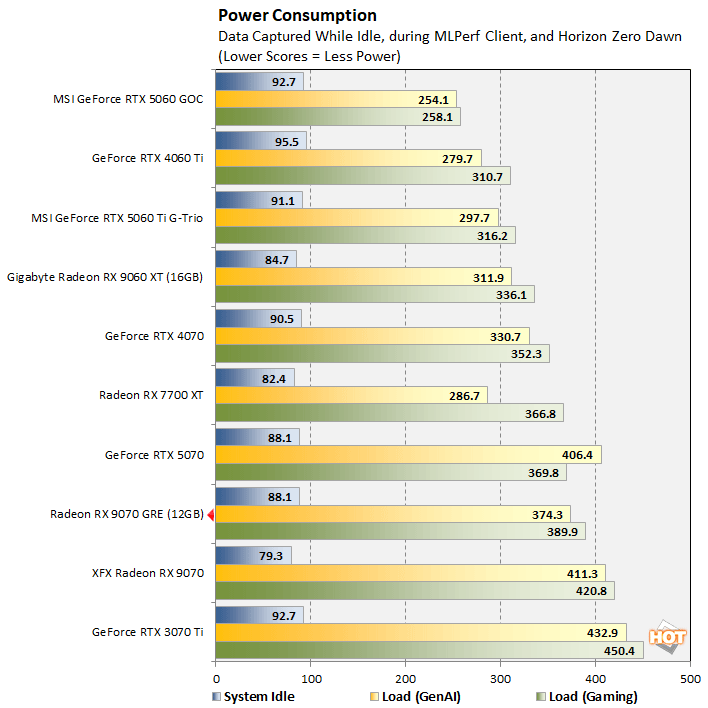
Despite its considerable power consumption, however, noise isn't a concern with the Powercolor Radeon RX 9070 GRE The card's fans are dead silent at idle, because they spin down completely when temperatures are low. In its stock config, the fans typically hovered around 1,200 RPM under long sustained loads, which produced a dull whir that wasn't particularly noticeable over our test system's PSU fans and CPU cooler. And while overclocked, the fans hovered at around 2,200 RPM at the settings we used, which had a minimal impact on noise output. Overall, we'd consider all of the Powercolor Radeon RX 9070 GRE we tested relatively quiet and noise shouldn't be an issue for most users, especially in a closed chassis.
Powercolor Radeon RX 9070 GRE Review: Our Conclusion
AMD positions the Radeon RX 9070 GRE as a competitor to the GeForce RTX 5060 Ti and with an optimal solution for 1440p gamers. Strictly considering those two things, AMD has succeeded—the Powercolor Radeon RX 9070 GRE we tested puts up perfectly playable framerates at 1440p in many modern titles with the image quality cranked up, and it’s usually faster than the 5060 Ti. If you push the ray tracing and graphics option to their maximum in showcase titles like Black Myth: Wukong or Cyberpunk 2077, the Radeon RX 9070 GRE will falter (just like any other mid-range GPU), but turning down the IQ settings somewhat or leveraging FSR can remedy that and smooth things out. The bottom line is the Radeon RX 9070 GRE is a competitive GPU at resolutions of 1440p and below, and it typically outruns the GeForce RTX 5060 Ti. And 12GB of VRAM addresses this market segment just fine.

The Radeon RX 9070 GRE’s pricing however, puts it in somewhat of a tough spot. AMD set the MSRP at $549, which is the same introductory price as the 16GB Radeon RX 9070. Obviously, "RAMageddon" and other market factors forced AMD to increase the price of the RX 9070 (its MSRP is now $619), but street prices on that card have recently fallen below MSRP. You can get a hot-clocked 16GB Radeon RX 9070 for $599 at the moment and GeForce RTX 5070s are only a few dollars more. We know its presumptuous to think everyone can just throw an additional $50 at a GPU, but in this case it would absolutely be worth it. The Radeon RX 9070 is simply a better card all around, with more GPU and memory resources. The Radeon RX 9070 GRE, however, has technically been around for over a year, so its POSSIBLE street prices will also settle below MSRP once availability ramps. If you’ve got a 1440p monitor and can snag a Radeon RX 9070 GRE in the $510 range give or take a few bucks, that’s about a 20% reduction over the 16GB Radeon RX 9070, which is easier to justify.
We’re cautiously optimistic things will shake out in the next few weeks, at which point we’ll have a better handle on the Radeon RX 9070 GRE's real-world street pricing. If partners have cards available at or below MSRP, the Radeon RX 9070 GRE should serve 1440p gamers well, without breaking the bank.