How To Build The Ultimate External SSD: With Biwin & Orico

This Is What Happens When You Pair A Fast Gen 4 SSD With A 80Gbps TB5 Enclosure

| Biwin Black Opal NV7400 2TB: $249 Orico X50: $199 ($159 w/ Coupon) External storage is pretty much a necessity for many users, so we built a high-capacity speed demon using parts from Biwin and Orico.
|
|||

|

|
||
External storage is a critical consideration for a multitude of use cases, from simple file storage and backup to augmenting the potentially limited internal storage of a laptop or small form factor PC. Whatever the use case may be though, it’s always helpful when said external storage is fast and reliable.
We’ve tested an array of excellent external storage devices over the years, many of which are still in use almost daily. But we’re enthusiasts around here and sometimes you just want to push the envelope—so we did. Orico recently launched its X50 Thunderbolt 5 compatible M.2 enclosure that supports up to 80Gbps and the Biwin Black Opal NV7400 SSD we recently featured in our gaming system giveaway seemed to be a perfect fit to make the most of the enclosure.
At a time when some of the fastest USB 4 external SSDs offers speeds up to 4GB/s, the combination of the Biwin Black Opal NV7400 and Orico X50 should be able to break the 6GB/s range. Let’s find out…

Biwin Black Opal NV7400 SSD Specs & Features
Before we get to the build / assembly process and benchmarks, a quick look at the Biwin Black Opal NV7400 and Orico X50 are in order.
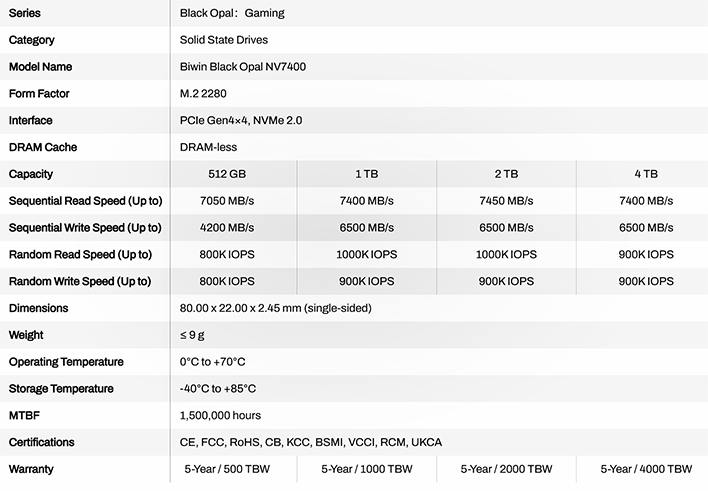
The Biwin Black Opal NV7400 is a standard M.2 2280 SSD, powered by a Maxio MAP1602 four-channel, DRAM-less controller and Micron 232-layer TLC NAND. The drive features a native PCIe Gen 4 interface and has a single-sided design, so it should be compatible with just about any device.

Biwin offers the Black Opal NV7400 in four capacities, starting at 512GB and topping out at 4TB – we’ve got a 2TB on tap here. The performance of the drives varies based non the capacity; the 2TB drive, under ideal conditions tops out at 7.45GB/s (reads) and 6.GB/s (writes), with up to 1M peak IOPS. The drives carry a health 5-year warranty and have endurance ratings roughly 1000x their capacity. That means the 2TB drive is rated for 2000TBW, the 4TB drive 4000TB, etc.

Because the Black Opal NV7400 is a single-sided drive (with a relatively low-power controller), with a Gen 4 interface, that tops out just over 7GB/s, it’s a great candidate for an enclosure like the X50. Gen 5 drives with higher sequential transfers will never come close to their peak speeds—the Black Opal NV7400, however, should get close.
Orico X50 TB5 Compatible Enclosure Specs & Features
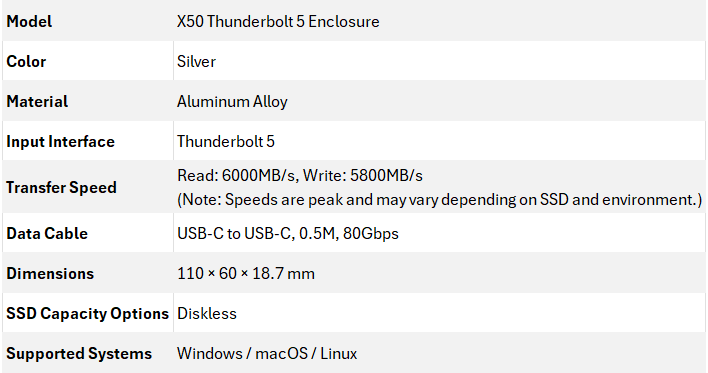
The Orico X50 (not to be confused with the more expensive X50 Pro, which also offers USB compatibility) is a durable, all-aluminum Thunderbolt 5 compatible enclosure that supports up to 80Gbps of bandwidth, or peak reads and write of 6GB/s and 5GB/s, respectively.

The Orico X50 has an innovative design with venting for the underside of its PCB (the black, vented mesh) and a thick aluminum heatplate, with small fins, to help cool whatever SSD is installed in the enclosure. The enclosure is fanless, and hence is dead silent, but it does a good job managing thermals. With the Black Opal NV7400 inside, the drive never throttled while benchmarks or under normal conditions. Just make sure you don’t stuff it somewhere, where it’s starved of fresh air.

The Orico X50 measures in at 110mm x 60mm x 18.7mm and has a single USB-C port at one end and some branding emblazoned on the sides. There’s not much to see over and above other aluminum SSD enclosures.
Orico includes a basic manual with the X50, along with a small screwdriver and a thermal pad to help aid with SSD cooling, a couple of screws, and a short (.5m) 80Gbps USB-C / Thunderbolt cable.
Building The Drive SSD

Installing an SSD into the Orico X50 is extremely easy. On the underside of the enclosure, there’s a single screw at one end. Disengage that screw and the bottom plate pops right off.

With the bottom plate removed, the open M.2 socket is exposed. Simply pop in your preferred SSD—in our case the Biwin Black Opal NV7400…

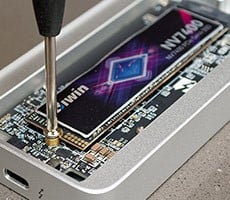
Secure the drive in place with the provided screw (and screwdriver!)…
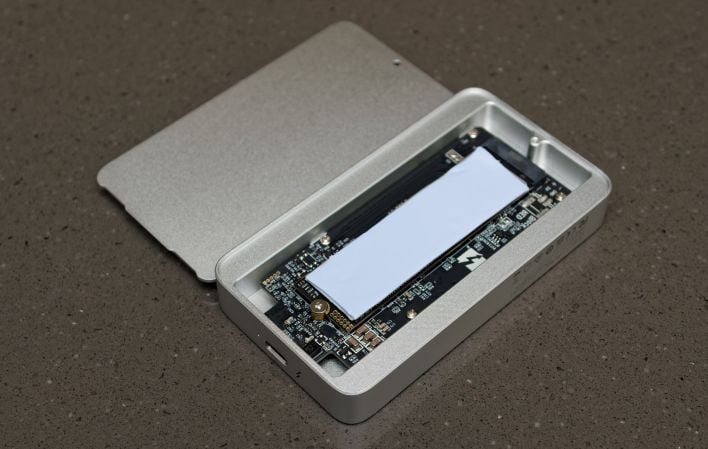
Then install the included thermal pad on the SSD and reinstall the bottom plate. You’ll notice that the bottom plate is much harder to remove once a drive and the thermal pad are installed, because the thermal pads makes good contact and adheres to the plate quite well.
Once fully assembled, using the Orico X50 is just like any other external Thunderbolt drive. Plug it into a compatible port, partition and format the drive, and you’re ready to go. The enclosure is compatible with Windows, Linux and Mac systems—just format the drive inside with your preferred file system and that’s it.
We should note, however, that the Orico X50 is Thunderbolt or USB 4 only. If you plug the drive into an older USB port (not USB 4), the storage volume won’t be accessible. And if you use anything other than a Thunderbolt 5 port, the device won’t be able to achieve its peak performance. That goes without saying, but wanted to point it out nonetheless. We’ll show you how the device performs in a TB4 port as well, in just a bit.
Biwin NV7400 SSD + Orico X50 Performance
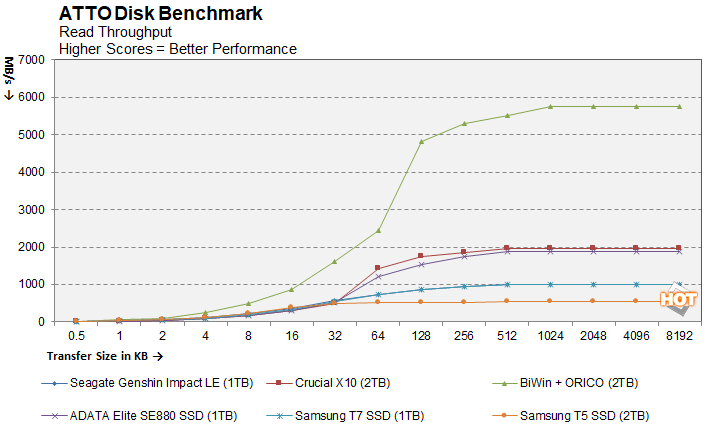
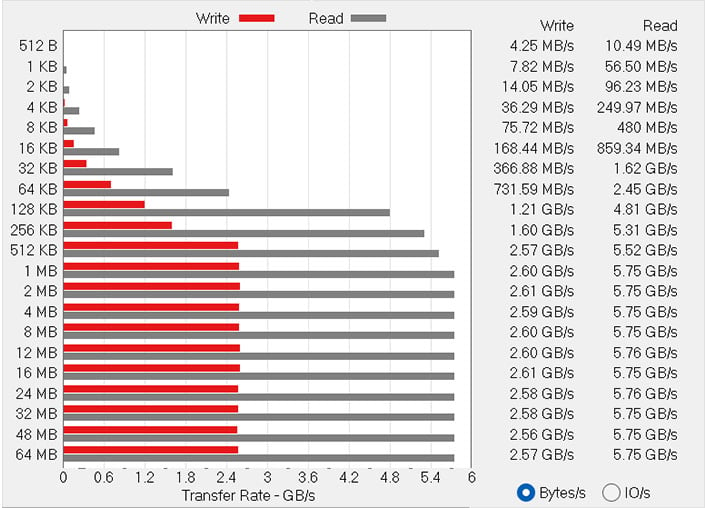
In order to test the performance of the Biwin NV7400 + Orico X50 combo, we enlisted the help of some straightforward benchmarks. First up is ATTO, a disk benchmark that measures sequential transfer speeds across a specific volume length with various block sizes. It measures transfer rates for both reads and writes and graphs them out in an easily interpreted chart. ATTO's workloads are sequential in nature and measure bandwidth, rather than I/O response time, access latency, etc.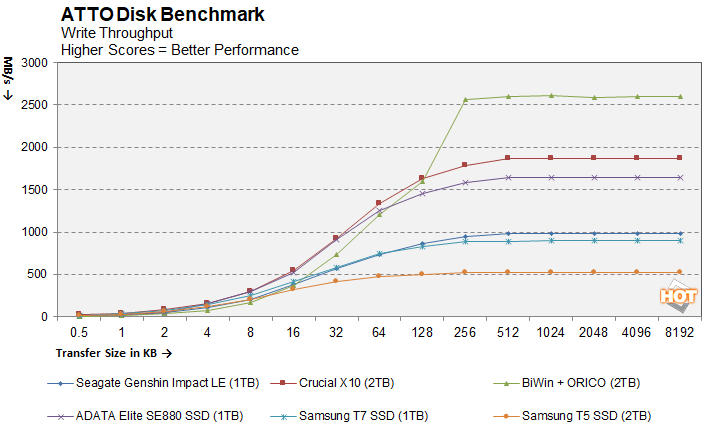
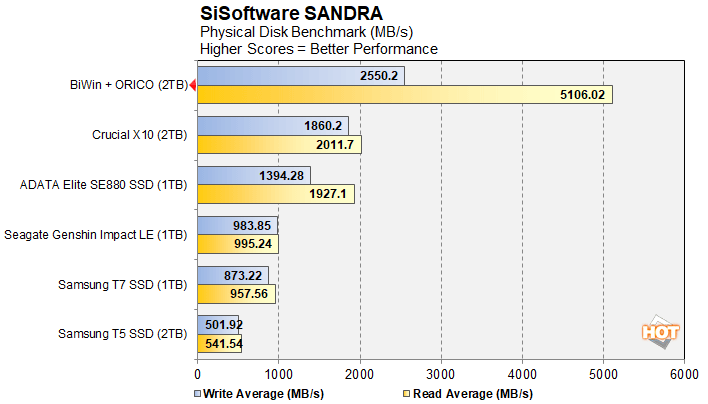
Next up are some numbers with SiSoft SANDRA, the the System ANalyzer, Diagnostic and Reporting Assistant. Here, we used the Physical Disk test suite and provide the results from our comparison SSDs...
CrystalDiskMark is a synthetic benchmark that tests both sequential and random small and mid-sized file transfers using incompressible data. It provides a quick look at best and worst case scenarios with regard to SSD performance, best case being larger sequential transfers and worse case being small, random transfers.
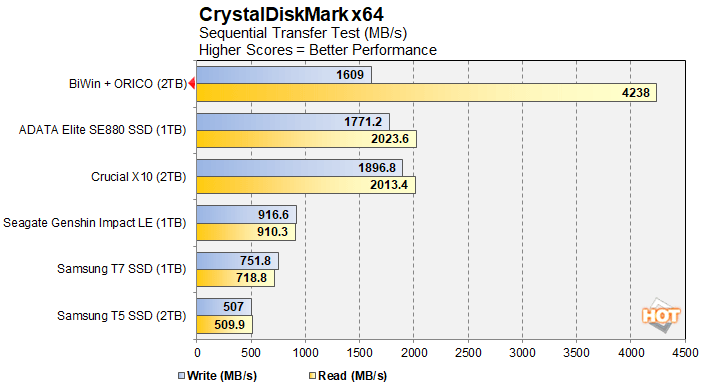
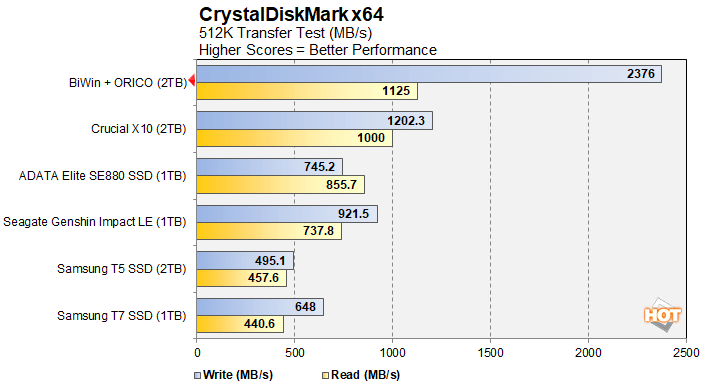
CrystalDiskMark's sequential tests had the Biwin NV7400 + Orico X50 trading blows with the SE880 and Crucial X10 in the large sequential write test, but the Biwin NV7400 + Orico X50 combo blows past any USB drive in the read test and 512K test.
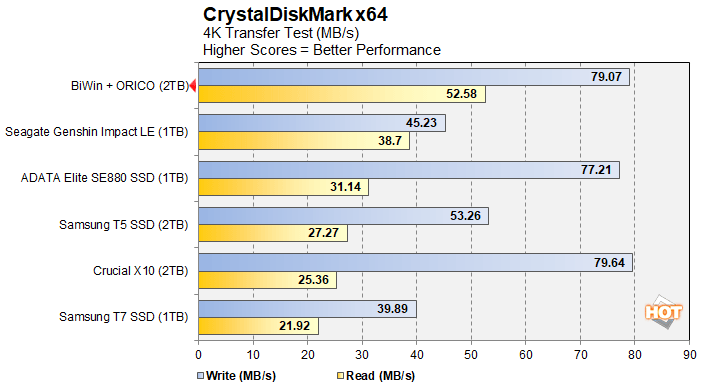
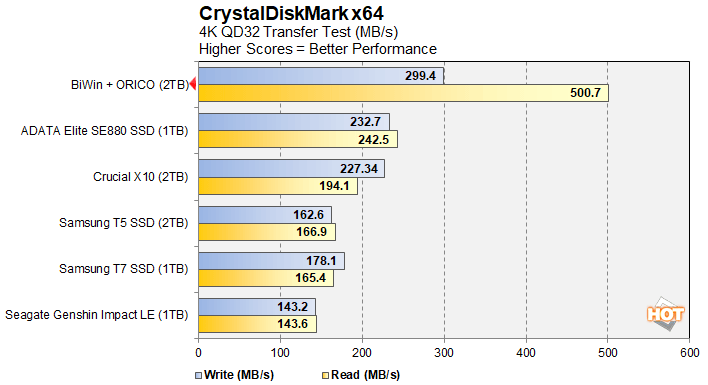
The 4K transfer tests favored the Biwin NV7400 + Orico X50 combo over every other drive we tested as well. Note that these tests were conducted with an older version of CDM, which was used for the previous USB drive reviews. Here's how things look with the latest version...
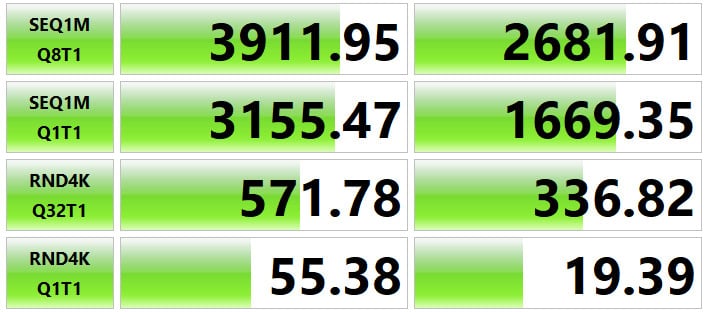
Thunderbolt 4 Interface
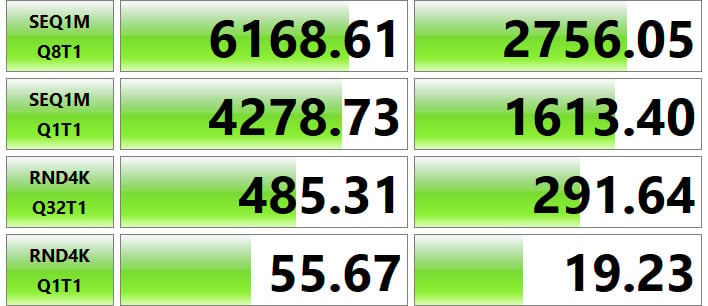
Thunderbolt 5 Interface
We ran the tests above with the latest version of CDM, with the Biwin NV7400 + Orico X50 combo connected via Thunderbolt 4 and Thunderbolt 5, just to show the expected performance difference on the much larger install base of TB4 systems out in the wild. As you can see, performance is excellent with either interface, but on TB5, peak speeds exceed 6.1GB/s.
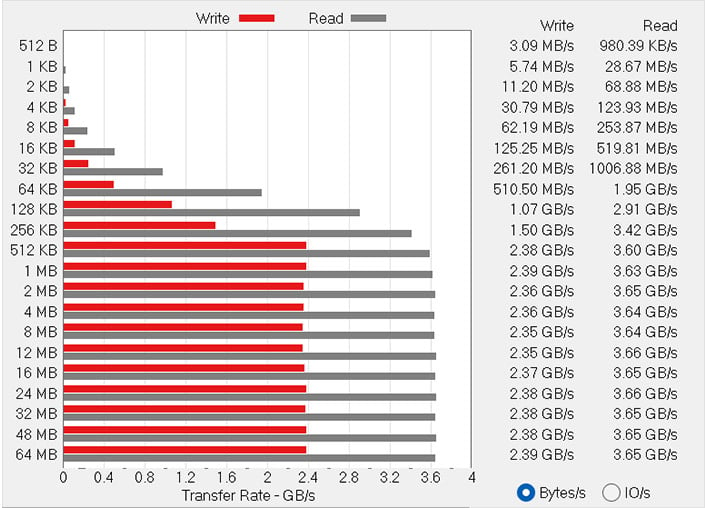
Thunderbolt 4 Interface
Thunderbolt 5 Interface
We did the same with the ATTO disk benchmark. At the smaller transfer sizes below 64K, there's not much difference between the two interfaces. At the larger file sizes, however, the Biwin NV7400 + Orico X50 combo connected to TB5 pulls way ahead and approaches the 6GB/s mark on the read test.
Biwin NV7400 + Orico X50 TB5 External SSD: Our Conclusion
If you’re searching for some blazing fast external Thunderbolt storage, the Orico X50 (or X50 Pro) plus a fast Gen 4 M.2 SSD like the Biwin Black Opal NV7400 is an excellent solution. Performance is top notch and the enclosure is built very well—the X50 feels rigid, sturdy and substantial in-hand, and its design should keep any mainstream Gen 4 drive cool enough to prevent throttling. In our testing, sitting on a desk in a run-of-the-mill office environment, the Orico X50 + Biwin NV7400 combo never throttled and maintained consistently high performance through many benchmark runs. We also had no trouble using the kit to hold our Steam library, for testing games across a couple of laptops.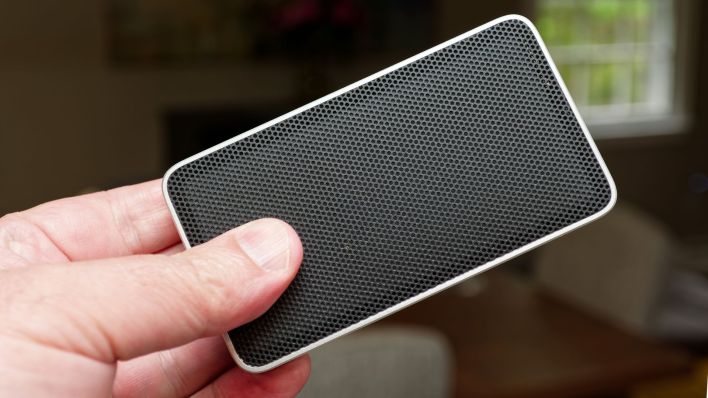
Rolling your own external storage solution like this does command somewhat of a premium, however. There’s currently a coupon available on Amazon, or you can use this code (RY6EA7J7HS0E) direct from Orico for 15% off, to get the X50 for $160 – 169. The 2TB Biwin Black Opal NV7400 is currently available for $249 on Amazon, which discounted by 7%. Together, the exact configuration we tested here will run just north of $400, which is pricier than a typical USB 3.2 External SSD like the Crucial X10 or Samsung T7, which run around $300 - $375. The Orico + Biwin combo is much faster, however, and it’s way more affordable than current pre-made, 2TB Thunderbolt external SSDs. Building your own also offers the added flexibility of being able to swap the internal M.2 SSD if the need arises.
Overall, we’re pleased with this setup and plan to beat on it in the coming months for future laptop testing. At this moment, we have no problem recommending the Orico X50 and Biwin Black Opal NV7400, and expect the combo will be a great workhorse in the lab for the foreseeable future.