AMD Radeon RX 9070 GRE Review: Great 1440p Gaming, With Caveats


Our Test System Configuration:
| Hardware Used: AMD Ryzen 7 9800X3D (4.7GHz - 5.2GHz, 8-Core) MSI X870E Carbon WiFi 32GB G.SKILL DDR5-6000 Samsung SSD 990 Integrated Audio / Network Radeon RX 7900 XTX XFX Radeon RX 9070 XFX Radeon RX 9070 XT Powercolor Radeon RX 9070 GRE GeForce RTX 3070 Ti GeForce RTX 4070 GeForce RTX 4070 Ti GeForce RTX 5070 GeForce RTX 4080 GeForce RTX 5080 Relevant Software: Windows 11 Pro 24H2 AMD Radeon v24.30.31.03 NVIDIA Drivers v571.86 / v572.30 |
Benchmarks Used: Geekbench AI Procyon AI Text Generation Procyon AI Stable Diffusion XL Blender v4.3 Blackmagic RAW Speed Test v4.3.1 UL 3DMark UL VRMark Unigine Superposition Games Tested: Black Myth Wukon Homeworld 3 Horizon Zero Dawn Remastered Cyberpunk 2077 (press beta) The Talos Principle II F1 24 |
Geekbench AI Testing
Geekbench AI is a cross-platform benchmark tool designed to evaluate the performance of AI workloads on a wide range devices, including smartphones, tablets, laptops, and desktops. It measures the performance of CPUs, GPUs, and NPUs (Neural Processing Units) across different operating systems like Android, iOS, Windows, macOS, and Linux with an array of machine learning tasks.

The Powercolor Radeon RX 9070 GRE's performance in GeekBench AI isn't too surprising. The card slots in just behind the Radeon RX 9070 (in terms of its quantized score) and trades blows with the Radeon RX 7900 XTX.
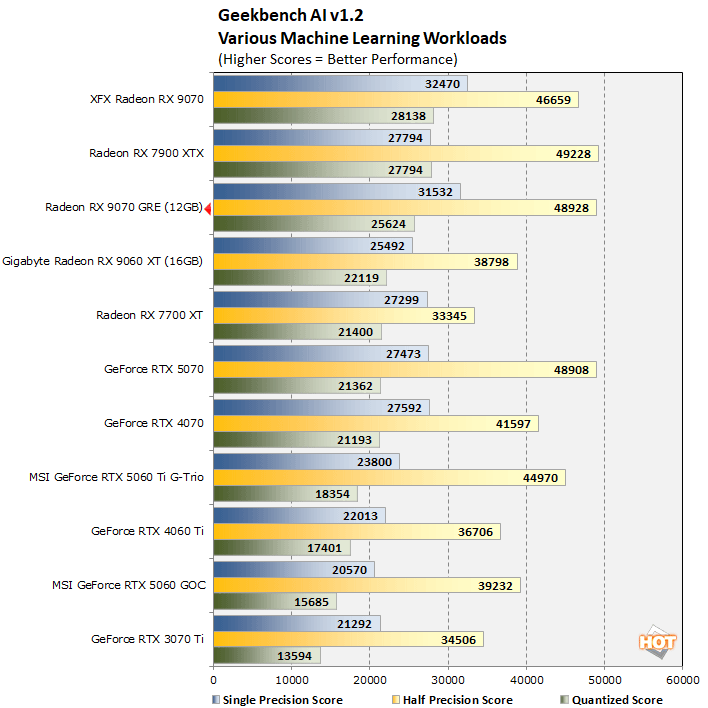
The Powercolor Radeon RX 9070 GRE's performance in GeekBench AI isn't too surprising. The card slots in just behind the Radeon RX 9070 (in terms of its quantized score) and trades blows with the Radeon RX 7900 XTX.
UL Procyon AI Text Generation Benchmarks
The Procyon AI Text Generation Benchmark is a tool developed by UL Solutions to evaluate the performance of large language models (LLMs) on Windows PCs. It features real-world use cases and uses seven prompts with both Retrieval-Augmented Generation (RAG) and non-RAG queries. It tests various AI models like Phi-3.5-mini, Mistral-7B, Llama-3.1-8B, and Llama-2-13B. These tests were run using ONNX with DirectML, not TensorRT, which is optimal for NVIDIA's RTX series discrete GPUs, but unavailable in this test at this time with this particular test.
With all four LLMs, the Powercolor Radeon RX 9070 GRE typically finished somewhere in between the Radeon RX 9070 and 16GB Radeon RX 9060 XT, at least in the tests where its 12GB of memory doesn't hold it back. In the Llama 2 test, a handful of 8GB cards are omitted from the chart because they are simply unable to run the benchmark. The Powercolor Radeon RX 9070 GRE's 12GB is a constraint as well, and the card drops down a run, behind the 9060 XT.
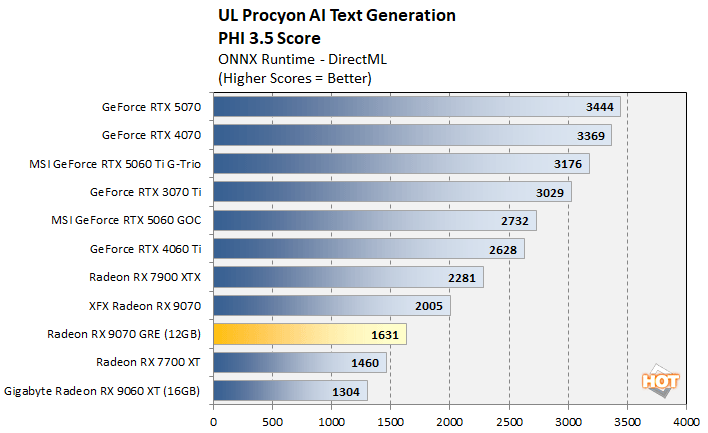
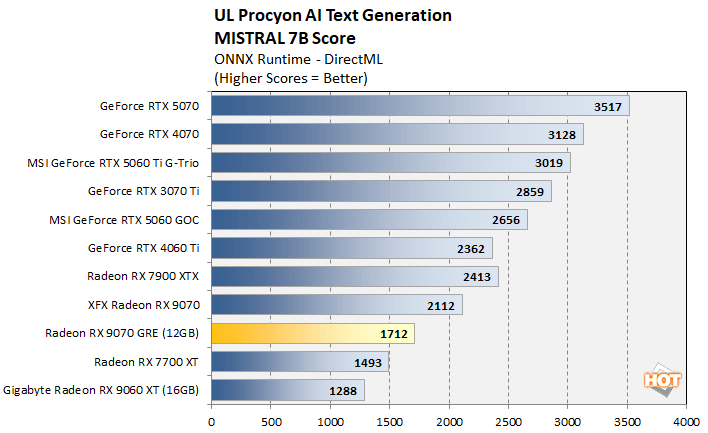
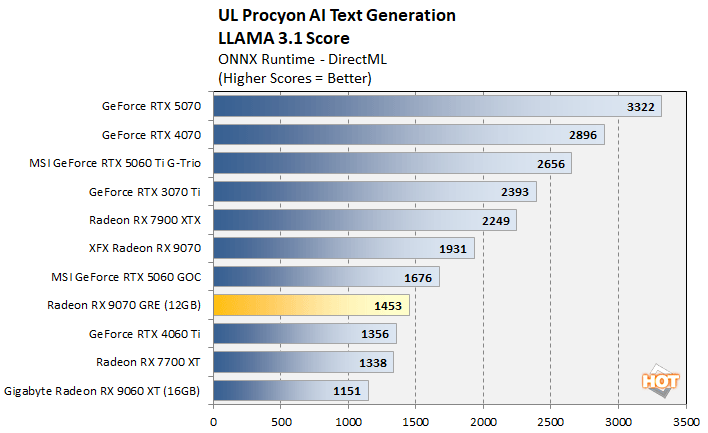
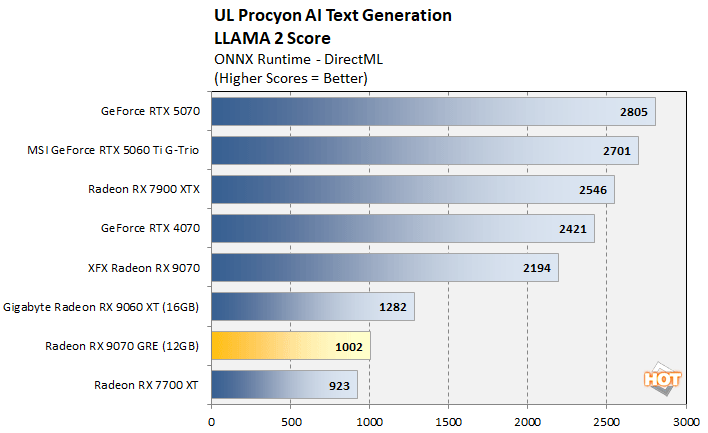
With all four LLMs, the Powercolor Radeon RX 9070 GRE typically finished somewhere in between the Radeon RX 9070 and 16GB Radeon RX 9060 XT, at least in the tests where its 12GB of memory doesn't hold it back. In the Llama 2 test, a handful of 8GB cards are omitted from the chart because they are simply unable to run the benchmark. The Powercolor Radeon RX 9070 GRE's 12GB is a constraint as well, and the card drops down a run, behind the 9060 XT.
UL Procyon Stable Diffusion XL AI Image Generation
The Procyon AI Image Generation Benchmark measures inference performance for image generation tasks. It includes several tests, with the Stable Diffusion XL (FP16) test we used here being the most demanding. The test is designed to evaluate a wide range of hardware from low power NPUs to high-end discrete GPUs and it can be configured to use different inference engines like NVIDIA TensorRT, Intel OpenVINO, and ONNX with DirectML. Unfortunately, the TensorRT engine hasn’t been updated for Blackwell just yet, but we tested it with ONNX to provide a point of reference versus the RTX 40 series cards.
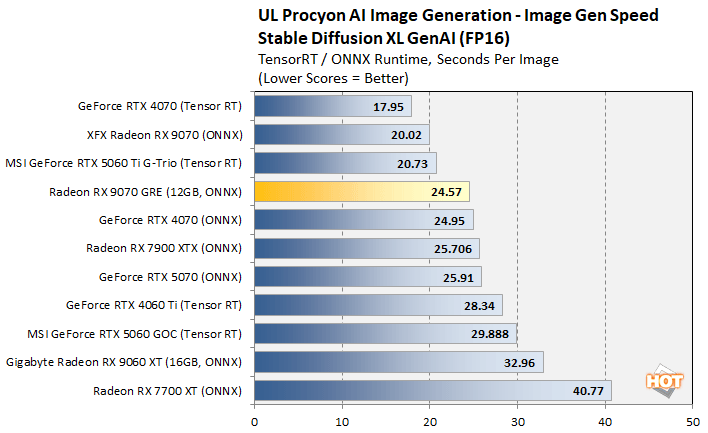
Once again we see, the Powercolor Radeon RX 9070 GRE slotting in between the RX 9070 and 16GB RX 9060 XT, though its performance is much closer to 9070. Overall things are pretty competitive here, though the GeForce RTX 5060 Ti with 16GB does offer about 20% better performance than the GRE.
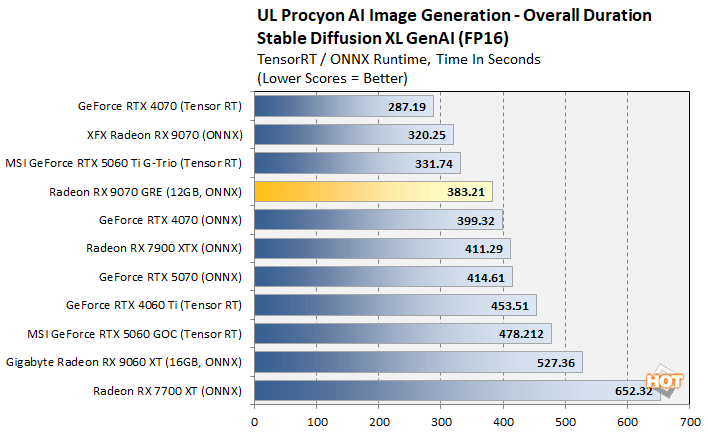
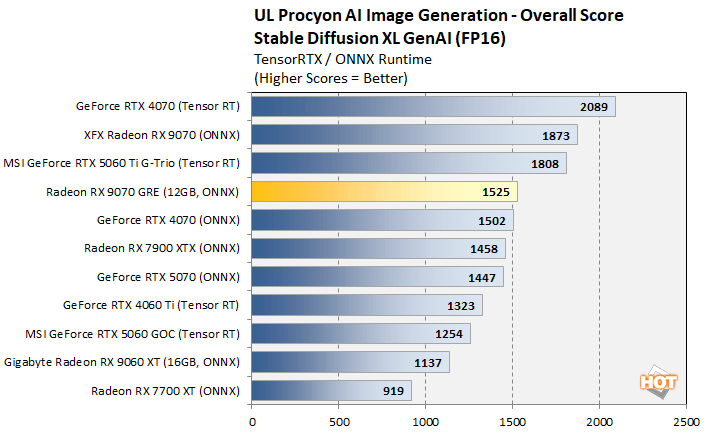
Once again we see, the Powercolor Radeon RX 9070 GRE slotting in between the RX 9070 and 16GB RX 9060 XT, though its performance is much closer to 9070. Overall things are pretty competitive here, though the GeForce RTX 5060 Ti with 16GB does offer about 20% better performance than the GRE.
Blender v4.3 GPU Rendering Benchmarks
Blender is a free and open source 3D creation suite that can handle everything from modeling, rigging, and animation, through simulation, rendering, compositing, motion tracking, and even video editing or game creation. The developers offer a standalone benchmark tool that will track performance while rendering a handful of models. We used all three of the default models for these tests...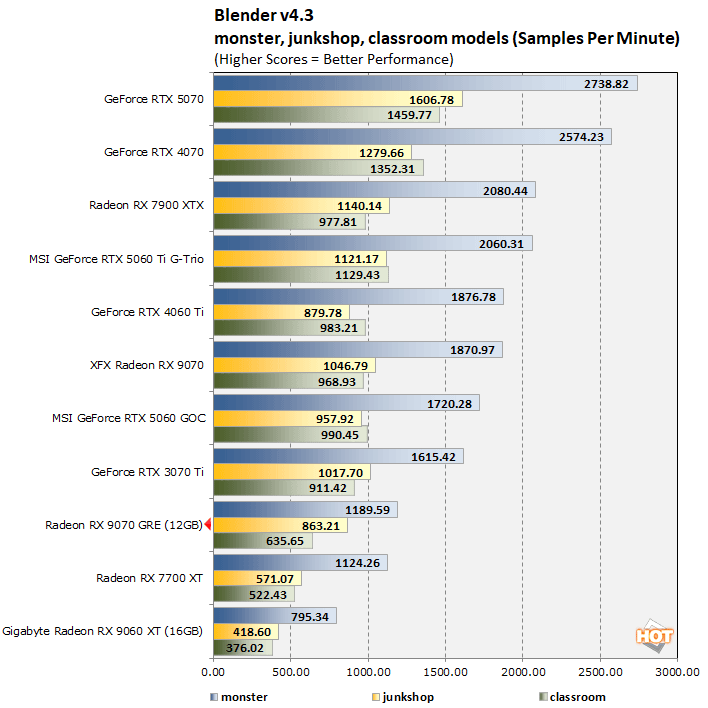
At this point a pattern should be emerging--the Powercolor Radeon RX 9070 GRE outpaced the Radeon RX 9060 XT by a good margin, but obviously can't catch the more powerful RX 9070. It finishes behind the GeForce RTX 5060 as well.
Blackmagic RAW Speed Test Results
The Blackmagic RAW Speed Test is a CPU and GPU benchmarking tool that determines the speed of decoding full-resolution Blackmagic RAW video frames. The tool can be used to evaluate performance at various resolutions and bitrates on the CPU or using OpenCL or CUDA on a GPU. We're reporting four results here, at 8K and 4K resolutions, but at differing bitrates and compression levels.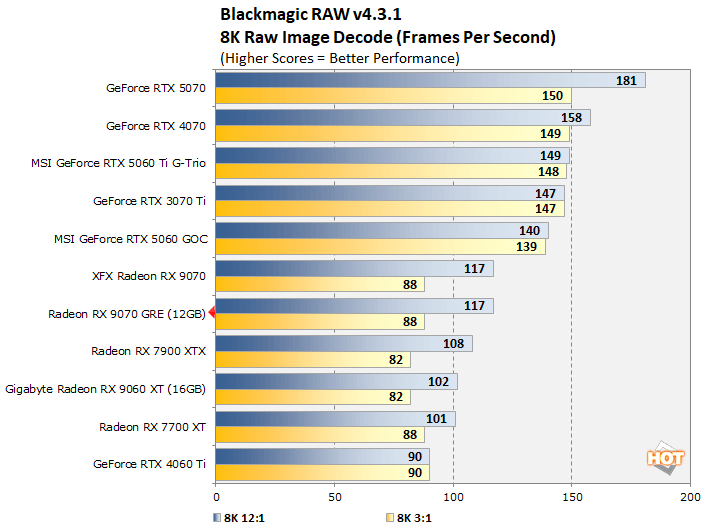
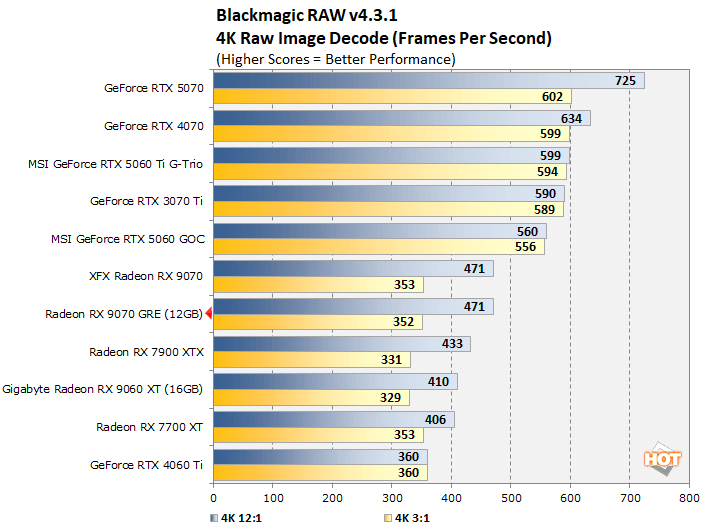
The Powercolor Radeon RX 9070 GRE finishes right on top of the Radeon RX 9070 here, which isn't a surprise considering they're based on the same GPU and have a similar encode / decode media engine. Overall though, the GeForces have a clear advantage here.