Lenovo IdeaPad Slim 3i Review: Can Intel's Wildcat Lake Compete With The MacBook Neo?


| Lenovo IdeaPad Slim 3i: MSRP $799 The Lenovo IdeaPad Slim 3i is an Intel Core Series 3 Wildcat Lake-powered, thin and light laptop designed for lower cost price segments, that can trade blows with the MacBook Neo.
|
|||

|

|
||
There will be multiple version of the Lenovo IdeaPad Slim 3i available across various channels, but the device we’ll be showing you here today is one of the more affordable models, that’s surprisingly well appointed. The Lenovo IdeaPad Slim 3i we have on tap is outfitted with 16GB of RAM, 512GB of fast storage, a relatively large 16:10 touch screen, and ample connectivity that goes well beyond the MacBook Neo, at sub $800 price point. Check it out...

Lenovo IdeaPad Slim 3i Specifications And Features
Find The Lenovo IdeaPad Slim 3i @ Best Buy
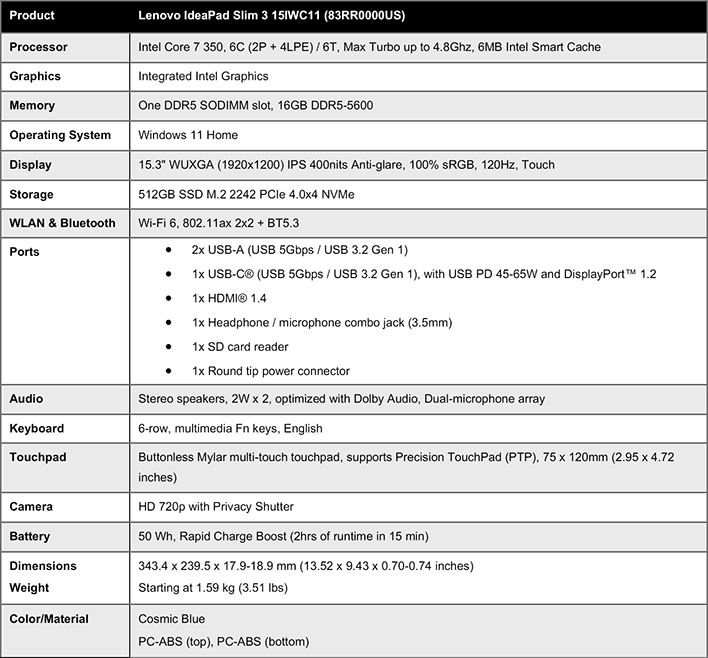
The Lenovo IdeaPad Slim 3i is powered by Intel’s new Core Series 3, codenamed Wildcat Lake. Specifically, it's outfitted with a Core 7 350, which is the second most powerful chip in the line-up. There are many more specs to cover as well, but we'll get to those a bit later, as we tour the system.
We’ve been talking about Wildcat Lake for many months and the chips officially launched a few weeks back, so we won’t go into detail again here. To quickly recap though, the Core Series 3 are essentially 5 and 6-core versions of Panther Lake, with four efficiency cores, two performance cores, and two integrated Xe Arc graphics cores. The platform also supports up to 7,467MT/s LPDDR5X or 6,400MT/s DDR5 memory.

Wildcat Lake-based Core Series 3 processors also feature a platform controller tile with six PCIe Gen 4 lanes and support for up to two Thunderbolt 4 ports, 2x USB 3.2 ports, 8x USB 2.0 ports, Wi-Fi 7, and Bluetooth 6.0.
There will initially be six processors in the Core Series 3 lineup, including the Core 7 360 and 350, the Core 5 330, 320, and 315, and the Core 3 304. Except for the Core 3, which is a 5 core processors, the remaining chips all have the same number of CPU and Xe cores, the same 6MB of L3 cache, the same memory support, and same 15-35W TDP values.
The models operate are different frequencies, however, with the max P-core turbo frequency ranging from 4.3GHz on the bottom end to 4.8GHz on both Core 7 models, the graphics frequencies, and peak TOPS also differ, based on frequency.
The Core Series 3 is basically a scaled down version Panther Lake designed for lower cost, lower power platforms.
The Lenovo IdeaPad Slim 3i Materials And Build Quality
The chassis on the Lenovo IdeaPad Slim 3i we received has a dark blue finish all around, but with different textures on each surface. The chassis is made from a polycarbonate material and the lid and deck are smooth and slick, but the underside and keycaps have a rougher, dimpled texture. The machine measures in at 13.52" x 9.43" x 0.74" and 3.51lbs. We should note, however, that other colors will be available as well and Lenovo will be offering some models with an aluminum chassis, presumably at a somewhat higher price point.

The top lid on the model we tested has a simple Lenovo badge in the center and the bottom has a large ventilation strip, with a Windows decal and another sticker with serial number and other system info. When closed, the Lenovo IdeaPad Slim 3i is about as clean as modern laptops get. There’s nothing gaudy or wild looking on this machine to speak of.
Open the lid, and the relatively large, keyboard with numpad is revealed. There is no backlighting on the keyboard, but there are indicator lights for the caps lock, num lock and the like. In typical Lenovo fashion, the keyboard on the IdeaPad Slim 3i is very good in terms of key travel and spacing, but the textured keycaps took some getting used to. We wouldn’t quite rank it as high as a top-end ThinkPads, but comfort and tactility are good and the spacing makes the machine easy to type on.
There are perforations along the top edge of the keyboard for the system’s speakers, but audio quality is not one of the Lenovo IdeaPad Slim 3i’s strong points. There’s minimal distortion with voices and everyday chimes and notifications, but the system’s dual 2W speakers don’t get particularly loud, and like most thin-and-light laptops, they lack any meaningful bass.
A mylar multi-touch, multi-gesture touchpad sits below the keyboard, favoring the left side of the deck area. While it is not particularly large, it is a decent size and very responsive and reliable. Unfortunately, the placement is somewhat awkward because it’s shifted so far left. I often found myself right-clicking on items, because it hadn’t reached far enough over to register a left click. For some folks this probably won’t be an issue, but I’ve been conditioned to expect a larger touchpad that’s more centered.
Up above the keyboard area you can also see the large hinge mechanism on the machine. The hinge is nearly 11” wide and relatively stiff. It’s not quite loose enough to allow opening the machine with one hand, without lifting the base, but that may break in over time – we’ve only had the machine a few days at this point. The movement is nice and smooth, however, and the can be swung all the way open nearly 180°, to make the machine lay almost flat on a desk.
The 15.3” display on the Lenovo IdeaPad Slim 3i is surprisingly good as well. The full-HD+, 1920x1200 matte display covers 100% of the sRBG color gamut and offers a sharp, punchy, accurate picture, with a 120Hz refresh rate and touch support. The display handled productivity and media/entertainments tasks quite well and should keep most users happy, while indoors at least. The maximum 400 nits brightness of the display leaves a little something to be desired, and can limit use in exceptionally bright lighting or outdoors.
Just above the display is a thin strip that houses an 720p webcam, with privacy shutter. The camera is not Windows Hello compatible, and it’s much lower resolution than today’s more premium laptops, but it’ll due for basic video conferencing.
In terms of IO connectivity, the Lenovo IdeaPad Slim 3i is relatively well appointed for an affordable machine in this class. On the right side of the machine, there is a SD card reader, the power button (with LED indicator) and a full-sized USB Type-A 5Gbps port. On the left side of the machine, there’s a round-top power connector, another USB-A port, and HDMI output, a USB Type-C 5Gbps port with 45-65W power delivery and DP 1.2, and a 3.5mm audio jack. We wish there was a second USB-C port, perhaps in place of the antiquated round-tip power connector, but can’t really complain when many more expensive laptops have a fraction of the Lenovo IdeaPad Slim 3i’s IO options. Wi-Fi 6 and Bluetooth 5.3 connectivity is available as well.

The top lid on the model we tested has a simple Lenovo badge in the center and the bottom has a large ventilation strip, with a Windows decal and another sticker with serial number and other system info. When closed, the Lenovo IdeaPad Slim 3i is about as clean as modern laptops get. There’s nothing gaudy or wild looking on this machine to speak of.

Open the lid, and the relatively large, keyboard with numpad is revealed. There is no backlighting on the keyboard, but there are indicator lights for the caps lock, num lock and the like. In typical Lenovo fashion, the keyboard on the IdeaPad Slim 3i is very good in terms of key travel and spacing, but the textured keycaps took some getting used to. We wouldn’t quite rank it as high as a top-end ThinkPads, but comfort and tactility are good and the spacing makes the machine easy to type on.

There are perforations along the top edge of the keyboard for the system’s speakers, but audio quality is not one of the Lenovo IdeaPad Slim 3i’s strong points. There’s minimal distortion with voices and everyday chimes and notifications, but the system’s dual 2W speakers don’t get particularly loud, and like most thin-and-light laptops, they lack any meaningful bass.

A mylar multi-touch, multi-gesture touchpad sits below the keyboard, favoring the left side of the deck area. While it is not particularly large, it is a decent size and very responsive and reliable. Unfortunately, the placement is somewhat awkward because it’s shifted so far left. I often found myself right-clicking on items, because it hadn’t reached far enough over to register a left click. For some folks this probably won’t be an issue, but I’ve been conditioned to expect a larger touchpad that’s more centered.
Up above the keyboard area you can also see the large hinge mechanism on the machine. The hinge is nearly 11” wide and relatively stiff. It’s not quite loose enough to allow opening the machine with one hand, without lifting the base, but that may break in over time – we’ve only had the machine a few days at this point. The movement is nice and smooth, however, and the can be swung all the way open nearly 180°, to make the machine lay almost flat on a desk.

The 15.3” display on the Lenovo IdeaPad Slim 3i is surprisingly good as well. The full-HD+, 1920x1200 matte display covers 100% of the sRBG color gamut and offers a sharp, punchy, accurate picture, with a 120Hz refresh rate and touch support. The display handled productivity and media/entertainments tasks quite well and should keep most users happy, while indoors at least. The maximum 400 nits brightness of the display leaves a little something to be desired, and can limit use in exceptionally bright lighting or outdoors.
Just above the display is a thin strip that houses an 720p webcam, with privacy shutter. The camera is not Windows Hello compatible, and it’s much lower resolution than today’s more premium laptops, but it’ll due for basic video conferencing.


In terms of IO connectivity, the Lenovo IdeaPad Slim 3i is relatively well appointed for an affordable machine in this class. On the right side of the machine, there is a SD card reader, the power button (with LED indicator) and a full-sized USB Type-A 5Gbps port. On the left side of the machine, there’s a round-top power connector, another USB-A port, and HDMI output, a USB Type-C 5Gbps port with 45-65W power delivery and DP 1.2, and a 3.5mm audio jack. We wish there was a second USB-C port, perhaps in place of the antiquated round-tip power connector, but can’t really complain when many more expensive laptops have a fraction of the Lenovo IdeaPad Slim 3i’s IO options. Wi-Fi 6 and Bluetooth 5.3 connectivity is available as well.
Lenovo IdeaPad Slim 3i Software Experience
The Lenovo IdeaPad Slim 3i ships with Windows 11 Home 25H2 out of the box, and the factory image is relatively clean and free of bloatware. The only exception was McAfee Antivirus, which was promptly uninstalled after the umpteenth nag screen and notification that popped up while installing updates and benchmarks.
The only noteworthy additional app on the factory image, over and above Microsoft’s defaults for Windows 11, was Lenovo's Vantage utility, which acts as a hub for system management, feature toggles, hardware monitoring, and firmware updates. Vantage also lists the specs of the system and has a number of troubleshooters to try to deal with various issues. Users can connect with Lenovo through the Lena Chatbot as well, which is integrated into Vantage, for help, support issues or warranty service requests.
Now that we've seen the Wildcat Lake-powered Lenovo IdeaPad Slim 3i up close and personal, let's take it for a spin through our benchmark suite to see how it performs…

The only noteworthy additional app on the factory image, over and above Microsoft’s defaults for Windows 11, was Lenovo's Vantage utility, which acts as a hub for system management, feature toggles, hardware monitoring, and firmware updates. Vantage also lists the specs of the system and has a number of troubleshooters to try to deal with various issues. Users can connect with Lenovo through the Lena Chatbot as well, which is integrated into Vantage, for help, support issues or warranty service requests.

Now that we've seen the Wildcat Lake-powered Lenovo IdeaPad Slim 3i up close and personal, let's take it for a spin through our benchmark suite to see how it performs…