Lenovo IdeaPad Slim 3i Review: Can Intel's Wildcat Lake Compete With The MacBook Neo?


The Lenovo IdeaPad Slim 3i has only a single fan inside, situated at the center of a heatsink that’s linked to a small heat plate, that’s affixed to the top of the Intel Core 7 350 SoC. With the bottom panel of the machine removed, you can also see the easily accessibly SO-DIMM, Wi-Fi card, and M.2 SSD. Considering the relatively simplicity of the IdeaPad Slim 3i's internals and how easy it is to get at them, this machine will likely score pretty high on the repairability index.


Lenovo IdeaPad Slim 3i Thermals And Acoustics
At idle, the machine is dead silent and when running less-taxing workloads, you have to put your ear up against the bottom of the system to hear anything running at all. As such, when the system was idling, nothing would register on our sound meter in the lab, which has a sound floor in the low 30dBa range.
The fan in the system will spin up when under a heavy, sustained load, however. To get a sense for acoustics and thermals under load, we fired up the Steel Nomad Lite stress test, which runs the benchmark in a continuous loop. The heat and noise generated by the Lenovo IdeaPad Slim 3i under these test conditions should be indicative of what a typical, prolonged gaming scenario or 3D rendering might produce.
With the sound meter about 14" – 18” from the display, we measured approximately 39dBA on average, which is very quiet (the peak 52dBA in the screenshot wasn't generated by the system itself—it was me moving in my creaky chair). The noise character also has a low pitch and is not particularly audible or irksome in our opinion. The fan emits a gentle whir as hot air is expelled from the chassis, which will likely go unnoticed by just about anyone in real-world environments with any sort of activity going on.
The actual hardware health data gathered during a PCMark10 run, which features content creation and gaming tests, shows how the Lenovo IdeaPad Slim 3i behaves thermally with some everyday workloads. As you can see, the CPU in the system will often jump right up into the mid-90°C range, but it then quickly throttles down into the mid-60s and 70s.
The minimal cooling hardware in the Lenovo IdeaPad Slim 3i is quickly saturated, which causes the SoC to throttle quite a bit. Frequencies bounce between ~1.4 and ~4.7GHz depending on the workload at the time, but the chip will remain in its max turbo range for relatively long stretches, even when the chip is riding the ragged edge of its thermal envelope (see the frequency plot at about the 0:60 mark).

The fan in the system will spin up when under a heavy, sustained load, however. To get a sense for acoustics and thermals under load, we fired up the Steel Nomad Lite stress test, which runs the benchmark in a continuous loop. The heat and noise generated by the Lenovo IdeaPad Slim 3i under these test conditions should be indicative of what a typical, prolonged gaming scenario or 3D rendering might produce.
With the sound meter about 14" – 18” from the display, we measured approximately 39dBA on average, which is very quiet (the peak 52dBA in the screenshot wasn't generated by the system itself—it was me moving in my creaky chair). The noise character also has a low pitch and is not particularly audible or irksome in our opinion. The fan emits a gentle whir as hot air is expelled from the chassis, which will likely go unnoticed by just about anyone in real-world environments with any sort of activity going on.

The actual hardware health data gathered during a PCMark10 run, which features content creation and gaming tests, shows how the Lenovo IdeaPad Slim 3i behaves thermally with some everyday workloads. As you can see, the CPU in the system will often jump right up into the mid-90°C range, but it then quickly throttles down into the mid-60s and 70s.
The minimal cooling hardware in the Lenovo IdeaPad Slim 3i is quickly saturated, which causes the SoC to throttle quite a bit. Frequencies bounce between ~1.4 and ~4.7GHz depending on the workload at the time, but the chip will remain in its max turbo range for relatively long stretches, even when the chip is riding the ragged edge of its thermal envelope (see the frequency plot at about the 0:60 mark).
How Is The Lenovo IdeaPad Slim 3i's Battery Life?
Battery life is critically important for a mobile PC. Being productive on the go could mean long stretches away from power outlets, so the machine needs to last through hours of work--whether its for writing e-mails or poring over spreadsheets. Binging on content during long flights is another common use case.
Here we've calibrated the laptop displays to a similar fixed brightness, in an effort to minimize that aspect of power draw, though lots of other variables come into play, like battery capacity, or the number of integrated peripherals in a system, for example.
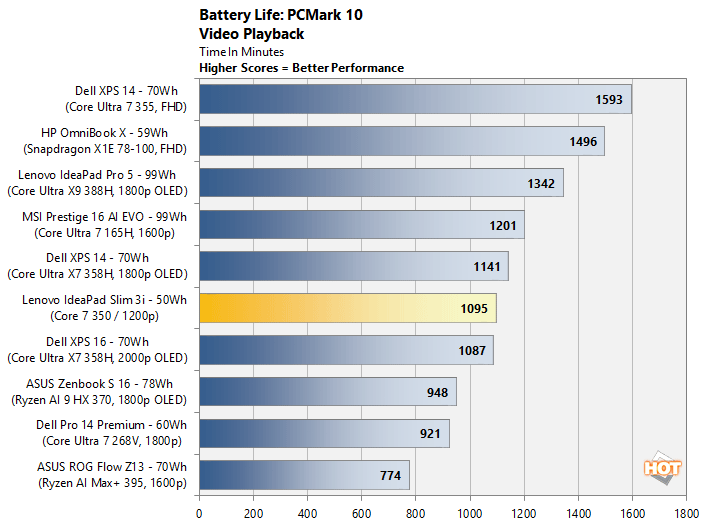
The Lenovo IdeaPad Slim 3i lasted for more than 18 hours on battery power, which put it right about in the middle of this chart. You may think that's not a particularly good score, but you must consider the system's battery capacity and slightly higher resolution 16:10 display relatively to some of the other laptops we tested.
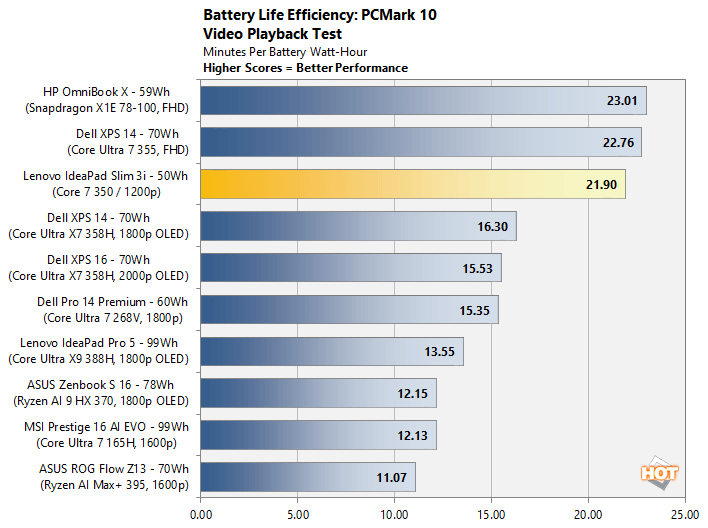
The Lenovo IdeaPad Slim 3i has the smallest battery of the bunch at only 50Whr, with a 15.3" 1200p display, with a 16:10 aspect ration. If we rank the machines on minutes per watt-hour of battery capacity, the Lenovo IdeaPad Slim 3i lands much closer to the top of the chart, lumped in with the some of the more power efficient systems that we've tested to date.
HotHardware's Lenovo IdeaPad Slim 3i: Review Conclusion
To introduce a modern, well-equipped, affordable laptop in the current market is exceedingly difficult. Memory and storage prices continue to skyrocket, along with many other materials and components, which makes it near impossible to hit previously mainstream price points, without sacrificing the user experience. We do not envy the current situation laptop OEMs/ODMs are in.That said, Lenovo seems to have taken a well thought out, measured approach with the IdeaPad Slim 3i. This machine strikes a good balance between screen size and portability, it has ample IO and connectivity that’s superior to many more expensive notebooks, the display is surprisingly good, battery life and efficiency are quite good, and the machine's slick cosmic blue colorway looks great in our opinion.

Find The Lenovo IdeaPad Slim 3i @ Best Buy
To hit its $799 price point (assuming it actually hits retail at that price), and still include 16GB of RAM, a 512GB Gen 4 M.2 SSD, and the aforementioned display and connectivity, however, Lenovo obviously had to make some concessions. For example, the polycarbonate materials and plastics used on the chassis and keyboard don’t have a premium feel, the webcam is low resolution, and the Core Series 3 platform offers a max of only 6 CPU cores, with an anemic iGPU. The benchmarks also show Core 7 350 in the system trailing previous-gen systems and the MacBook Neo more often than not. In real world use, the IdeaPad Slim 3i actually feels pretty snappy for everyday computing tasks, and is perfectly sufficient for office productivity, email and web browsing, but it’s lack of horsepower become more obvious with more taxing workloads.
If you’re accustomed to more premium, higher-performing laptops and notebooks, the IdeaPad Slim 3i probably isn't for you. But if you’re in the market for a new, relatively affordable, mainstream device for basic computing needs, the IdeaPad Slim 3i should fit the bill. Just be sure to shop for deals on previous-gen systems before pulling the trigger. More powerful Core Ultra 200 series systems with more cores, faster GPUs, 16GB of RAM and additional storage are currently available at similar or lower prices, at least while supplies last.
If you’re accustomed to more premium, higher-performing laptops and notebooks, the IdeaPad Slim 3i probably isn't for you. But if you’re in the market for a new, relatively affordable, mainstream device for basic computing needs, the IdeaPad Slim 3i should fit the bill. Just be sure to shop for deals on previous-gen systems before pulling the trigger. More powerful Core Ultra 200 series systems with more cores, faster GPUs, 16GB of RAM and additional storage are currently available at similar or lower prices, at least while supplies last.