Apple MacBook Neo Long-Term Review: 27 Days On The Road

MacBook Neo Performance
For the past four years, I’ve been using a MacBook Air M2 (8GB RAM, 256GB storage) when I’m on the road, which is often (about one third of the year). Since mid-April, I’ve been traveling with the MacBook Neo instead, and spent about 27 days with it on the road so far. I also have an iMac M3 (8GB RAM, 512GB storage) at home and a Mac mini M4 (16GB RAM, 1TB storage) at the office, which I use about equally when I’m not traveling.My most common use cases involve working in Firefox and Chrome, making video calls, editing audio in Audacity, editing photos in Affinity, and editing videos in iMovie and DaVinci Resolve. I typically have ten to twenty tabs open, primarily in Firefox, sometimes in Chrome, but I never use Safari. I mostly edit two tracks of audio in Audacity, 12MP JPEG Images in Affinity, and I edit both 1080p and 4K videos in iMovie and DaVinci Resolve.

Obviously, I’m not the target audience for the MacBook Neo. The MacBook Air is certainly a better fit for my use cases. But here’s the thing: I don’t really notice any massive difference in performance when jumping between my four Macs. Sure the Mac mini is marginally faster when processing audio in Audacity (like noise reduction, de-clicking), and it renders 4K video faster. But the MacBook Neo gets the job done without any fuss.
The MacBook Neo is powered by a binned version of Apple’s A18 Pro, a 3nm mobile SoC originally designed for smartphones that launched in 2024 alongside the iPhone 16 Pro. It’s missing one GPU core (five instead of six) and comes with 8GB of unified (on-chip) RAM. Yes, Apple put a smartphone chip in a laptop, and it doesn’t suck. In fact, the A18 Pro outperforms Apple’s M1 from 2020, and almost matches the M4 in single-core performance.
Like the MacBook Air, the MacBook Neo is a fanless (passively cooled) system, but while the Air uses thermal paste and a clip-on metal shield as a heat sink, the Neo makes do with a simple graphene sheet. As a result, both laptops will throttle under heavy workloads, but in my experience, it’s been slightly more noticeable with the Neo than the M2 Air. Basically, this is only obvious when rendering long 4K videos, or gaming.
As for RAM, 8GB is far from ideal on any computer these days. But that generally isn’t a problem with macOS, at least not for the MacBook Neo’s intended audience. That’s because macOS is highly optimized for Apple Silicon chips, and manages RAM more efficiently than Windows, in part by using compression. Plus, macOS handles disk swapping more seamlessly than Windows, by swapping sooner and more aggressively.

I’ve only run into performance issues with the MacBook Neo twice so far. While in LA, editing my Moto Razr hands-on video (4K) in iMovie, the MacBook Neo came to crawl. I was able to launch Activity Monitor (Apple’s equivalent to Windows’ Resource Monitor) and noticed that several tabs open in Firefox were using an obscene amount of RAM. I restarted Firefox, restored my tabs and everything went back to normal. Memory leak, I guess.
The second time was at Computex in Taipei. I was rendering the video version of my podcast (a 1-hour long 4K video with some color grading) in DaVinci Resolve while watching YouTube videos in Firefox (with a handful of other tabs open). The render was taking forever and YouTube playback (4K) was stuttering. Memory use was fine. Restarting Firefox made no difference, but restarting the MacBook Neo solved the problem.
I tend to keep my Macs between five and seven years on average before performance becomes an issue, and it’s time to upgrade. My four-year old MacBook Air M2 is the base model with 8GB of RAM and 256GB of storage, and still gets the job done. My only concern with the MacBook Neo is that five years from now, 8GB of RAM simply won’t cut it anymore. After all, every other Mac now ships with a minimum of 16GB of RAM.
The rest of the MacBook Neo’s specs include either 256 or 512GB of storage (NVMe SSD, approx. 1.6MB/s read and write speeds), WiFi 6e (802.11ax), Bluetooth 6.0 (LE), and dual beamforming mics.
MacBook Neo Benchmarks
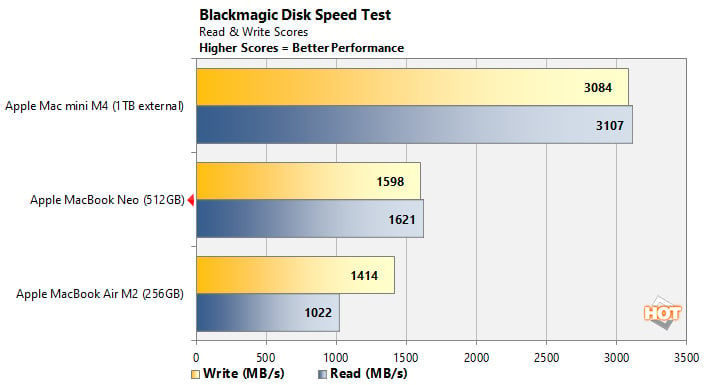
BlackMagic’s Disk Speed Test is a popular, free benchmark used to measure disk performance. In this test, the MacBook Neo’s 512GB NVMe SSD averages about 1.6MB/s read and write speeds after multiple iterations of the 5GB test. This is slower than my Mac mini M4 with an external Western Digital SN850X 1TB M.2 SSD in an Other World Computing Express 1M2 Thunderbolt 4 enclosure, which averages about 3.1MB/s read and write speeds.

Speedometer 3.1 is BrowserBench.org's web application performance test. It automatically loads and runs a variety of sample web apps using the most popular web development frameworks around, including React, Angular, Ember.js, and even simple JavaScript. This test shows how systems cope with real-world, modern web apps. All tests were performed using the latest version of Chrome.
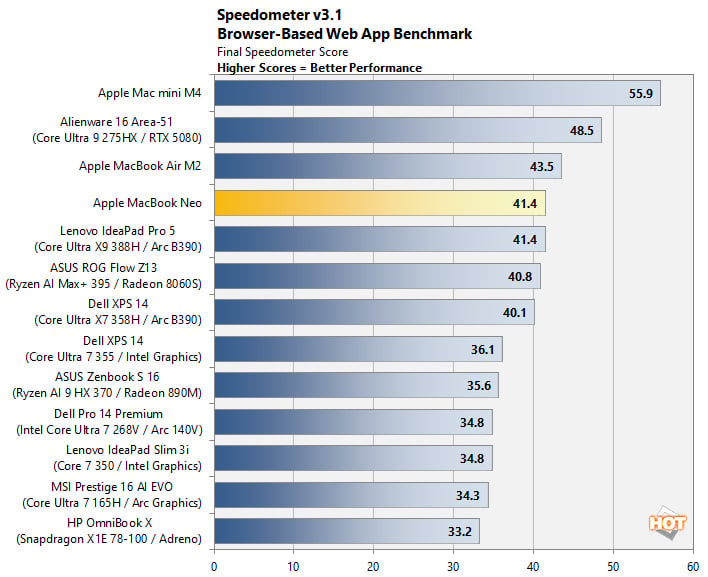
Here, the MacBook Neo scores near the top of our list (41.4), besting most Windows Laptop we’ve recently tested except the Lenovo Ideapad Pro 5 (tie) and Alienware 16 Area 51 (48.5). Still, it’s no match for the Mac mini M4 (55.9), though it’s worth noting that the MacBook Neo scores better when running Apple’s highly optimized Safari browser (50.4).

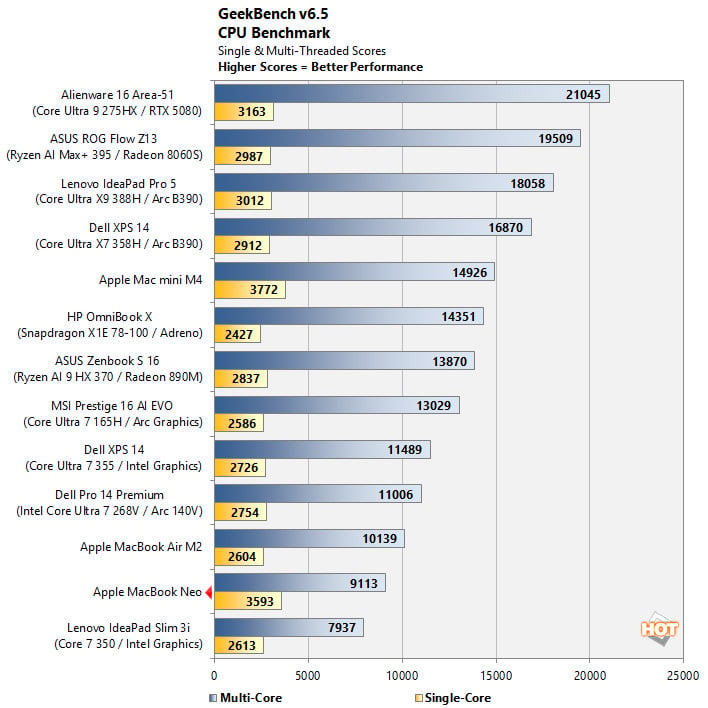
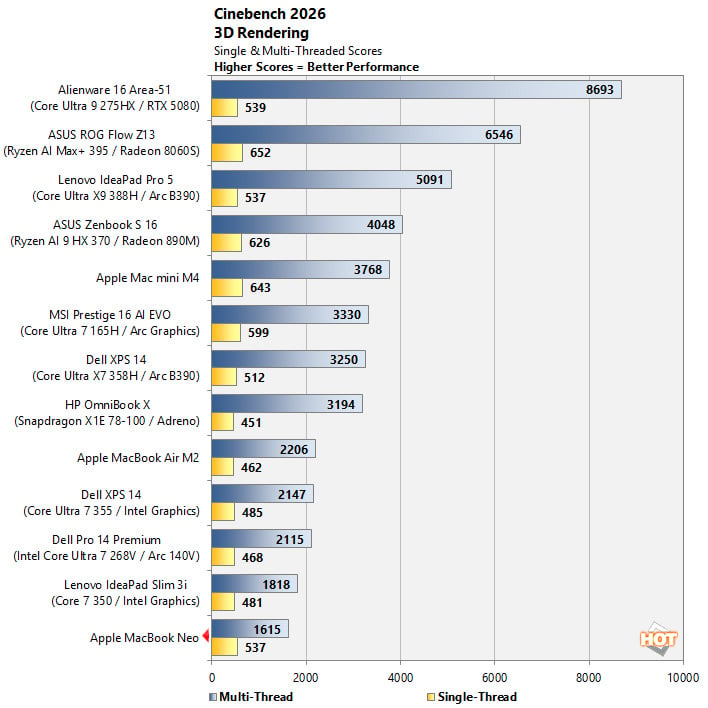
Cinebench 26 is Maxon’s latest 3D rendering benchmark, based on the Cinema 4D rendering engine. It's a purely CPU-based test that doesn't make use of the graphics processor or NPU, and it scales very well with additional CPU cores. We ran both single- and multi-threaded tests on all of the systems in these charts.
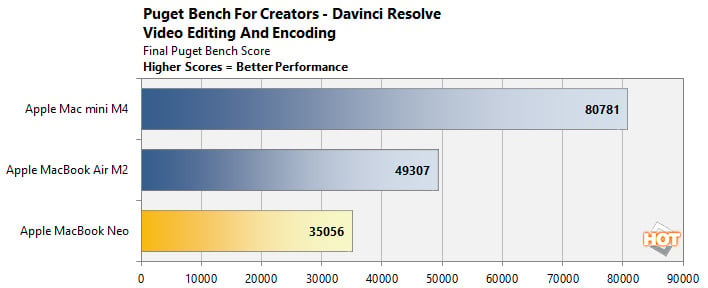
Puget Bench for Creators is a free benchmark created by Puget Systems to evaluate hardware performance based on real-world content creation workloads, rather than theoretical synthetic tests. The company has been developing benchmarks that leverage real-world applications and workloads for a number of years now, using popular content creation applications like Adobe Photoshop and DaVinci Resolve. Here, we used the free version of DaVinci Resolve on three different Macs using hardware acceleration.
MacBook Neo Battery Life
The MacBook Neo’s 36.5Wh battery is pretty small by laptop standards, yet Apple advertises up to 16 hours of video streaming and up to 11 hours of web browsing. For reference, the current MacBook Air M5 boasts a 53.8Wh battery, and my MacBook Air M2 packs a 52.6Wh battery. Both are rated for up to 18 hours of video streaming and up to 15 hours of web browsing, and Apple’s battery life claims are usually accurate.Despite having a 33% smaller battery, the MacBook Neo’s endurance roughly matches that of my MacBook Air M2’s, which currently shows 85% battery health after four years. On my 13-hour flight from San Francisco to Taipei for Computex, I used the MacBook Neo for eight hours with WiFi disabled and brightness set to 1/3, editing audio in Audacity, then editing and rendering two 1-hour long 1080p videos in iMovie.
I started with a full charge, and ended with 40% battery left after 8 hours of almost continuous use. That’s excellent battery life, and a testament to the A18 Pro’s efficiency. Even with WiFi enabled and brightness set between 50 and 66%, the MacBook Neo’s battery life easily holds up to a workday of web browsing and content/media consumption. As such, battery life won’t be a concern for the vast majority of MacBook Neo users.
Next up: software, user experience, and review verdict...