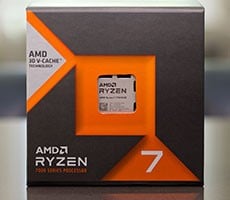
AMD Ryzen 7 7700X3D Review: 3D V-Cache Gaming Performance For Less


Although the Ryzen 7 7700X3D is not fully unlocked and doesn't offer fine-grained multiplier and clock manipulation, memory overclocking (with full EXPO support), Curve Optimizer and PBO are all supported. As is the case with most modern processors, to get the best performance from a Ryzen 7 7700X3D, you’ll want a good cooler and power supply and an enthusiast-class motherboard with power headroom for overclocking.

AMD Ryzen 7 7700X3D Clocks, Voltages And Temps: Default, Stock Configuration
Overclocking The Ryzen 7 7700X3D
I took a straightforward approach to overclocking the Ryzen 7 7700X3D, using some of the one-click methods available via AMD's Ryzen Master software, including PBO and PBO Advanced. PBO and PBO Advanced allow the processor to consume more power through the socket and exploit any additional current headroom available on motherboards with robust VRM configurations.
AMD Ryzen 7 7700X3D Clocks, Voltages And Temps: PCB Advanced +200MHz CPU Offset
During my initial testing, I enabled PBO and then PBO Advanced, but saw minimal changes in performance. Adding a +200MHz CPU offset with PBO Advanced and jacking memory clocks up to 6000MT/s using our memory's EXPO profile started to moved the needle, however.
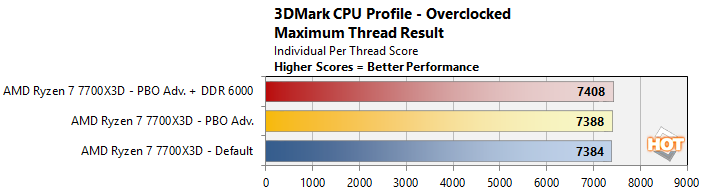
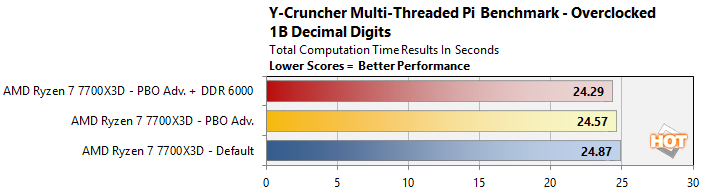
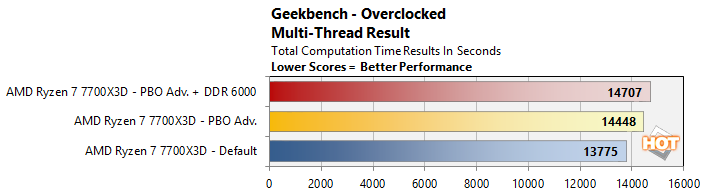
I saw small performance improvements across the board, though they were more pronounced with Geekbench's shorter, bursty workloads. The multi-threaded 3DMark CPU performance profiler showed a small gain, but we shaved about 1/2 a second off a 1B digit Y-Cruncher run. Geekbench showed a nearly 1,000 point gain in the Ryzen 7 7700X3D's multi-threaded result, though.
I should also mention that temperatures and power were non-issues while we experimented with overclocking on the Ryzen 7 7700X3D. The processor typically ran in the mid-60°C range, with peaks into the low 70's. And total system power hardly changed at all. If you have any decent cooler and are willing to put in some time tweaking, there should be a decent amount of headroom available to squeeze some additional performance out of the Ryzen 7 7700X3D without worrying about power and temps.
AMD's Ryzen 7 7700X3D: The Verdict
AMD's Ryzen 7 7700X3D processor is designed specifically for gamers on a budget, looking for an affordable entry point into the socket AM5 platform or to upgrade an existing, lower-end Ryzen 7000 series processor. As my benchmarks show, the Ryzen 7 7700X3D is not a barnburner in most everyday computing, productivity, and creator workloads, relative to higher-clocked processors with newer architectures. Run a game on this thing though, and it punches well above its weight class and hangs with much pricier CPUs.
Find The AMD Ryzen 7 7700X3D @ NewEgg
At its full $329 MSRP, however, the Ryzen 7 7700X3D is walking a tight rope. The higher-clocked and better performing Ryzen 7 7800X3D is currently available for only $348, for example. The standard 12-core Ryzen 7 9900X is also available for about the same price (currently $328). The 9900X lacks 3D V-Cache, so it won’t always game as well as the 7700X3D, but if you do anything else on the system, its newer Zen 5 architecture and 50% higher core count will offer much more performance for just about everything else. And then there’s the Core Ultra 7 270K Plus. The 270K plus has triple the total number of cores of the 7700X3D (24 vs. 8), is excellent for MT workloads and creator applications, and it’s available for just $308 at the moment, though you'd need faster, much more expensive memory to get the most out of it.
We don’t call out all of these other processors to disparage the Ryzen 7 7700X3D, but only to highlight that there are crucial decisions to be made in this price segment. If all you care about is gaming, and want an affordable, power-friendly CPU, that won’t require elaborate cooling and will drop into a myriad of mature socket AM5 motherboards using mainstream DDR5 memory, while you wait for Zen 6, the Ryzen 7 7700X3D may fit the bill. If you stray at all from that gaming-only use case though, do some shopping and scrutinize the benchmarks to ensure you get the best all-around bang for your buck.