AMD Ryzen 7 7700X3D Review: 3D V-Cache Gaming Performance For Less


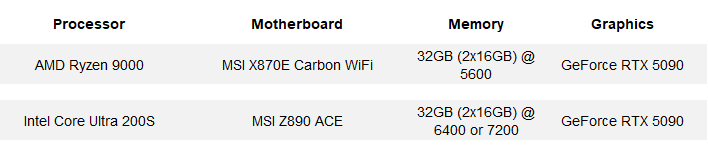
When configuring our test systems for benchmarking, we first make sure all firmwares are up to date, and then we enter each system's respective BIOS / UEFI and set the board to its "Optimized" or "High Performance" defaults. We then save the settings, re-enter the BIOS, and set the memory frequency to the maximum officially supported speed for the given platform without overclocking. After that, we format the SSDs and install and fully update Windows 11 Pro. With the Windows installation was complete, we install all of the drivers necessary for our components, disable auto-updating and OneDrive, and install all of our benchmarking software. When that process was done, we performed a disk clean-up, cleared any temp and prefetch data, processed idle tasks, and optimized all of the SSDs using Windows' built-in tools. Finally, we enabled Windows Focus Assist to minimize any potential interruptions and let the systems reach an idle state before invoking any tests.
HotHardware's Test Systems:
Geekbench v6.3 CPU Benchmark
The GeekBench CPU tests stress only the processor cores in a system (not the graphics card/GPU), with both single and multi-threaded workloads. The tests are comprised of encryption processing, image compression, HTML5 parsing, physics calculations and other general purpose compute processing workloads.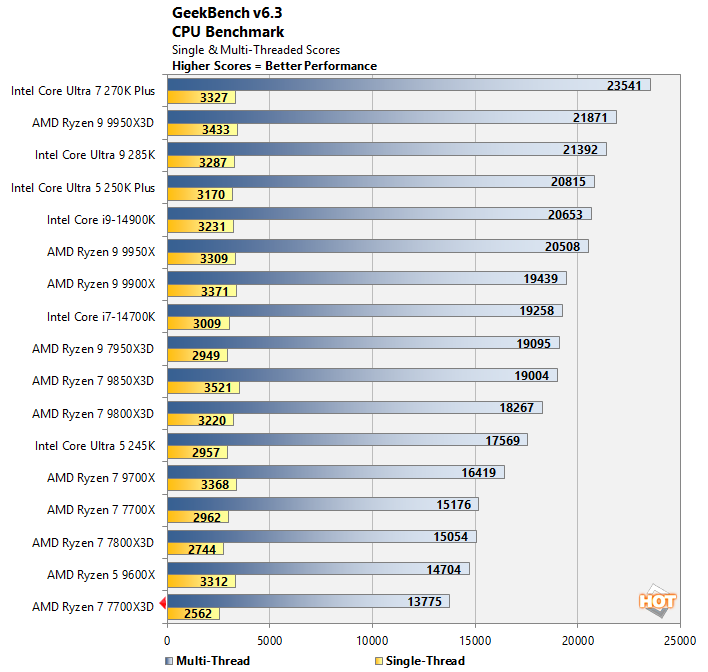
With only 8 cores / 16 threads and the lowest clocks of the bunch, the Ryzen 7 7700X3D trailed the rest of the pack here. The Ryzen 7 7700X3D lands about 6% - 8% behind the Ryzen 7 7800X3D depending on the test, which is a theme you'll see often as you continue on through the numbers below.
UL Procyon AI Machine Vision Benchmark
Running AI workloads natively on local hardware, or at the edge instead of in the cloud, is relatively new on consumer-class Windows PCs. As a result, reliable, easily repeatable benchmarks for these workloads aren't prolific just yet, though UL has already built a few into its Procyon benchmark suite and Primate Labs has released Geekbench AI.Let's take a look at how these processors do with the UL Procyon AI Computer Vision benchmark, running solely on the CPU cores using Integer precision. Though many mobile processors feature second or third generation NPUs, they just recently arrived for desktop processors. That said, this version Procyon AI's Computer Vision benchmark as configured runs solely on the CPU cores.
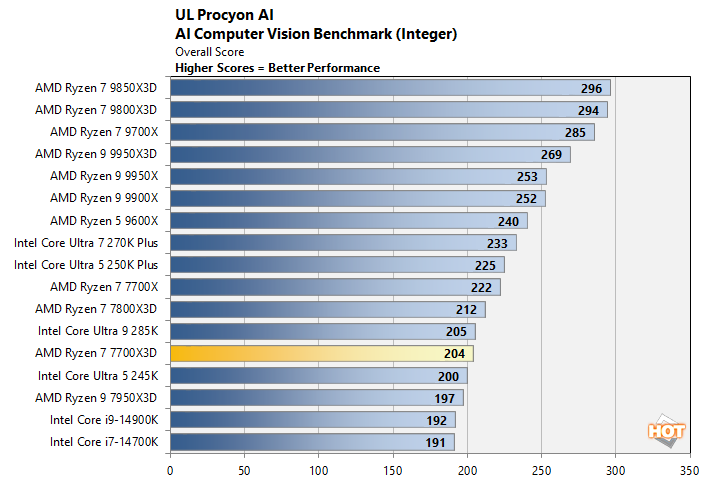
Procyon's computer vision benchmark doesn't leverage all of the cores available in these desktop processors and performance is heavily impacted by cache and memory bandwidth and latency. As you can see, the highest clocked AMD Zen 5-based processors with single CCDs -- not the highest core count processors -- jump out in front. The Ryzen 7 7700X3D lands between a couple of Core Ultra processors and a notch behind the Ryzen 7 7800X3D.
Geekbench AI Machine Learning Benchmarks
The Geekbench AI benchmark provides a straightforward look at how well a device handles a variety of AI-assisted tasks. This quick and easy test gives you a numerical snapshot of a CPU, GPU, or NPU's ability to power through real-world machine learning workloads, factoring in both speed and accuracy. The higher the score, the better the device's AI chops, whether it's for image recognition, object detection, or natural language processing.Results are presented for three levels of numerical precision: single precision or FP32, half precision or FP16, and quantized or INT8. All results that the benchmark provides are geomean scores from multiple runs of each test workload. We've got results using the ONNX and OpenVINO frameworks.
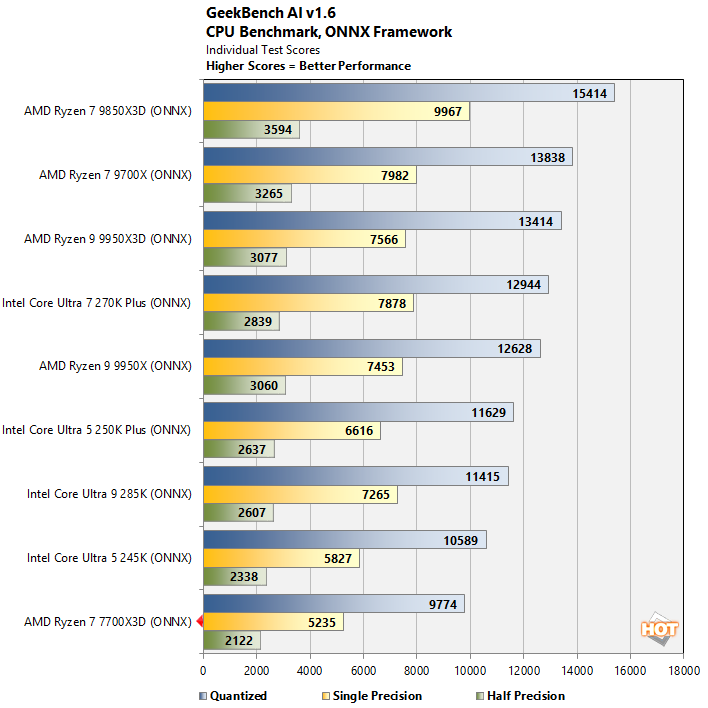
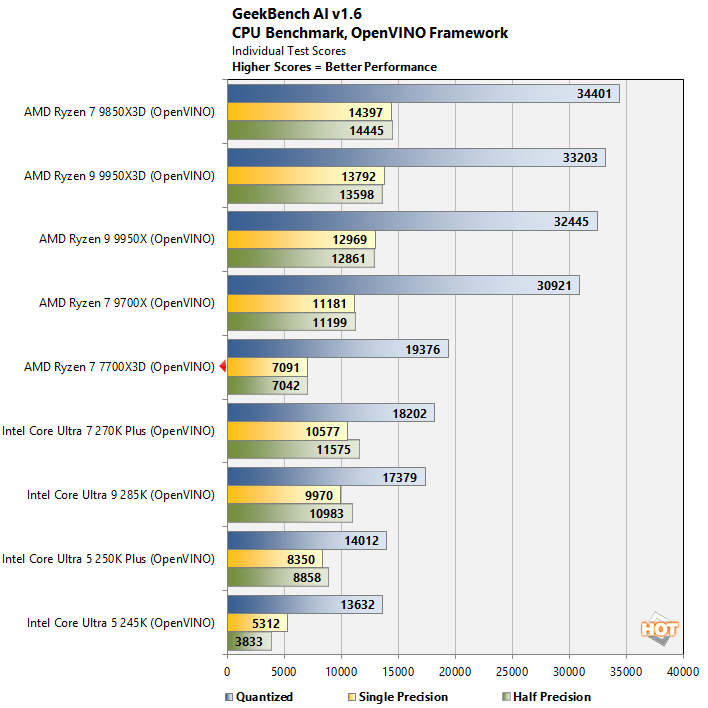
The processors I tested here perform very differently, depending on the framework being used. With the ONNX framework, the Ryzen 7 7700X3D brings up the rear. When using the Intel OpenVINO framework, however, which is better optimized for modern x86 CPU architectures, the Ryzen 7 7700X3D lands about in the middle of the pack, ahead of all of the Core Ultra processors.
UL PCMark 10 Applications Benchmarks
Next, up we have some full-system testing with PCMark. We're reporting all test results from the PCMark 10 Applications benchmark suite, which uses actual Microsoft Office applications, in addition to the Microsoft Edge browser. The workloads are specific to each Office application (Word, Excel, and PowerPoint), and the Edge tests simulates real-world web browsing.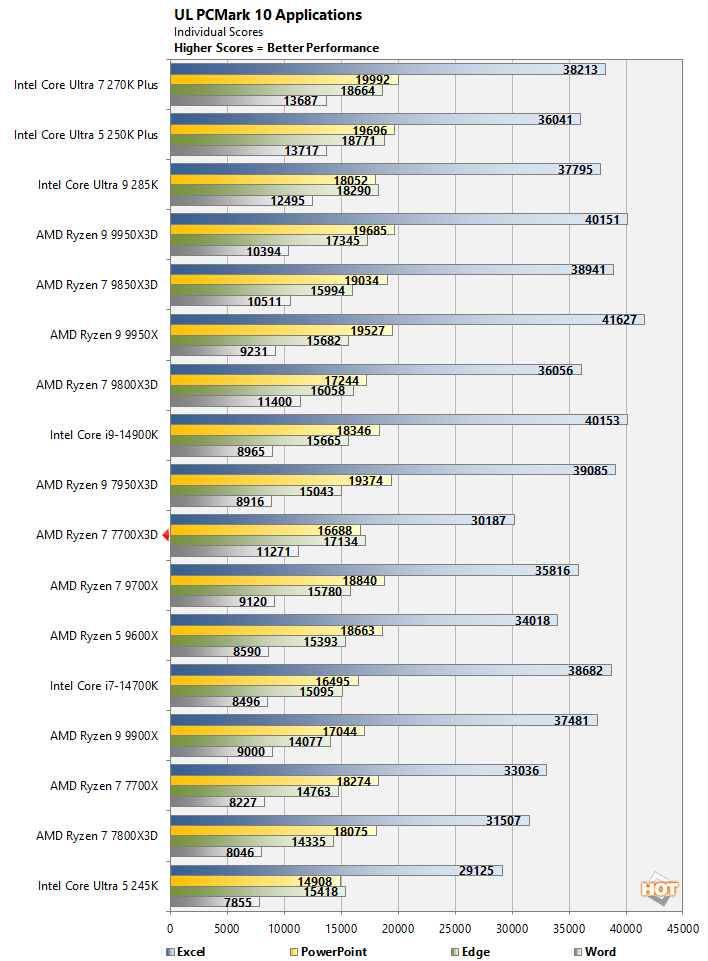
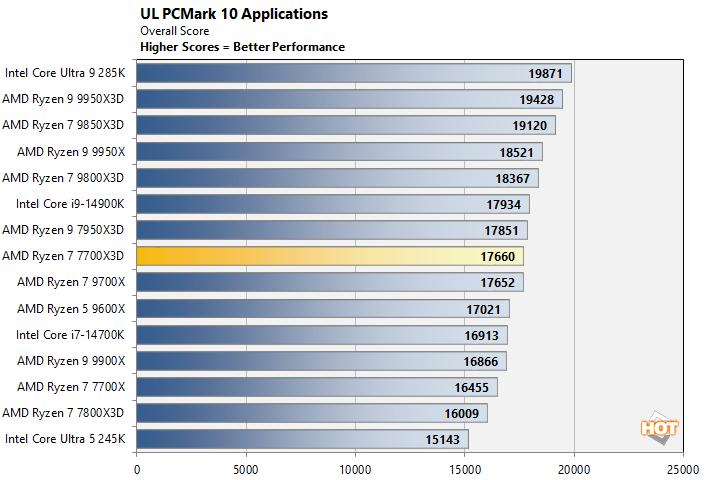
Its single-CCD design (which lowers latency), and all of that cache, push the Ryzen 7 7700X3D near the middle of the pack in our PCMark testing. While its 8-cores / 16 threads may not entice demanding creators, this processor is perfectly fine for general computing tasks and Microsoft Office applications, which is fair to say for all of these processors.
Browser & Web App Benchmarks: Jetstream 2.2 And Speedometer 3
Next up, we have some numbers from the Speedometer 2.0 and Jetstream 2 tests available at Browserbench.org. The Speedometer Benchmark Suite uses a wide array of latency and throughput benchmarks to evaluate web application performance, while Jetstream evaluates Javascript and WebAssembly performance; both tests take all of their individual results and tabulate them into a final score.These benchmarks measure performance of an array of browser-based technologies used on modern, rich web applications. Scores in these benchmark are an indicator of the performance users would see when browsing the web and running advanced web apps. All of the systems were tested using the latest version of Google Chrome, with default browser settings, on a clean, fully-updated install of Windows 11.
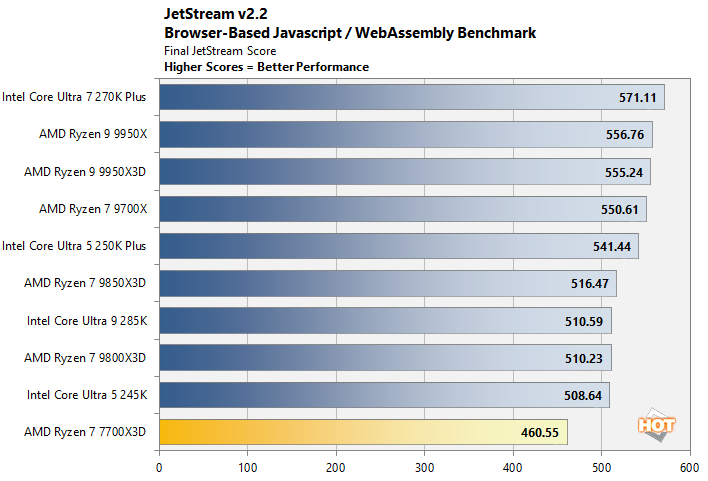
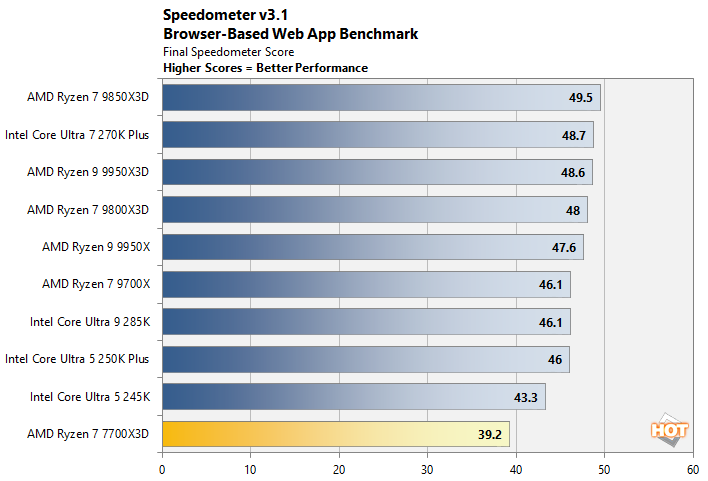
I didn't have time to re-run this benchmark on all of our test platforms, but I gathered some new data to reflect accurate performance as it stands today. These two benchmarks are significantly impacted by browser updates and our legacy reference data was no longer relevant. That said, the Ryzen 7 7700X3D takes it on the chin here due to its significantly lower boost clocks and previous-gen Zen 4 architecture.
7-Zip Data Compression / Decompression Tests
The 7-Zip benchmark measures compression and decompression performance using the LZMA method, which leverages the Lempel–Ziv–Markov chain algorithm to perform lossless data compression. The benchmark produces a final rating in GIPS (giga instructions per second).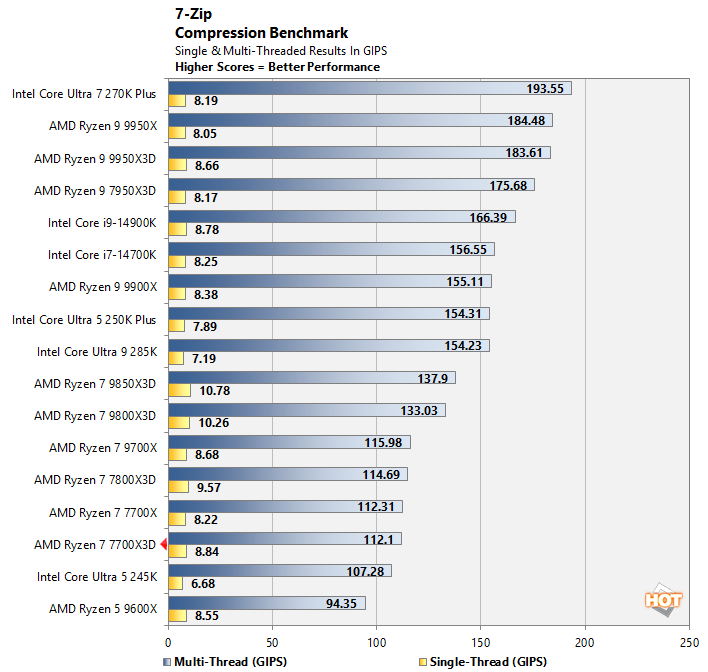
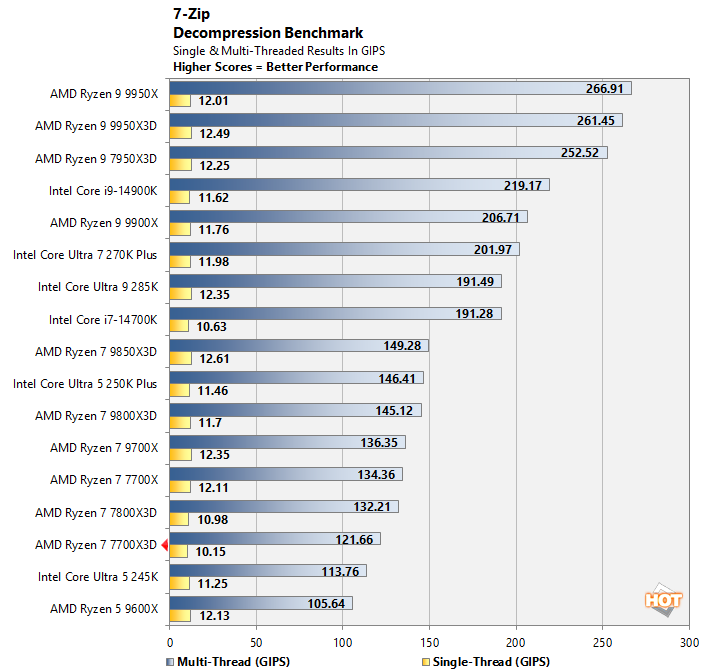
These 7-Zip compression / decompression workloads will utilize any and all available CPU resources, so the Ryzen 7 7700X3D's 8-cores / 16-threads can't hang with the higher-core count, higher-clocked chips. Its performance is in-line with expectations though, and it finishes a notch behind the Ryzen 7 7800X3D.