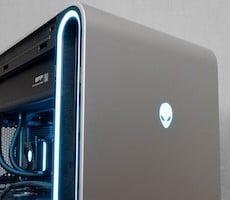
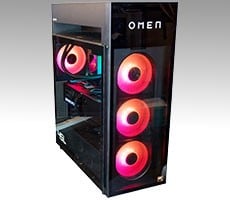
Alienware Area-51 Review: Ryzen 7 9850X3D Powered Elite Gaming


Alienware's software loadout has always been pretty light on the systems we've tested. Alienware Command Center is pretty much a one-stop shop for all hardware monitoring and management needs, including the pre-configured overclocking options. This is also where you can configure the Alienware FX RGB lighting, including the fans, accent ring, and lighting on any Alienware peripheral like the Pro Keyboard and Mouse that we tested with the previous Area-51 desktop.
Of course, that starts with Windows 11 Pro, in our case. Most buyers will probably want to save $60 on Windows 11 Home since most of the added features, like Active Directory support and BitLocker being the most notable, aren't probably all that's interesting to most folks. There weren't any additional packages on our system beyond drivers, and we appreciate not getting nagged by trialware like we found on the HP Omen Max 45L Desktop not too long ago.
The thermal and performance configuration options are pretty basic. There's the default setting, which is called Balanced, then there's a slower, quieter option called Quiet and a more aggresive, faster version called Performance. We ran all our benchmarks with the Balanced option since it was how our system was configured out of the box. When we talk about overclocking, we'll talk about the Performance profile, which rather than boosting CPU performance, focuses on more graphics performance. Most games running at high resolutions are generally held back by their GPUs (although the GeForce RTX 5090 is kind of fast as it is) so it makes sense to tweak graphics power and performance first.

We can also monitor temperatures and fan curves, although it doesn't give specific RPM figures. Still, all of the fans in the Area-51 are temperature controlled, so we can watch as they ebb and flow with greater demands on the CPU and GPU. Rather than tweak fan settings individually, users are going to get different performance out of different power settings, so Quiet turns them down and Performance will crank them up when needed.
The Command Center app really wants users to also use it as a game library manager of sorts, but it has to launch Steam or the Epic Game Store or whatever other launcher the games come with anyway. So I've always just found it easier to launch them directly from the store which I purchased them.
Alienware Area-51 with AMD X3D Processors: The Benchmarks
With all that out of the way, let's get on to performance. As usual, we ran each test in our benchmark suite a minimum of three times, and we took the median result which is reported below. All Windows updates and upgraded drivers were installed, including NVIDIA's 610.62 were installed on the Area-51. Now let's get into it.ATTO Disk Benchmark on the Alienware Area-51
We'll start off by checking out storage performance with ATTO. The ATTO disk benchmark is a fairly quick and simple test which measures read/write bandwidth and IOPS across a range of different data sizes with a configurable queue depth. While we don't typically compare these results across multiple machines, it's useful to gauge whether a particular system's storage subsystem is up to snuff.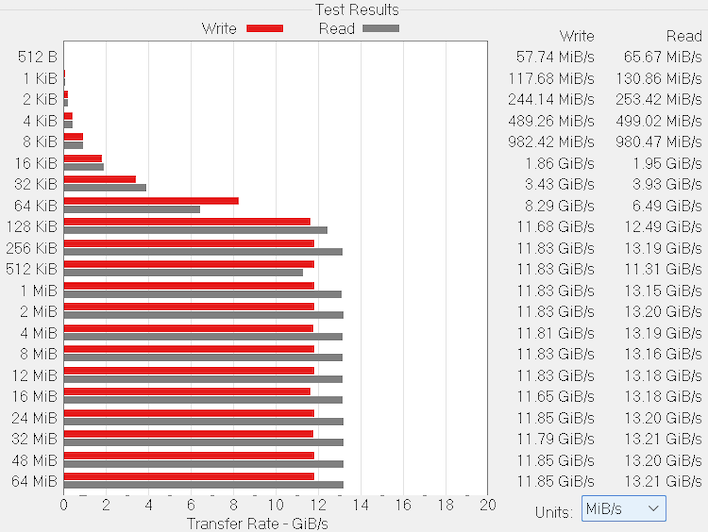
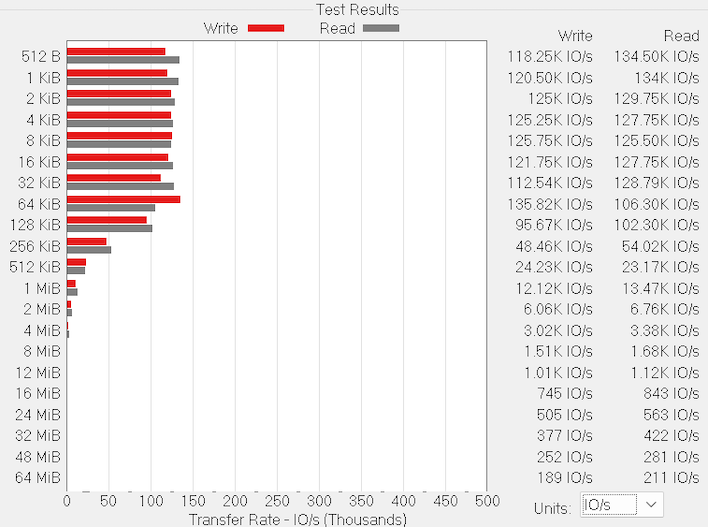
Our Area-51 is running a PCB01 SED from SK hynix, which is a PCI Express 5.0 drive, and the raw performance numbers live up to expectations. It maxed out with write speeds just south of 12 GB per second, with 13.2 GB per second of read bandwidth. I/O of course drops with the size of each operation, but nearly 135K IO/s with a queue depth of just 4 is very solid. Larger queue depths can pad those I/O numbers, but they're extremely uncommon on consumer hardware. This reflects what users should expect from Alienware's Gen 5 SSDs.
Browserbench Speedometer on the Alienware Area-51
We use BrowserBench.org's Speedometer test to take a holistic look at web application performance. This test automatically loads and runs a variety of sample web apps using the most popular web development frameworks around, including React, Angular, Ember.js, and even plain-Jane JavaScript. All tests were performed using the latest version of Chrome.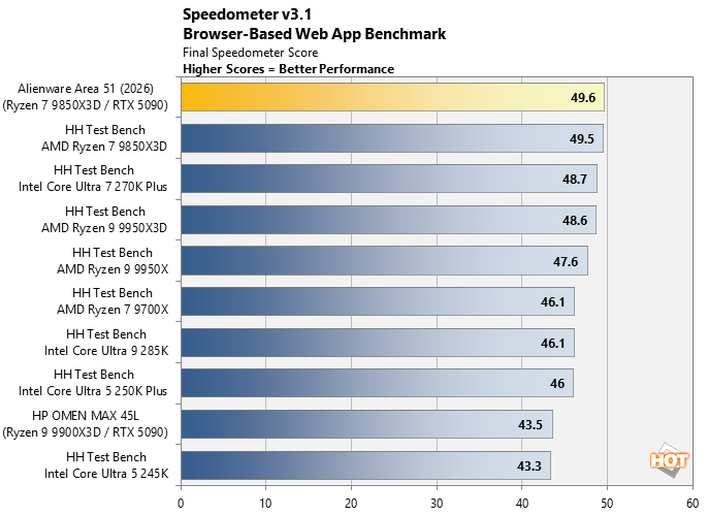
Blender 5.1 Benchmark on the Alienware Area-51
Blender is a free and open source 3D creation suite that can handle everything from modeling, rigging, and animation to simulation, rendering, compositing and motion tracking. It has a purpose-built benchmarking tool that will track the time it takes to complete rendering a particular model (or models). We used the CPU-focused benchmark with the three models that Blender presents as typical benchmark scenes.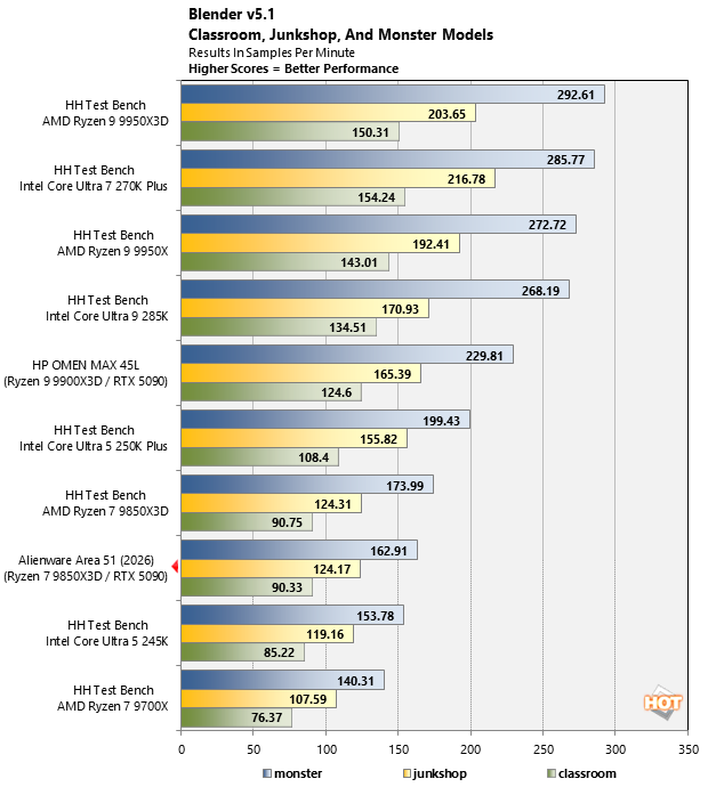
With "only" eight CPU cores, the Area-51 drops towards the bottom on this heavily multi-threaded benchmark. It falls off the pace of our test bench a bit in all three tests, we think that may be due to the Area-51's use of higher-latency CL46 memory. Most enthusiasts are on the lookout for more like CL32 at DDR5-6400 speeds, and that latency adds up.
Cinebench 2026 On The Alienware Area-51
Cinebench 2026 is a 3D rendering performance test based on Maxon's Cinema 4D rendering and animation tool suite, which is used by animation houses the world over. It's very demanding of system processor resources and can utilize any number of threads, which makes it an excellent gauge of computational throughput. This is a multi-threaded, multi-processor aware benchmark that renders a scene and tracks the length of the entire process. The rate at which each test system was able to render the entire scene is represented in the graphs below.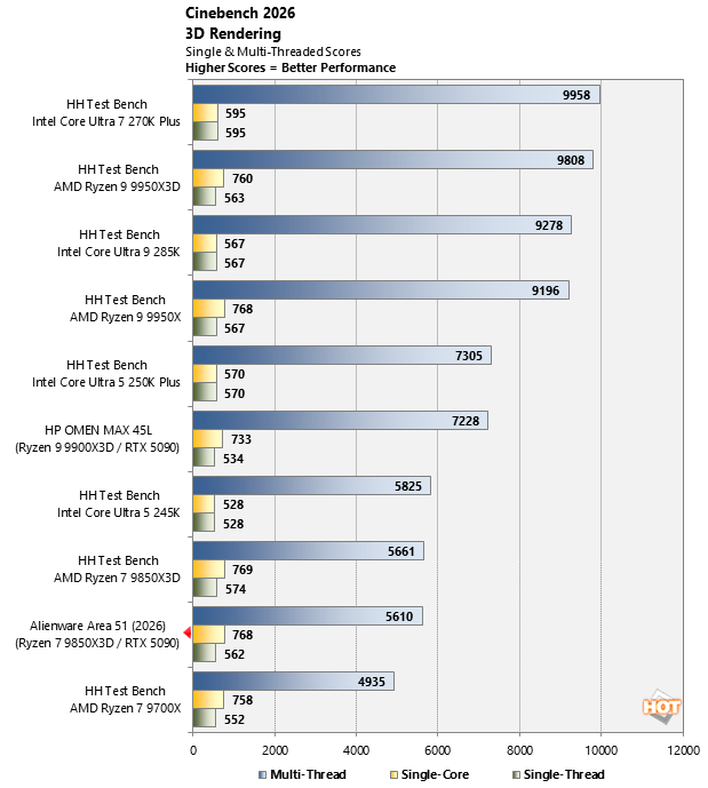
This is another test where the Area-51 falls to the bottom just because it has eight CPU cores. It's helpful to remember that Alienware does ship configurations with the Ryzen 9 9950X3D and Ryzen 9 9950X3D2 Dual Edition if you need the extra grunt in productivity tasks. This is no fault of the configuration, but rather just reality when there are CPUs with more resources available.
Geekbench 6.5 on the Alienware Area-51
The GeekBench CPU tests stress only the processor cores in a system (so not the graphics card or GPU), with both single and multi-threaded workloads. The tests are comprised of encryption processing, image compression, HTML5 parsing, physics calculations, and many other kinds of general purpose compute processing workloads.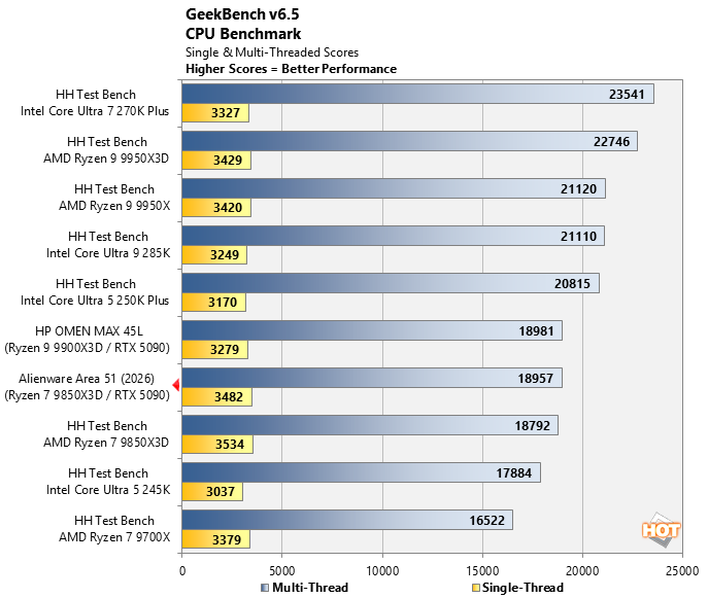
In Geekbench, the Area-51 is able to keep up with the slightly more-endowed HP OMEN MAX 45L, but this test has traditionally favored plenty of memory bandwidth. And despite its place on the chart, which is sorted by multi-threaded performance, the Area-51 actually turns in the best single-thread score of the test group.
Geekbench AI on the Alienware Area-51
The Geekbench AI benchmark provides a straightforward look at how well a device handles a variety of AI-assisted tasks. This quick and easy test gives you a numerical snapshot of a CPU, GPU, or NPU's ability to power through real-world machine learning workloads, factoring in both speed and accuracy. The higher the score, the better the device's AI chops, whether it's image recognition, object detection, or natural language processing.Results are presented for three levels of numerical precision: single precision or FP32, half precision or FP16, and quantized or INT8. All results that the benchmark provides are geomean scores from multiple runs of each test workload.
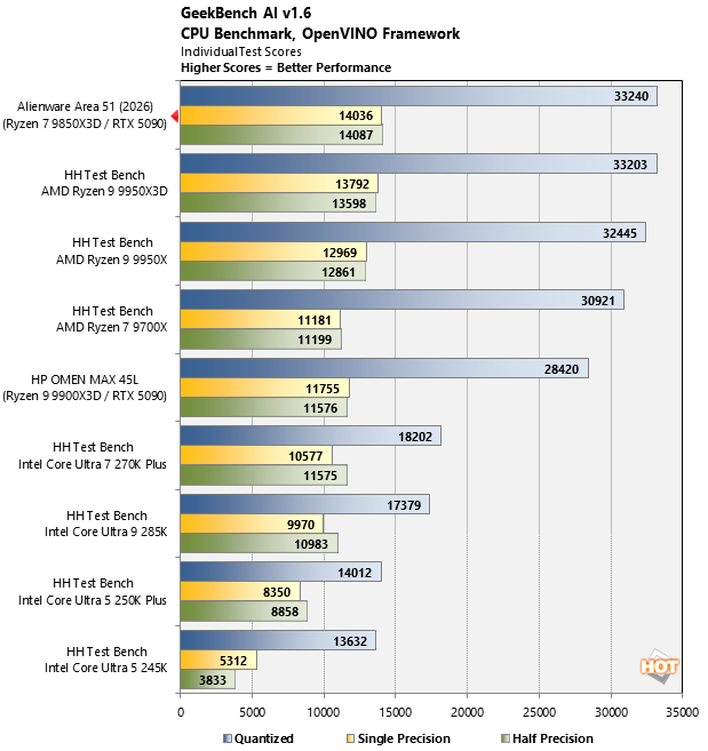
Here's another test that is almost entirely memory bound. The DDR5-6400 in our Area-51 has the same peak bandwidth as our AM5 test benches. If you pay attention to other AI benchmarks and tests around the internet, you're already keenly aware that inference tests are often bound by memory bandwidth. So this is no surprise at all; the Area-51 does well.
Next up we're going to dive into a little gaming and bang on the GeForce RTX 5090 a bit...