Alienware Area-51 Review: Ryzen 7 9850X3D Powered Elite Gaming


| Alienware Area-51 with AMD X3D CPUs: Starts at $4049, as tested $5899 Alienware's excellent Legend 3 chassis houses a powerful gaming desktop with AMD X3D processors, NVIDIA GeForce RTX Graphics and highly effective cooling.
|
|||

|

|
||
Alienware kind of surprised us with its current generation of Area-51 desktop systems. Dubbed Legend 3, the new industrial design traded out the proprietary design and modest thermal management of previous desktops for an attractive. more streamlined chassis with thermal headroom to spare and industry standard motherboards and power supplies. New to the series in 2026 is the addition of systems based on AMD's leading X3D processors for gamers, and that's what we're looking at today.
We can argue all day about building vs. buying. For sure building a system is a ton of fun and there's great pride in showing off a neat and tidy hand-built system, but in 2026 there are some significant challenges just sourcing the components. It's much easier to just give Dell's gaming brand some money for the hardware they've already sourced, knowing full well that they've built a competent system, and the economies of scale often work to you advantage.
So without further ado, let's meet the AMD X3D generation of the Alienware Area-51...
Alienware Area-51 Specifications And Features
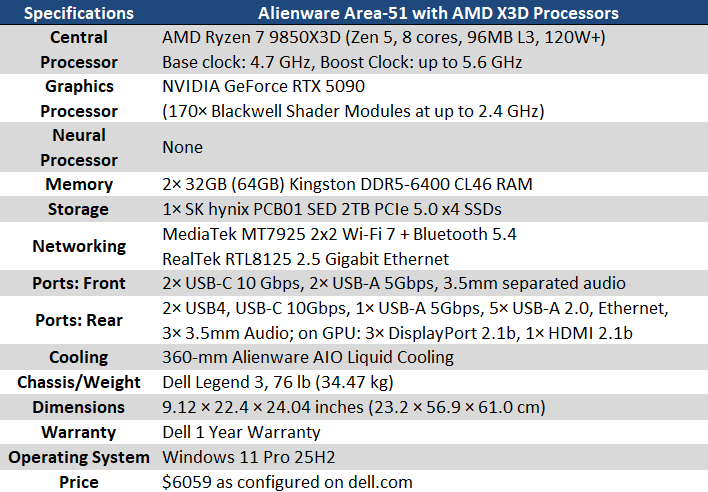
As the name implies, the biggest change over the last Area-51 we reviewed is the brand of CPU and motherboard chipset. The AMD Ryzen 7 9850X3D is the fastest single-CCD processor that AMD currently makes, and especially in games this thing is a monster. Eight cores, a maximum of 5.6 GHz boost clock, and of course that 96 MB of L3 cache all come together to make an outstanding CPU. Our review unit feeds the CPU with 64GB of DDR5-6400 CL46 memory from Kingston, which is ample for all the latest games and then some.
The Ryzen processor rides on a standard ATX12VO motherboard of Alienware's own design featuring AMD's X870E chipset. That chipset means there's PCI-Express 5.0 for the graphics and NVMe storage slots, and USB 4 at 40 Gbps on the back of the board. The voltage regulation is configured in a 10+2+2 phase design which converts the power from the system's 1500W Platinum-rated power supply to the lower voltages components need. While ATX12VO is still kind of a novelty, it represents a step forward and down the road will hopefully start to catch on by the time folks want to upgrade.

Strapped to the CPU is Alienware's closed-loop AIO liquid cooling solution. There are 240 and 360 mm options available, and our review system has the beefier 360 mm option with a trio of 120 mm fans sandwiched between the honeycomb shaped vents on top and the radiator itself. The pump/CPU block has a glowing Alienware logo that matches whatever colors are chosen for the rest of the system's RGB LED setup.
And of course, no top-of-the-line gaming PC is complete without NVIDIA's GeForce RTX 5090. The Area-51's version has a rather large cooler that occupies three slots on the motherboard. This card as 32 GB of GDDR7 and what is right now the single largest, most powerful consumer-oriented GPU on the market. Unfortunately, the only other slots on the motherboard are x2 PCIe 4.0 and x1 3.0. However, in a gaming system we don't think most buyers will care--this rig already has the best hardware inside.
The PCIe Gen 5 x16 slot the card is plugged into is sandwiched by a total of three M.2 slots. Two of them support Gen 4.0, below the graphics card. Our system's 2 TB Gen 5 SSD is slotted between the CPU and the graphics card. Alienware's configurator allows buyers to configure up to 12 TB of solid-state storage.

Alienware Area-51 Build and Design
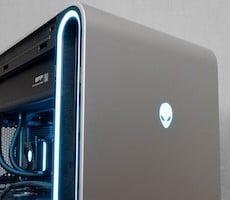
Externally, the Area-51 looks just like the previous iteration we reviewed. The best news for most people is that these towers are built well and look good on a desk. The front panel is solid gray save for the power button, which lights up with the Alienware logo. The internal-facing side is tempered glass, so you can gaze lovingly at the components and the cables that have been so neatly routed, while the right side is a solid white metal panel. It's a large chassis, but once you start looking at the cooling, you understand why.Right behind the solid front panel is the side air intake. Alienware intentionally makes no effort to cover it up so as to not create a wind tunnel effect. The intakes on each side measure one inch wide and span the height of the case, and it's ringed in an LED accent.
Those big intakes feed a pair of 200 millimeter fans, which draw air in from the outside and push it to the rear. In fact, all of the fans in the Area-51, including the bottom case fan and the three 120-mm fans on the AIO CPU cooler at the top bring in air from the outside, and it naturally flows out the rear of the case. This positive pressure system makes sense from a dust perspective, as it should get filtered on the way in, and not settle anywhere inside the system. It's a trick that DIY enthusiasts like us often use to keep the innards clean, and it's nice to see the big players do the same.
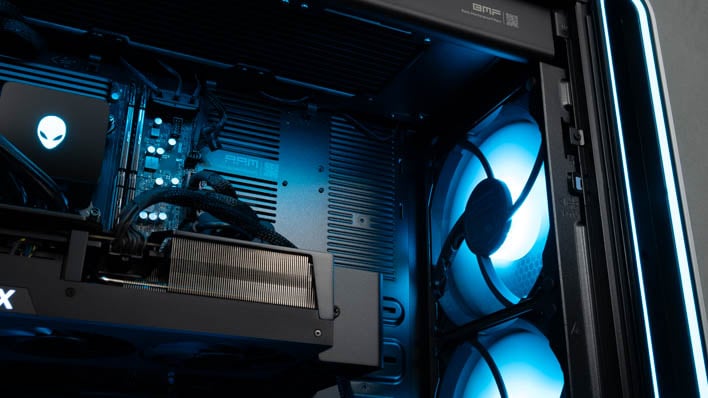
Both side panels come off with the press of a button, provided you first remove the screw keeping the door lock sealed during shipping, and then turn the knob to unlock those buttons. Removing the tempered glass panel gives full access to the innards of the system. Meanwhile, removing the metal panel gets to the cabling and additional drive bays.
The cable routing inside the Area-51 is as clean as anything I've ever done myself, completely routed through the case's various channels. There are three drive bays, including two 2.5" SSD side-mount trays complete with screws for mounting the drive, and a tool-less 3.5" bay on the bottom. Power and SATA data cables are are pre-routed and already plugged into the PSU and motherboard as well. All you have to do is add the drives and plug them in if you so choose.

Alienware Area-51 Connectivity
The Area-51 has a plethora of external connectivity. The rear panel has four USB-C ports, two of which are USB 4.0 40-Gbps ports, with two others that provide 10 Gbps each. There's also a surprising number of USB 2.0 ports for peripherals, and just a single 5 Gbps Type-A port. Fortunately, it's easy to tell what's what because they are all labeled, so you don't have to guess which USB-C connector is 40 Gbps or 10 Gbps.
The rear panel also provides 2.5 Gbps Ethernet with a Realtek controller and Wi-Fi 7 + Bluetooth 5.4 care of MediaTek's MT7925 controller. The motherboard's rear connector also houses analog audio out and line in, and optical audio out. The GeForce RTX 5090 has three DisplayPort 2.1b ports and an HDMI 2.1b that drove our Dell G3223Q gaming monitor at its native 4K 144 Hz.

Around the front, the easily accessible ports are on the top of the case. There's a pair of Type-A 5 Gbps ports, a pair of 10 Gbps USB-C connectors, and split jacks for an analog headset and microphone. All-in-all it should be just about everything a typical user should need to interface with their system.
Next up let's talk about the Area-51's software and dig into some performance...