Alienware 16X Aurora Review: Gaming Power, Premium Design, Solid Value


At any rate, we just need to remove a total of ten Phillips-head screws. Eight of those screws come out, while the rear two corner screws are captive and they serve an important purpose: backing them out fully pushes the rear corners of the case up and away from the palm rest. That makes it easier to slide a guitar pick or something else thin and rigid into the gap and undo all the clips. Incidentally, when you reassemble it, each screw reassuringly pulls those clips back together around it, making it an easy process.

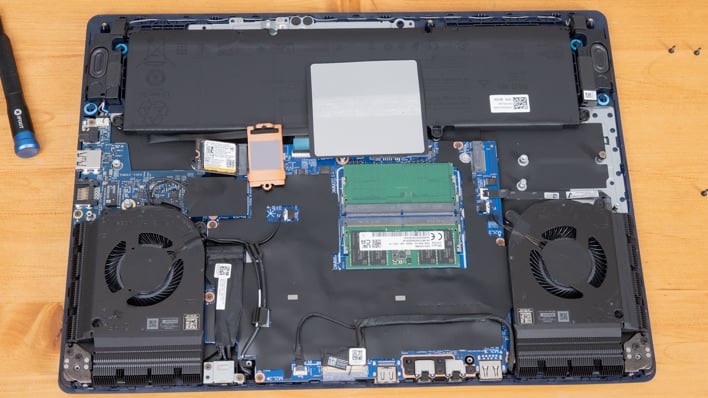
Alienware 16X Aurora Bottom Side View, Cover Removed
Once we have the bottom off, we can see a pair of fans blowing across two fin arrays on the rear. Since the hinge folds up above the system, we don't have any heat escaping between the chassis and the display; it's all directly out the rear. This is definitely the superior design because the heat isn't trapped between the user and the screen. Instead it can waft away freely from the rear. At the top we can see two of the quad speakers, which fire down next to the 96 Watt-hour battery.
What parts of the Alienware 16X Aurora are user-upgradeable? Almost all the important ones. Let's pop out the SSD and RAM.
This review is not sponsored by iFixit, but I do like their screwdrivers.
The RAM is hidden by a little plastic shield that is just attached by some adhesive. Peel that away carefully from the SO-DIMM slots and dual DDR5-5600 SO-DIMMs are easily removable. The SSD (which, yes, that's the SSD) is a tiny 2230 M.2 form factor. The really nice thing is that over on the right side in this shot we can see a full M.2 2280 socket for more normally-sized SSDs, giving the system ample expansion options. Incidentally, the battery is user-serviceable by removing a couple screws and a connector, and the machine's combo Bluetooth/Wi-Fi module is nestled in another M.2 socket below the SSD. We do love some modularity in our gaming laptops.
Alienware 16X Aurora Thermal Performance
To test thermal performance, we used the 3DMark Steel Nomad stress test. This runs for a total of 20 loops and compares the performance in each loop to evaluate how well it stays at its max performance. Since the overclocked Performance setting in Alienware Command Center didn't do anything for us, we chose to test on Balanced and we think most users will stick to that.
Over the course of 20+ minutes, the Alienware 16X Aurora maintained 99.3% of its peak performance, resulting in a passing score. That is another trait that we really value in a notebook, as that's not always the case. That means thermals are at kept well in check internally.

But did it make us lose our hearing due to roaring fans? No, not at all. At idle the system sticks right around or even below our room's 30 dBA sound floor. Under load, which was measured after 15 minutes of the test had gone by, we measured 46-47 dBA, which is very good for a gaming notebook. Our measurements were taken right about where our heads would be if we were hunched over the machine playing, just over 12 inches in distance.

Even better, the Alienware 16X Aurora didn't have any significant hot spots where skin temps would get uncomfortable. The warmest area was right above the keyboard, rather than on the keyboard itself, and it measured 46-ish degrees Celsius under load. The keyboard itself was all under 40C, which translates to 104 degrees Fahrenheit. You'll notice some warmth while gaming, particularly if a title uses the top row of function keys, but it won't make anybody uncomfortable under load. We're satisfied with these results.

Alienware 16X Aurora Gaming Notebook Conclusion
Many times, when reviewing an Alienware gaming notebook, it's a big, heavy desktop replacement with tons of horsepower and a bunch of cooling fans to keep it under control, with a big price tag to match. But in this case, that's not what the Aurora series is about. Instead, this is a mid-sized notebook, weighing in at around six pounds, with a gorgeous, fast display, good performance for its size, and a more reasonable price tag. Alienware's metal enclosure still looks premium without the "otherworldliness" of some of the company's machines, and the minimal RGB lighting is a plus in my book.Performance-wise, the system sits in the same class as other Intel-based gaming notebooks with the NVIDIA GeForce RTX 5070 mobile chip inside. That is to say, 1080p is an absolute given, and 1440p is smooth even on the latest AAA game titles. As we saw with the max settings in F1 24 testing, you might want some DLSS and frame generation to get the most out of that 240 Hz display, but you could just as easily bump a couple settings down to gain some performance, too. In productivity tests, the many cores of some Ryzen 9 9000-series CPUs might do better under a heavy multithreaded loads, but for mainstream content creation tasks and the like, there's more than enough horsepower with Intel's Arrow Lake-HX on board this machine. In office productivity and web browsing, the 16X Aurora is right in the thick of it as well.

Minuses are few and far between with this new Alienware 16X Aurora laptop. We don't love that the GeForce RTX 5070 notebook GPU only comes with 8 GB of memory. The gaming community gave AMD's Frank Azor a hard time for justifying the optional 8GB version of the Radeon RX 9060 XT. Making that amount standard for something with a GeForce RTX 5070 name badge seems wild, but that's on NVIDIA, not Alienware. Battery life was only so-so, considering the large battery and the way that the 16X Aurora can put the GeForce to sleep when it's not in use. Still, it lasts for close to 6 hours of video playback and that's probably enough for most people. And as we mentioned at the start, the trackpad feels a touch "gritty" rather than a smooth glide, but most users will want an external mouse anyway, at least for games.
Regardless, performance is excellent for the 16X Aurora's footprint, and its pricing is also very good. Our review unit has the Intel Core 9 Ultra 275HX CPU, that aforementioned 125-Watt GeForce RTX 5070 GPU, 1TB of storage, 32GB of memory, and a fast G-Sync compatible 240 Hz 1600p display. This exact one will set you back $1,549 (currently on sale) on Alienware's website, which seems reasonable considering the build quality and performance on tap here.
On the other hand if you want to cut back on the hardware a bit, a Core 7 Ultra 255HX, RTX 5060, 16 GB of RAM and the same 1TB SSD is normally $1,549, or on sale for $1,349. The only bummer is that you can't get the GeForce RTX 5070 with the only slightly slower Core 7 Ultra 255HX, which in my opinion would be a great bang for the buck. Looking at the larger gaming notebook category, there are cheaper options with similar specs, like the previously mentioned ASUS ROG Strix G16 in its GeForce RTX 5070 flavor. However, when it comes down between the two, the sale price on the Alienware makes that compare very close. Meanwhile, the HP OMEN MAX 16 is a whopping $2,300, if you order a version with specs to match the Alienware 16X Aurora, making even a full-priced Aurora a solid contender.
In short, we really like the Alienware 16X Aurora. If you're shopping for a gaming laptop and desire a sturdy build with an all-metal shell at an affordable price, start by giving this machine a good look. Its performance, connectivity, build quality, and very fast display make for a compelling combination. While this machine's battery life may not be stellar under heavier loads, it's not enough to deter us from bestowing our highest Editor's Choice rating upon the new Alienware 16X Aurora.