HP ZBook Ultra G1a Review: An AMD Strix Halo Based Portable Powerhouse


HP ZBook Ultra G1a Disassembly
It's time to dig into the HP ZBook Ultra G1a and see what makes it tick. Fortunately, getting into the system is pretty easy. The screws are not Torx and there's no security bit; just grab your trusty Phillips head #0 screwdriver and back out four screws. They're captive, so they won't fall out. Then we took a thin guitar pick and put it between the layers, ran it along the edges, and released a handful of clips. That's all fairly standard for opening a laptop these days.Once we're in, we can see that most of the laptop is shrouded in mystery. And it's not really worth poking around under that shroud, because everything is soldered to the board. CPUs like our review unit's AMD Ryzen AI Max+ 395 PRO have been soldered in laptops for over a decade at this point, of course, but so in the memory. LPDDR5x can have sky-high aggregate bandwidth, but it's not coming on a SODIMM module, so you won't be upgrading. Of course, our review unit has 128GB of memory, so there's no need, but for those who are buying less, be sure you get what you need.
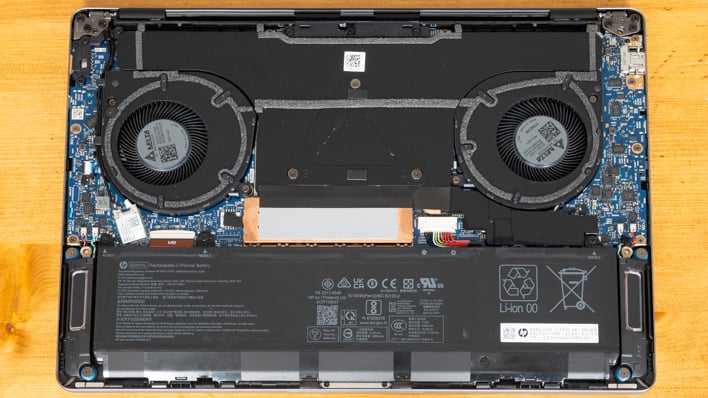
Unfortunately, WiFi and Bluetooth are soldered down as well, so they can't be replaced. Even the ports are mounted directly to the motherboard. That means swapping out busted ports means getting a whole new motherboard or learning how to micro-solder. That doesn't make this laptop particularly repairable at a component level. The fans are replaced easily enough, at least. The ZBook Ultra G1a has a pair of blower-style fans that exhaust air out the back of the bottom chassis, up in front of the display when sitting upright and open.
The memory, ports, and CPU may all be soldered down, but as previously discussed, the WD SN810 SSD may not be as fast as WD's Black SN8100, but it is a standard M.2 2280 drive. You can see the thermal insulator that goes between the copper heat spreader and the bottom of the machine. In order to protect users and their sensitive legs, laptop users are protected by not radiating heat to the magnesium alloy shell. Below that, we can see a user-replaceable battery as well. It's a 74.5 Whr model held down by a few screws. Our speakers are also discrete units that flank the battery.
Putting it all back together is just a matter of snapping the bottom cover back on and re-attaching the screws.
HP ZBook Ultra G1a Thermal Performance
To test thermal performance, we use the UL 3DMark Steel Nomad stress test. This is a 20-minute slog that checks the performance of each run, and reports what percentage of the highest score that the lowest score achieved. UL considers anything above 95% to be a "passing" score.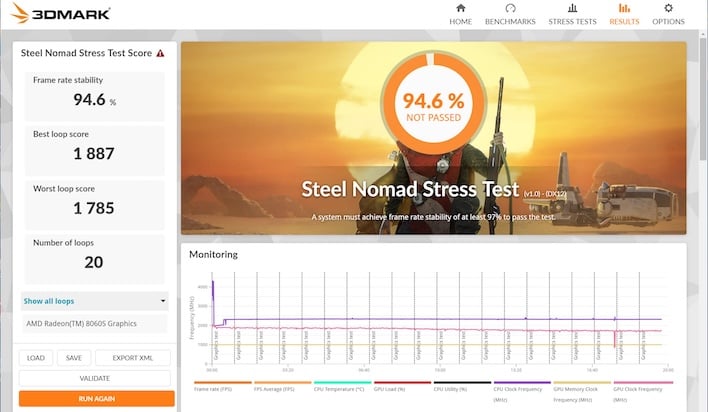
While the ZBook Ultra G1a technically did not pass, I suppose if we rounded up, it might have done so. The good news is that unlike a lot of smartphones, the drop-off in performance from the fastest run to the slowest was not dramatic. And It's also worth noting that if we were comparing the first run to the slowest, we would have seen a passing grade. Run number three was actually the fastest of the runs in the stress test.

To gauge user comfort, we measured surface temperatures at the hottest point we could find, as well as fan noise. Our measurement photos were taken at around 12 minutes into the run, over half-way through. While the ZBook Ultra G1a was silent at idle, it was audible under a load. At a distance of around 12 inches from the display, we measured mid-to-upper 40 dBA, usually between 47-49. That's loud enough to be audible but not loud enough to be a big problem, in our estimation. That's in large part due to the fact that the noise is mostly just air moving, not whining fans.

The surface of the laptop definitely got warm enough to notice. The hot spot was in the center of the keyboard, which is not a great location. The letters R, T, and Y were the warmest, with the center of that being the focal point. 43-44 degrees Celsius, which is around 110 degrees Fahrenheit, is enough to notice to be sure. Like Eminem in Lose Yourself, our palms were sweaty playing a couple rounds of keyboard-centric and free-to-play StarCraft II on the ladder. If you're a controller-focused gamer, we doubt you'd notice the heat. At idle, the system feels much cooler to the touch.

HP ZBook Ultra G1a Conclusions
The HP ZBook Ultra G1a is a pretty serious machine. It's got conservative stylings with an aluminum enclosure, company logo, and not an LED to be found. But serious also means a factory-calibrated OLED display for creative pros, sixteen CPU cores for those who need lots of performance, and gobs of memory. Serious even extends to the integrated GPU which boasts excellent performance that's on par with a lot of discrete solutions paired with "serious" professional drivers rather than the gaming-focused variety.Unfortunately, the seriousness of the machine also results in a couple of shortcomings. First of all, the Wolf Security Suite did have a performance impact so we tested with it disabled. If we omit PCMark, we could say that performance was basically on par with the ASUS ROG Flow z13, except that the HP system was always on the losing side of the comparison. Even if it's half a percentage point, it happened over and over. However, if you factor in PCMark because you rely on those applications (which include Microsoft Office / Microsoft 365, which is a must for most business professionals) the delta separating the machines is larger. The ASUS notebook also had better battery life, even though the ZBook's battery life is what we'd generally characterize as good for its size and weight. We wouldn't be surprised if HP is still tuning the power profile and BIOS on this system for optimal efficiency.

Find The HP Zbook Ultra G1a @ Amazon
As you might expect, the ZBook Ultra G1a's pricing is appropriately serious as well. The unit starts with a Ryzen AI Max 385 Pro, which comes with eight Zen 5 cores and a 32-"core" GPU, 32GB of memory, and 512GB of storage for $1,999. That unit also takes a hit to the display, which is a UWVA panel rather than OLED, which does not have touch features. But to get to our review unit's 16-core Ryzen AI Max 395 Pro, 128GB of RAM, and 2TB of storage, and of course that OLED display will set you back quite a bit - $7295 if you use the CTO options on HP's site. And this where HP's configurator doesn't make a ton of sense -- the same configuration is $4,049 at Adorama as of this writing. In the 30 days I've been evaluating this notebook, the price has varied wildly. Our best advice is to take your time and shop for deals.
In the end, the HP ZBook Ultra G1a is a pretty neat notebook. It has battery life that rivals a lot of thin-and-light notebooks but with performance that puts most of those ultra-light models to shame. It doesn't quite hang with the fastest gaming notebooks, but it weighs a whole lot less and has some unique capabilities. Thanks to AMD's Strix Halo family of chips, HP was able to put together an offering that presents the best of both worlds that justifies its premium pricing. It's a little unfortunate that the performance doesn't quite match its similarly-equipped competition, but it's a new technology and perhaps HP can wring a bit more out of the design. Whether this is the right notebook for you is something only you can decide. Just shop around so you don't spend more than you have to.