

iPhone Duo Review: Apple's First Foldable Impresses Despite Flaws

iPhone Duo Software, Apps, User Experience, And AI
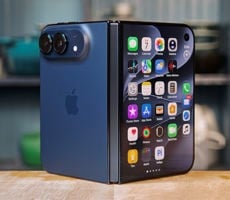
Apple’s known for making innovative devices with an intuitive user experience, and a vast ecosystem that seamlessly combines hardware, software, services, and accessories. So while I went into this review knowing that the iPhone Duo’s first-generation hardware wouldn't quite match the Android competition (it’s close), I expected the company would deliver polished software and an intuitive folding phone user experience.Unfortunately, that‘s not the case. Apple had seven years of folding phone growing pains to learn from, yet the iPhone Duo still feels like a first-generation experiment. To be fair, the vast majority of issues I’m about to describe can be remedied with software updates, and these are still early days. My biggest concern is that whether you’re coming from Android or iOS, the Duo’s user experience is challenging right now.

What’s been most jarring for me (and other Duo users I’ve discussed this with, whether Android or iOS users) is Apple’s decision to move the dock and in-app buttons from the bottom to a sidebar to the right of the screen. First, this sidebar robs 1/5th of screen width that could be used by apps. Second, it breaks muscle memory for iOS users who are accustomed to the dock and in-app buttons being at the bottom of the screen.
Third, it makes it difficult for left-handed folks to use the iPhone Duo. Yes, iOS 27.3 beta adds a reachability feature for Duo users that somewhat alleviates this problem but I have a better solution: why not flip the dock and in-app buttons 180 degrees when the phone is rotated 180 degrees? That way, left-handed users can reach the dock and in-app buttons as well as the power/lock key, fingerprint sensor, and Camera Control.
Fourth, if the dock and in-app buttons must remain in the sidebar to the right of the display, why not add more items to the dock? There is room for at least six apps in this vertical dock layout, instead of the usual four. This brings us to the next item that needs improvements: apps. Now, I realize that third-party Apple developers are quick to update their apps when the company introduces new hardware or software. As a Mac user, I know this well.
I lived through Apple’s chip transition from 68k to PowerPC to Intel to Apple Silicon, and each time, third-party Mac developers were quick to update their apps for the new chip architecture. And for legacy apps, Apple always provided a solid emulation layer. The same thing happened when the iPhone switched to Retina displays (iPhone 4), to a 16:9 aspect ratio (iPhone 5), and to Face ID (iPhone X). Developers have always updated their apps quickly.

inner screen rotated and scaled (middle right), inner screen rotated and unscaled (right) - Image: HotHardware

inner screen unscaled (middle), inner screen rotated and unscaled (right) - Image: HotHardware
I’m sure that in a few months most third-party iOS apps will be optimized for the iPhone Duo, but right now things are rather inconsistent. There are basically three types of apps which each behave differently on the Duo. First are pre-iOS 27 apps like LinkedIn, Bluesky, and many Google apps (Calendar, Chat, Drive, Sheets, Slides, YouTube Music). On the outer screen, these apps display a black bar in the sidebar instead of in app-buttons.
A better solution would be for Apple to automatically extend the app’s background color to fill the sidebar instead of showing a black bar. It would look much better. On the inner screen, these pre-iOS 27 apps display with black bars on both sides, and Apple gives you the option to scale (double the size) or rotate the app to fill the display. To avoid wasted space on the inner screen, you can always run one of these apps side-by-side with another app.

outer screen (left), inner screen (middle), inner screen rotated (right) - Image: HotHardware
Second are apps that have been built with the base iOS 27 SDK, like Chrome, Gmail, and Google Docs. On both the inner and outer screens, these apps also display a black bar in the sidebar instead of in-app buttons. But, black bar aside, apps built with the base iOS 27 SDK will scale and rotate to fill the inner screen, which is an improvement. Regardless, these apps don’t reflow their UI or support multiple panes.
Third are apps that have been built with the iOS 27.1 and newer SDKs, like most Apple first-party apps, most Meta apps, Telegram, and some Google apps (Gemini, Google Maps, YouTube). These apps are optimized for the iPhone Duo and will scale and rotate to fill both the inner and outer screens, without any black bars. In addition, these apps support multiple panes, and are able to reflow their UI into the sidebar to display in-app buttons.

outer screen (left), inner screen (middle), inner screen rotated (right) - Image: HotHardware
I find it interesting that what has long been considered one of Android’s weaknesses -- the proliferation of hardware specs and form factors -- has become one of Android’s strengths over time. Generally speaking, most modern Android apps can adapt to almost any display size, resolution, and aspect ratio, making them significantly more flexible on folding phones and other devices (like Clicks Communicator) with support for arbitrary layouts, and even windowing. This adaptability makes all the difference.
iOS simply doesn’t provide this level of flexibility, and this clearly impacts the iPhone Duo’s user experience. This is reflected in how the Duo handles split multitasking. If, like me, you were expecting iPad-grade multitasking, prepare to be disappointed. You can multitask on the Duo as long as you’re satisfied with running only two apps side-by-side, taking up exactly one half of the screen each, and only when using the handset in landscape orientation.

You can’t adjust the split's ratio (like 40/60), or split apps horizontally, or add a third app, or multitask when using the iPhone Duo in portrait orientation. There’s no support for widowing apps or arbitrarily resizing apps. As such, Android folding phones like Samsung’s Galaxy Z Fold8 and Oppo’s Find N6 deliver a vastly superior multitasking experience. This may not matter to most people, but matters to power users.
But it’s not all doom and gloom. The iPhone Duo’s open/close animation is delightful. It uses a dynamic blur and scaling effect to transition content seamlessly between open and closed states. Apple’s new status icon combining battery, cellular, and WiFi levels is excellent. Not to mention, third-party iOS developers have already published several fun Duo apps, like Tiny Computers, Deck-Man, TypeDraw, FoldType, DuoDoodle, and Toastie.

And unlike the Galaxy Z Fold8, which doesn’t support Samsung’s Flex mode because of its hinge design, the iPhone Duo features what Apple calls poses when partially open and placed on a surface. Book pose is ideal for reading or watching vertical videos. Tent pose is great for watching horizontal videos. Seated pose lets you use the Duo like a laptop when typing, taking video calls, or watching horizontal videos.

Regardless of the pose, most optimized apps (like Camera, Photos, YouTube, and Netflix, for example) will automatically split their UI between the two inner screen halves to accommodate the current pose. If the iPhone Duo is locked, the book and tent modes activate iOS’ StanBy mode, turning the handset into a bed-side clock/calendar/photo frame, complete with a gentle, ambient glow emanating from the unused display when an alarm goes off.

Like its predecessors, the iPhone Duo is free of pre-installed bloatware, and is expected to receive seven to eight years of security updates and OS upgrades. While Apple doesn’t have an official policy for this, it has typically supported other iPhones for that long in the past.
iPhone Duo Review Summary
I’ve been using Apple’s iPhone Duo for almost a month, and after all this time, I have mixed feelings. On the one hand, Apple users finally have a viable folding phone option, but on the other hand, it comes with a steep learning curve for both seasoned iOS pros and Android veterans alike. The Duo’s hardware delivers beautiful displays, excellent shooters, outstanding performance, and impressive battery life, but it’s heavier and thicker than the competition.And while I’m not a fan of the iPhone Duo’s D-shape or the inner screen’s matte nano-texture film and under-display camera, kudos to Apple for including MagSafe and designing a hinge that feels like a million bucks. Right now, cumbersome Touch ID implementation aside, the Duo’s biggest challenge is with its software and apps.

That being said, these are still early days. Software can be improved, and Apple developers are always quick to update their apps. Based on what’s coming with iOS 27.3 beta, it looks like Apple is listening to user and developer feedback. So, who’s the iPhone Duo for, then? Curious tech-savvy early adopters who are heavily invested in Apple’s ecosystem. For $1,999, most Apple faithful are probably better off buying an iPhone 18 Pro plus an OLED iPad mini or simply waiting for a second-gen Duo, which will likely be much more refined.
Personally, I’d pick Samsung’s Galaxy Z Fold8 or Oppo’s Find N6 over the iPhone Duo, but as a phone reviewer, I’ll keep testing the Duo and report back to see how this Apple ripens.