



Lenovo IdeaPad Z400 Touch: Affordable, Touch-Enabled

 |
|
Futuremark’s PCMark 7 benchmark includes a suite of tests designed to measure the way your computer would perform during typical tasks. It includes an Entertainment Suite, which offers gaming scenarios and tests its media playback capabilities. The benchmark also has a Creativity Suite, in which the system processes images and video. Other tools include the Computation Suite and the Storage Suite. The latter is capable of measure SSDs and hard drives, either individually, or as a whole.

PCMark 7 produces an overall score and scores for the individual test suites. We use the overall PCMark score for comparison purposes, and that score puts the Z400 Touch around the lower middle of our pack of recently tested systems. Not bad, considering it outscored a system with a Core i7 processor.
 |
|
As a gaming benchmark, 3DMark 11 puts extra emphasis on your system’s handling of DirectX 11. But it measures more than the graphics card’s performance (the processor can make a big difference to a score, for example) and is a good way to get a feel for a system both as a gaming PC and as a general-use computer. Futuremark recently updated 3DMark 11 to support Windows 8, so if you plan to run this test on your own Windows 8 system, be sure to get the latest update.
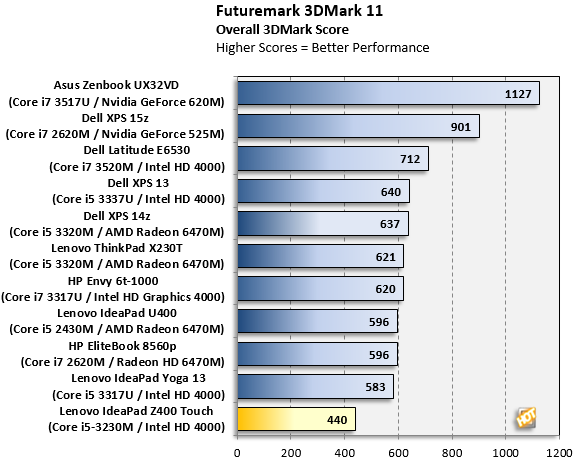
The Z400 Touch really didn’t hold its own, here. The Intel HD 4000 graphics appeared in several systems that provided better benchmark scores. The Z400 Touch's processor, memory, and software / driver configuration all contribute to its somewhat lower score here.





