Dell XPS 16 (2026) Review: Thin, Elegant And Surprisingly Fast


| Dell XPS 16 (DA16260) Laptop: Starting At $1899, $2349 As Tested Dell’s XPS 16 (DA16260) for 2026 delivers the same impressive Panther Lake performance, class-leading efficiency, and clean, premium design as the 14" model we previously reviewed.
|
|||

|

 |
||
If you follow the laptop scene at all, we probably don't have to remind you that Dell discontinued the XPS brand last year, only to bring it back this year. When Dell originally announced it was doing away with the XPS brand, many responded poorly to the rebranding effort that brought the Plus, Premium, and Pro machines (despite the fact that they were quite good.) Along with the return of the XPS brand, Dell has fully revamped its flagship consumer laptops with an efficiency-first design that refuses to sacrifice performance or fashion in the pursuit of long battery life.
Hot Hardware head honcho Dave actually already reviewed the 14" version of this laptop; if you haven't read his review, spoilers: it's pretty great. This machine is similar in many ways, but as is often the case between our team members, my opinion of this larger machine is just a little bit more reserved. Plus, there are a few complaints that make sense on a 16" laptop which aren't really fair to levy against a 14" machine. But, I'm getting ahead of myself here.

This new XPS 16 (2026), known as the DA16260 model, is plenty fast, super portable, and has one of the most gorgeous laptop screens I've ever seen. I won't spoil the whole review here in the introduction, though. Instead, you'll have to read on to see what I really think about Dell's most-premium mainstream 16" laptop.
Dell XPS 16 (DA16260) Full Specifications
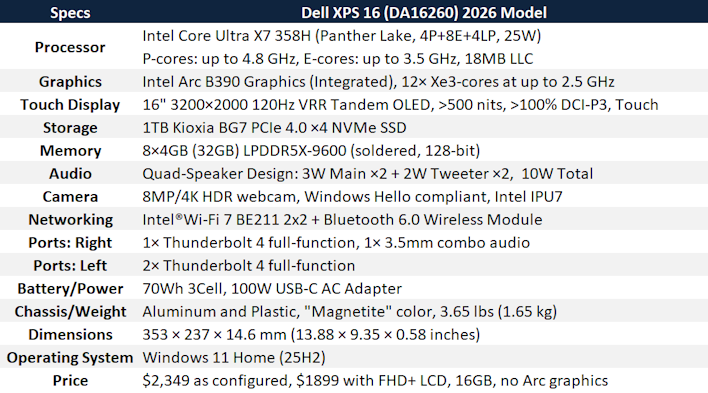
Starting right from the top, we have the exact same SoC as was in the 14" XPS we reviewed. It's a fantastic little chip for what it is; it's plenty fast enough that you never feel constrained by performance in day-to-day use, yet has a surprising amount of multi-core grunt for a 25W processor thanks to its super-efficient 18A compute tile. Naturally, graphics duties are handled by the integrated Intel Arc B390 graphics.
Other notable specs we should discuss before we move on to the walk-around include the super-fast RAM, the mid-range SSD, and the power situation. First and foremost, the RAM: 32GB is "just right" for a machine like this, but Dell has gone with the Intel-recommended 9.6 Gbps memory to maximize the integrated graphics performance, and it really helps. This does have consequences in terms of memory latency, but these are the trade-offs we make in advanced product design.
The sole SSD is a Kioxia BG7; this is a mainstream PCIe 4.0 SSD without a DRAM cache, so it relies on Host Memory Buffer. Ordinarily we'd say it's a slightly odd inclusion in a premium machine like this, but given the ongoing flash memory shortage, it's an understandable decision. It's a darn sight better than the Samsung SSD Dave had in his XPS 14, anyway. Performance is quite good, as you'll see, so there's no complaint here.
Where Dell definitely didn't cut any corners at all is with the 70-Whr battery. Having that kind of capacity in a machine this thin and light is excellent. The included power adapter is a 100W GaN unit, too, so it's nice and compact while delivering enough power to make sure the XPS 16 can never drain its battery while plugged in, another great 'nice to have' feature.
Exploring Dell XPS 16 (2026) Design, Build Quality, Display And IO Expansion

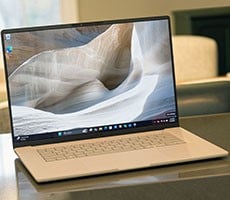
At a glance, the XPS 16 just screams refinement. It's a gorgeous machine in "Magnetite," which is basically a very fancy way of saying "black". It's not as matte as it might look in some of the photos; the exterior chassis is aluminum, and actually pretty reflective. Some of the interior is plastic, but it doesn't feel cheap or plasticky under the fingers. The palm rest is apparently glass; could have fooled me—it feels just like the exterior under my thick-skinned fingers.

Flipping the machine around for a moment, you can see the lid of the laptop with an inset XPS logo that is reflective, but not illuminated. That's not a fancy vignette effect on my camera; the lid of the laptop overall is quite reflective. So much so in fact that you can even make out coarse details with enough light. It's an interesting look, but it's worth noting that the lid of the machine picks up fingerprints pretty easily.

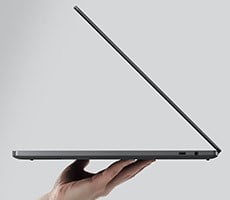
Compared to other thin & light machines, the XPS 16 isn't especially thin or light, but it absolutely belongs in the category. In contrast with the heavyweight gamer laptops I often review, this machine is downright svelte. The hinge on ours is very stiff and not easily openable with one finger as some folks demand, but that will probably loosen up as you continue to use the machine.

In what is really my only serious complaint about the system, the I/O on this model is lacking. Not a single USB Type-A port is anywhere to be found, nevermind exotic fineries such as an HDMI port or RJ-45 jack. Instead, you get three Thunderbolt ports and a combo audio jack, and that's it. Much like a Macbook, you'll be living the dongle life with this machine, which is "OK". Dongles are functional enough. It's just tedious to have to pack them when Dell could have easily fit some additional ports on the system. Definitely a downer, but it's basically standard practice for this market segment, so I really can't fault Dell too much here.

As a contrast, the keyboard on the XPS 16 is excellent, for what it is. Personally, I favor keyboards with a longer 'throw', or actuation distance. However, that's not really a fair ask in a laptop that's not even 2/3" thick. Dell's keyboard here is the thin membrane type, with crisp key activation and zero flex in the deck as well as a decent layout. I would prefer to see a more complete layout in a 16" laptop, though You don't necessarily have to include a numeric keypad (although there's totally room to do so; MSI did), but having one or two more rows of keys to decompress the arrow keys and include the editing block would be a nice use of the wasted space on either side of the keyboard. Also, "insert" does not need its own top-layer key. Not over "Home" or "End", anyway.
The touchpad is quite nice too, with a massive size and good palm rejection. It did not activate even one time while typing on the system. (I'm writing this review on the machine, as usual.) Unlike last year's "Premium" laptops, the new XPS 16 does include subtle demarcations to indicate where the trackpad starts and ends, which are very welcome. It also doesn't seem to have the same problems I had last year with picking up multi-finger inputs.

The bottom of the XPS 16 is pretty nondescript. You get a couple of rubber feet that span nearly the whole width of the system, and then there are long vents on either side for both cooling and speakers. The speakers on this machine are outstanding, by the way; while they don't have much in the way of bass response (like all other thin and light machines), they are bright and clear, with killer stereo separation even when you're not using fake software-based spatial audio.
Normally, at this point I'd show you a picture of the inside of the system. Well, there are actually two different versions of the XPS 16 DA16260 already, both of which share the same model number, unfortunately. The original model received high scores for repairability in early reviews. This newer model cuts the number of screws used in the construction in favor of more of additional clips.
In theory, the way you're supposed to disassemble the machine is to remove the four screws on the bottom, push from the bottom to get your spudger started, and then pop the keyboard tray out with said spudger. In practice, I ruined two plastic spudgers on the sharp interior edges of the aluminum chassis trying to get the keyboard out and eventually gave up for fear of breaking something. This might simply be a skill issue on my part, but I've taken apart many, many laptops in my over-30-years of doing this; this one was one of the more harrowing attempts.

Finally, we come to the centerpiece of this system, which is the screen. Our specific configuration of the XPS 16 offers a 3200×1800 Tandem OLED that supports refresh rates up to 120 Hz and is rated for 500 nits peak brightness, though our system managed 545 nits in HDR mode. Put simply, this screen is brilliant, but ours came poorly calibrated out of the box, with a gamma around 1.4, so everything was hyper-saturated and overly bright. After fixing that by applying a standard IEC sRGB color profile, the display is absolutely brilliant. Razor-sharp at 230 DPI and crystal clear thanks to the glossy finish on the screen, it offers stunning dark blacks and brilliant colors. It's a shame about the stock calibration, but that's fortunately easily fixed.
One thing we will say is that the HDR capabilities of the screen are somewhat limited. Despite being an OLED and supporting over 500 nits peak brightness, the contrast between the brightest and darkest values isn't as visually striking here as it is on something like the Razer Blade 18. Colors are much more saturated and there's nary a hint of light bleed (which mini-LED struggle with) or fringing, so it's a minor complaint. Just don't expect eye-popping HDR highlights like you can see on some high-end monitors and TVs.
Dave covered the software experience on the new Dell XPS machines in his review, and nothing has changed on this system; there is shockingly little bloatware from either Dell or its partners, at least on our review machine. So, without further ado, let's get to the benchmarks!