OnePlus Pad Go 2 Review: Solid Execution With Uninspiring Performance

The OnePlus Pad Go 2 Tries to Be All Things to a Few People

| OnePlus Pad Go 2: Currently $349 @ OnePlus.com Intel's mid-model Arrow Lake refresh improves upon the original Core Ultra 200S processors in a number of meaningful ways to boost performance and value significantly.
|
|||

|

 |
||
OnePlus considers its latest tablet, the Pad Go 2, an ideal choice for students and young professionals that want to enjoy digital content, create some of their own and perhaps do a little productivity work on the side. We've evaluated a few OnePlus tablets in this past but the Pad Go 2 tries to strike a different balance. At $349.99, it undercuts some competitors but also sees OnePlus make a few compromises to get that price down, which also makes for an interesting situation throughout the user experience.
We’ve been rolling with it for over two weeks to get a good sense of where this tablet truly lands, especially when factoring in its accessories, like its Folio Case ($44.99) and Pad Go 2 Stylo (coupon price currently $68). Here’s our take on what to expect...
OnePlus Pad Go 2: Specifications
OnePlus Pad Go 2: Hardware And Industrial Design
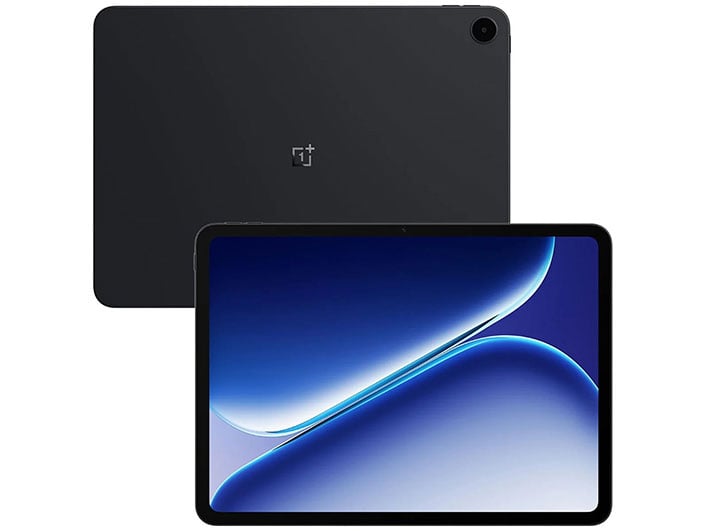
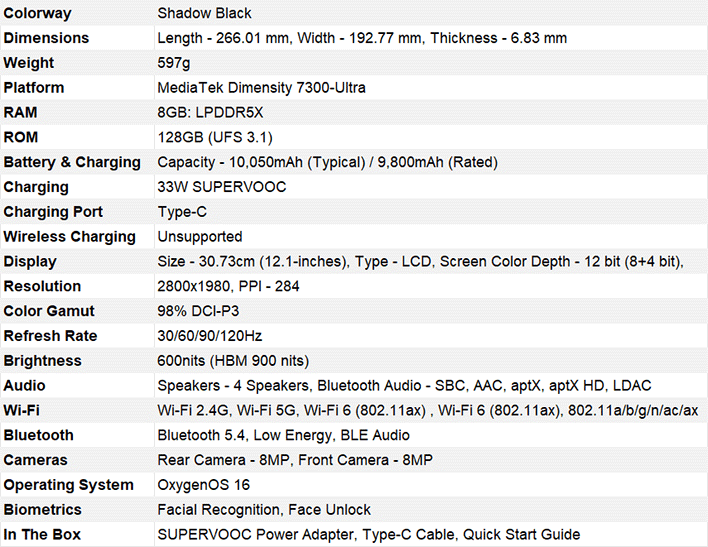
Coming off the heels of the more robust OnePlus Pad 3, the Pad 2 Go presents a configuration that lays out some compromises right off the bat. The 12.1-inch LCD (2800 x 1980 pixels, 7:5 aspect ratio, 120Hz refresh rate, 900 nits HBM) is big enough for a mid-range tablet, and that’s partly because the bezels are so obvious. The 88.5% screen-to-body ratio is one of those trade-offs you see with your own eyes immediately.The good news is the 12-bit color depth (8+4-bit) and 98% P3 color gamut give the display some pop to offset the pixel density (284ppi). OnePlus sets the screen color mode to Vivid by default, though even the Natural tones don’t come out looking too muted in comparison. This tablet does make a good visual impression upon startup.

Running on the MediaTek Dimensity 7300-Ultra, along with 8GB of LPDDR5X RAM and 128GB of UFS 3.1 storage, its modest specs also quickly show on paper. The 10,050mAh battery supports 33W SuperVOOC wired charging, which is good, but also a step down from the warp speeds OnePlus typically delivers for its devices. At least they include a charger in the box, so there’s that. Plus, reverse cable charging support is a nice touch to power other devices, in case your phone or earbuds need some juice.

You get one 8-megapixel camera on the back side of this slate, with another 8-megapixel shooter on the front. Both function well but are just adequate in terms of visual fidelity, though you do have a few modes (Photo, Video, Selfie, Pano, Time-Lapse, and Doc Scanner) to choose from on either side. Video recording maxes out at 1080p at 30fps on both sides as well, and naturally, the front camera is placed at the center within the bezel for alignment when orienting the Pad Go 2 in landscape.
Buttons are limited to the power button on the top right corner (when holding the tablet in portrait orientation) plus the volume buttons at the top-right edge. The only input is a USB-C port, and there’s no 3.5mm headphone jack here either. Quad speakers arrayed along the top and bottom lay out nicely when watching content in landscape, pumping out stereo sound, including solid Bluetooth codec support (SBC, AAC, aptX, aptX HD, LDAC) to round out a relatively well-equipped audio setup that sounds reasonably good, especially for this price range.

The rest of the specs include just Wi-Fi 6 (802.11ax) connectivity, Bluetooth 5.4, and face unlock. For lock screen security, you choose between a numeric code or face unlock (you can have both), as there’s no fingerprint sensor. While there is a 5G cellular variant for the Pad Go 2, we didn’t get to test that, as we were testing the Wi-Fi only variant. Finally, Shadow Black is also the only colorway available in the U.S.
OnePlus Pad Go 2: Performance And Benchmarks
Rather than pigeon-hole the Pad Go 2, OnePlus tries to spread things out by making the tablet functional enough to feel useful as a variety tool. Streaming apps never seem to take a toll on its capabilities, which I enjoyed while traveling or commuting. In practice, shows, movies, or even lighter-duty gaming weren't notably affected by sluggish performance. The same is true of the basic apps one might use on the regular, like email, messaging, social media, reading ebooks, and scrolling through news feeds.I even had some success editing photos in Lightroom, Snapseed, and Google Photos, though much of the workflow hinged on the fact I uploaded photos in very small numbers at a time. Or I worked on images already available in the library.
I even played some more demanding games, including those downloaded from the Play Store and those streamed from Xbox Game Pass, to gauge performance. Unsurprisingly, the imposed limits set by the specs sideline the Pad Go 2 are not consistent with being a true gaming device. It’s not built for that and its Wild Life Unlimited benchmark results prove this out specifically.

We’d argue that you shouldn’t consider this tablet if intense gaming is part of your wish list. Casual games pose no real problem because they don’t demand as much power, so you can play Angry Birds or Block Blast without feeling so much as a hiccup. Try Call of Duty: Mobile or PUBG and you won’t experience the smooth gameplay they require. Streaming titles from Game Pass or Netflix offer a middle ground that can work out well when you have the requisite bandwidth necessary to run them effectively.
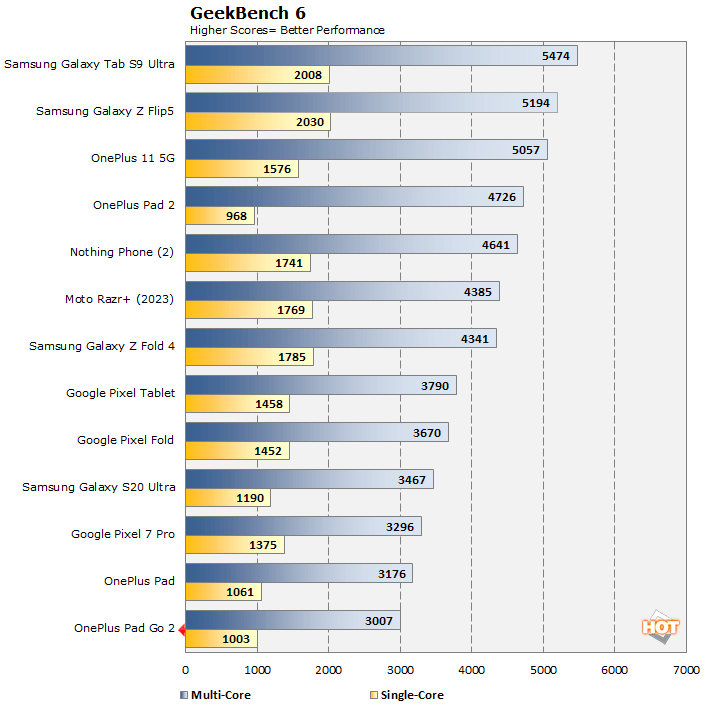
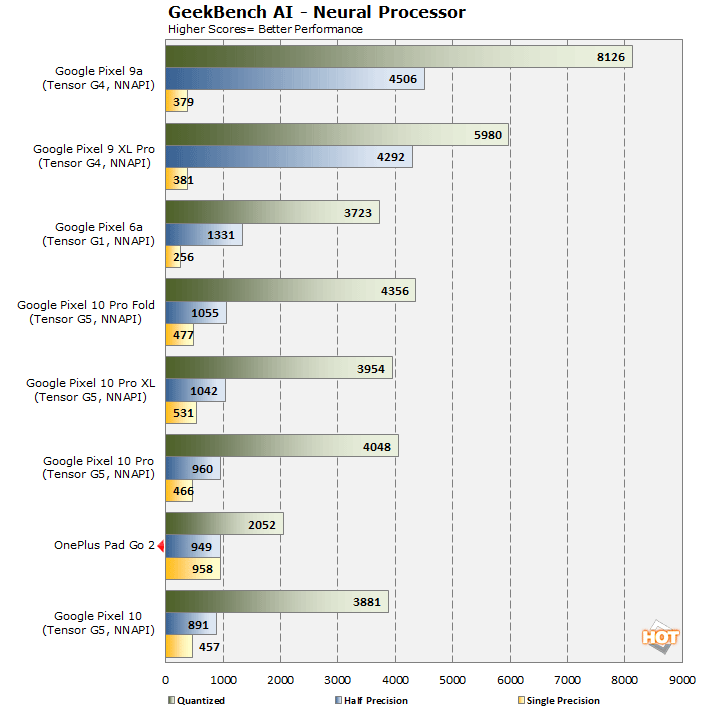
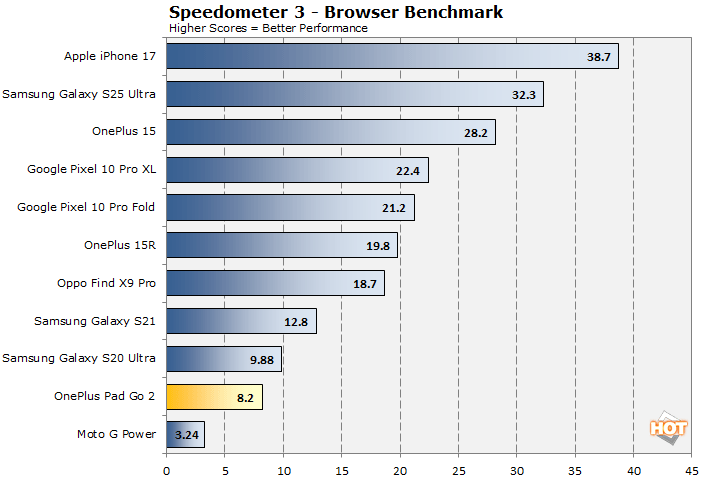
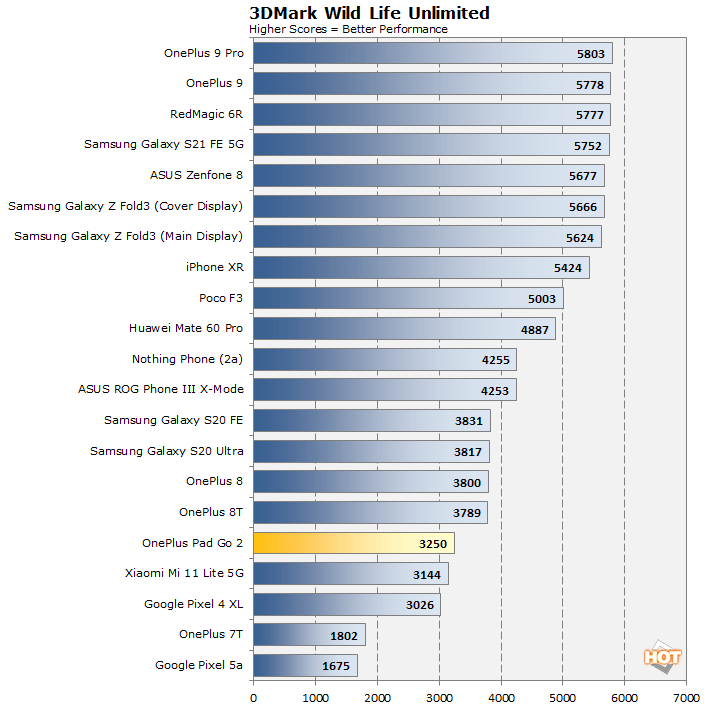
The GeekBench 6 scores above tell the tale pretty clearly. Much of this is simply based on the Dimensity 7300-Ultra chipset’s own ceiling, but also the device itself seemingly thermal throttles to protect overall performance and battery life. As a mid-ranger, it’s just not going to wow you with robust muscle in running the most demanding apps and games. The strengths of this tablet lie in doing the little things right.
OnePlus Pad Go 2: Software, AI, And User Experience
OnePlus has been doing software well for years, and we really like OxygenOS 16 as an excellent Android overlay. The multitasking side of things — what OnePlus calls Open Canvas — is essentially a carryover from the previous OnePlus Open foldable phone and flagship Pad 3 tablet. You can set up two apps in split-screen and switch between them with ease. It’s still as fluid as it is on other OnePlus devices in that you simply do a two-finger swipe down onscreen to activate split-screen mode, or pinch inwards with four fingers to convert any full-screen app into a movable floating window.It's also possible to add a third floating window app over a split-screen setup via the Smart Sidebar menu on the top right edge. We like this because it acts like a favorites section where the apps we use most are easy to find and bring in for split-screen situations. All of it feels smooth and precise, despite our previous benchmarks suggesting otherwise sluggish performance.

The AI stack doesn’t serve up much that’s different from other OnePlus devices, including previous tablets. You can write, translate, summarize, and record voice notes using the OnePlus AI suite, as well as utilize third-party AI features like Gemini, ChatGPT, Claude Ai, and various AI editing features in Google Photos. OnePlus’ AI photo editing tools are cloud-based (as they are on the company’s other devices), but they’re not going to turn images captured with the tablet’s cameras into masterful creations. You’ll get better results plucking images captured on your phone or another superior camera.
That’s made a lot easier when sharing files back and forth is still easy. OnePlus’ O+ Connect app enables Apple devices, like the Mac, iPhone, and iPad, as well as Windows PCs, to view files on the Pad Go 2 and transfer them in either direction. It becomes a much easier way to copy over batches of photos and documents to the tablet without resorting to cloud uploads and re-downloads. I’ve used it with great success on the OnePlus 13 and 15, too.
The one caveat is that OnePlus extracts a broader swath of permissions to enable the AirDrop-style experience, so we would suggest you read through those first before committing. There may be a price to pay in data that you may not be comfortable with.
Over time, the Pad Go 2 settles into a routine when you recognize where the fault lines are. Since OnePlus seems to be prioritizing battery efficiency and reliable performance, this tablet doesn’t excel at any one particular aspect. It simply runs whatever you use in the best way it can, and that’s why the limitations eventually become obvious after a while. OnePlus also promises five years of Android updates and six years of security updates to keep the Pad Go 2 going for years to come, though we suspect by year three, it will be better suited sticking to streaming video and doing video calls rather than serving as a truly mobile productivity device.
OnePlus Pad Go 2: Accessories
Speaking of which, the two main, aforementioned accessories — the Folio Case and Pad Go 2 Stylo — help the cause but aren’t transformative add-ons. The Folio Case is convenient as a case and stand to prop up the tablet but doesn’t make an input impact the way the Stylo can.The pen is fine as a writing and editing tool, offering a decent level of low latency and 4,096 levels of pressure sensitivity, as OnePlus claims, but that’s also most applicable to somewhat restrained experiences. For instance, jotting down notes can feel a bit off at times, whereas sketching may depend more on the app you use than the pen’s actual input. We didn’t mind it as a way to finetune some edits in Lightroom or to play certain games where the pen added some flair to controlling the action.

Pressing the pen’s button switches between tools, while pressing and holding lets you take a cropped screenshot. Swiping from the upper-right corner with it opens a new note in a floating window to jot down something quickly. A cool feature is the ability to take notes by simply making contact with the screen when it’s off, turning it into a blank white canvas that accepts the pen’s input automatically. In some cases, you might also be able to write in text fields and see them converted to text.

While the Folio Case doesn’t give you a keyboard, you could use a Bluetooth one with the Pad Go 2 as an another option. If you have one lying around, great, but we don’t see this tablet functioning as a serious laptop alternative, so bear in mind the functional limits here.
Neither the case nor pen have magnets, making that Stylo easier to misplace or lose. It’s a cost-cutting measure given magnets are standard on OnePlus’ premium tablets. The Folio’s flap does have room to tuck it in but we weren’t always comfortable rolling with that unless it was moving from a desk to a couch or carrying it in hand the entire time.
OnePlus Pad Go 2: Our Review Final Analysis
OnePlus plays it safe with the reasonably priced Pad Go 2. There’s throttling going on here to preserve battery life, which we find to be fairly good over the course of a day, but the slower charging speeds (under OnePlus standards) also mean you’ll plug in longer to keep the lights on.At $349, the Pad Go 2 is a hard sell up against an entry-level 11-inch iPad coming at a similar price, even if it’s not bundled with an Apple Pencil. The paradox is that as open as Android is, its tablet-optimized apps still don’t come in the abundance they should. The price point isn’t bad, even if you throw in the pen, but we also reckon you can find a OnePlus Pad 2 at a bargain to make it a compelling choice when you want a big screen with higher resolution and faster performance.