Google Home Speaker (2026) Review: A Great Gemini Hub, Despite The Paywall

Google Home Speaker: Smarter Audio With Gemini AI For Your Connected Home

| Google Home Speaker: MSRP $99 The 2026 Google Home Speaker offers impressive omni-directional sound and natural AI conversations, but the best features require a paid subscription.
|
|||

|

|
||
It has been an interesting journey for Google's consumer speaker and home hub devices, one that began a decade ago with the introduction of the original, cylindrical Google Home device. Several models followed in the years since, as did a branding pivot to Nest, which carried Google's smart display and standalone audio aspirations through the Nest Audio speaker released in 2020 and second-generation Nest Hub released in 2021.
Returning to where it all began, Google is back to using its own brand name with the release of the Google Home Speaker for 2026. Branding aside, this is Google's first smart speaker in more than half a decade, and a lot has changed in the time that has elapsed, not the least of which is the rise of AI. This is pivotal to the goal of transforming smart speakers from glorified kitchen timers and voice-controlled jukeboxes into more functional and capable assistants, and for Google, its Gemini AI is the key that unlocks this transformation.

Notice I did not say Google Assistant. Over the past year, Google has been phasing out its Google Assistant and replacing it with Gemini on mobile devices and smart gadgets. More than a name change, Gemini is capable of everything the Google Assistant could do, but runs on a more advanced AI engine for more intelligent and intuitive interactions. These interactions are now baked into the 2026 Google Home Speaker, which I've been using and experimenting with over the past few days for this review. Does it live up to the hype? Let's get into it.
Google Home Speaker Design And Build Quality

In terms of its form factor, the new Google Home Speaker is taller and more bulbous than the Google Home Mini and Nest Mini, and more compact compared to Google's original speaker and the Nest Audio. It stands just 3.4 inches tall with a 4.2-inch diameter, and weighs just 0.9 pounds. That includes the permanently attached USB-C cable, though not the included 30W power adapter.
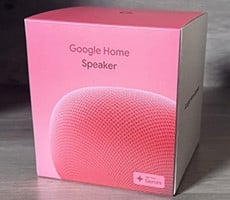
Suffice to say, it's incredibly compact, just not quite to the extent of a puck-shaped speaker. It's also reasonably stylish for a speaker. I requested the Berry colorway, which is one of two color options exclusive to the U.S. market, the other being Jade. Google also offers Porcelain and Hazel colorways.

The speaker is wrapped in a non-removable cloth cover that Google describes as an "innovative yarn" constructed from a "unique 3D knitting process" designed to reduce fabric waste. I suspect the average person won't care about such details, but for the environmentally conscious who do, Google's claim is that recycled materials comprise at least 37% of the entire speaker.
Why no yellow, blue, or orange colors? I suppose Google had to draw the line somewhere, though I would like to see black added to the mix for those who prefer a sleeker aesthetic. Just choose your color carefully because you are stuck with whichever one you pick—there's not swapping the fabric.
Likewise, be careful not to damage the white USB-C cable that snakes from the backside. If the cable frays or otherwise goes bad, you are at the mercy of Google's warranty policy. That said, it is a rather long cord measuring 4.9 feet (1.5 meters), which is great for added flexibility on where to put the speaker, because you don't necessarily have situate it right next to an outlet.

Though the latest Google Home Speaker weighs under a pound, that's actually more than twice the weight of a regulation softball and it feels solidly designed, not at all cheap or flimsy. It also packs enough heft to stay put when tapping the speaker, which is one way to control the playback. Touch controls include a play/pause button on top of the speaker in the center, and you can adjust the volume down and up by tapping the left and right sides, respectively, as indicated in the setup guide.
It took me a second to figure out exactly where to tap on the speaker to adjust the volume. At first, I kept tapping on the actual sides instead of where it curves along the top. However, once the caffeine kicked in and I realized that the LEDs lit up indicating exactly where to tap, I was off and running.
Of course, the other way to control playback is with your voice. Tapping is handy if you're close by and want to make lightning quick adjustments, otherwise Gemini responds quite well to commands like, "Hey Google, turn the volume up slightly" or "Hey Google, put the volume at 75%."

There is also a physical switch around the back and near the bottom to mute the microphone. It's one action that cannot be performed via voice control, and for good reason—otherwise, it would be problematic to turn it back on. However, if you are concerned about Google listening to your private conversations, you can flip the toggle to disable the microphone entirely.
Google Home Speaker Setup, Software And Sound Quality
Setting up the Google Home Speaker is a breeze. When you plug it in, the status light that circles the base illuminates so you know it's getting power.
From there, download the Google Home app from the Google Play store (Android) or Apple's App Store (iOS), open the app, tap Devices, then tap +Add and follow the instructions. The app holds your hand through the setup routine, part of which entails firing up your smartphone's camera to scan the QR code on the bottom of the speaker. Just be sure that when you select a wireless network, it's the same one your phone is connected to.
Once configured, you have access to Gemini and this is where Google's newest smart speaker truly shines as a hub for your connected gadgets. Google's goal is for Gemini to deliver a more natural, conversational voice assistant experience, and it succeeds for the most part, though it is not perfect.
The whole idea is that you can speak to Gemini like you would an actual person. Instead of memorizing rigid command phrases, Google's pitch is that you can speak more naturally and Gemini will adapt to your style. I find that latter part hard to quantify, but what is measurable is how Gemini is able to listen and respond accordingly with less friction than earlier digital assistant implementations.

For example, if you stumble over your speech, you can correct yourself without having to start your command from the beginning and Gemini will figure it out. A basic example is something like, "Hey Google, turn down the volume...I mean turn it up to 75%!"
You can also string together multiple commands. The example Google provides is, "Hey Google, dim the kitchen lights, play some relaxing music, and set a timer for 20 minutes." I do not have smart lighting in my home, but I was able to test this in other ways with varying success. In one instance, I said, "Hey Google, play a different song and reduce the volume to 20%," and Gemini obliged. Other times with similar commands, Gemini would erroneously tell me that my living room speaker does not support volume adjustments, even though it clearly does.
The more complex the commands, the more rough around the edges it feels, though I did find that it at least recognized my intent consistently when speaking naturally, regardless of whether it followed through or told me it could not do something. In that regard, the heavy reliance on AI is both a blessing (when it works as intended) and a curse (when it trips over itself or hallucinates).
I found the Google Home Speaker to be more consistent with recognizing and successfully responding to corrections in speech, such as the aforementioned volume adjustment example. It also consistently responded to non-specific commands like, "Hey Google, turn the volume up slightly" or "a little bit," which I discovered increases or decreases the volume in 5% increments. If I asked it to turn the volume up or down by "a lot," it would adjust it in increments of 20%. You can specify more fine-grained volume adjustments, so long as they are in whole numbers (so 41% or 63% are fine, but you can't tune it to 41.5% or 63.8%, for example).
A 58mm full-range driver powers the Google Home Speaker, blaring 360-degree omni-directional sound. This means you can place it practically anywhere rather than have to worry about facing it a certain way. What really stood out to me, though, is that it offers up plenty of volume to fill a large room, and then some. I placed it on a bookshelf at the far edge of my long living room and I was able to hear it clearly and loudly on the other side, as well as in the attached kitchen. It's a two level townhome and when I went upstairs, I could still hear the Google Home Speaker belting out my playlist.
The trio of far-field microphones do an excellent job at picking up commands, too. I was surprised that it 'heard' and responded to me when I was in the next room, and it also heard me from upstairs, though obviously I had to raise my voice. What I found to be the case is that if a person can hear you at whatever volume and distance, so too can the Google Home Speaker.
As for the quality of the sound, it is good enough to handle a variety of music genres, from rock and rap, to bluegrass and everything in between. That said, this is designed as more of a multi-purpose smart hub at an affordable price, so temper your expectations if you are hoping it will hold its ground against speakers that cost hundreds of dollars more. You won't get audiophile-grade sound from the Google Home Speaker, though the overall sound profile is quite good for its size.

You can also perform basic tuning with a couple of equalizer sliders in the app, one for bass and another for treble. There is a slight delay when adjusting either one, and at first, I thought they were not working. Turns out I just needed to wait a couple of seconds for the settings to be applied. Also, for whatever reason, these are not controls you can have Gemini adjust (I tried, multiple times) via voice control. By default, both are set at 50% and I found that to be fine. You can coax a bit more bass response out of the Google Home Speaker, and while certainly better than anything you'll get out of a laptop (as a point of reference), it's not going to hit hard enough to rattle your walls (or annoy your neighbors).
Google Home Speaker: What's Hot, Not And The Paywall

Google says it built its newest Home Speaker to take advantage of its Gemini AI assistant, and it shows in how the speaker reacts and responds to you. AI assistants have been working towards more conversational experiences for several years, and Gemini is a more polished implementation than what some people might be used to, at least when it works as intended. Being able to talk naturally like you would if Gemini were an actual person and have it understand and respond accordingly makes the Google Home Speaker feel more like an entity than a scripted, robotic tool. If you need to correct yourself mid-sentence, you're not penalized by having to start all over again.
I also like that you can optionally enable Google's Continued Conversation feature. This keeps the microphone active for a few seconds after Gemini responds so that you can issue more commands or ask follow-up questions without having to bark out the "Hey Google" wake phrase again.
Simply put, the Google Home Speaker with Gemini is intelligent as advertised. However, there is a caveat. Two, actually. The first is that some of the best features require a Google Home Premium (formerly Nest Aware) subscription, which runs $10/month or $100/year for the Standard tier, or $20/month or $200/year for the upgraded Advanced tier. This lets you tap into more advanced capabilities, like having Gemini tell you what it saw on your connected Nest cameras with 30-day (Standard) or 60-day (Advanced) histories, have more natural conversations via Gemini Live, and more as outlined on the subscription page. Google offers new Home Speaker owners a generous six-month trial, so at least it's not an expense you'd incur right away to take advantage of the speaker.

The other caveat is that you really have to be invested in Google's ecosystem and/or supported products to get the most out of the Google Home Speaker's capabilities. I own a Ring Video Doorbell, which is not supported, so I was not able to test the speaker's ability to peer through my camera and tell me what it sees, let alone receive familiar face alerts.
Those caveats aside, the Google Home Speaker is a solid product for the $99.99 asking price. As a regular Bluetooth speaker without tapping into paid features, it offers a strong value proposition with loud and clear audio, microphones that 'hear' you from a distance, and an attractive, compact design. And if you're willing to pay for the advanced features, it becomes a reasonably powerful hub for your smart home, so long as you strategically invest in support products that it is capable of tapping into.