HP Omen 15 Gaming Notebook Review, A Bit Of Mojo And Voodoo

Chances are, battery life isn’t going be a deal-breaker for you when you’re shopping for a gaming laptop. You’ll probably be at a table when gaming (in general) and have access to a power outlet. So long as the laptop can handle regular tasks (and maybe a brief gaming session) untethered, battery life isn’t a huge deal.

Battery Life
Heavy and Light Loads

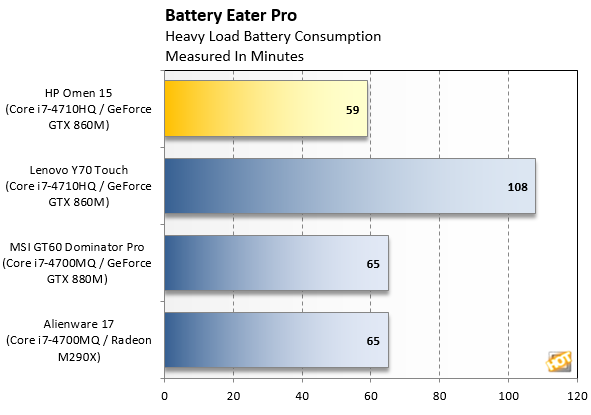
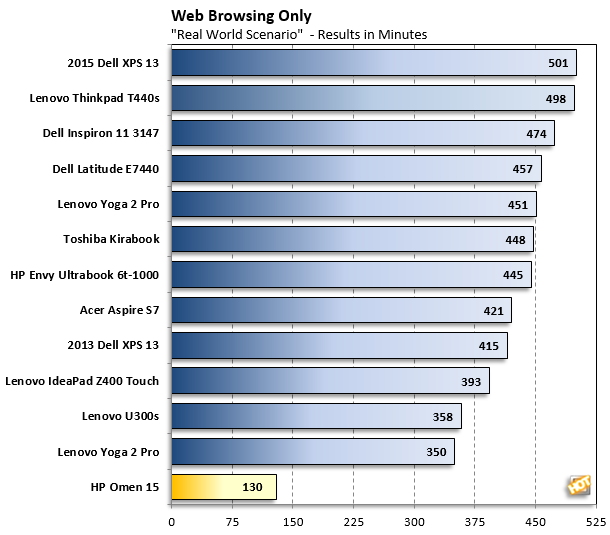
We put the HP Omen 15 through two battery life benchmarks: Battery Eater Pro and our own Web browsing test. Battery Eater Pro creates a heavy workload to grind your system’s battery down, while the HotHardware.com test refreshes a Web page regularly, giving you a general impressive of what the battery life might look like if you use it for light online tasks.
bep omen

hhbrowsertest
                  Ultrabook times listed just for reference.
                     We are building our database of web browsing battery tests for gaming notebooks.


Before you jump up and down about the web browser comparison numbers here, we agree, competing against these super thin and light ultrabooks isn't a level playing field for the Omen.  However, the Omen 15 is a bit of a "tweener" in that regard, at just over 4.5 pounds.  In addition, we haven't compiled numbers our light-duty web browsing tests on other gaming notebooks, so this data is just for reference and additional perspective.

The HP Omen 15 held out for just under an hour on heavy load Battery Eater test, which puts it in the same general territory as several of the other systems we’ve tested. However, it doesn’t hold a candle to the Lenovo Y70’s impressive 108-minute performance. For contrast, and to be fair, the Y70 does bring a lot more heft with it as well, at 7.5 pounds.  In our web browsing test, the Omen lasted for two hours and 10 minutes, which isn’t particularly long, but will get you through a layover at the airport. A long flight, however, is going to be too much for the Omen.

A note on acoustics and cooling:
Most of the time, the HP Omen 15 is fairly quiet, though its cooling fans run strong often, sometimes even when the system is handling mundane tasks like Web browsing. That may help explain the system's faster battery drain in our light-duty test. When you fire up a game or other intensive task, things get a little noisy. The noise from the Omen 15's fans wasn't loud enough to break-up the experience too much, but it was noticeable.

Joshua Gulick

Joshua Gulick

Josh cut his teeth (and hands) on his first PC upgrade in 2000 and was instantly hooked on all things tech. He took a degree in English and tech writing with him to Computer Power User Magazine and spent years reviewing high-end workstations and gaming systems, processors, motherboards, memory and video cards. His enthusiasm for PC hardware also made him a natural fit for covering the burgeoning modding community, and he wrote CPU’s “Mad Reader Mod” cover stories from the series’ inception until becoming the publication editor for Smart Computing Magazine.  A few years ago, he returned to his first love, reviewing smoking-hot PCs and components, for HotHardware. When he’s not agonizing over benchmark scores, Josh is either running (very slowly) or spending time with family. 

Related content