Dell’s XPS 14 (DA14260) for 2026 leaps forward with Intel Panther Lake, delivering impressive performance, class-leading efficiency, and a clean, premium design that continues to set the XPS line apart.
Gorgeous Tandem OLED Display
Exceptional Battery Life
Quality Laptop Sound
Great Performance, Especially Graphics & AI
Excellent Keyboard And Trackpad
Top-Notch Design And Build Quality
Almost Too Minimalistic Design Language
Lack-Luster Storage Performance
Dell’s XPS lineup has long represented the company’s design-forward, premium Windows PC offering. It has been a family of products that consistently blended industrial craftsmanship, high-end displays, and solid performance into sleek, highly portable machines. But in a surprising move not long ago, Dell painfully retired the iconic XPS branding in favor of what it thought was a simplified portfolio strategy. That decision didn’t last long.
Following strong customer feedback and clear demand for the return of one of the most recognizable names in premium laptop PCs, Dell brought XPS back, and not just as a badge, but as a refined platform built around efficiency, thermals, acoustics, and intelligent performance scaling. The new Dell XPS 14, model DA14260, represents a strong revival effort by the company. Powered by Intel’s latest Core Ultra Series 3 processors, aka Panther Lake, this generation focuses as much on sustained real-world performance and battery longevity as it does on thinness and aesthetics. Rather than chasing extremes, Dell appears to have prioritized balance, delivering a premium ultraportable that feels mature, disciplined, and future-ready.
And this time, the XPS name feels fully earned again, so let's dive in...
Dell XPS 14 (2026) With 2.8K OLED Display (Left), 2K LCD Right
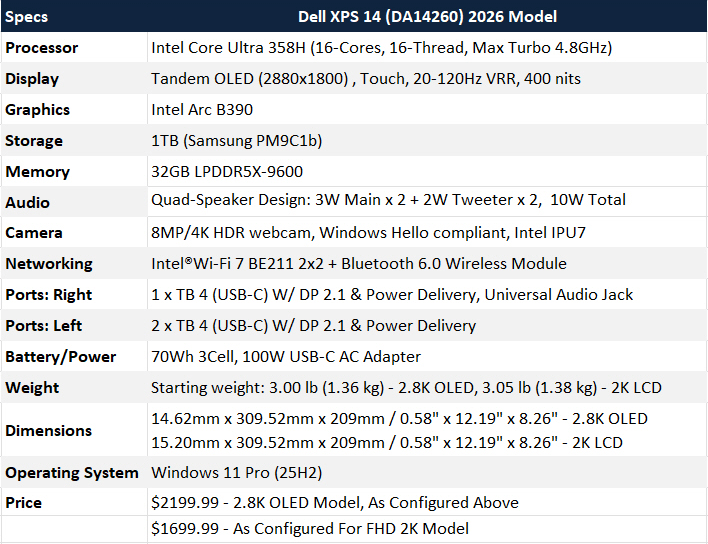
The chips powering the XPS 14 platform span from Intel’s Core Ultra 5 325 through the Core Ultra X9 388H, topping out at a 16-core configuration in higher-end trims. That’s meaningful because this chassis sits firmly in the thin-and-light class, yet Dell is offering high-performance silicon typically reserved for larger systems.
Of note, as you can see above, is that we have two SKUs of the new XPS 14 in house, one based on a Core Ultra 355 8-core/16 GB RAM config with a 1920x1200 IPS display, and a higher-end option with a Core Ultra 358H 16-core/32GB RAM config with a 2.8K (2880x1800) Tandem OLED display. The former will undoubtedly bring better battery life, while our higher-end XPS 14 will deliver more performance and the deep, well-saturated goodness of OLED, in exchange for a modest reduction battery life.
What Are The Dell XPS 14's (DA14260) Key Specs? Let's Break It Down
As noted, system memory options scale from 16GB of LPDDR5x to 64GB on higher end SKUs, with faster 9600 MT/s speeds available alongside the more powerful processors. That pairing is key, especially for AI-accelerated workflows and integrated Arc graphics performance, because bandwidth plays a critical role in how well the GPU cores stretch their legs.
Storage options move into PCIe Gen5 territory at the higher end, which future-proofs somewhat for larger file transfers and creative workloads. While Gen5 SSDs won’t dramatically change day-to-day responsiveness versus Gen4, sustained throughput under heavy workloads will benefit. Unfortunately, both of our configs came with PCIe Gen 4 drives.
Display options include a 2K IPS 500 nits non-touch LCD running from 1Hz to 120Hz and a 2.8K OLED touch 400 nits panel with a 20–120Hz adaptive refresh rate. The LCD is the efficiency champion, while the OLED delivers cinematic contrast and DCI-P3 gamut coverage more suitable for professional content creators. Both panels are Dolby Vision capable and sport Eyesafe low blue light technology, but only the OLED panel rocks a DisplayHDR True Black 500 certification.
All of this hardware sits in a chassis that measures just under 15mm thick (OLED option, IPS is 15.2 mm) and weighs roughly three pounds. That balance between performance ceiling and physical footprint is the defining technical achievement for Dell here.
Dell's XPS 14 once again delivers one of the most refined Windows laptops in hand. Its CNC-machined aluminum unibody construction feels sturdy and deliberate, with absolutely minimal flex and tight tolerances throughout. Dell’s restrained use of seams and a subdued, monochromatic finish give the XPS 14 a clean, uncluttered look that feels modern and refined rather than busy. Surface areas can be fingerprint magnets but a microfiber cloth cleans things up quickly. The system currently ships in Graphite, with a lighter Shimmer colorway planned for later this year.
Dell XPS 14 (2026) Left Side PortsDell XPS 14 (2026) Right Side Ports
Dell’s press-fit hinge mechanism deserves special mention. It just barely enables one-handed opening of the machine while keeping the lid stable under touch input. It’s a subtle detail, but these small mechanical refinements separate good laptops from great ones. Connectivity also remains minimalist but forward-looking. The system features three Thunderbolt 4 ports with DisplayPort 2.1 support and power delivery, along with a headphone jack. There is no legacy USB-A ports, which will frustrate some users, but from a bandwidth and expansion standpoint, the XPS 14's available IO is plenty capable. There's also charging on both sides of the machine, and Dell integrates a clever Kensington locking mechanism through the Type-C ports, reinforcing its enterprise appeal.
Dell's XPS 14 For 2026 Now Has Touchpad Demarcation Lines
The XPS 14’s zero-lattice keyboard continues Dell’s clean theme, but with noticeably improved key stability and crisper tactile feedback compared to prior generations. Despite the laptop’s ultra-thin profile, key travel feels well-damped and comfortable for extended typing sessions, avoiding the shallow, hard bottoming-out feel common in many slim designs. The seamless Gorilla Glass 3 palm rest reinforces the premium aesthetic while staying cool to the touch, and the subtly etched haptic touchpad blends cleanly into the surface while delivering precise, responsive input without physical buttons.
Dell was clearly listening to customer feedback from its previous generation of invisible trackpads, and these subtle etch lines feel like the perfect solution for those that complained about the prior-gen invisible touchpad design.
The Dell XPS 14's IPS Display Is Bright But Nothing The Beats Tandem OLED Model
Display quality continues to be a core XPS strength. The 2K LCD panel strikes an excellent balance between sharpness and efficiency, and its ability to dynamically scale refresh rates down to 1Hz genuinely contributes to runtime improvements during static workloads. Text clarity is crisp, brightness is ample, and color reproduction is accurate. The OLED option, meanwhile, is visually striking. Blacks are inky, contrast is fantastic, and HDR content benefits from the panel’s dynamic range. As expected, power consumption is higher than the LCD model, but Dell’s panel tuning and Tandem OLED display technology mitigates the power consumption impact better than most standard OLED-equipped competitors. More on this in our battery life section toward the end of this review.
In addition, Dell's tiny integrated webcam is an 8MP/4K HDR shooter that's Windows Hello compliant, powered by Intel's IPU7 Image Processing Unit. It does a really good job of capturing crisp detail, even in lower light environments.
Dell Inscribed XPS On The Top Cover For The First Time With XPS 14
Finally, for the first time in the modern XPS era, Dell has brought the iconic XPS logo out front and center, placing it directly on the back of the display lid, rather than keeping the branding understated and hidden. It’s a subtle but confident design statement that reinforces XPS as a flagship line again, not just another premium Dell notebook, but a distinct identity of its own.
Dell Pro 14 Premium Software Experience And Utilities
Dell has refined its software stack significantly over the years. Dell Optimizer now serves as a practical tool rather than basic utility. Power and thermal profiles can be adjusted to favor quiet operation, sustained performance, or balanced use. The differences between modes are tangible, particularly under extended CPU or GPU loads.
Dell Optimizer UtilityDell Support Assist UtilityDell Trusted Device Dashboard
Dell SupportAssist remains useful for firmware/driver updates and diagnostics, and the system ships clean enough that power users won’t immediately feel the urge to reset the machine. Dell’s Trusted Device Security dashboard adds an extra layer of peace of mind by providing real-time visibility into system health, firmware integrity, and threat protections directly within Windows. It quietly works in the background to monitor BIOS security, credential protection, and hardware-level safeguards, giving users an easy way to verify that their XPS 14 remains protected from the moment it boots up. I will say that our device was flagging BIOS signatures as invalid but that may just be an early hiccup with the software not recognizing Intel's new Panther Lake platform. Dell will likely remedy this in a future update.
Next we'll fire up some benchmarks on the two new XPS 14 machines we have on our test bench...
Dave Altavilla is the founder, Editor In Chief and Publisher of HotHardware.com. With decades of experience as a semiconductor sales engineer, Dave Altavilla founded HotHardware.com over 25 years ago. Dave is also a published contributor to various technology-based publications and is a featured Tech Analyst expert on various network media shows.