Dell Pro Max GB10 Review: NVIDIA’s Mini AI Supercomputer Tested


Now that we've established that the Dell Pro Max is absolutely on par with NVIDIA's own DGX Spark complete with NVIDIA's updated dev tools, it's time to dig into something we didn't get a chance to do in our first look at GB10: dual systems and distributed compute. All GB10 systems have a pair of QSFP ports, and our systems came with a pair of QSFP cables to connect them together using 200 Gbit networking. What we don't need on these devices for a dual setup is the two ports; full interoperability is established with one cable. So what's the second port for?
Well, you can build a ring of these systems. The first GB10-based system connects to the second via one cable, the second to the third via its second port, and so on, until the last one connects back to the starting point and you can have several of these little powerhouses working together. However, that hits the 200 Gbit/sec max theoretical throughput of a single ConnectX device and more than two Sparks would see performance fall off. Or if you have a fast enough QSFP switch, you could run a large network of these devices each with their own 200 Gbit/sec connection. We don't have such a switch, however.
Using NCCL to Verify Multi-Pro Max Environments
Still, we can prove the point with just two of these systems, and since that's what we have, that's what we'll do. The 200 Gigabit connection works out to be 25 GB per second of theoretical throughput. How do we measure that? We'll use NVIDIA's DGX Spark playbooks, which we discussed in our DGX Spark review, as a guide. The playbook for dual GB10s walks through the process, which is basically just to connect the two machines via a QSFP cable plugged into port 0 on both devices, set IP addresses and subnet masks for each, and configure password-less SSH between the two.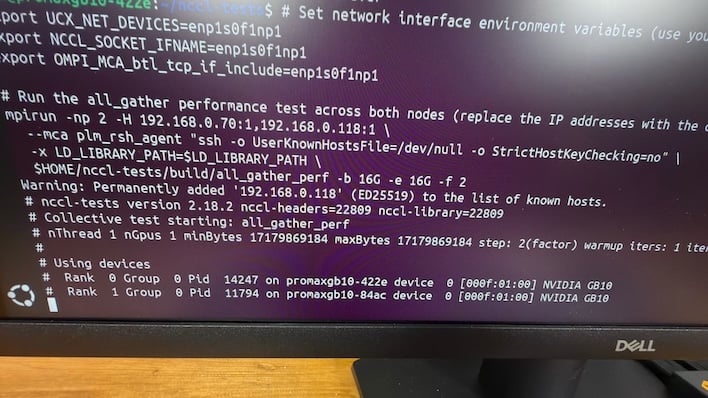
And that's not difficult, thanks to NVIDIA's walkthrough. NVIDIA provides cluster setup scripts that will set the networking configuration to pre-determined values, which is fine for even a production environment since these devices are talking directly to each other, effectively creating a private LAN between the two systems. Still, you can change IP addresses and update scripts if that suits your needs. Once the network is set up, the discover-sparks shell script will help the machines find each other and exchange fingerprints for password-less SSH, effectively recognizing each other as trusted hosts, where any other host will be rejected due to having a different fingerprint.
It's easy-peasy as long as you read the doc and don't do what I did -- plug port 0 on one device into port 1 on the other. That was not a good time. The devices couldn't recognize each other, network requests timed out, and no communication was happening. Why that is, is beyond the scope of this article. Just follow instructions better than I do and you'll be golden.
Multi-Device Fun with Dell Pro Max
So once the devices are linked, what do you do with them? The first thing we did was verify the bandwidth between the two systems. There's a Two Sparks playbook guide on the NVIDIA Collective Communication Library, the aforementioned NCCL. The basic idea is to measure the bandwidth between the two nodes. In practice you clone the NCCL library and tests repositories from GitHub, compile it on both, and run it on one so it can start talking to the other. We ran this benchmark a handful of times, and each time it hit 24.5 to 25 GB/sec as expected, the theoretical max for the ConnectX controller.Now with the network configured and tested, it's time to do something fun and interesting with two Sparks. What about really big LLMs? Or a multi-agent LLM set up across two GB10 systems like our Dell Pro Maxes? Well, there's a reason we used sparkrun to test a single system. Its tools are designed for multi-GB10 fun. So it was time to start testing the pair together using the --tp 2 flag on the command line.
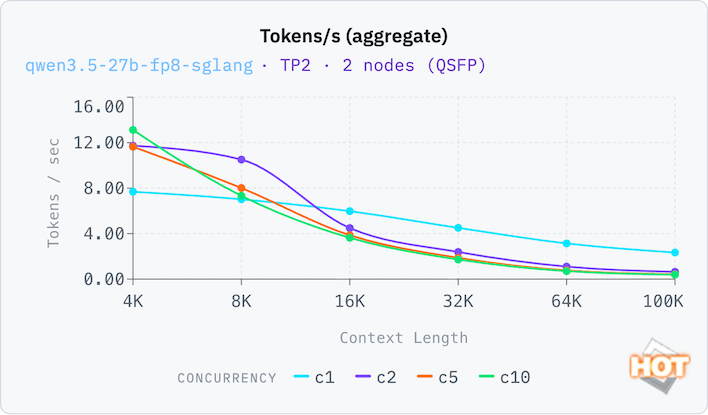
We're running the same Qwen 3.5 27B FP8 test from before, but now it's running on the pair of Pro Max systems. The great news is that performance is up around 50% from before.
Again, with a full context window, we see that odd little hump on 2 concurrent requests at the 8K window. The 4K window is pretty small for an extended chat, so that makes some sense, but it prevents the dual setup from achieving maximum throughput on C2. Regardless, we think most people will be interested in 16k to 32k for longer conversations before the LLM starts forgetting things.
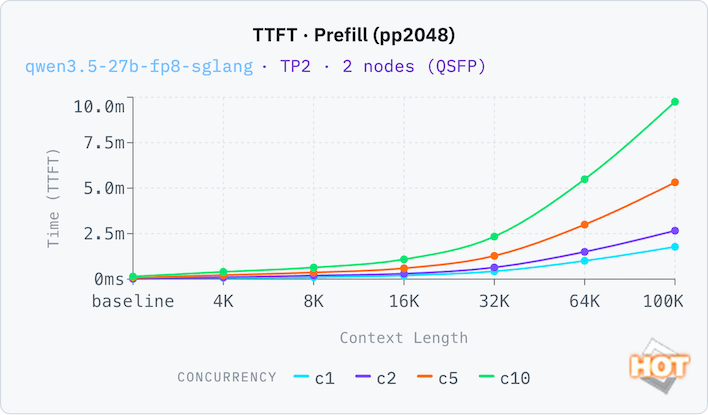
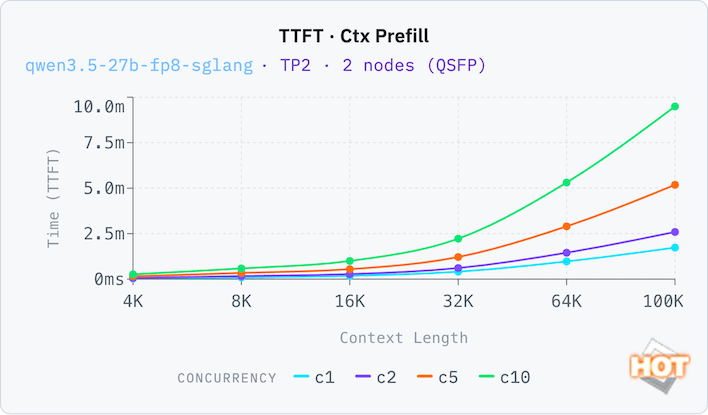
Our TTFT charts look similar. And in fact if you flip back to the previous page, we'll see TTFT on big context windows isn't much lower with two machines than it is with one machine at all. Once you start getting TTFT responses measured in minutes, as C10 does starting at 16K, it's really only useful for batch operations rather than conversation.
It's probably a little easier to look at as a single chart, though, so here we've plotted the two together. These charts were generated after the fact, so the formatting might be a little different, but it still represents the same exact data as above.
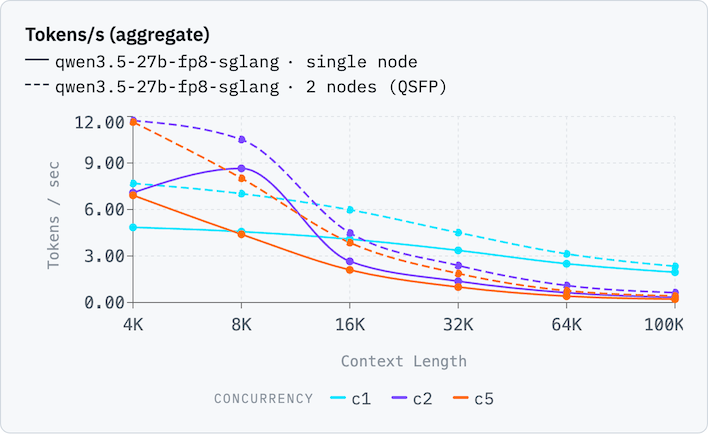
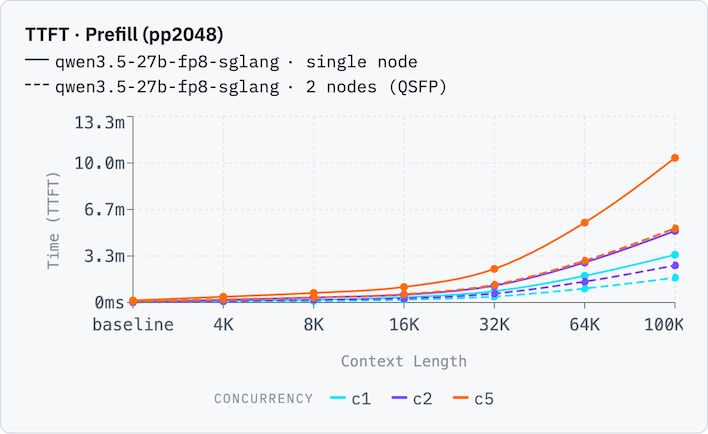
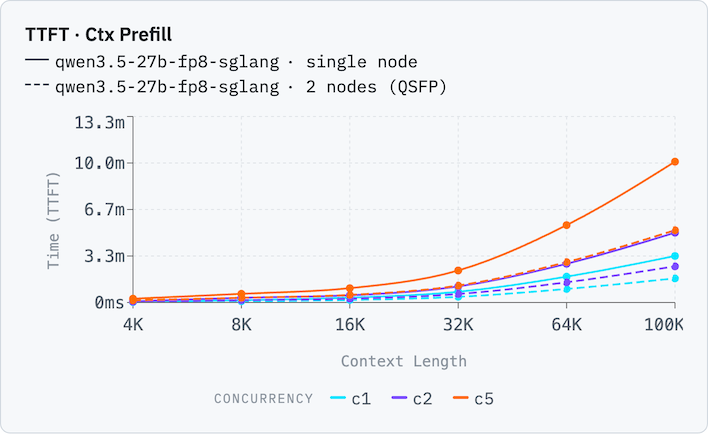
You can see that pretty much across the board, tokens per second is generated at a 50% performance improvement on the dual setup vs. the single machine. On the other hand, time to first token is split in half -- that is, twice as fast -- on the dual Dell Pro Max configuration. Once the context window hits 100,000 tokens, that's saving minutes in response times, which is a big relief. Note that these charts omit 10 concurrent requests. This allows the chart to zoom in a bit more and show separation between configurations. There were a lot of lines on the chart otherwise.
What happens when we crank the number of parameters (and therefore the memory requirements) to 122 billion, and stick to FP8 data types? Well, we run out of memory, for starters -- this test will not run on a single GB10 machine because it needs more than the 102.4 GB (80% of the total 128 GB) of memory available. So we are now distributing the model across multiple Dell Pro Max systems rather than loading the full model into memory of both. We expect that our 200 Gbit ConnectX controllers will be the limiting factor here. The two systems will need to work together to produce any results.
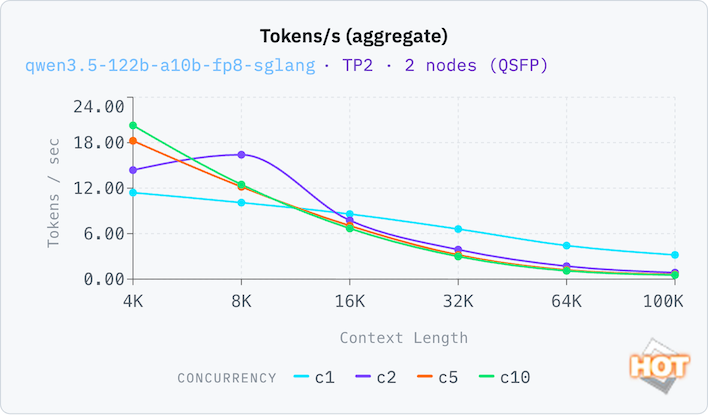
Whoa, this isn't what we expected at all. The 122B version of the model is actually faster distributed across two Dell Pro Maxes than the 27B version running on both. In fact it's around 50% faster for all concurrency levels except for C2 when compared to the much smaller model.
It's diffucult to gauge why that is. Our theory is that previously with the full model loaded on both systems, there was never any opportunity for the second system to help the first one out. They were working independently rather than cooperatively. And now they're being forced to cooperate. There might be more to it than that, so if you know, please drop a knowledge bomb in the comments.
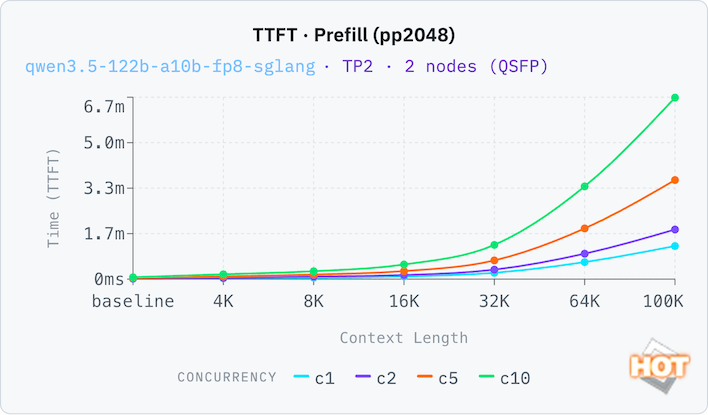
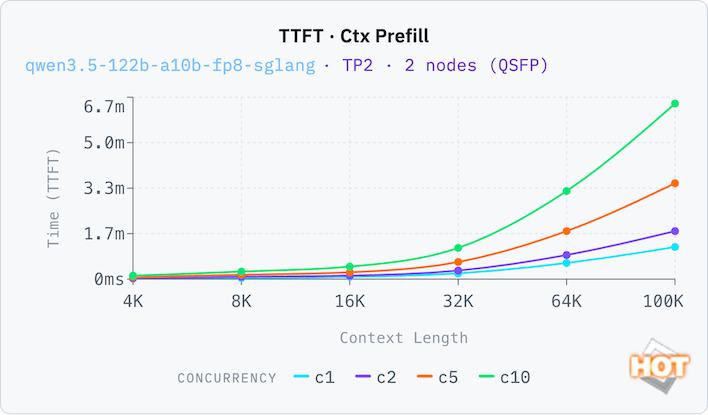
Our time to first token is also greatly reduced for all context sizes and concurrency levels. It's fast enough that a single concurrent user could have a relatively enormous context window of 64k and get responses in under a minute. They'd only roll in at around 5 tokens per second, but it's certainly usable. Of course, once you factor in the need to have two GB10 systems, it becomes a bit of a pricy proposition.
Needing 256 GB of memory, of course, I couldn't really compare this on the Mac Studio (which is now Apple's top-end desktop, by the way). And Apple has insanely long lead times for M3 Ultra versions of the Studio with that much memory due to component shortages. So if you need more than 128 GB of RAM, a pair of Dell Pro Maxes is about as good as it's going to get in the near future.
Dell Pro Max Thermal Performance
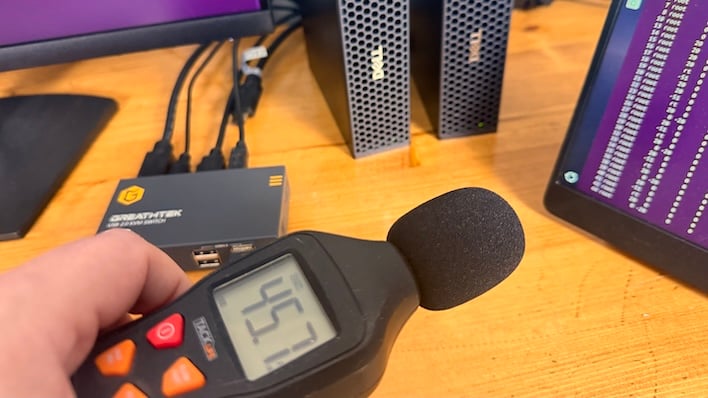
The GB10 Superchip is much like that DGX Spark in that it draws a decent amount of power for its size. We found with our Kill-A-Watt that it pulls in 160 Watts from the wall under load, so two of them are north of 300 Watts. That generates a lot of heat, so where does that go?The design of the Pro Max centers around efficient cooling. A big blower fan draws cool air in the porous front of the L6 chassis and pushes it out the rear. Under a heavy load (like one of our dual-system sparkrun tests) we let it run for about two hours and then whipped out the old sound meter and surface thermometer.
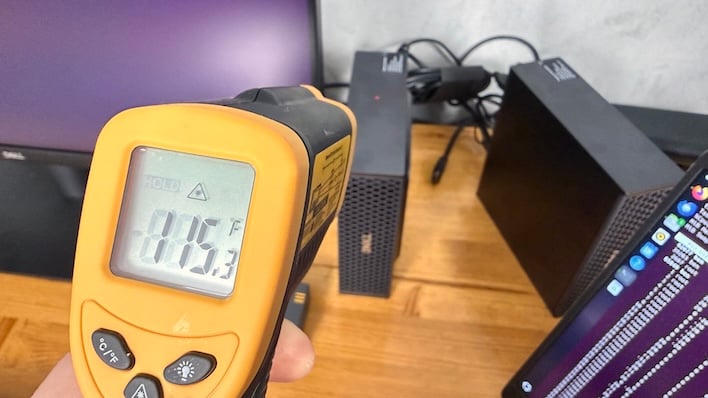
We measured the chassis hitting between 115 and 120°Ft towards the back of the machine. The all-metal design is helping dissipate heat, which aids in cooling. And since this isn't a laptop, that's not a bad thing. You wouldn't necessarily want to grab it tightly, but the Dell Pro Max won't singe your fingerprints.

Dell Pro Max with GB10 Conclusions
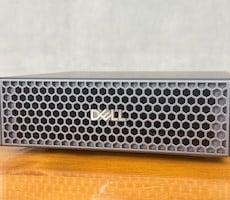
This was an enlightening look at what dual GB10 machines can do, but the star of the show is of course the Dell Pro Max with GB10. Like NVIDIA's DGX Spark, this thing is tiny. Thanks to the GB10 Superchip, it's pretty powerful, and it's packed with memory too. The specs are downright identical, so the performance is exactly what you'd expect whether you go with Dell or NVIDIA.The best part about the Pro Max is that due to its architecture and NVIDIA's bespoke software development tools, any AI development done on these machines drops right into a DGX Cloud server. The thing to remember about the Dell Pro Max with GB10 is that it's a development tool to prepare your AI models for datacenter deployment, not really a local LLM device, as the performance comparison with the Mac Studio illustrated. It might be a good target for NVIDIA's agentic NemoClaw, however.
We haven't really talked about pricing in this article, but if you read our previous work on this architecture, you know it doesn't come cheap. And that was true before the AI goldrush caused a global component shortage. Regardless of how we got here, the current state is that the Dell Pro Max with GB10 is available directly from Dell for $5,780. That's up considerably from the $4,000 original retail price due to the aforementioned shortage. While it's also higher than what NVIDIA sells the DGX Spark for at $4,700, the Dell Pro Max with GB10 is actually available. So you can wait for other systems to get restocked or you can buy today from Dell at a somewhat higher price.
While the price is high, the GB10 Superchip offers something that no other development platform currently does: real hardware, running NVIDIA's SDK with CUDA compatibility, with gobs of memory and storage. If you're looking for a development system with an eye to deploying in the datacenter, a GB10-based system is getting in at the ground floor, but if you need more, the new GB300-based Dell Pro Max Ultra sits high above it. As for the systems that we've tested so far, the Dell Pro Max with GB10 is a great way to get started on your AI dev journey.