



GeForce RTX 5070 Ti vs RTX 3070 Ti: Is the 2-Gen Upgrade Worth it Today?


Keep in mind that while we're directly comparing these two graphics cards, our findings are broadly applicable across the product range. While it's true that generational gains increase as you rise up the product stack (with the greatest uplift in the x90 tier), there are gains to be had everywhere above the x60 tier, which has been sadly somewhat stagnant. If you're gaming on a high-refresh or high-resolution display, though, you're probably using a higher-end GPU, and that means you could stand to gain a lot from a new graphics card. Or not.
On our overclocked Core Ultra 9 285K test bench, we've tested a set of eight games using diverse engines on the GeForce RTX 3070 Ti and the GeForce RTX 5070 Ti. In each game, we've carefully established the highest playable settings for the GeForce RTX 3070 Ti card, although in some cases they're a little marginal as you'll see. Then, we tested those same settings on the GeForce RTX 5070 Ti to see how much performance uplift you could get at the same settings. After that, we established the best playable settings on the GeForce RTX 5070 Ti, although in most games it basically comes down to "max out the settings and use DLSS."
Let's not get ahead of ourselves, though. First, some shout-outs: thanks to ASUS and NVIDIA for the GeForce RTX 5070 Ti card we used in testing, and thanks to MSI, Intel, and Kingston for the test bench setup that we used.
Baldur's Gate 3 Vulkan Benchmarks

We've tested Baldur's Gate 3 in Vulkan because while it typically gives a bit lower performance overall, it is usually a bit less CPU-limited in Vulkan mode and we wanted to make sure we got the highest GPU load possible. We tested in Act 3 with an advanced character and a low camera angle as we strolled through the city with dozens of characters around.
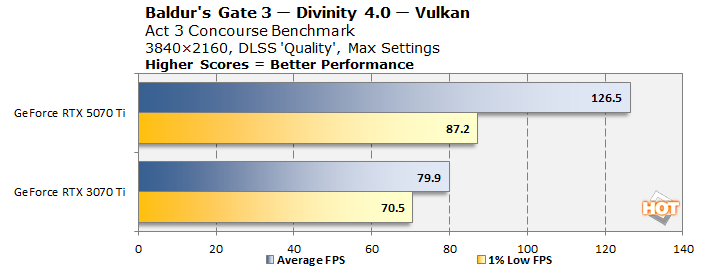
Baldur's Gate 3 is very demanding, but the biggest part of the system load is on the CPU, RAM, and I/O, not the GPU. As a result, even with maxed-out settings at 4K resolution, our GeForce RTX 3070 Ti runs it with aplomb. You can see a bit of that CPU limitation in our GeForce RTX 5070 Ti's 1% low results, although its 1% lows are still faster than the average with the older GPU. This is a very solid upgrade that would allow you to enjoy the benefits of a 120 Hz display in this Dungeons & Dragons RPG.
Cyberpunk 2077 Ray-Tracing Benchmarks

Of course, we had to test everyone's favorite GPU benchmark from the last five years. It's hard to believe this game came out back in 2020, isn't it? It's not even the same game at this point, with the 2.0 patch bringing a full rework of the game's systems and Phantom Liberty expanding the content in major ways.
Our settings for the GeForce RTX 3070 Ti included running in 2560×1440 resolution, with DLSS 4 ("Transformer" in the CP2077 settings) set to "Balanced", Ray Reconstruction enabled, and the RT Medium preset. However, we significantly customized the settings to cut video RAM usage a bit; we set Cascaded Shadows, the Volumetrics settings, Screen Space Reflections, and Ambient Occlusion to Medium. The game still looks great this way, and it runs pretty decently too.
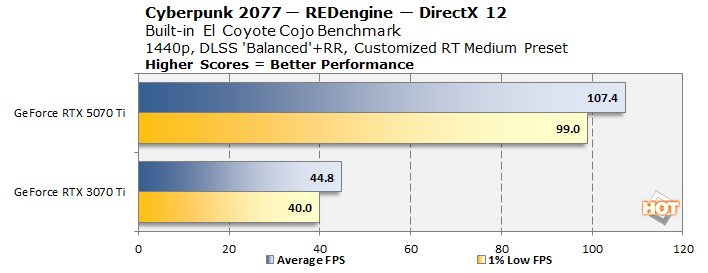
It's no surprise that the GeForce RTX 5070 Ti massacres the older card here. The Blackwell architecture is simply better tuned for ray-tracing, and remember, the older Ampere card misses out on the optimizations available in the Ada Lovelace architecture, including Shader Execution Reordering. If you're interested in playing games with the visual features turned up, a newer GPU could make a huge difference. Kudos to the REDengine developers for making it such a smooth and consistent performer, though.
Crimson Desert Open-World RPG Benchmarks

Crimson Desert is a brilliant game, and don't let anyone tell you otherwise. It takes a bit to get going, but once you get into the rhythm of the game, it's the most open RPG in years and years, with a shocking level of depth and interactivity. It also has an impressive level of optimization, as the game runs well even with all of its visual effects enabled on the GeForce RTX 3070 Ti. We tested in 2560×1440 on the High preset, but with all of the effects turned on (which necessitated increasing certain settings to Ultra.) We used DLSS 4.0 in 'Performance' mode with Ray Reconstruction turned on, because it's hard to overstate how much Ray Reconstruction improves this game's visuals. (Seriously, it's crazy!)
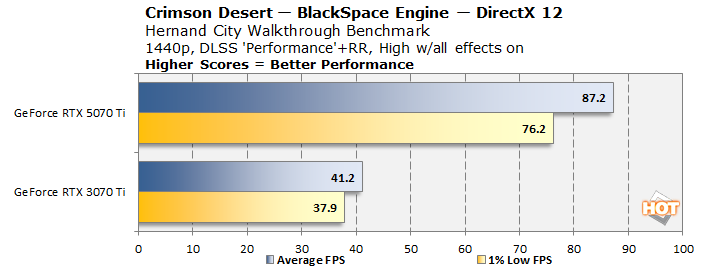
Another tremendous gulf between the older Ampere GPU and the RTX 5070 Ti. Now, to be clear, this game is fully playable at 40 or even 30 FPS, so the RTX 3070 Ti is putting up a grand performance here given its age. The newer GPU just steamrolls it with over 87 FPS average in our test scene, though.
F1 25 Formula One Racing Benchmarks

We had to include the F1 series in our benchmarking because it's a highly advanced game with beautiful graphics that also includes one of the best built-in benchmarks in the business. We deviated a bit from our usual process and tested using the Singapore track with the weather set to "Wet", which produces much heavier performance than any other map in the game, as far as we could tell. So saying, these are absolutely 'worst case' benchmarks.
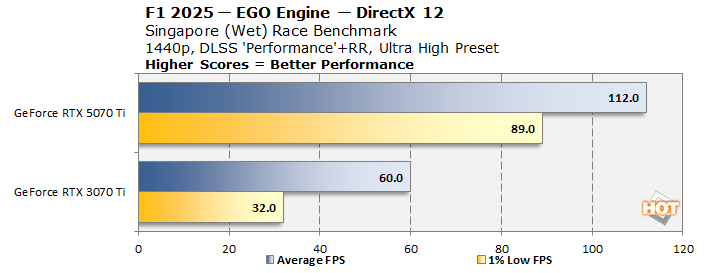
The old RTX 3070 Ti manages to pull out a 60 FPS average here, but the 1% lows aren't great and that's because, like most of the tests here, the card is VRAM-limited in this game at these settings. In fact, this game is really borderline on that card at these settings because the VRAM will occasionally hike up over the 8GB limit and performance falls off a cliff. No such issues on the GeForce RTX 5070 Ti, of course. Realistically, if you were trying to play on the GeForce RTX 3070 Ti, you would probably want to turn some settings down to relieve VRAM pressure. DLSS Ray Reconstruction makes a big improvement in this game, too, though, so we'd keep that.
Hogwarts Legacy Wizarding Benchmarks

Hogwarts Legacy got a huge patch early last year that broke all of the mods but also drastically improved the game's performance, especially with regards to memory management. That's how we're able to play it on Ultra with Ultra ray-tracing on the GeForce RTX 3070 Ti. However, in an extremely heavy scene like Hogsmeade village at daytime, VRAM still overflows a little bit.
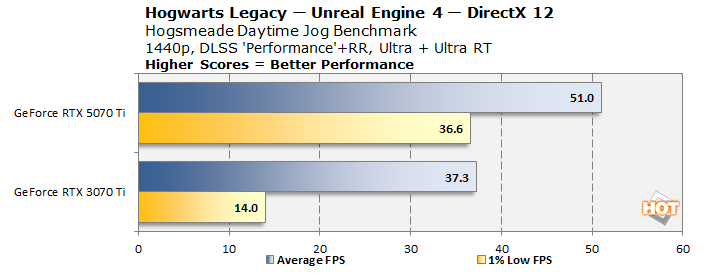
As an aside, I actually played quite a bit of Hogwarts Legacy in this configuration on the GeForce RTX 3070 Ti, and to be honest, it normally runs better than this. In fact, inside Hogwarts you're usually above 50 FPS at these settings. So, again, this is another 'worst case', but it is true that you can run into VRAM overflows where performance craters down to single digits briefly.
The GeForce RTX 5070 Ti doesn't have this problem, but surprisingly performance is still only middling. What's really surprising, though, is that performance doesn't really change when going to 4K resolution. Clearly we're bottlenecked somewhere else here; potentially ray-tracing intersect performance. In any case, it's a materially better experience on the GeForce RTX 5070 Ti simply because of its increased memory.
Nioh 3 Edo Period RPG Benchmarks

Nioh 3 is a bit of an odd inclusion here because it has a strict 60 FPS cap. That is, unless you run Frame Generation. You see, the GeForce RTX 3070 Ti is based on the Ampere architecture and that means that it does not have access to any form of DLSS Frame Generation. You can still use AMD's FSR Frame Generation, and in rare titles, Intel's XeSS Frame Generation. DLSS Frame Generation is walled off, though, and we wanted one game to represent that.
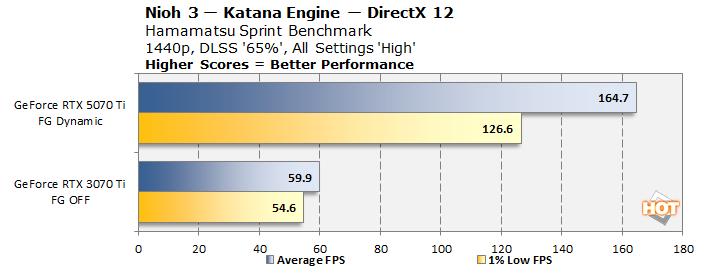
With our chosen settings, Nioh 3 looks decent, but a little messy. There are 'Ultra' settings above the 'High' settings here, but the RTX 3070 Ti simply does not have the video RAM to make use of them. This game also does something interesting where it doesn't use DLSS quality presets like most games but instead presents the user with a resolution scaling slider that moves in 5% increments. So, 65% gets us to slightly over 1080p resolution, and that allows the old card to deliver a nearly locked 60 FPS.
However, turning on Dynamic Frame Generation with the new card skyrockets our frame rate to over 160 FPS, and even that may have ultimately been limited by the 160 Hz refresh rate of the display attached to the test bench. DLSS Frame Generation at this point has evolved significantly since the time Ada Lovelace launched; much like DLSS upscaling before it, the quality has improved exponentially.
Pragmata Sci-Fi Parenthood Benchmarks

The most recent game in our testing, Pragmata is a new IP from Capcom that has you put on the armored spacesuit of Hugh, an engineer sent to a corporate base on the moon to figure out what's gone wrong there. He immediately picks up with Diana, an advanced robot in the form of an adorable little girl. It's fundamentally a third-person shooter, and it runs on the advanced RE Engine from Capcom. We spent some time dialing in the settings here for good performance on the older GeForce RTX 3070 Ti.
In the end, we ran the game in 2560×1440 resolution with 'High' settings, except for Textures and Shadows which we dropped to 'Medium' for VRAM considerations. We enabled ray-tracing and used DLSS at 'Quality' mode, but Pragmata doesn't allow players to use Ray Reconstruction unless they are also using Path Tracing, which is a bummer, as the GeForce RTX 3070 Ti can't really handle the full path-traced mode.
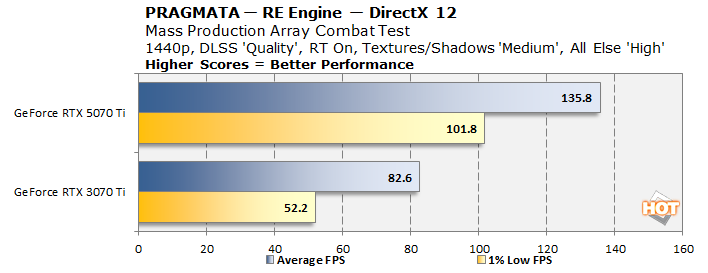
As should be no surprise now, the newer card absolutely decimates the older card in this game. Notably it actually does have enough performance to run the path-traced lighting system, but we'll talk about that more in the last section.
The Talos Principle II Unreal Engine 5 Benchmarks

The Talos Principle II is an absolutely gorgeous game with the settings turned up. This title as much as any other justifies the performance cost of Unreal Engine 5 with absolutely gorgeous Lumen lighting and an insane level of geometric detail. Shockingly, despite the lush visuals, it's really not all that demanding. Check out our benchmarks:
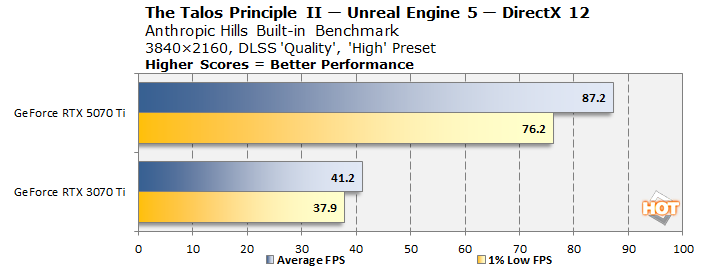
A key detail to notice is that we're actually testing this in 4K resolution, with DLSS 'Quality' no less. Indeed, this is the only game besides Baldur's Gate 3 that we didn't have to drop back to 1440p to cut VRAM usage. Now, it is pretty tight here at these settings, but in our testing we didn't encounter any major hitches or performance drops that weren't explainable through what was simply going on in the game. Once again, the GeForce RTX 5070 Ti obliterates the two-generation-older card.
GeForce RTX 5070 Ti Recommended Settings
We tested the GeForce RTX 5070 Ti at the same settings as the older card to make performance comparisons sensible, but we also tested the GeForce RTX 5070 Ti to see what kind of settings it could achieve in these games as well as a few others. Spoiler alert: it can run 4K max on just about every game. Here's our results in a short summary form: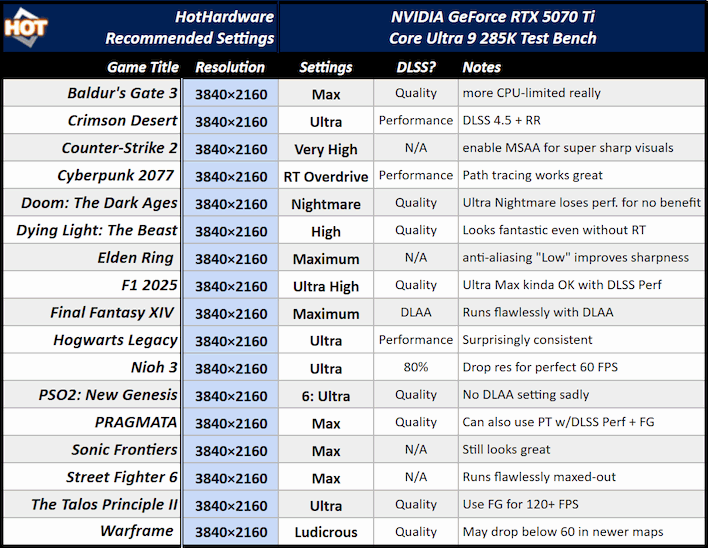
There are very few games here that aren't simply running at their highest settings. Crimson Desert has an aspirational "Cinematic" settings that absolutely tanks performance on anything short of a 4090. Cyberpunk 2077 is maxed-out, although we're using a lot of upscaling, and you'll want frame generation too, probably. F1 2025 has an "Ultra Max" preset that enables path tracing, but it's pretty heavy and the RTX 5070 Ti can't do a solid 60 FPS with it turned on even with DLSS Performance. You could try Ultra Performance, or just stick to the Ultra High preset with Ray Reconstruction, which still looks phenomenal.
You can get away with Balanced or even Quality upscaling in Hogwarts Legacy; it's just about whether you want 40 FPS and higher resolution or 60 FPS and lower resolution. For some of the game's long draw distances, the higher upscaling factors can look pretty grimy. In PSO2 New Genesis, the built-in anti-aliasing methods are a terrible FXAA pass or a somehow even worse TAA pass; DLSS Quality, despite lowering resolution, still looks better than either. The only other specific comment we'd make is that you may want to crank the resolution down to 4/5 in Street Fighter 6 to avoid the occasional dips that can happen for smooth online play.
GeForce RTX 3070 Ti vs. GeForce RTX 5070 Ti: Our Thoughts
There is a very solid argument to be made that the GeForce RTX 3070 Ti already runs all of these games and there's no need for a new graphics card. It's true that we intentionally picked high settings that are near the limit of the card's capability. If you're willing to accept a lower visual standard, you can absolutely achieve 60 FPS and more in any of these games. This argument becomes even more salient when we talk about the fact that GeForce RTX 5070 Ti cards are not currently available for less than $980, while this specific card is going for $999. That's the MSRP of the GeForce RTX 5080, and while that card isn't available for that price either, it still stings to pay some $250 over MSRP for... well, anything, really.
There's also a very solid argument to be made that the newer card offers a radical performance uplift, and that it justifies the cost. Particularly if you'd like to start playing games in 4K resolution, enjoying that razor sharpness, the extra video RAM is essentially necessary. It's almost a shame, really, that the GeForce RTX 3070 Ti didn't come with more video RAM, because the GPU itself has plenty of grunt for modern games, even on high settings. There's just not enough memory onboard, and you end up VRAM limited in most games.
Ultimately I wouldn't fault anyone for buying now or waiting to upgrade. The newer GPU is a massive upgrade from the older card, but it's also a lot of money. Hopefully this RAM shortage will abate eventually and we'll see consumer graphics cards return to mass production, and thus, to their regular prices. By that time, we may actually have new generations of graphics cards out, whether from NVIDIA or its competitors, and in that case, the performance uplift from a GPU upgrade is likely to be even larger. At least now you know what you can look forward to.





