



6 PC Gaming Accessories To Level Up Your Battlestation


Think about it like this: your peripherals are the only part of your PC that you actually interact with. Not only in the literal sense, as in touching the physical parts, but also what you hear and see. How about this car metaphor: tires are the only part of your car that touches the road. Without good tires, your car won't perform. Likewise, without good peripherals, you're not nearly getting the best experience possible out of that potent PC you parted out, purchased, and put together.
Let's go over some great deals on peripherals you really should pick up to level up your PC gaming experience.
The Most Important: A Proper Modern Monitor
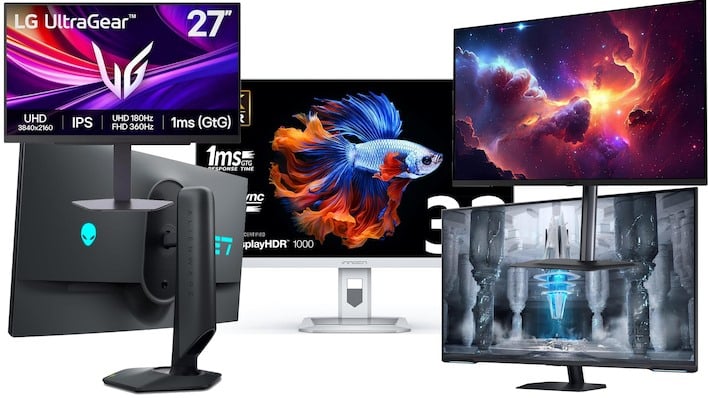
27" LG UltraGear Dual Mode 4K/360Hz Gaming Monitor: $299 at Amazon
27" Alienware Dual Mode 4K/360Hz HDR600 Gaming Monitor: $419 at Amazon (24% off!)
32" INNOCN MiniLED 4K 144Hz HDR1000 Gaming Monitor: $449 at Amazon
43" Odyssey G7 Neo 4K 144Hz HDR600 Gaming Monitor: $549 at Amazon (45% off!)
32" Gigabyte MO32U 4K 165Hz OLED Gaming Monitor: $699 at Amazon (13% off)
Gaming monitors are a dime a dozen these days. That old VG24QE you're holding onto was amazing in its day, but monitor technology hasn't been standing still. By clinging to a display that's long past its prime, you're missing out on so many functions and quality of life features. We've picked out five amazing monitors at price points ranging form $300 to $700, and they each have their merits:
- The LG Ultragear 4K (27G810A-B) is a dual-mode display that supports 180Hz operation at 4K resolution, or for hardcore competitive gaming, you can drop it down to 1080p for a blistering 360 Hz. This is an IPS LCD with great response times and support for G-SYNC as well as AMD FreeSync Premium. At $299, it's a hell of a deal.
- Alienware's AW2725QF is a similar monitor that's on sale right now. It takes the Ultragear's feature set and amps it up with DisplayHDR 600 support. The Alienware here is functionally similar to the LG, but offers superior brightness and contrast over the LG model. You also can enjoy factory calibration with DeltaE <2, and Alienware's legendary warranty support.
- INNOCN might not be a name you're familiar with, but it has been making major inroads in the monitor market for a while. The INNOCN 32M2V is a 32" 4K monitor that supports a 144Hz refresh rate and DisplayHDR 1000. That's right: this is a miniLED display with mega brightness for gorgeous HDR gaming. It also supports USB Type-C input and comes with a glossy surface for razor sharp images.
- Samsung's 43" Odyssey Neo G7 is a massive display for use with a PC, but you won't beat the specs at this price. 4K resolution, 144Hz refresh rate, and DisplayHDR 600 in a QLED LCD for 45% off is crazy. This monitor is actually also a smart TV including a remote and built-in functions, so if you're looking for one display that does it all, here you go.
- Finally, Gigabyte's MO32U is a 32" 4K QD-OLED monitor priced for mere mortals. Unrivalled HDR highlights, 165 Hz refresh rate, instant response times, FreeSync Premium Pro, USB-C input with KVM function, and a built in USB hub make this an incredible gaming display for the money—as long as you're not an MMO player, anyway.
A Necessary Accessory: Monitor Arms
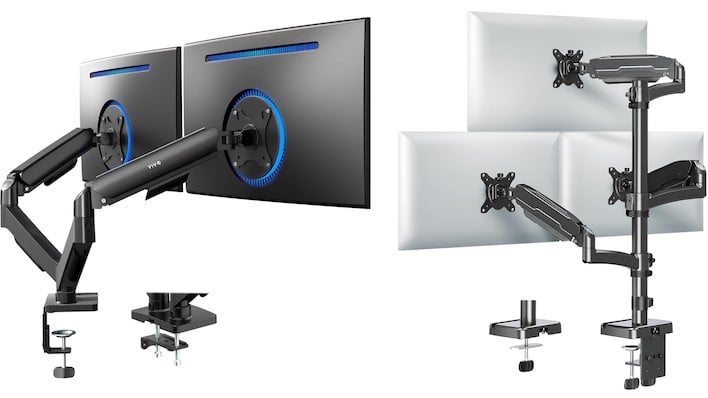
VIVO Desk-Mount Pneumatic Dual-Monitor Arms: $49.99 at Amazon (17% off)
MOUNT PRO Desk-Mount Triple Monitor Arms: $81.99 at Amazon (31% off)
If you've never used a proper monitor arm before, you might be sneering at the idea that such a mount is "necessary." It really is one of those "you have to try it for yourself" type of things. Once you have a monitor on an arm, all of the desk space it was occupying before is free. You can even move the monitor(s) up out of your way if you need to use the desk for something. You can put speakers or a phone charger or a desktop amplifier or really whatever you want in the space that they were taking up. You need to try a monitor arm.
Here's a couple that the author has personally purchased and put to good use:
- VIVO's dual monitor mount is as simple as it gets: a pair of pneumatic arms that clamps to your desk and will hold displays up to 32". VIVO says "19.8 lbs per arm"; we think that might be a bit optimistic, but thankfully most modern LED-backlit LCDs don't way anywhere near that much.
- Mount Pro's triple monitor mount has three independent arms with support for 75x75 or 100x100 VESA mounts. Obviously, you'll have to make sure your monitors are compatible, but this is an excellent way to enter the ranks of the triple-monitor monarchy.
An Oft-Overlooked Option: High-Fidelity Audio Experience
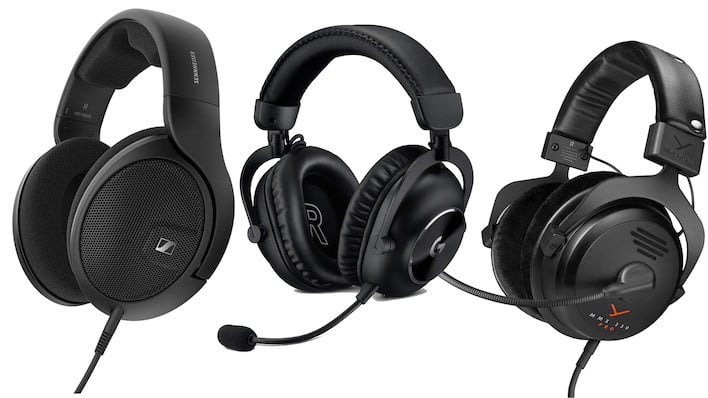
Sennheiser HD 560 S Audiophile Headphones: $179 at Amazon (35% off!)
Logitech G PRO X 2 Wireless Gaming Headset: $209 at Amazon (25% off!)
beyerdynamic MMX330 Pro Audiophile Gaming Headset: $329 at Amazon
Gaming headsets are embarrassing at the low end. They often come tuned with a V-shaped equalizer profile that overemphasizes bass and treble at the cost of the midrange where all the detail is. They also make it harder to hear your friends, ironically. What you want is a quality pair of headphones that will give you the most neutral, balanced audio experience, with clear reproduction of the sounds your PC is putting out.
Here's a few options for high-quality headsets and headphones that are worth every penny:
- Sennheiser's HD 560 S is not a "headset", as it does not include a microphone. You can add one easily with Sennheiser's own HD 500 BAM, or you can simply go without if you're not an online gamer. For the money right now, you won't find a better set of headphones than this.
- Amazon's running a deep sale on the Logitech G PRO X 2 headset, too. Now, this may not deliver quite the kind of sound quality of the Sennheisers above, but it still sounds pretty damn good, and it offers fully wireless low-latency connectivity as well as a quality headset microphone. You could do much worse for the money.
- If you want the absolute peak of gaming headset quality, look no further than the beyerdynamic MMX 330 Pro. It's expensive, but it absolutely justifies its price. This set is uniquely open-back, which means it offers more natural and spatial sound than most other headsets. It also includes a true broadcast-quality microphone. You'll have your friends asking "dude, how does your sound so clear?"
Input Part One: A Killer Mechanical Gaming Keyboard
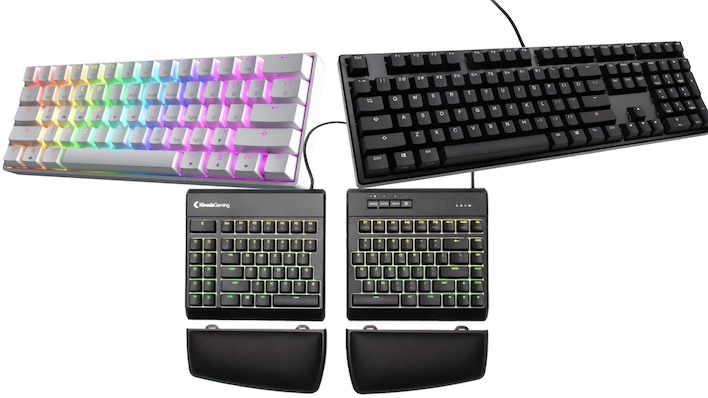
HK GAMING GK61 60% Mechanical Gaming Keyboard: $39.99 at Amazon
Ducky Origin Black Mechanical Keyboard: $49.99 at Amazon (37% off!)
Kinesis Freestyle Edge RGB Ergo Mech Gaming Keyboard: $149.99 at Amazon (29% off!)
When you think of mechanical keyboards, you probably imagine loud, obnoxious clacky things used by typists who want everyone to know how fast they can type. That's not the only kind of mechanical keyboard, though, and mechanical keyswitches have big advantages for gamers, too. In particular, Cherry's MX Speed Silver switches have a significantly shorter actuation difference than regular mechanical keyswitches. This means faster response when you press the button, and that's a competitive advantage. They're also fully linear keyswitches with no click or bump, so they're very quiet in use.
Check out these three keyboard options based on MX Speed Silver switches:
- This tiny 60% board from HK GAMING comes in a gorgeous white colorway, has vibrant RGB LED lighting, and uses MX Speed Silver switches. It's also dirt cheap for what it is. Gamers often prefer 60% layouts because it allows them to more easily fit their keyboard and mouse on the desk.
- If you absolutely have to have a numeric keypad and you hate RGB LED lighting, we hear you. How about this Ducky Origin board instead. It also has MX Speed Silver switches, and it comes with super-durable double-shot PBT keycaps that won't wear too quickly. This is an awesome price on a function-first keyboard.
- Of course, the author has to recommend his absolute favorite keyboard, the Kinesis Gaming Freestyle Edge RGB. Zak owns three of these things and he won't shut up about them. The Freestyle Edge RGB is a split ergonomic keyboard with a 20-inch cable connecting the two halves. That means superior ergonomics for both typing and gaming. It has ten macro keys, it has ten fully programmable layouts, it supports macros, and you can do all of those things without janky Windows-only software by editing text files stored on the keyboard. This model was $279 when it came out; it's down to just $149 and that's a hell of a deal.
Input Part Two: Seriously Speedy Pointing Peripherals
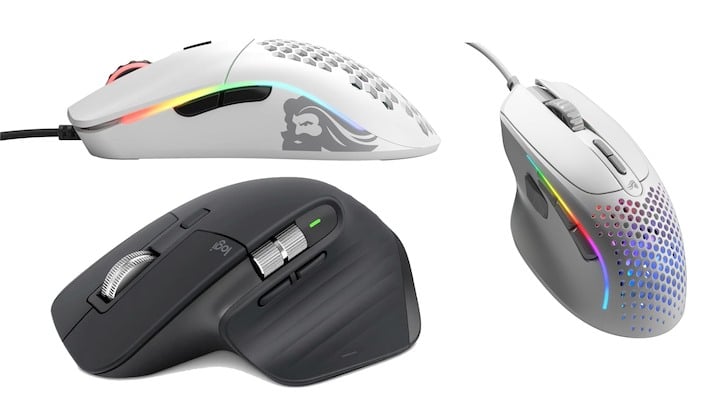
Glorious Model O Ultralight Ambidextrous Gaming Mouse: $46.43 at Amazon (7% off)
Glorious Model I2 9-Button Ultralight Gaming Mouse: $64.99 at Amazon
Logitech MX Master 3S Wireless Productivity Mouse: $99.99 at Amazon (17% off!)
What kind of mouse are you using? If you can't immediately recall at least the brand, it's probably time to replace it. Proper gaming mice include a lot of high-end features, like high-DPI sensors, high-motion sensors, macro programmability, key rebinding, and so on. We've picked out three of the best mice on the market, both for gaming and for work. Check out these options:
- Glorious is a name that oldheads might not know, but the company has quietly grown to be arguably the best maker of serious gaming mice on the market. The Glorious Model O is a wired gaming mouse that weighs just 67 grams. It has a high-end Pixart optical sensor, it has real Omron switches, and it's fully ambidextrous.
- If you need more functionality than the Model O offers, check out Glorious' Model I2. This wired gaming mouse has nine programmable buttons, a 26,000 DPI optical sensor, and still only weighs 66 grams. You don't realize how great a lightweight mouse is until you have one, especially for twitch FPS gaming. Glorius' software is lightweight and easy to use, and best of all, it doesn't have to stay running all the time.
- Of course, we'd be remiss if we didn't point out this solid deal on Logitech's MX Master 3S wireless mouse. Now, this isn't a gaming mouse, exactly; it doesn't have a macro function, for example. However, it's a no-nonsense high-performance mouse that does support key rebinding. It has free-wheel scrolling, it has a horizontal scroll wheel, and it uses a laser sensor that can even track on glass. If you use your PC for work as well as play, this might just be your best mouse option. This version comes with the Logitech Bolt USB receiver; which we recommend using for gaming.
Input Part Three: A Current-Generation Gamepad
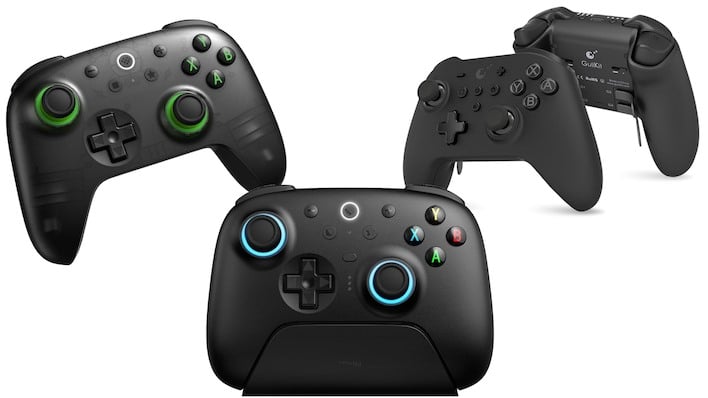
8BitDo Ultimate 2C Wireless Hall-Effect Game Controller: $29.99 at Amazon
8BitDo Ultimate 2 Wireless TMR Controller w/Charging Dock: $59.99 at Amazon
GuliKit King Kong 3 Max Wireless Elite Gaming Controller: $79.99 at Amazon
Some PC gamers sneer at the idea of using a gamepad for PC gaming. That's old-fashioned, gramps. Look, we love our keyboards and mice, too, and some games are definitely best suited for that; nobody's telling you to take a gamepad into Counter-Strike or Europa Universalis. Some games simply are best played with a gamepad, though; titles like Elden Ring, Hollow Knight: Silksong, and Black Myth Wukong are difficult to play well on a mouse and keyboard. Not impossible, but ultimately, why not play them the way they were made to be played?
Modern gamepads have moved far from the Xbox 360 Controller for Windows days. Standard features include Hall-effect or Tunneling Magneto-Resistance (TMR) sensors for the sticks and triggers, gyro input for precise aiming, and turbo and macro functions are common. Check out these three excellent gamepad options:
- The 8BitDo Ultimate 2C remains the standard PC gamepad recommendation. We've shilled this thing several times, and it just continues to improve. Not just for the price (which is quite nice), it is a fantastic controller all the way around. Hall-effect sticks and triggers means no drift and long life, 1000-Hz polling rate even over wireless means 1ms response time, and this specific model comes in a slick smoke-and-green color scheme.
- If you're willing to spend a bit more, the latest version of the 8BitDo Ultimate 2 upgrades to power-efficient TMR sensors for the sticks, adds RGB LED illumination, and comes with a charging dock that also holds the USB receiver. Simply plug in the dock to your PC with a Type-C cable and never have to fiddle with wires again. This is really the gold standard for gaming controllers, and it works with Apple and Android devices, too.
- Those wanting more functionality could check out the new GuliKit King Kong 3 MAX. It's a bit more expensive than the 8BitDo Ultimate 2, but not for nothing; it has four back paddles like the Xbox Elite controllers, and it also has "maglev" vibration that GuliKit claims is both more power-efficient and smoother. Plus, GuliKit includes "Smart Triggers" that can be switched from a full analog range for things like racing games to a short-throw clicky button style for shooter games. It uses magnetic sensors like the 8BitDos and also supports the same 1 KHz polling rate.
Now Is The Time To Step Up Your PC Peripherals Game
Considering that the memory shortage has made PC parts practically unpurchaseable, it's a good time to peer at your peripheral components and pick up some upgrades. Even if you're thinking "man, I don't really have the GPU for 4K," remember that upscaling exists. You might be surprised at how well your system can manage games in 4K output resolution. Just take a look at our Simulated Steam Machine article, where we tested many modern games on a 4K monitor using a detuned Radeon RX 7600—a GPU that gets dunked on by an RTX 4060.Did we pick out something you hadn't anticipated? Do you see something at the shops that is an even better deal than what we spotted? Let us know what you think of our choices in the comments below.





