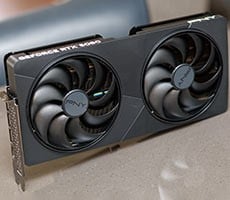
PNY GeForce RTX 5080 Slim OC Review: Big 4K Performance In Two Slots


Even though it's already got a higher boost frequency than NVIDIA's reference spec, we still spent some time manually overclocking the PNY GeForce RTX 5080 Slim OC to see what kind of additional performance it had in the tank. We've had good luck overclocking a couple of other RTX 5080s, so we were very interested to see what PNY's custom Slim card could do...
Overclocking The PNY GeForce RTX 5080 Slim OC
As we've already mentioned in numerous articles at this point, Blackwell-based GeForce RTX 50 series cards' GPU Boost algo scale their frequencies and voltages up and down, based on the GPU's workload at the time -- within predefined power and temperature limits. Should a temperature or power limit be reached, GPU Boost will drop down to the previous boost frequency and voltage stepping, in an attempt to bring power and temperatures down gradually and not cause any significant swings in performance.
To overclock an RTX 50 series card, the maximum boost clock, the memory clock, and power limit can be tweaked to increase performance. Altering the fan speed curve and GPU voltage (when applicable) can allow for further tuning when supported. Fan speeds could be tweaked with the PNY GeForce RTX 5080 Slim OC, but no voltage options were available.

Like most other GeForces, the PNY GeForce RTX 5080 Slim OC is usually voltage or power limited to prevent damage and ensure longevity, and without modifying the card, it's those limits that will usually determine your success when overclocking. You can see the card hitting those limits in its stock configuration in the data captured above. With the PNY GeForce RTX 5080 Slim OC, the power target can be increased by up to 10%, but the GPU voltage could not be altered. That said, we were able to increase the GPU and memory clocks quite a bit over their default values, in addition to cranking up that power limit.

We upped the power target to its maximum and used the GPU and memory frequency offsets in Afterburner to manually alter the PNY GeForce RTX 5080 Slim OC's frequencies. We increased the GPU and memory clock offsets incrementally until the test system was no longer stable, showed on-screen artifacts, or performance peaked due to hitting a power or other limit.
In its stock configuration, the PNY GeForce RTX 5080 Slim OC hit a 2,842MHz boost clock and peaked at 65°C, while maintaining its 30Gbps memory data rate (effective 15,000MHz). While overclocked, however, we were able to take its GPU clock all the way up to 3,150MHz with an effective 31Gbps memory speed.
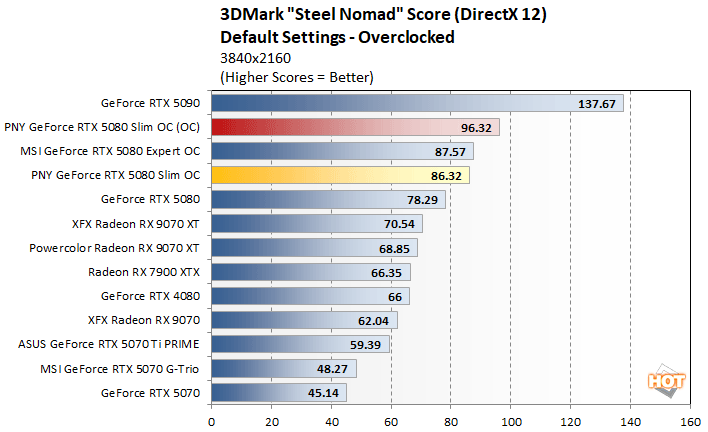
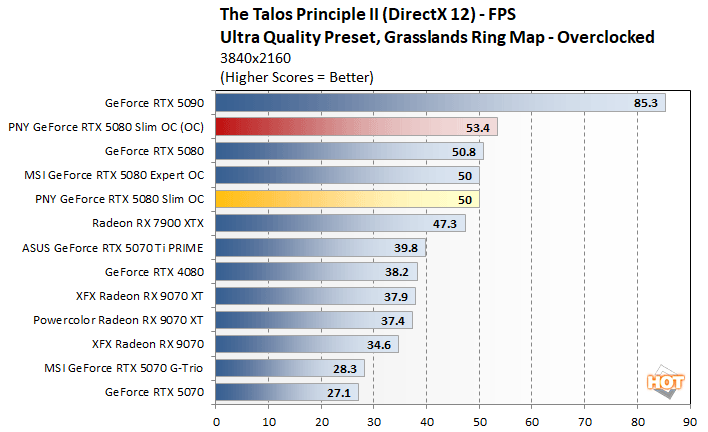
We should also mention, that while overclocked the PNY GeForce RTX 5080 Slim OC remained relatively cool for such a powerful GPU, even without altering the stock fan curve. We saw temperatures peak at only 67°C, which was only slightly higher than stock and the fan speed maxed out at only 43%.
PNY GeForce RTX 5080 Slim OC Vs Other RTX 5080s
To more easily show you how the PNY GeForce RTX 5080 Slim OC compared to a couple of other GeForce RTX 5080 cards we've tested, we've isolated some GPU frequency and temperature data, with all of the cards in their stock and overclocked configurations.

Stock / Default Configurations
In their out of box, stock configurations, the hot-clocked PNY and MSI cards both offer higher, real world GPU boost frequencies than the Founders Edition. The MSI card peaked at 2,857MHz and the PNY card hit 2,842MHz. Despite their vastly different cooler configurations, the triple-slot MSI Expert and dual-slot Founders Edition both peaked at the exact same temperature of 70°C. The PNY GeForce RTX 5080 Slim OC, however, topped out at only 65°C.


Overclocked Configurations
After manually overclocking, both the PNY and MSI cards outdo the Founders Edition card as well. The PNY GeForce RTX 5080 Slim OC topped out at 3,150MHz, while the MSI Expert hit 3,180MHz. Temperatures, however, favor the PNY GeForce RTX 5080 Slim OC. While overclocked, the PNY card peaked at only 67°C, with the others both broke the 70°C mark. With these cards, peak temperatures are more a result of their fan curve than the size of the heatsinks installed on the GPUs. PNY seems slightly more aggressive in that regard, but that's perfectly fine in our opinion -- the card is still relatively quiet overall.
The moral of the story is that you don't really give up any performance with the PNY GeForce RTX 5080 Slim OC. It may not be as massive or look as intimidating as some other third-party GeForce RTX 5080s, but that doesn't mean it can't hang with the best of them.
Total System Power Consumption
Throughout all of our benchmarking and testing, we also monitored noise output and tracked how much power the GPUs were consuming in our test system. Our goal here is to give you an idea as to how much power each GPU used while idle and also while under a heavy workload.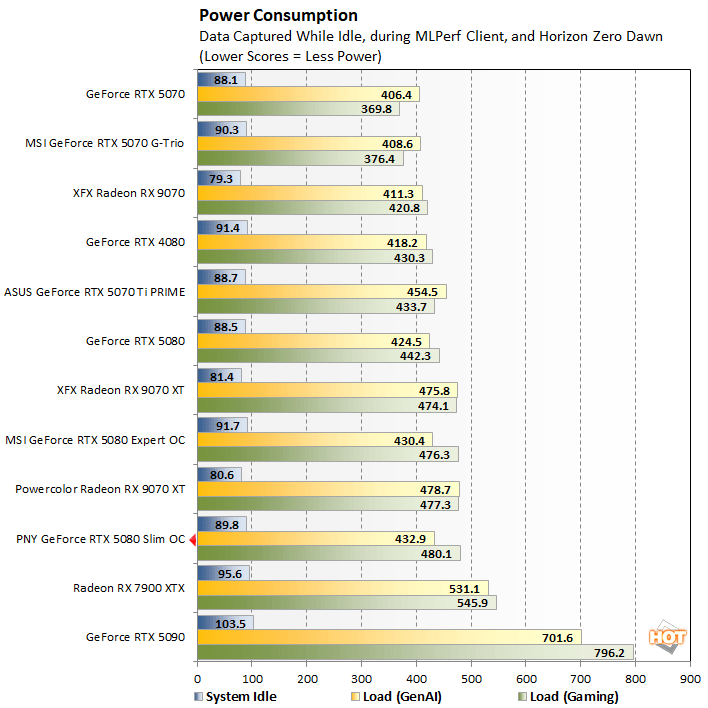
As you would expect looking back through the numbers, the PNY GeForce RTX 5080 Slim OC consumed somewhat more power than NVIDIA's Founders Edition. Its higher clocks and custom build increase performance, but also result in somewhat higher power consumption. That said, it's not too far off the Founders Edition or MSI's Expert model and is right in-line with the Radeon RX 9070 XT.
In terms of noise, there's not much to say. The PNY GeForce RTX 5080 Slim OC's fans spin down completely at idle or when under light workloads, so the card is effectively silent if you're not gaming, rendering a scene, or running and AI workload. Under load, even while overclocked, the 120mm fans on the card topped out at barely over 40% with the stock fan curve. At those speeds, the fans are slightly audible and generate only a dull whir. When installed inside a chassis with multiple cooling fans, the PNY GeForce RTX 5080 Slim OC won't contribute much to the overall noise output at all.
PNY GeForce RTX 5080 Slim OC Review Summary & Conclusion
To state it plainly, we really like the PNY GeForce RTX 5080 Slim OC. The card is well built, its understated aesthetic looks great, and despite its relatively slim cooler versus other third-party GeForce RTX 5080 series cards, the PNY GeForce RTX 5080 Slim OC remains cool and quiet, and is plenty overclockable as well. The simple fact is, gamers won’t really sacrifice anything with the PNY GeForce RTX 5080 Slim OC. Its cooler may be smaller than some other options, but it still performs well and doesn’t hold NVIDIA's GeForce RTX 5080 back at all.
Although we dig the understated design of the PNY GeForce RTX 5080 Slim OC, we do wish it had some additional bling in the form of addressable lighting. The card also commands a small premium. It’s currently available for $1,299, which is about $100 - $150 more than some of the more affordable RTX 5080s out there. At this price point, we suspect the additional premium won’t be much of an obstacle, especially for gamers that want the two-slot form factor for a specific build. The good news is, you won't have to give up any performance in exchange for its skinny profile.